My Quicken Classic downloads are broken since 8/1. What is up?

I went to update yesterday and I get some but not all transactions from Wells Fargo, I get nothing from my three Fidelity accounts now marked zzz - Fidelity - DC (though are there transactions to download), nothing from eTrade accounts, or from Schwab accounts.
What is going on? I'm traveling for another week, but will try to read up. Was there something we were supposed to do before August 1 (when everything broke on my Windows computer Quicken installation. Version R63.21 Version 27.163.21))
I've used Quicken since 1992 - I have never seen such a mess-up before. It's end-of-month coming up and bills must be paid. [Removed - Rant]
Comments
-
Hello @Graygeek,
Thank you for sharing your experience. To help troubleshoot, please provide more information. Was there anything else that happened around the same time as this issue started, such as a program/computer update or an unexpected program/computer shutdown? Did you transfer/copy your Quicken file to a different device to prepare for travel? Is your Quicken file stored directly on your local hard drive? Were you traveling when this issue started? If so, were there any changes to your internet connection that may be contributing to the issue (such as using a VPN, or being outside the US and Canada)?
If you haven't already done so, following the steps in our article on missing transactions/transactions not downloading is a good place to start troubleshooting the issue:
Be sure to follow these steps in order:
1. Go to Edit > Preferences > Downloaded Transactions. The option Automatically add to banking registers needs to be unchecked.
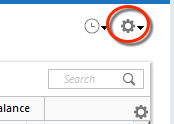
2. Refresh your online account information by clicking the Actions Gear Icon on the upper right of the register, and select Update Now. Follow the on-screen instructions to complete the update.
3. Confirm that the Sort Order in your account is by Date; just click the top of the Date column in your account register. It's possible the transactions are in your register, but not where you thought they'd be.

4. Click the Reset button at the top of the register. This will confirm that there's no filtering in your account register.
5. Go to Actions (Gear Icon) > Register Columns > Check Downloaded Payee in the account register. This allows you to search by Payee to confirm the transactions haven't been renamed unexpectedly.
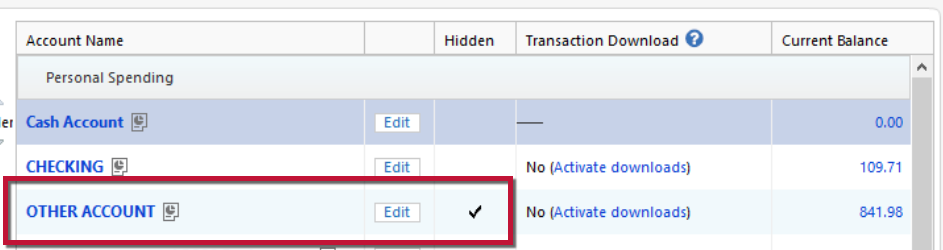
6. Go to Tools > Account List and check Show Hidden Accounts at the bottom left. Confirm the missing transactions haven't been added to a hidden account by clicking on the name of any account that appears with a check mark in the Hidden column.
I look forward to your response!
Quicken Kristina
Make sure to sign up for the email digest to see a round up of your top posts.
0 -
Hello Kristina -
Thank you for your reply. I've returned from a trip for a family wedding and I can't tell if today (Friday 29 August), the problem with Fidelity is fixed. I've downloaded transactions from Wells Fargo, ETrade, Charles Schwab, and bank accounts plus credit card accounts. I'll be reconciling these with August end-of month statements from each institution, so I can't quite yet tell if all is working OK.
That said, I've been following the Fidelity-Quicken Classic troubleshooting thread, and it just stops with your post on August 19. There is not much data about this on the Fidelity site — they view this as a 3rd party vendor's problem that has to be fixed by Quicken.
Please refresh the Status on the Quicken support page regarding fixing the mess with Fidelity. It is the end of the month. I have done a download though my Fidelity accounts have a LOT of data that can't get messed up, but is also a lot of work to reconcile by hand. Will follow up after the rather lengthy and tedious process of hand reconciling the Quicken data with the financial institution's statements.
Barry
0 -
Thank you for the follow-up,
We have a new alert covering the most reported issues people were encountering. According to the alert, linked below, the issue with missing transactions should be fixed, and is currently being tested.
If the issue is persisting, please let me know!
Quicken Kristina
Make sure to sign up for the email digest to see a round up of your top posts.
0 -
My Quicken Premiere updated to version 64.23, but the Issue persists - my connection with Fidelity is still labeled zzzFidelity - DC (*it is a direct connection,, just as it always has been). I spent Labor Day manually entering missing transactions from July and August, but thankfully that was mostly confined to one of the multiple accounts I have there.
The past two weeks, it seems to be working well (no missing transactions), but I'm afraid to clean up the account name or try any sort of 'reset' to the connection without guidance with Quicken. Is there a light at the end of the tunnel with Fidelity? Do I have to do some kind of manual reset to get the correct account name back?
One more question: I have some other accounts (Wells Fargo etc) that are "Direct Connect". They're working. Is the end goal with this transition to have all online downloads as EWC versus Direct Connect? I have a mix of both right now.
0 -
Thank you for your reply,
Fidelity is phasing out their Direct Connect (DC) connection. It will be changing to Express Web Connect+ (EWC+) only soon. Our teams are working with Fidelity to resolve the known issues with the EWC+ connection.
When you ask about any sort of reset to get the correct account name back, are you referring to zzzFidelity - DC? If that is what you're referring to, the zzz is because that connection option will be going away soon, as Fidelity transitions to EWC+ only. If that's not what you're referring to, please clarify the question, so I can better assist.
To answer your other question, I am not aware of any plans to completely eliminate Direct Connect. It is the financial institution's decision which connection methods they will support. Some choose to support it and others choose not to.
I hope this helps!
Quicken Kristina
Make sure to sign up for the email digest to see a round up of your top posts.
0
