Fidelity 3 Digit Balance?

Hello. Lately, since the change in download methods, my Quicken has been downloading mutual fund transactions from Fidelity that have two digits after the decimal point. Problem is, on the statements, Fidelity reports 3 digits. So all the totals are off. Not by much, but enough to be annoying and it will grow if not corrected. Is there a way to fix this?
Answers
-
But the reinvestments are reported as 3 digits
0 -
Hello @brianmichael8403,
Thanks for bringing this up!
To better understand what’s happening, could you please submit your log files along with a couple of examples of the Fidelity mutual fund transactions showing the 2 digits? This will help us review the logs and confirm how the data is being sent by Fidelity.
To submit your log files, please navigate to Help > Report a problem.
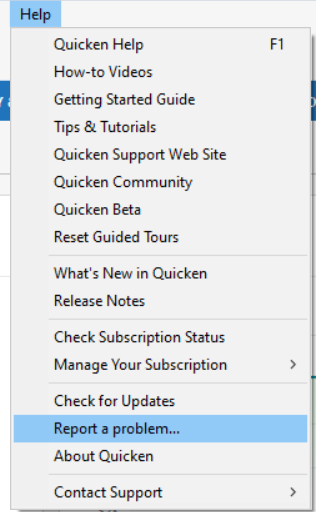
Thank you!
-Quicken Anja
Make sure to sign up for the email digest to see a round up of your top posts.0 -
Other reports of the same issue:
Quicken user since Q1999. Currently using QW2017.
Questions? Check out the Quicken Windows FAQ list0 -
I tried to submit a trouble report three times. I got a "Unable to send Report to Quicken" each time.
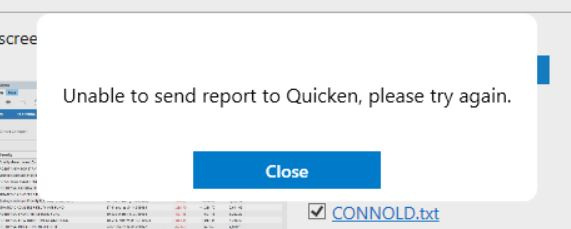 0
0 -
Here is an example:
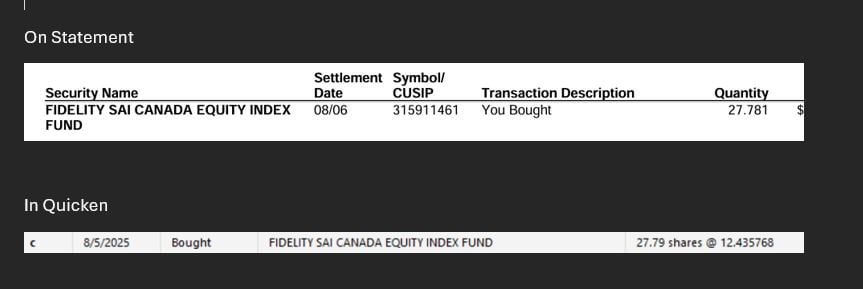 0
0 -
Thank you for your reply,
That error message you're getting when trying to send the problem report indicates that something is interfering with the communication between your program and Quicken's servers. Do you use a VPN? If so, please try turning it off when sending the problem report.
If you use an anti-virus or firewall other than the one native to Windows, it is possible that one of those could also be preventing communication. If that is the case, please try pausing or temporarily disabling them while sending the problem report.
If you have a low upload speed, that could also be causing the issue. If that is the case, you may want to try reducing the amount of data you are sending by making sure the sanitized file option is not selected and unselecting any preselected files with OLD in the filename.
I hope this helps!
Quicken Kristina
Make sure to sign up for the email digest to see a round up of your top posts.
0 -
I still get the error sending a report. No VPN. No non-native anti-virus or firewall, and a 1 Gig upload.
0



Categories
- All Categories
- 5 Product Ideas
- 34 Announcements
- 248 Alerts, Online Banking & Known Product Issues
- 19 Product Alerts
- 265 Welcome to the Community!
- 301 Before you Buy
- 1.5K Product Ideas
- 55.8K Quicken Classic for Windows
- 16.9K Quicken Classic for Mac
- 1K Quicken Mobile
- 834 Quicken on the Web
- 129 Quicken LifeHub