TD Bank – Direct Connect Broken & Constant Reactivations Across Multiple Files

I’d like to confirm whether others are still experiencing these issues with TD Bank in Quicken (Windows Classic, latest release).
For me, there are two main problems:
- Direct Connect not working - When I update using Direct Connect, Quicken reports a “successful” connection immediately, but no transactions download. This began around late 2024 and has continued into 2025. Direct Connect is critical to my workflow because it saves me from having to double-enter bill payments (once in Quicken, once in TD’s bill pay). Without it, Quicken loses much of its value. Web Connect seems to work properly.
- Constant reactivation required - I maintain three separate Quicken files (1 personal and 2 business).
- If I activate the TD checking account in one file, it will continue to update (but only via Web Connect) as long as I stay in that file.
- The moment I switch to another file and update, I’m forced to reactivate the associated TD checking account again.
- This happens every time I move between files or after Quicken updates.
Questions for the community / Quicken team:
- Is this an acknowledged issue with TD Bank connections?
- Are others still seeing the same behavior with Direct Connect and reactivations across multiple files?
- Is there any plan to restore full Direct Connect support for TD Bank customers?
Comments
-
Hello @Gary Wnorowski,
Thanks for bringing this issue up!
A few things I’m wondering that might help make sense of what’s going on with TD Bank:
- When Direct Connect last worked, were there any changes on TD Bank’s side — new account types, security updates, or changes in how they allow connections?
- Do the “successful” connection messages happen immediately every time, or are there times it seems to stall before reporting success?
- With multiple Quicken files, does the reactivation always follow a pattern, or is it unpredictable?
- Have you noticed any differences in how transactions appear or are reported in Web Connect versus Direct Connect?
- Are there specific accounts that trigger reactivation more often than others, or does it happen across all accounts?
- Since TD Bank ultimately controls which connection methods are allowed, could any recent policy changes or restrictions on multiple file access be affecting this behavior?
Let me know!
-Quicken Jasmine
Make sure to sign up for the email digest to see a round-up of your top posts.
0 -
Thanks for your reply. To answer your questions:
When Direct Connect last worked: As far as I know, there haven’t been any changes on TD Bank’s side such as new account types or security changes. The failure began around late 2024 and has been consistent since then.
Successful connection messages: Yes, the “successful” message happens immediately every time. It never stalls — it just reports success without downloading any transactions.
Reactivation pattern with multiple files: I use three Quicken files. If I reactivate the TD checking account associated with one file, it will continue to update (though only via Web Connect) as long as I stay in that file. The problem arises when I switch to another file — then I have to reactivate again. This happens reliably every time I switch files, so it’s very repeatable.
Differences between Web Connect and Direct Connect: With Web Connect, transactions download, but I lose the ability to manage bill pay directly in Quicken, which forces double entry. With Direct Connect, I get the “success” message but no transactions.
Accounts triggering reactivation: This seems to happen across all three TD Bank checking accounts; it’s not isolated to one specific account.
Possible TD Bank restrictions: I can’t rule out changes on TD Bank’s side, but from a user perspective the pattern strongly suggests Quicken is not retaining authorizations across multiple files. I also recently spoke with someone at TD Bank online support about this. They were not helpful and offered no clarity on whether TD has changed their connection policies. The service rep was insistent that it must be a problem with the software (which despite multiple attempts to correct them, they repeatedly referred to as QuickBooks).
Direct Connect is critical for me because it’s what eliminates the need to enter bill payments twice (once in Quicken, once on TD’s website). That’s the main reason I’m pushing to get this resolved.
Please let me know if you’d like me to gather logs the next time I reactivate or update.
Thanks,
Gary0 -
Quicken Jasmine
Any feedback?
0 -
Hello @Gary Wnorowski,
Thank you for the follow-up. Which connection option are you using for Direct Connect with TD Bank?
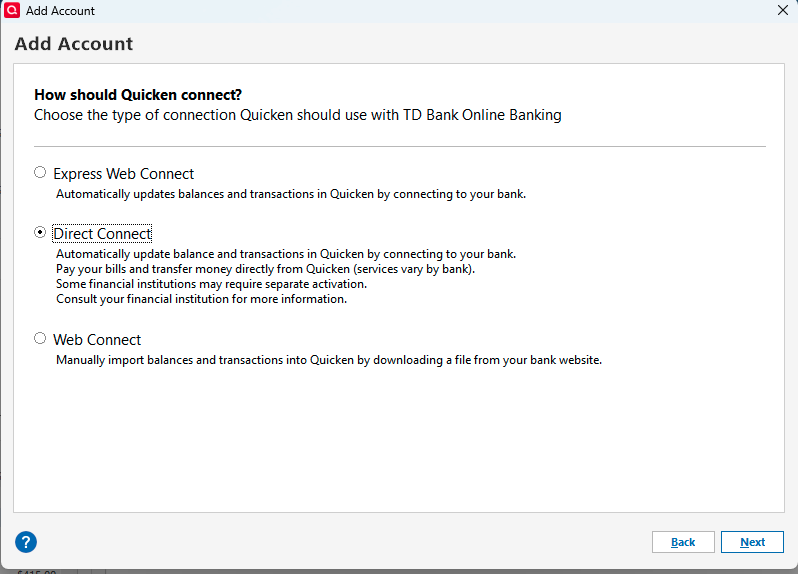
Are you seeing any error messages/codes, or is it just not downloading?
You may be able to bypass the double documentation issue by creating bill reminders in your Quicken for the payments you usually schedule through your bank's bill pay. You can set the reminders to automatically enter into your register, or you can manually enter them.
I look forward to your reply!
Quicken Kristina
Make sure to sign up for the email digest to see a round up of your top posts.
0 -
Hi Kristina,
Thanks for your reply. Here’s a clearer summary of the two issues I’m facing:
1. Direct Connect not working properly
- I’m trying to use Direct Connect with my TD Bank accounts. This connection method worked flawlessly for many years.
- Now, even though Quicken reports a successful connection almost instantly, no transactions download.
- There are no error messages or codes displayed.
- At this point, I can only reliably use Web Connect, which limits functionality and removes features I rely on.
2. Reauthorization required when switching files
- I maintain three separate Quicken files (personal and business).
- After reactivating a TD account in one file, it will continue to update (via Web Connect) as long as I remain in that file.
- As soon as I switch to another file and run an update, I am forced to reactivate that TD account again.
- This happens every time I switch files, so the pattern is very consistent and reproducible.
Direct Connect is critical for my workflow because it eliminates the need to enter bill payments twice—once in Quicken and once on TD’s website. Without it, Quicken loses much of its value for me.
I’m happy to provide logs or any additional troubleshooting information if it would help escalate this to engineering or TD Bank’s technical team.
Thanks,
Gary
0 -
I am seeing the exact same problem. Last successfully download from TD Bank was 8/27. Since then I get an almost instant complete message with zero transaction updates. Have reactivated all TD accounts multiple times with no change. Please advise how/when this can be fixed.
Thank you
0 -
Thank you for your replies @Gary Wnorowski & @smgmahoney,
The most likely cause of the issue is having the same accounts connected in multiple Quicken files. Due to the nature of the issue, I recommend that you contact Quicken Support directly for further assistance, as they have access to tools that we on the Community can't access and they can escalate the issue as needed. The Quicken Support phone number can be found through this link here. Phone support is available from 5:00 am PT to 5:00 pm PT, Monday through Friday.
I apologize that I could not be of more assistance!
Quicken Kristina
Make sure to sign up for the email digest to see a round up of your top posts.
0

