Every transaction asks if it is a next scheduled payment

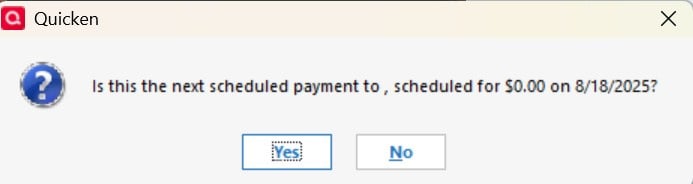
I recently updated to the most recent version of quicken. Now, whenever I enter any transaction, in any account, it gives me the same pop-up: "Is this the next scheduled payment to , scheduled for $0.00 on 9/6/2025?" This happens for EVERYTHING I do, even things that aren't payments (like credit card charges). I even went into Manage Bill & Income Reminders > Options > Suggest Reminders and turned off the checks. Still, even just adding a category to an entry gives me that pop up.
Comments
-
For the past two days, I have been getting a pop-up twice after every transaction. It asks "Is this the next scheduled payment to , scheduled for $0.00 on [date]". This is happening when charges are being entered.
Here is a screenshot.
Started right after an update.
Version: R64.19 Build 27.1.64.19
 0
0 -
same here…. anyone know why?
0 -
Hello @Andrew Kurtz & @aziggy,
Thank you for letting us know you're seeing this issue. To help troubleshoot, please provide more information. Is this happening just in one account register, or multiple registers? Are the problem charges being entered manually, or downloaded and accepted into your register?
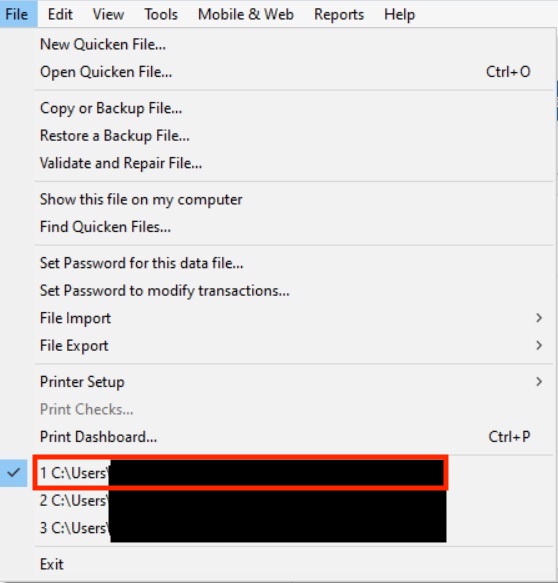
You mentioned this started two days ago. Was there anything else that happened around the same time, such as a program/computer update or unexpected program/computer shutdown? Do you keep your Quicken file directly on your local hard drive? You can view the location of your file in your Quicken program by navigating to File, and looking just above the Exit option at the bottom. The 4 most recent Quicken files you have accessed will be listed there, with the file you're currently in at the #1 spot.
Is your Quicken file synced with any cloud service, such as OneDrive, iCloud, or Dropbox?
I look forward to your reply!
Quicken Kristina
Make sure to sign up for the email digest to see a round up of your top posts.
0 -
I did have a blue screen of death about 2 days ago.
This only happens when I download my credit card info (Southwest Airlines via Chase)Also, found a post from 2021 where someone else was having a similar problem. The solution was to look at the "Bills and Income " tab and noticed their was one weird entry that had no Biller name, was for $0.00 and today's date. I used the "Action" pull down (right edge) and deleted that one
I'll see tomorrow if that fixed it
It looked similar to this one (from the 2021 post, but mine had a $0.00 "Auto Enter" balance)
 1
1 -
Thank you for your reply,
Please let us know what happens tomorrow!
Quicken Kristina
Make sure to sign up for the email digest to see a round up of your top posts.
0 -
This is happening on multiple registers. Turns out some credit card and some banks.
I also have some odd entries with due dates of 8/18 and $0.00 as the bill. Deleting them now - guessing that was it.
0 -
NOTE - deleting those two entries did seem to fix it
0 -
Deleting that Biller (with no name and $0.00 current bill) seems to have fixed the issue)
0 -
I noticed the same thing "Is this the next scheduled payment to , scheduled for $0.00 on [date]?" over the past couple of day. Yes or No. Then I had to click "No" at least 4 times to move on. This happened for downloaded transactions from banks and credit cards, and also for manual transactions I entered for both bank accounts and credit card accounts. I believe this behavior started right after a recent Quicken program update. Coincident with this behavior I noticed 5 or 6 new Billers in my list, with no name. Because of the suggestions in this thread, I deleted all of those no-name Billers, and I think that his corrected this problem.
1 -
Thank you for sharing,
I'm glad to hear that deleting the no-name billers seems to have corrected the issue.
Were these no-name billers all new billers that appeared after the update?
If the issue returns or if you need further assistance, please reach out!
Quicken Kristina
Make sure to sign up for the email digest to see a round up of your top posts.
0 -
I am experiencing the same issue too
0 -
I would first try a Validate/Super Validate, but it sounds like a corrupt update. I'd next try uninstalling and reinstalling the Quicken program software.
0 -
Thank you for letting us know you're seeing this issue. If you're seeing that message for every transaction you enter, regardless of what kind of transaction it is and what account you're entering it in, then the issue is either a program issue or a file issue.
Please start troubleshooting by backing up your Quicken file and reinstalling the most recent patch. Please use the article linked below to download the patch and for instructions on installing it:
Please let me know how it goes!
Quicken Kristina
Make sure to sign up for the email digest to see a round up of your top posts.
0 -
I am seeing the same issue since updating to R64.23. I am adding credit card transactions and it is happening EVERYTIME.
0 -
Hello @ae0705t,
Thank you for letting us know you're also seeing this issue. If you haven't already done so, please follow the troubleshooting I provided in my earlier post.
Please let me know how it goes!
Quicken Kristina
Make sure to sign up for the email digest to see a round up of your top posts.
0 -
I am having the same issue. I downloaded the patch but still having the same issue.
0 -
I am also seeing this issue after updating to R64.23. I downloaded the patch listed above and ran the executable. It says I am on Quicken version R1 (when I am on version R64.23) so I am concerned about running the patch. Please advise.
0 -
I validated the data file and downloaded/installed the latest patch. It is still doing this popup. It was fine before the update. You have a bug in this update.
0 -
Same issue here as well. Never seen this until the recent update. Is Quicken going to ignore this as well?
0 -
Same here. Started after a recent update. Maddening! Stop asking questions and fix the problem. Do you not use your own products in house? This has now been reported for weeks with no solution!
-1 -
Hello All,
Thank you for taking the time to visit the Community to report this issue, though we apologize that you are experiencing this.
We have forwarded this issue to the proper channels to have this further investigated. In the meantime, we request that you please navigate to Help > Report a problem and submit a problem report with log files attached and (if you are willing) a sanitized copy of your data file in order to contribute to the investigation.
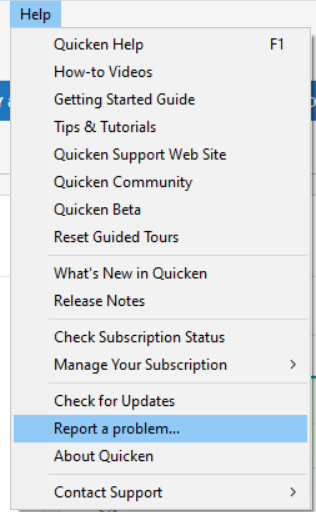
While you will not receive a response through this submission, these reports will help our teams in further investigating the issue. The more problem reports we receive, the better.
We apologize for any inconvenience!
Thank you.
(CBT-806)
Quicken Kristina
Make sure to sign up for the email digest to see a round up of your top posts.
0 -
This is happening to me also. Checking and Credit Card accounts. I do not have any "no name" billers to delete.
0 -
Me, too. I just sent a report via the Help/Report A Problem function in Quicken.
0 -
64.23 is a disaster. Go back to 62.16 and everything will be fine.
0 -
IS it possible to go back to 62.16 until Quicken gets their act together? Where can older versions be downloaded?
0 -
I just checked my bills and income reminders and saw there was a blank entry with $0. I deleted this and that seems to have fixed the problem
0 -
Hello @SForsgren,
Thanks for reaching out! Yes, it is possible to revert to an earlier release if needed. You can download and install previous Quicken Windows versions from this support article. This page provides links to prior version releases, including R62.16.
Hope this helps!
Hello @Jonathan Mo,
Thanks for sharing your experience! That’s a helpful tip for others who may run into the same problem.
-Quicken Anja
Make sure to sign up for the email digest to see a round up of your top posts.0 -
Backup your file, download and apply 64.25. Check your bills and income reminders and delete any blank entries with $0, I had two such entries. I also had a quarterly reminder that had switched to monthly so I deleted these as well and that seems to have fixed the problem.
0


