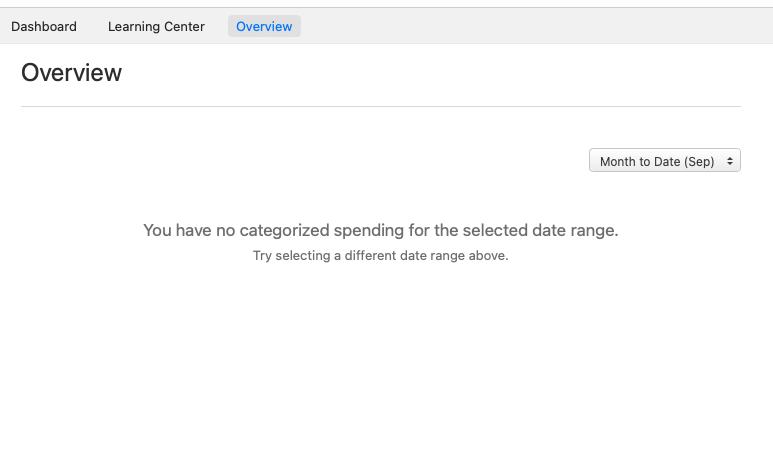
"You have no categorized spending for the selected date range." (Q Mac)

Since Sept. 1, my overview page shows this message:
You have no categorized spending for the selected date range. Try selecting a different date range above.
It shows none of my spending for this month. Is anyone else seeing this?
I can change to the previous month and it pops right up. I can run a report for my spending so far this month in certain categories like grocery, gas, entertainment, etc. and that shows the exact amounts.
I am using Version 8.2.1 (Build 802.57282.100) on a Mac Mini (MacOS 15.6.1)
Best Answer
-
Thank you for the follow-up,
It is strange that the issue reflected in the May backup, even though you didn't notice the issue until this month. My best guess is that it's a file specific issue that wasn't a problem until a recent update.
Based on your earlier post, it sounds like getting everything set back up in a new file with your data imported in is more work than it's worth to get the Overview tab working again. If the Spending by Category is the main thing you pay attention to on Home>Overview, would the Spending by Category card found on Home>Dashboard meet your needs?
Thank you!
Quicken Kristina
Make sure to sign up for the email digest to see a round up of your top posts.
1

Answers
-
Hello @Stewart Dale Spencer,
Thank you for letting us know you're seeing this issue. To help troubleshoot the issue, please provide more information. Have posted transactions from this month downloaded into your Quicken? Are you seeing the same issue in reports and dashboard tiles?
I look forward to your reply!
Quicken Kristina
Make sure to sign up for the email digest to see a round up of your top posts.
0 -
Yes, I download transactions every morning. That is working properly.
No, I am not seeing the same issue in reports and dashboard tiles. It appears to be limited the home page overview report.
1 -
Ha-ha! This morning it is showing one expense for $1.49 total for the month-to-date. The actual total is over $84. And I noticed that the spending over time section of the overview is now showing $49.80. Definitely something is wrong.
0 -
Thank you for your reply,
Are there specific accounts that aren't showing up in the overview? If so, check to see if those accounts are marked separate, since that can prevent them from reflecting in the overview. To check if an account is marked separate, navigate to Accounts>Hide and Show Accounts. The window that comes up will let you see if an account is hidden, marked separate, or closed.

Do you track multiple currencies in your Quicken file? That can also prevent transactions in different currencies from showing up in the overview.
Thank you!
Quicken Kristina
Make sure to sign up for the email digest to see a round up of your top posts.
0 -
It is quite strange. Just now I paid my water bill and that showed up. And following your clue, I checked, and apparently most of my accounts are not showing up in that overview report. But I have not changed any settings. They're not hidden and they're not closed and they're not separate. I have some hidden and closed accounts, but they're always included in totals, and I didn't even know about the keep separate function.
On a whim, I changed it from month to date to last month and I noticed right away that it did not include the grocery category in the August overview. It looked like it had most of everything else, but I didn't dig any further.
I checked for updates and saw that there was one available. I usually get notified when they're available whenever I open the program. Anyway it updated quickly to the latest version: Version 8.3.0 (Build 803.58807.100)
That did not change anything.
Cash, American Express, and an escrow account have all had transactions so far in September, but none of them are showing up. There is nothing in the settings of any of those accounts that are different from any of the other accounts.
The only two accounts that are apparently included in the report are my Discover card and a Randolph-Brooks Federal Credit Union credit card.
0 -
Thank you for your reply,
Since there don't seem to be any settings causing this issue, it may be file-specific. Please try restoring a backup from before you noticed the issue, and test to see if the issue is resolved in the newly restored file.
Please let me know how it goes!
Quicken Kristina
Make sure to sign up for the email digest to see a round up of your top posts.
0 -
Oh, and I don't track multiple currencies . . . never have.
1 -
I tried what you suggested. I only keep the five most recent backups, but when I went into the backup folder, I saw that there was a pre-update backup from May 5. I restored that one and had to set the overview to the last six months since there was nothing in it for this month or august. And I noticed in that one, it also did not show any grocery expenses. The only reason I noticed the issue this month was because, unlike all the months past, as soon as I entered in some expenses on the second day of the month for the first day, the overview shows those expenses right away. I know that happened in August.
0 -
Thank you for your reply,
To clarify, even in the restored file from May, spending from most of your accounts still does not reflect in the Overview tab? Is that correct?
Thank you!
Quicken Kristina
Make sure to sign up for the email digest to see a round up of your top posts.
0 -
Is anyone else seeing this?
I'm not. I tried to replicate it in several tests, and the Overview works correctly.
As this is a screen in the program which is slated to go away in the future, I'm pretty sure the developers haven't made any changes to the code for this screen. (But we can't say definitively that a change somewhere else in the program code didn't unexpectedly affect something here.) I haven't really been visiting this screen since the addition of the Dashboard screen a few year ago.
I can force this t happen, though, if there is a negative expense (e.g. a credit or refund). If I have a category showing $85 in expense in the Overview from a transaction this month, it shows up. Then I enter a transaction using the same category with a credit (cash received) of $100. So my total for this expense category is now a positive $15 — and the Overview screen shows the "No categorized transactions…" message. So I suspect that you have a negative expense(s) in excess of your regular expense(s).
Quicken Mac Subscription • Quicken user since 19931 -
Quicken Kristina, yes, that is correct. The restored file from May still did not show most of my accounts.
Jacobs, no, that doesn't seem to be the issue.
However, take a look at these two screenshots. Here we are on September 7, and I've had some more expenses. And just on a whim, I clicked on where the overview says "spending by category" because I realized it had a hyperlink. It opened a transaction report which accurately shows all of the expenses.
0 -
Thank you for your reply,
Since there isn't a recent backup file where it is functioning correctly, the next thing I recommend is to try exporting your data, creating a new file, then importing your data into that new file.
To export your data, navigate to File>Export>Quicken Transfer File (QXF)….
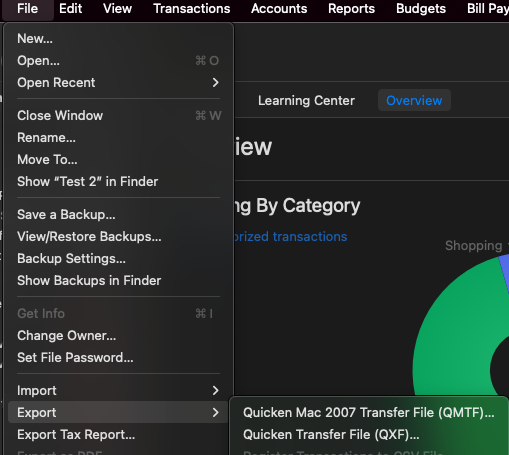
Once you've created the export file, in your Quicken, navigate to File>New…. That will close your current file and bring up a Lets get started window.
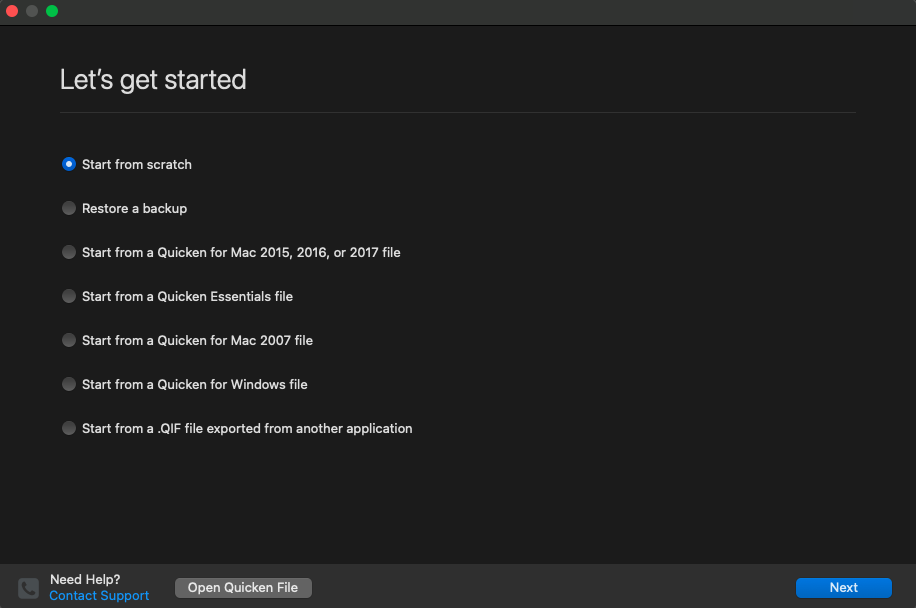
Select Start from scratch, then click next. Select whether you'd like to use Mobile & Web (you'll be able to name the cloud account if you want to use it), then click next. Close the prompt to add accounts, then navigate to File>Import>Quicken Windows File (QDF, QXF)….
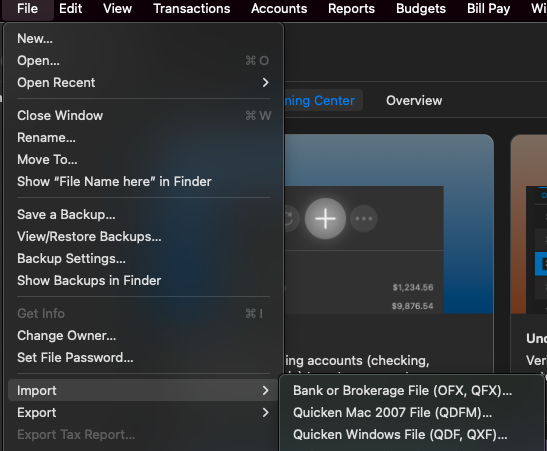
Locate the export file you created and import it into the new file. This may take several minutes to complete.
Once your data is imported, test to see if the issue is resolved. If it is, you may want to considering connecting your accounts in that new file, and using it as your main file going forward.
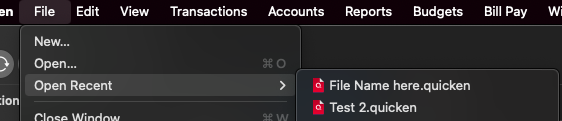
If the issue is not resolved, you can return to your main file by navigating to File>Open Recent, and selecting your main file from the list (It will most likely be the 2nd from the top).
Let me know how it goes!
Quicken Kristina
Make sure to sign up for the email digest to see a round up of your top posts.
0 -
Thank you Kristina. I will give that a shot tomorrow and let you know.
1 -
Kristina, I followed the instructions and created the new file and imported the data. I didn't bother selecting use mobile and web. Once the import was done, I went to the overview tab, and it appeared like that resolved the issue. I decided to check the report and compare the results to the overview tab. Most of the category totals were exactly the same, but not all. And of course, I got the reminder that the overview was going to be replaced in a dashboard update.
When I did the export, I got the message in the following screenshot:
I don't remember doing an attachment. It was probably a long time ago, so I'm not worried about that. However, the 23 custom reports would not be much fun to have to re-create. I think I only actually use about 8 custom reports, but it took me a long time to tweak them just right.
I'm wondering if the weird results indicate that my file is somehow corrupted. I have noticed some odd behavior from time to time.
And another thing that I totally forgot about until you mentioned about naming the cloud account is that I seem to have multiple cloud accounts and I'm not sure how to deal with that or if it matters. I forget now where I even saw them.
For now I'm sticking with my original file. I don't particularly want to have to go to a lot of extra time and trouble to set up a new one, but I'd like to know what you think about the situation.
0 -
Thank you for your reply,
Based on the information you provided, it does sound like there may be a file specific issue in your original file. That is less common in Quicken for Mac, but it can sometimes happen. Do you keep your file directly on your local hard drive? Do you have it synced with any cloud service, like iCloud, OneDrive, or Dropbox? Have you had any computer or program crashes?
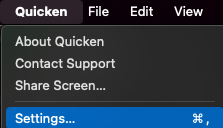
To answer your question about cloud accounts, you can find and manage them by navigating to Quicken>Settings….
In the Settings window, choose Connected Services.
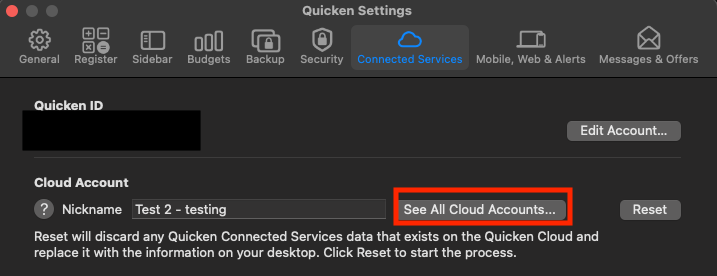
It will show you the cloud account for your current file, and you can click the See All Cloud Accounts… button to view, edit, and delete your other cloud accounts.
I hope this helps!
Quicken Kristina
Make sure to sign up for the email digest to see a round up of your top posts.
0 -
Kristina, thanks for the information about the cloud accounts. I only see the one I use and the one I created the other day. I don't remember where I came across the other ones now. I know I didn't imagine it, but if they're not there, I don't need to worry about it.
Getting back to the file issue, I've been using Quicken for Mac since October 2016. It has been on many different devices over the years, all iMacs until my current machine. Whenever I changed computers, I used Apple Time Machine to set up the new one with all of my files. Of course, the main file has always been on my hard drive, but I made sure my backups were somewhere else. For a while, I had it them in Dropbox. Now I have the main file on my iCloud Drive, which of course resides on my hard drive and at iCloud. I have my backups going into a specific folder in iCloud.
As far as crashes go, I've had a few issues over the years. About the only thing that was really unusual was when my iMac 2017, with the fusion drive, got a little wonky. The two parts of the fusion drive, apparently had a temporary separation. Took a while to get that figured out. That's when I got this Mac mini, but then Apple came up with a software solution to resolve that issue. Then I switched back to the iMac. I think Fusion Drive issue resulted in a crash or two, but that was a few years ago now. I've been using this Mac mini exclusively for a while now. That iMac was being kind of slow and sometimes unreliable. This Mac mini is way better as far as speed and performance, although I miss the retina screen and all the built-in features of the iMac. Sadly, Apple doesn't make it in the larger size anymore.
It's kind of weird how that issue showed up in that May backup. I look at that screen all the time and I never noticed a problem until this month.
Thanks for all your help and for hanging with me.
0 -
Thank you for the follow-up,
It is strange that the issue reflected in the May backup, even though you didn't notice the issue until this month. My best guess is that it's a file specific issue that wasn't a problem until a recent update.
Based on your earlier post, it sounds like getting everything set back up in a new file with your data imported in is more work than it's worth to get the Overview tab working again. If the Spending by Category is the main thing you pay attention to on Home>Overview, would the Spending by Category card found on Home>Dashboard meet your needs?
Thank you!
Quicken Kristina
Make sure to sign up for the email digest to see a round up of your top posts.
1 -
That makes sense. And yes, unless I notice some other serious issues, I won't bother with Setting up a new file. But thank you for telling me about that because if I need to do it, now I know how.
I always start quicken with the home page showing because that has reminders of all my upcoming bills and other expenses. I have a separate report that I created where I track my more or less discretionary expenses to make sure I stay in my budget each month. However, it is pretty easy to click on that spending by category to see the whole picture. I don't think I would've ever noticed that if this problem had cropped up.
So let's consider this closed and thank you very much for your assistance!
1 -
Thank you for your follow-up,
I'm happy to help.
If you need further assistance, please feel free to reach out!
Quicken Kristina
Make sure to sign up for the email digest to see a round up of your top posts.
0



