Quicken Classic Mac 8.3 has been released!

We have started rolling out Quicken Classic for Mac 8.3 into a stage release.
You can get the latest Quicken build by clicking "Check for Updates" under the Quicken menu.
Thank you for your help and support.
Best Regards,
The Quicken for Mac Team
Please take a moment to review the summary and try the new features in the product.
Investments
- IMPROVED We now default to Detailed Tracking when adding accounts at financial institutions that support detailed tracking
- NEW You can now bulk-import security prices (from a single CSV file with prices for multiple dates and multiple securities)
- FIXED The Portfolio Graph now shows negative values even when set for “Y-Axis starts at zero”
- IMPROVED You can now add the cost basis of holdings within the Capital Gains Estimator
Accounts
- NEW Easily organize your accounts within each account type group in the Sidebar to match your personal workflow
- NEW A new graph for banking account registers that allows you to see the account balance over time and projected balances is now available in a new Balances tab (available in Premier and Business & Personal subscriptions)
- NEW A new keyboard shortcut (⌘ + L) is available to access the Reconcile Account window
- NEW You can now update a single account by right-clicking on the account in the sidebar
- IMPROVED A Balance column is now included in All Transactions and account group registers, letting you view running account totals at a glance
Business & Personal
- NEW You can now create a new Client from the register
- IMPROVED You can now import mileage records from CSV files
- IMPROVED You can now easily customize the columns displayed in the Mileage tab
- NEW You can now assign a client to a mileage record
- NEW You can now make a mileage record billable
- NEW You can now import and export the Client list from the File menu
- NEW New Mileage tab in Client Details provides a quick way to review mileage records associated with each client
Transactions, Registers, and Dashboard
- FIXED Resolved an issue where bills for $0 were always entered as Income after using Edit & Mark as Paid to edit the amount
- IMPROVED Added a setting at Quicken > Settings > Registers to control how the Tab key behaves in the Date field. When enabled, pressing Tab exits the Date field in one step; when disabled, Tab moves between the month, day, and year before exiting
- NEW Quickly jump to the other side of a transfer transaction using the keyboard shortcut ⌘ + [ or the register’s contextual menu
- NEW You can now customize the Top Spending Payees card by payee and the Spending by Category card by category for a more tailored dashboard view
Invoicing
- IMPROVED Products and Services and Sales Tax lists now allow Hide and Taxable options from the contextual menu when you right-click on a row
- IMPROVED Invoice Activity timeline now shows credited/refund activity
- IMPROVED You can now preview a newly added logo to see how it will appear before creating a new invoice
- NEW You can now specify which business details you want shown on printed invoices
- FIXED Long notes were sometimes truncated on printed invoices. This has been fixed.
- IMPROVED You can now reorder product/service lines on invoices
- NEW Added an Invoice Actions menu to invoice windows, making it easier to perform common tasks such as receiving payments or issuing a refund
Quicken Bree
Comments
-
GREAT!
However, the install keeps looping every restart of the application. It never installs.
Version 8.2.1 (Build 802.57282.100) macOS 15.7
1 -
@JohnnyMac This happens to small number of users from time to time. Here's a workaround to get a fresh Quicken installed…
- Quit Quicken.
- Go to your Applications folder and drag Quicken.app to the Trash. (Don't empty the trash, so you can restore it if for some reason you need to.)
- In a browser, go Quicken.com and Sign In to your account
- Scroll down the page to the Download Quicien box, and click on the Quicken for Mac button. This will download the installer.
- Double-click the downloaded installer and allow it to install a fresh copy of Quicken.
You should now be able to launch the new Quicken.app installed in your Applications folder, and the program should tell you it's updating your database.
BUT… Quicken Mac 8.3 is currently in staged release, so the download version is likely still 8.2.1. You may have to wait for a day or two until they end the staged release and update the installer to be versions 8.3.
Quicken Mac Subscription • Quicken user since 19931 -
Yes, the download version is still 8.2.1.
0 -
There's another way I know of to get around the updater not correctly completing the new version installation which involves removing a preferences file, but there are potentially unwanted side effects from that — so I'd advise waiting a day or two (or three?) until the staged release is over, and then following the steps above.
Quicken Mac Subscription • Quicken user since 19931 -
@JohnnyMac You can download an 8.3.0 installer from the link on this page, I verified that it does install 8.3.0.
0 -
Did Check Pay go away? I don't see that option anymore.
Quicken user since 1994.
0 -
Thank you all. I should know better, and should wait until +10d or x.x.1 LOL
0 -
File Size after update. Has anyone else seen a dramatic reduction in file size? In my case the working file dropped from 477mb to 280mb and compressed backups from 173mb to 90mb. I can't find any missing data and everything is working normally.
1 -
Yes, you may have noticed it took a little longer than usual to open your file after updating the app. Quicken discovered a bug that was causing data files to be larger than they should.
1 -
The good news was short lived. Yes my file dropped in size dramatically but is now growing even faster than before. My working file had dropped to 280mb on August 29th and now on September 2nd has already grown 6mb to 285mb. At this rate it will be back to its old size of 477mb pretty quickly.
0 -
Money market fund balances from Fidelity have gone away. All of the historic transactions are still in the data, the fund security is just not being listed.
0 -
Where is this located:
- NEW You can now specify which business details you want shown on printed invoices
I am unable to find it. I would like my business email and phone number to show on the client invoices.
Thanks
0 -
@Lindaread I think there is a bug, but there's also a work-around.
You can enter your business information, including address, email, phone, and logo by selecting Manage Businesses > Edit Business from the main Business page. When you create a new invoice, it auto-populates with the company name and address, but not the phone and email.
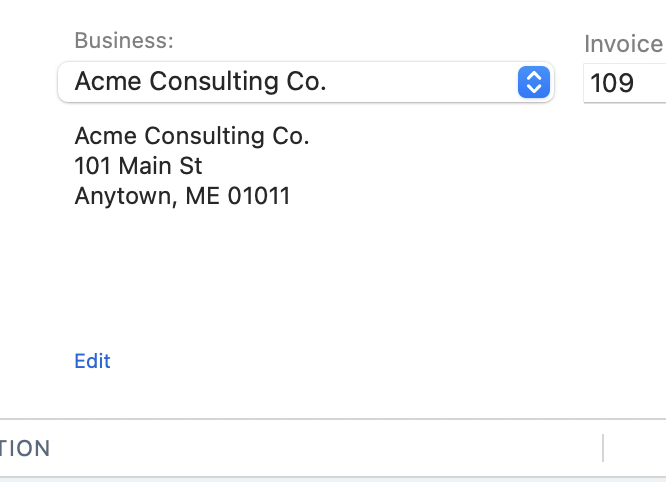
That sure seems like a bug; what's the point of having this information entered for the business if it isn't used? You can click the Edit link below the Business info on the invoice, and in the pop-up window, you can enter your email and phone number:
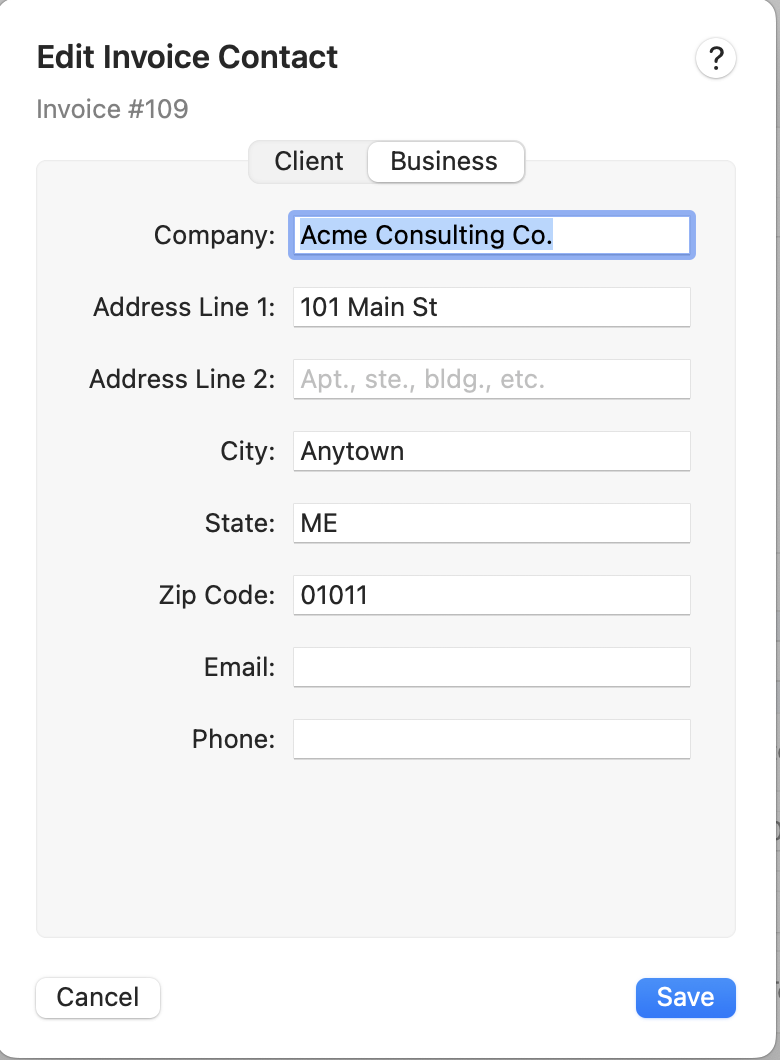
Once you enter the two fields and click Save, the email and phone are visible on the invoice:
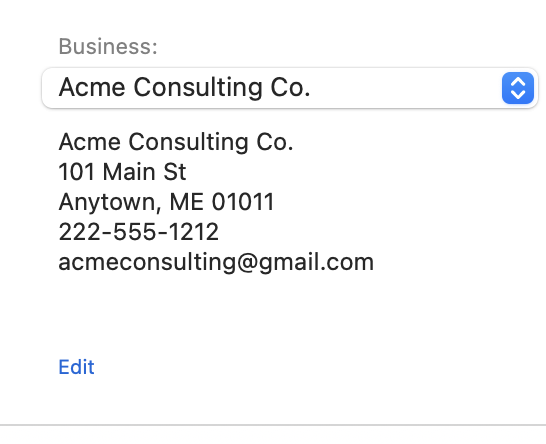
I think this should be fixed so that if there is an email and.or phone number for the business, those fields auto-populate new invoices.
Quicken Mac Subscription • Quicken user since 19930 -
I am having the same looping install problem with Version 8.3. I will wait a couple of days and try again. I am currently on Version 8.2.1 (Build 802.57282.100) / macOS 15.6.1 (24G90).
0 -
@Fishermjk Here's a workaround to get a fresh Quicken installed…
- Quit Quicken.
- Go to your Applications folder and drag Quicken.app to the Trash. (Don't empty the Trash, so you can restore it, if for some reason you need to.)
- In a browser, go Quicken.com and Sign In to your account
- Scroll down the page to the Download Quicken box, and click on the Quicken for Mac button. This will download the installer.
- Double-click the downloaded installer and allow it to install a fresh copy of Quicken.
You should now be able to launch the new Quicken.app installed in your Applications folder, and the program should tell you it's updating your database.
Quicken Mac Subscription • Quicken user since 19931 -
Thanks jacobs! It worked!
0 -
I found clicking the sidebar items of either Checking or Cash now display the following columns Business, Billable & Client in the transaction display. These columns are new and unnecessary. However the column selector menu does not show then at all. So there is no way to remove them. I feel this is a bug. Please enlighten me as to what is going on. See example in the untitled.png
0 -
@jtomsheck What subscription do you have? Those columns should only show up if you have a Business & Personal subscription, and in that case you should be able to turn them off.
0 -
Quicken Classic Premier V 8.3.1 (Build 803.58866.100) on MacOS Sequoia 15.6.1
As I said in the previous message. The screenshot the columns cannot be turned off as they don't appear in the list of items to check/uncheck.
0 -
It makes sense that they aren’t on the list since they’re not supposed to be available at all on a Premier subscription. You should use the Report A Problem option on the help menu to report this back to Quicken.
0 -
Jon, per your suggestion I sent a Report A Problem message with relevant details.
0 -
@jtomsheck Just be aware that you'll get no response from Report a Problem submissions; there's no way to know if they verify the issue you reported, nor if/when it may be addressed. You can also call Quicken Support, if you wish, and talk on the phone to a live agent; at least there's dialog, and the agent should be able to can screen-share with you and document the issue and escalate it.
Quicken Mac Subscription • Quicken user since 19930 -
Hello! Thank you for being loyal Quicken Mac customers!
We want you to know that every comment posted on the Quicken Community forums and every report submitted through Help > Report a Problem is reviewed by our team. While we may not always reach out to each customer individually, please be assured that your feedback is seen and taken seriously.
We truly value the time you take to share your experiences, and your reports play a key role in helping us improve Quicken Mac. Please keep letting us know when you encounter issues; your involvement makes a real difference in making Quicken Mac better for everyone.
Thank you!
1 -
After updating to 8.3.2 the funds in my Fidelity account (401K) no longer update the closing prices. The workaround is for me to go to fidelity online, get the values and manually enter them into the securities list. This is very tedious to do every day. Is anyone else having this issue?
Quicken Mac Subscription • Quicken user since 19941 -
I had a lot of issues with fidelity after the update. My security symbols were not reconciling with what was reported and had to go back in manually and change the security symbol for it to match.
1 -
There is a separate thread on this topic where I recently provided an example (scroll to the bottom). If this matches your experience, please comment in the other thread.
https://community.quicken.com/discussion/comment/205168521 -
For sure download an 8.3.0 installer.
0




Categories
- All Categories
- 23 Product Ideas
- 34 Announcements
- 247 Alerts, Online Banking & Known Product Issues
- 19 Product Alerts
- 265 Welcome to the Community!
- 300 Before you Buy
- 1.5K Product Ideas
- 55.8K Quicken Classic for Windows
- 16.9K Quicken Classic for Mac
- 1K Quicken Mobile
- 834 Quicken on the Web
- 128 Quicken LifeHub