Windows to Mac Conversion Error: Not able to read the contents of your QDF file

Windows Quicken Deluxe: Ver. R64.25 Build 27.1.64.25
Mac Quicken Deluxe: Ver. 8.3.1
Windows QDF File size: 35MB
Figured I would reach out to the community to see if anyone has ever come across this error before. I am including a copy of the error.
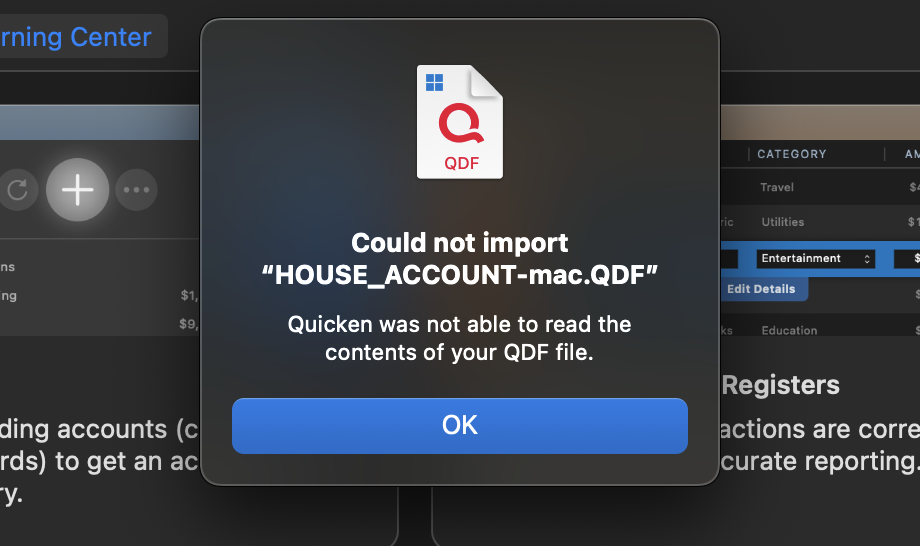
I have followed all the instructions provided on the support page. I even went through the process on my Windows file of doing a "Validate" and then doing a "Super-validate" (holding CTRL+Shift when you click Validate), and each have no errors returned under the logs.
I also tried all of the following:
- Unhide the accounts I originally had hidden
- Tried to use the backup file to import into Quicken for Mac instead of using the original file
- Tried to create a new "copy" of the file through the Copy feature in Windows Quicken. Even tried the "Super-copy" version of this (i.e. using CTRL+Shift when click Copy/Backup)
- I tried to create a smaller version of my file with just 2025 data in it.
- I tried creating a QFX export, and I received the same error as above, just having the QFX replaced as the file name
- I tried the import process by double clicking the windows quicken file on the Mac;
- I also tried the other way of doing the import process by opening Quicken on the Mac then choosing File—>New—>From Windows file
Nothing I tried would allow me to convert my Windows Quicken File to Mac. A couple of additional interesting facts:
- My brother, who has the same version of Windows Quicken as me on his own computer, is having the same problem when he tries to convert his file to Quicken Mac. He has his own MacBook Air M4. He gets the same errors.
- We have tried moving the file from the Windows computer to the Mac via USB Drive, iCloud, and OneDrive; all produce the same size file on the Mac, and the same issue.
- As far as we can tell, the Quicken Windows file is not corrupt. It opens fine in Quicken on multiple PC. I can even open his file, and he can open my file. We could open the file on a backup PC that I have at my home.
I reached out to support, but they indicated they had not seen this error before. They are going to get back with my mid-week, but I figured I would start here in the community to see if anyone else has had this issue before.
A couple last pieces of information that I am not sure if it matters or not, but trying to give all the details:
- Both my brother and I enter all of our transactions manually. We do not allow the transactions to download from the bank.
- We typically do not mark the transactions as "cleared" or reconciled. But we DID go back and do this across all accounts, but still got the same errors as above.
- I have the balance (not specific transactions) of my 401k account with Fidelity download to my file, but he does not have anything download to his file
- I use the Cloud/Mobile App to view my file data, which works perfectly with no errors on that side with the uploads that come from this Windows Quicken Data file. (I did delete my cloud file prior to trying the migration to Mac)
- Neither of us use a VPN for internet connection.
Anyone seen anything like this? Any thoughts? I really would prefer to run Quicken Natively on Mac and not have to deal with Parallels or any other emulator tool just for this one app. Thanks!
Comments
-
I’m having the same issue on my wife’s new MacBook. Get the same error message as you with the validated file from my Windows laptop.
We just switched from Quicken Deluxe 2010 on her old laptop to the subscription as we no longer have the CD and wanted to get transactions entered automatically from our bank1 -
Let's step back a bit. In your screenshot, you have an open file in the background, so I don't know how you are trying things. The conversion will go into a blank, new file.
You need to File:New, and follow the pathway for importing from Windows. This will allow you to choose the file for conversion. (The Quicken servers will perform this.)
If you are doing this, at what point does it fail?
You shouldn't have to deal with QXF files.
1 -
Thank you for the response and noticing that. The file created in the background is the aftermath of this error happening. Even though that file is created it is completely blank. I got this error when I initially installed Quicken on Mac and it asked me how I wanted to create my new Mac file. I also tried just doing a double click on the windows QDF and lastly tried via the File—>New Process. This error happens after I click to use Quicken Cloud Converter. It uploads the file, starts its process, and then pops this error. The file name in the background only shows up after the error pops up.
0 -
Thanks for the update.
It sounds like you are following the correct steps, so you will likely have to wait to hear back from support.
The only tidbit I noticed is that you are possibly running Windows in a VM on your Mac. If so, make sure the file you are trying to convert has been copied out from the shared VM location. In the past, that caused some issues for some users if the Quicken Windows file was in the VMware/Parallels shared location.
Good luck-I hope support figures this out for you.
1 -
Actually it is a separate pc that I am running Windows 11 and Quicken for Windows. The MacBook Air M4 I recently got, and was transitioning. Of course Quicken is one of the transitions. I will certainly let the team here know what I hear from support as well.
0 -
Hi team, wanted to share an update. I called back in to speak with the support team. While I was on hold, I decided to just "try" to load the file again as I had not tried since a couple days ago. This time, the file worked. I was using the same file and the same version of Quicken Mac. I gave the rep my ticket number, explain what had happened. They indicated that even though there was no memo or anything, it is possible the service was down durning the days I had tried to do the conversion, thus the reason I was getting the error. I asked if there were any notes to that effect, or anything that would help indicate if something was changed on the server that now allowed my file tow work, and he indicated there was not. So fortunately, my conversion using the Windows QDF to Mac did work, but unfortunately, I am not able to provide any insight into what was causing the error or why it works now.
1 -
it is possible the service was down durning the days I had tried to do the conversion, thus the reason I was getting the error.
@TazMan81 Yes, it's indeed possible. I remember an instance with the converter for the old Quicken Mac to the modern Quicken Mac — which uses a similar cloud-based Quicken server — where people were experiencing failures in conversion until a Quicken Mac administrator acknowledged they found a problem with the conversion server and restarted it to resolve the problem. I doubt information about that incident was documented such that Quicken phone support representatives would have known about it after the fact.
In other news: welcome to Quicken Mac! 🤣
Quicken Mac Subscription • Quicken user since 19931

