Suggested bills

R64.25 Build27.1.64.25 Windows 11
I declined to have Quicken suggest billers (Bills and Income Reminders/Options/Decline Suggestions). Quicken promptly placed all the declined suggested bills into my Bills and Income Tab.
When I return to Bills and Income Reminders/Options, the Decline option is greyed out and no check and "Review My Accounts for Suggestions" is checked.
Should Quicken automatically move deleted suggested bills to the Bills and Income Tab? Should "Decline" option be unavailable after it is selected.
I seem to remember having this same declined suggested bill issue when trouble shooting Ticket 11933060 in R64.24 last week.
Steve
Quicken User since 1988.
Steve
Quicken user since 1988
Comments
-
This is a feature that I've never touched over the years, but I opened my Quicken file and went down the path of
Bills and Income Reminders/Options/Suggest Reminders/Decline Suggestions
(I'm using R62.16 Build 27.162.16 and didn't see that "Suggest Reminders" in the path you posted, which may be because I'm well behind in updating.)
Immediately after clicking on "Decline" I went over to the Bills and Income Tab and didn't see the effect you've described. Going back down that path again this is what I saw:
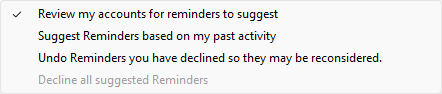
There's a line there that you didn't report, that "Undo Reminders…", line, so I'm left to wonder if some kink in your version is the problem?
1 -
Thanks for that info.
Let's see what Quicken has to say.Steve
Quicken user since 1988.Steve
Quicken user since 19881 -
Hello @Steve Horrocks,
Thank you for reaching out! The Decline option is greyed out if it doesn't have any reminders to recommend. I tested in my Quicken, and was not able to replicate the issue you are reporting. That makes me suspect that this is either a program issue or a file-specific issue.
Does selecting the "Undo Reminders you have declined so they may be reconsidered." option remove all those recommended reminders from your Bills & Income tab? If it does not, then you may need to restore a backup from before the issue happened, or manually delete them.
I recommend that you try reinstalling the most current update, just in case the update didn't install properly initially. For the instructions on how to do that and the link to download the most recent patch, please see this article:
I hope this helps!
Quicken Kristina
Make sure to sign up for the email digest to see a round up of your top posts.
0 -
Thanks for the information.
I selected the "Undo Reminders you have declined so they may be reconsidered." This action removed all the suggested bills from the "Bills and Income" Tab. The suggested bills now exist back in the "Manage Bills and Income" window.I usually back up my file when I perform an action in Quicken, this happens at a minimum of every other day. I cannot recall the exact that the problem started, and, therefore, restoring a backup may not help.
I will try reinstalling the latest build.Steve
Quicken user since 1988.Steve
Quicken user since 19880 -
Thank you for the follow-up,
Please let us know if reinstalling the latest patch corrects the issue!
Quicken Kristina
Make sure to sign up for the email digest to see a round up of your top posts.
0 -
It did not! I reinstalled the latest patch: R64.25.
There were over a dozen reminders that Quicken wanted to suggest. I elected to "decline" the suggestions.
All of the declined suggestions appeared in the "Bills and Income" tab
After selecting to "Undo" the declined suggested bills, the previously declined bills were removed from the "Bills and Income" tab and reappeared in the "Manage Bills and Income" window.
Steve
Quicken user since 1988.Steve
Quicken user since 19880 -
Since neither of us were able to duplicate what you're reporting in our own files it does seem that the problem might be "file specific."
Probably the next try at fixing this would be going through the File > Validate and Repair File… process.
Some users have suggested making a Quicken "Copy" of the data file and then doing the validate and repair process on the copy, since Quicken's Copy process re-writes the data file, which can result in a smaller file size, especially if the original file was corrupted or contained excessive deleted data. The downside of doing this is that you have to re-establish downloading for all your downloading Accounts.
0 -
Thank you for that information.
I created a copy of my data file. I attempted to "delete" suggested transactions with the same results as before.I performed a "Validate and Repair" on the copy and there are no more "Suggested" transactions.
Your solution seems to have corrected the problem.Thanks, again.
Steve
Quicken User since 1988 (DOS 3)
Steve
Quicken user since 19880 -
Thank you for the follow-up,
I'm glad to hear the solution provided by @Tom Young corrected the issue!
If you need further assistance, please feel free to reach out!
Quicken Kristina
Make sure to sign up for the email digest to see a round up of your top posts.
0
