Get rid of "Save this to Memorized Payee List" pop up

This new pop up feature slows down the work flow if we do not want to be reminded of this option on every transaction. Make a way to siable it
Comments
-
or at least make it a configurable option
3 -
Voted
- Q Win Deluxe user since 2010, US Subscription
- I don't use Cloud Sync, Mobile & Web, Bill Pay1 -
Very annoying, make it go away.
1 -
Add me to the list of those who find it a very annoying feature.
0 -
Unworkable
0 -
Ditto
0 -
Requires an extra click to save every new or modified transaction.
Quicken since version 61 -
Now you have this popup, “Save This To Memorized Payee List” that I can’t get rid of. [Removed - Rant]
0 -
Thank you for your feedback! I went ahead and merged your idea with this existing one.
Already at 10 votes!
Quicken Alyssa
Make sure to sign up for the email digest to see a round up of your top posts.
0 -
This is very frustrating. Why would you not have made this feature optional? Can you please register the dissatisfaction on both the Canadian and US sites as we need this fixed in both countries!!
2 -
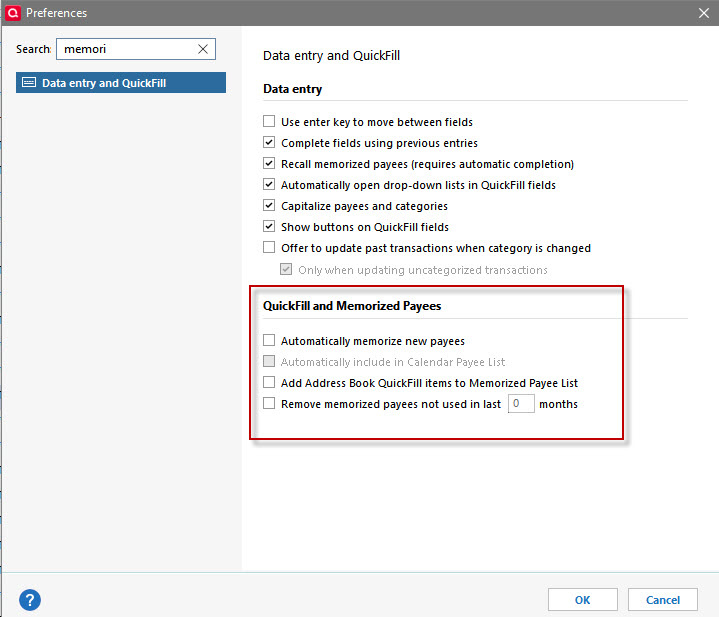
This feature makes no sense. It's not like you need this option on every transaction - probably a low percentage of them, actually. I've always used the Ctrl+m (windows) shortcut if/when I need to memorize a payee, which isn't often. Please either remove this feature entirely or at least provide the option to disable it here, in the Quick Fill and Memorized Payees preferences section.
 3
3 -
How do I vote? LOL STill a problem in Oct. I think one of the updates UNDID the removal. Maybe that is why it is still there despite unchecking the box.
0 -
To vote, check on the little up arrow below the vote count in the first post of the discussion and the vote count should increase. If the count goes down, it means you have already voted. Click once more to restore your vote. If you have already voted, the arrow will be a light gray.
QWin Premier subscription0 -
RE: How do I vote?
Go to the very top (the initial post) and click on the arrow in the box, such that you see the number increment by 1.

- Q Win Deluxe user since 2010, US Subscription
- I don't use Cloud Sync, Mobile & Web, Bill Pay1 -
While this feature may help novices in their learning curve for Quicken, for me it is a major rut in workflow. (But I have used Quicken since the 1980s DOS versions.) Please eliminate or make optional.
0 -
agreed with everybody on here - this "feature" is a huge disruption to seamless workflow, and it's unfathomable why the preferences don't allow turning this off. (WHY ADD UX FRICTION FOR EXISTING USERS?)
It's particular bad for those of us that are primarily hotkey / keyboard data entry folks. In my case, I'm not sure if it's exacerbated due to my "focus follows mouse" OS settings, but if I have my mouse accidentally pointing at the spot in the register where this checkbox pops up, it completely eliminates the ability to move to the next field using the keyboard - I have to move my hand to the mouse just to move the pointer off that part of the Quicken screen before I can continue doing data entry in the register.
I just went through every setting I could think of trying to get the old functionality back, and no luck. @chrisandmark330 is absolutely correct, above, in that a simple option to disable this should be included in that section of Preferences.
1 -
Please get rid of this annoying popup or fix the toggle in preferences to turn it off.
0 -
Please make this feature optional or remove it entirely. It is a nuisance that covers up the payee name when you are verifying or changing the category. I have been a Q user for many years and I've never even thought about whether or not a payee should be memorized when I'm entering a transaction.
0 -
This feature is super annoying, please remove it.
0 -
Please get rid of this popup - or make i an option. BTW, hitting escape is a quick way to get rid of it
0 -
Remove it, it sucks and slows down my workflow.
0 -
It is a real pain in the a_s. It blocks the view of the Payee, slowing down the entry process, and it's just plain annoying. PLEASE get rid of this! I can't for the life of me figure out why someone added this thinking it was a "good" idea. They obviously don't use this tool. Ref the attached image. Can you tell who the Payee is?!
 2
2 -
Hmmm. Doesn't impact me.
-1 -
I am not able to enter the category because this pop up blocks the view.
0 -
Thank you for sharing.
I went ahead and merged your idea with this existing one.
Thanks again!
Quicken Alyssa
Make sure to sign up for the email digest to see a round up of your top posts.
0 -
I've been a Quicken user for over 20+ years. I absolutely cannot fill or correct a field because that pop-up is blocking me!
This feature is so annoying that I've already started practice my books on a competitive software under evaluation.
You're losing so many customers over this bug. Please remove it ASAP.0 -
Please make it a priority to remove the pop-up.
I'm confident we'd support a Go Fund Me if that's what's needed.
You Don't Have to Have a Point, To Have A Point
0 -
Please either get rid of it or allow the user to disable it.
0 -
If you like this idea, just adding your comment is not enough. You need to scroll to the very top and click just once on the gray square box to ensure the vote count increments. Rumor has it that 50+ might be the number to take it into consideration.
- Q Win Deluxe user since 2010, US Subscription
- I don't use Cloud Sync, Mobile & Web, Bill Pay0 -
Do the programmers of quicken even read this? They screw with things that are working fine because THEY want it and feel everyone does, and make you pay every year for updates WE DON"T WANT! I'd go back to my quicken 2003 where I don't need or want updates if it weren't for the accountant that needed one feature in the 2019 Deluxe.
HEY INTUIT, ARE YOU LISTENING?
0