Securities Value incorrect after importing

It seems there is a bug pertaining to the Securities Value for my 401k after I import my contributions from my investment center. Before I import my transactions, I make a note of the Securities Value and Total Market Value for my 401k account. After I import, my new transactions are there (with a little blue dot in the 1st column), but the Securities Value doesn't change. If I click the Holdings button and look at the Market Value column, I see the correct total. If I exit Quicken and then open it again, then the Securities Value for my 401k shows the correct amount.
Anyone else seeing this?
Answers
-
Where is your 401k being held?
Are the securities publicly traded or are they private funds? Many 401k plans have proprietary private funds that have the exact same name as the publicly traded funds they are modeled after. However, they do not share the same TICKER and the share prices are usually much different from what the publicly traded share prices are.
If the securities in question are private 401k plan funds, if your 401k plan management company is not downloading that data, you will likely need to manually enter the correct share prices.
Quicken Classic Premier (US) Subscription: R66.23 on Windows 11 Home
0 -
See if this answers your question:
https://community.quicken.com/discussion/7950902/have-two-investments-accounts-that-always-show-the-blue-dot-on-the-account-list
0 -
@Tom Young, thank you for that link, though it has nothing to do with my issue, I always wondered why my 401k account was my only investment account that showed the blue dote. I successfully reset it back to default settings.
0 -
Let me make my issue more clear.
When I import my transactions into my 401k investment account, I have to restart Quicken to get it to add the new values of the imported transactions to the 401k balance.

This section here is the issue. The Securities Value does not add up properly when I import new transactions. But the Market Value on the Holdings page does add it.
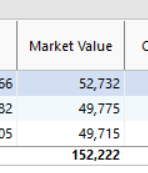
I know my screenshots are the same value, that is because I restarted Quicken to force the recalc of the security values. The bug is that when the transactions are imported and added to the register, the totals should auto-calc, but they currently do not.
0 -
I've seen that happen occasionally (not often). But I found that going to a different account and then going back to the account at issue will cause Quicken to perform the calculation without having to close Quicken. Have you tried doing that?
Quicken Classic Premier (US) Subscription: R66.23 on Windows 11 Home
0 -
I have tried that, to no avail, unfortunately. I will assume this to be a bug, and I hope the support team will read this.
0 -
@SilverEagle This is primarily a user to user forum. Forum Moderators (users whose names begin with "Quicken") sometimes review issues discussed here and refer them to Development, but if you want Quicken to work on a problem, you should contact Support via phone. Be sure the support agent understands the problem and gives you a ticket number for future reference. Please post the ticket number here. Development only works on problems that have been referred by a Moderator or confirmed by a Support contact.
You should also use the Help > Report a Problem menu in Quicken to submit the issue online. In your submission, be as clear and thorough as possible. Reference the ticket number and provide a link to this discussion. Provide step by step instructions to reproduce the problem and note any error messages you receive. They will not pay much attention to a problem unless they can replicate it in house or see it in a support session.
You will not get a response to an electronic submission, but apparently they review and prioritize the submissions and use the data to help resolve problems they decide to work on. The more reports they receive the better.
Updates on problems that Quicken has acknowledged are posted here
QWin Premier subscription3


Categories
- All Categories
- 23 Product Ideas
- 34 Announcements
- 247 Alerts, Online Banking & Known Product Issues
- 19 Product Alerts
- 265 Welcome to the Community!
- 300 Before you Buy
- 1.5K Product Ideas
- 55.8K Quicken Classic for Windows
- 16.9K Quicken Classic for Mac
- 1K Quicken Mobile
- 834 Quicken on the Web
- 128 Quicken LifeHub