zzz-Fidelity Updates
Comments
-
Does this match or not match what is shown in your online Fidelity accounts?
Quicken Classic Premier (US) Subscription: R66.28 on Windows 11 Home
0 -
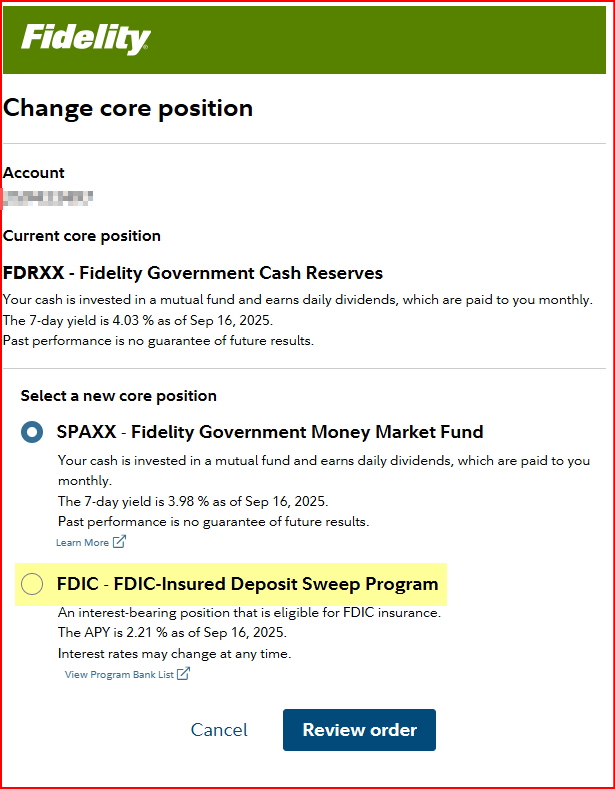
This is what I get when I try to change the Core position for one of my IRAs…I do get the FDIC Sweep option:
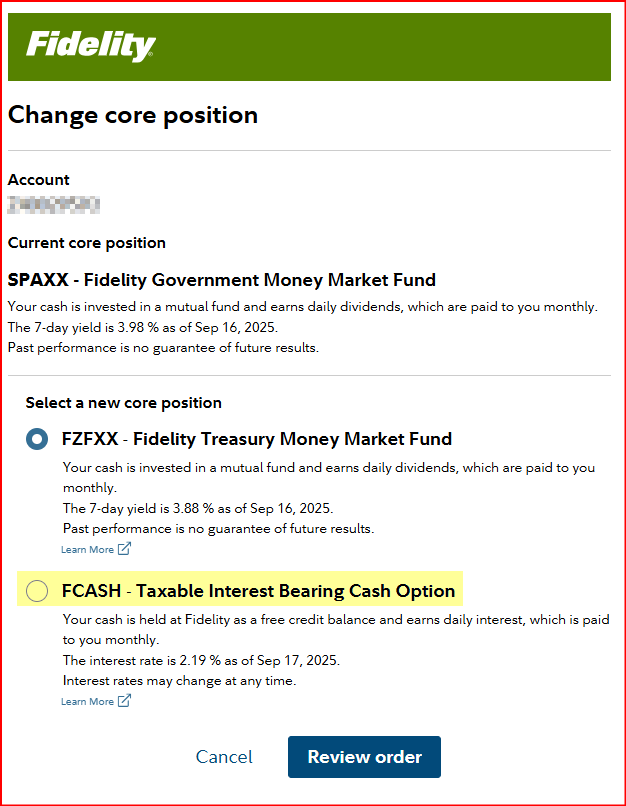
For my taxable brokerage account I do not get the FDIC option but I do get the FCASH option:
I did not bother checking other accounts because most of them are being professionally managed by a 3rd party (the accounts are still held at Fidelity) and they determine and control how cash is to be held in them….but they do follow the standard Fidelity cash holding options with the exception of FCASH (they do not use that one).
Quicken Classic Premier (US) Subscription: R66.28 on Windows 11 Home
0 -
Changing the "Core Position" within your Fidelity account does not change whether it is Cash or not. It still is Cash, and is not a distinct, purchased position that can be bought or sold. It is merely the place where uninvested cash is held, and the Core Position refers to the fund that is used to determine dividends. In that respect, the Cash or Core Position is more akin to a "deemed investment" meaning you're not really owning the Core Position itself, but your Cash holding is being credited with dividends as if you did own it.
0 -
@pablomiller I think we are aware of this, what we're trying to determine is how the core position chosen affects whether the cash balance is represented correctly in Quicken at the moment. Hopefully, before too long, all the cash positions will reflect correctly in Quicken.
Barry Graham
Quicken H&B Subscription0 -
It means that they prevent the downloading of Core Account shares into Quicken and instead download only the Cash value of those shares.
It used to be that this FAQ said they do that for all Core Account positions (both MMFs and FDIC Sweeps) but now it says they do that only for the FDIC Sweeps. I'm guessing that this change was done in anticipation of EWC+ and that it was never retroactively applied to DC since all of my DC accounts still download all Core Account MMFs only as cash value.
Quicken Classic Premier (US) Subscription: R66.28 on Windows 11 Home
0 -
I think if you go to the Positions tab of your Fidelity online account you will see that the Core Position is listed as a held security and you can place buy and sell orders for it there. So, yes, they actually held positions that can be bought and sold.
However, doing that creates issues for the downloading of the Core Position. When the account owner places buy and sell orders for the Core Position Fidelity will then download those as buy/sell orders to Quicken creating a security and Cash Balance issue in the account register in Quicken.
For the Core Position it is best to let Fidelity place the buy/sell orders behind the scenes so those transactions do not get downloaded into Quicken.
Quicken Classic Premier (US) Subscription: R66.28 on Windows 11 Home
0 -
I see references to a forced 9/25 cut-over, but I do not see that in the official alert here: https://community.quicken.com/discussion/comment/20507894#Comment_20507894
Where is the 9/25 mandate documented?0 -
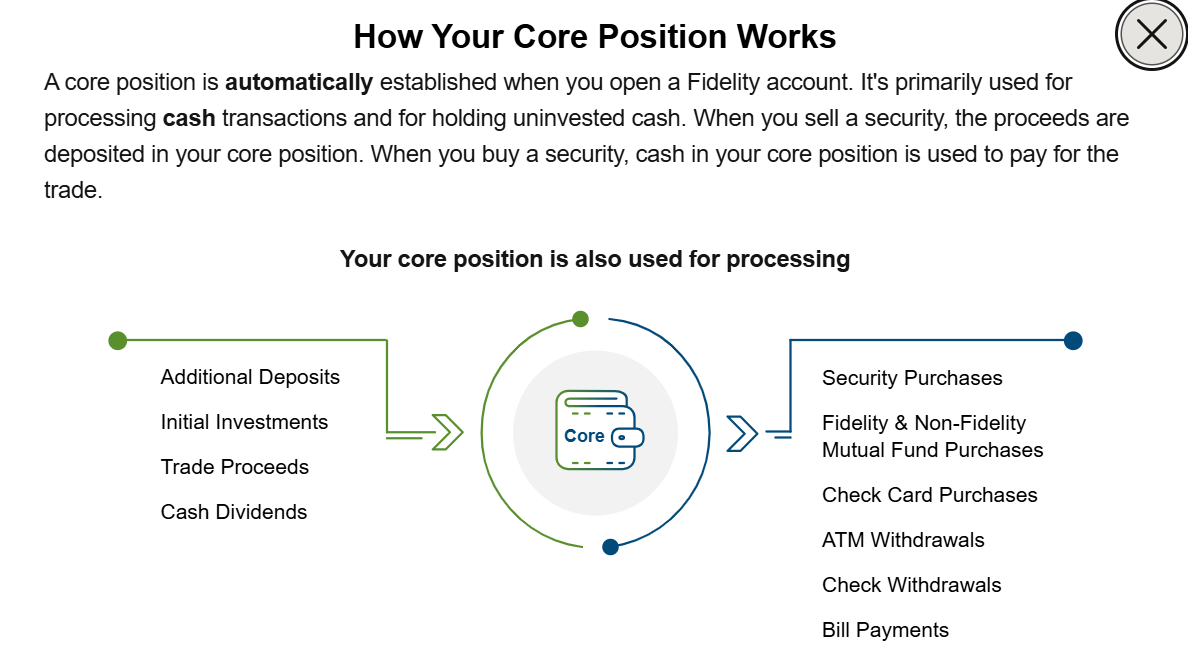
When I go to Positions, regardless of the account, Cash simply shows as "Held in Money Market". When I click on Cash, the only thing I can see or do is "Change Core Position", i.e. select from 1 or 2 additional Core Position options. I have no ability to "trade" the Cash. It is untradeable. There is no purchase history as there would be with any actual traded investment. If I attempt to purchase the symbol for the Core Position in a given account, I am precluded from purchasing it or selling it, with the following message: "FDRXX is where we hold your uninvested funds. We'll automatically debit or credit FDRXX when you buy or sell a security, but it can't be traded directly." This inability to purchase or sell the Core Position shows up in both Taxable Brokerage accounts and Tax-Deferred Brokerage accounts. The Core Position is un-tradeable Cash.
 1
1 -
I am, unfortunately, having the same issue with the MMF to Cash representation as other here. I attempted to switch to EWC+ and was prompted to treat one of the MMFs (FDRXX, I believe, which is used by my IRA account as the cash position), but this has now screwed up several accounts that use other MMFs as the "core" account.
I checked for both the "Cash Representation" button on the "Update Cash Balance" screen as well as the "Reset Money Market securities/cash" button on the Online Settings screen, but neither of these buttons exists for me on any of my Fidelity accounts.
I did call Quicken Support this morning and spent 2 hours on the phone with them, during which we tried to restore various backups (back to a copy using DC), reset the Fidelity accounts' online settings and then connect up with the new EWC+ settings. But, the prompt to treat the MMF as cash never re-appeared. Ultimately, I've restored to yesterday's version and have decided to keep using DC until it won't permit me.
If I had to guess, my belief is that the mapping of MMF to Core/Cash position is stored and applied on Intuit's integration servers (which are used by Quicken for EWC+). In other words, the translation of the MMF position into a cash balance is done before the data ever reaches Quicken — Quicken never sees the designated MMF position, it simply sees Cash.
As a result, fixing this likely requires Intuit to provide an means (i.e. an API) that can be called by Quicken to reset the MMF→Cash mapping (which is likely what the "Reset Money Market securities/cash" button is calling, if it's present).
0 -
Well, I'll be. For years that was not the case and it was the primary cause for Fidelity downloading buy/sell transactions of the Core MMF into Quicken causing balance discrepancies in Holdings and in Cash. I wonder when they made that change? I haven't looked into it for a while because I learned the hard way to not enter buy/sell orders for the Core MMF in my online accounts…just let Quicken manage it behind the scenes. Regardless, this is a good change because it eliminates one significant user generated error in the downloads to Quicken. Thanks for posting this here!
But while Fidelity appears to have put in place a good and needed restriction regarding our ability to trade the Core Account MMF it still is a MMF security and there are shares held but we just can't see them there. This becomes apparent in EWC+ downloaded accounts where Fidelity downloads the Core Account MMF as shares and sometimes as both shares and cash. And the fact that they are wanting us to decide how we want to see the Core Account represented….as Cash or as Shares.
Quicken Classic Premier (US) Subscription: R66.28 on Windows 11 Home
0 -
You're welcome. I'm not sure when the change at Fidelity came, but it was just one of many things that prompted be to consolidate my investments at Fidelity a couple years ago. I still use several key Vanguard ETF's in a significant way, but the overall investment management platform at Fidelity is 20x better and still getting better. I'm very gratified that I can own products from nearly anyone within one platform at Fidelity. Now, if we can just get Quicken to finish the job !
0 -
-
@Boatnmaniac You wrote:
"But if you have more than 1 MMF in the account you will see that Fidelity will show the cumulative value of all the MMFs in that account as Cash on that Balances tab. And Fidelity will automatically do Sell orders, first from the Core Account MMF until it is depleted followed by Sells of other non-Core Account MMFs, when there is a cash need to buy another security, for distributions and for other account expenses"
From what I recall, there's always been a mismatch. I have SPAXX/FZDXX in my self-managed, non-IRA Fidelity brokerage account, and what you describe is exactly how it works for me. On the Fidelity site, SPAXX+FZDXX=cash balance. Quicken (DC) currently, and has always displayed only the SPAXX holding as cash.
0 -
I have SPAXX/FZDXX in my self-managed, non-IRA Fidelity brokerage account, and what you describe is exactly how it works for me. On the Fidelity site, SPAXX+FZDXX=cash balance. Quicken (DC) currently, and has always displayed only the SPAXX holding as cash.
If SPAXX is your designated Core Account, then that is exactly how it is supposed to work. And that's exactly how it always works for me with the DC connection I have set up.
Quicken Classic Premier (US) Subscription: R66.28 on Windows 11 Home
1 -
I understand. In the example I posted about the problem, there is only the core MMF in that account.
Deluxe R66.23, Windows 11 Pro
0 -
I do have the "Remind me next time" button, but that doesn't change the fact that migration is presented as the default behavior of the system. Like any normal user, I followed the prompt, trusting Quicken to guide me through a stable process. I had no idea the migration was deeply flawed, and I think it's entirely reasonable to say that most users will do exactly what I did: click through, expecting reliability.
The claim that migration is “on hold until the 25th” doesn’t reflect the actual user experience. The prompt is still active, and users are still being directed into a broken workflow. If the system isn’t ready, the responsible move is to disable the migration wholesale.
IMHO!
1 -
I think you will find many users in this Community who do not simply do as prompted because they've learned that is not always the best thing to do. Likewise, Quicken will always push for people to update their installed software to the latest version but there are many users, like me, who will not do that until they are reasonably convinced that the new release is stable.
Since you were given the option to opt out of the migration it is not accurate to say you were forced to migrate. When there is an option presented it should always be viewed as optional, not mandatory.
BTW, the migration itself is not on hold until the 25th. But the forced migration is on hold until the 25th. (And I certainly hope that will be pushed out unless and until all of the issues are resolved.)
That being said, if you have a backup file dated from before when you migrated to the EWC+ connection you can restore that backup file and the DC connections (for Fidelity and other financial institutions) will still be intact. EWC and EWC+ connections might need to be set up, again.
Quicken Classic Premier (US) Subscription: R66.28 on Windows 11 Home
1 -
For me, since I have both the core MMF and another MMF, it's true for Balances tab their values are added together and included in the total "Cash and credits" in the Holding subsection. Of course they are also being included - to whatever extent is appropriate given the state of one's trading, unsettled trades, probably other factors - in "the Available to trade (all settled)" and the "Available to withdraw" rows.
But in the Positions tab, they are displayed very differently:
For the core MMF, the "symbol" is the word "CASH", and the "security name" under it is "Held in Money Market." If you click that row, it shows the actual security name and symbol (e.g. "Fidelity Government Cash Reserves (FDRXX)").
For other MMFs, the symbol is the actual MMF symbol, e.g. FZDXX, and the security name under it is the actual fund name, e.g. "Fidelity Mmkt Premium Class".
For me, using DC, I don't remember ever making a choice, and most of the time, my core position is treated as cash, which is exactly how I want it. Once in a while, some part of the core position gets turned into the MMF again, and I have to update both the share and the cash balances to get it all back into cash. I never figured out what triggers the switcheroo, but my overall account balances are always right, and I often don't even notice the problem for a while. It's easy enough to fix.
1 -
I only have 3 Fidelity accounts (brokerage, IRA, and HSA). Foolishly, I converted yesterday to EWC+. The good news is that all my accounts have converted to EWC+. The bad news is that every time I do a "one Step Update", Quicken indicates that I have to convert my Fidelity accounts even though it has already been done. And like the issues identified here, it is impossible to correct the balance of all my MM funds so I'm thinking the representation of "cash" may be wrong for good. I tried to change my election in Quicken to track each money market fund (instead of the "cash" view) and that has not worked. So I guess I am in waiting mode to see if Quicken can pull victory from the jaws of defeat. I'm not optimistic….
For any of you who have been around awhile, this feels like a carbon copy of the Charles Schwab conversion debacle (which I had 3 accounts). At the end of the day, Quicken wound up apologizing to its Schwab users for the debacle. I'm starting to wonder if someone at Quicken has begun drafting a new apology letter?????
PGAVON
Quicken Premier - Windows Subscription
1 -
After a total fail updating my iPhone to 28 yesterday, I decided I haven't suffered enough and flipped Fidelity over to EWC+. In the end I succeeded but not without incident. OSU wanted to create new accounts, I had to manually link them back to the existing ones. Once linked, I had to manually match a few securities even though they had their respective tickers (it did list every security I ever had since starting the account, not just the active ones). Then I had to delete a few duplicates. Fortunately, they only went back to early August.
Both 401k's retained their "Complete Positions" so I see each security listed. The action types have remained the same. I noticed when I reauthorized, I was taken to a different Fidelity page (different from Netbenefits). So it appears Fidelity is consolidating some of it's consumer portals. Anyway, I logged into the "new to me" Fidelity Investments site, selected my 401K accounts and compared my holdings. They match so far. I'll see a dividend distribution at the end of this month. Then I'll know for sure if it's working for me.
My use case is pretty straightforward. I have 2 401K from past employers, so I no longer contribute. The only "buys" are from dividend distributions. So there is no cash balance once the trade completes. I can only imagine the frustration some of you are enduring. Hang in there.
Now back to my iPhone. :(
1 -
Regarding wanting to create new accounts, that is how it works when you reauthorize. You have to make sure you tell it to link to an existing account if that is not the default (when it can't automatically tell which online accounts are matched with which Quicken accounts). I'm glad you were able to figure that out and match the accounts correctly.
The NetBenefits site still exists. What took you to the Fidelity site? It is true that you've always (or at least for a long time) been able to use the standard Fidelity site to access your 401k.
Barry Graham
Quicken H&B Subscription0 -
When you converted, did you create new Quicken accounts or link to existing ones? If you created new ones, you will need to redo it and link to existing accounts in Quicken as in the post after yours.
Barry Graham
Quicken H&B Subscription0 -
- I linked to the existing accounts. I had a number of old accounts that are no longer used so I did not include those accounts in the authorization and only linked the current accounts I use.
PGAVON
Quicken Premier - Windows Subscription
0 -
@pgavon Did you ever deactivate the Quicken online setup for those old accounts? If not, go ahead and do that.
Barry Graham
Quicken H&B Subscription0 -
- I went back and checked and found 2 old accounts that were still active in Quicken (using the Direct Connect method) and I deactivated them. I'm going to run One step update and see if deactivating those accounts makes any difference. Thanks!
PGAVON
Quicken Premier - Windows Subscription
0 -
- Deactivating the old accounts stopped the process of prompting to reauthorize, so that was a success. Thanks! The issue of the fund assigned as "cash" (which in my case is FDLXX) in my brokerage account is still an issue.
PGAVON
Quicken Premier - Windows Subscription
1 -
Regarding the new vs linked accounts, I'm aware of it. Typically, it either finds the linked account or shows "don't add". When I reauthorized, I noted the URL was different. So rather than netbenefits.com (nb.fidelity.com), I went to Fidelity.com. When I logged in, it recognized that I have a workplace investing account and permits me to go direct to NB. I've just always used NB since I only have 401Ks with them, no other accounts. For now, I can still login to either site, but Q shows Fidelity Investments now for the EWC+connection.
0 -
fidelity transactions haven’t downloaded since ewc. 5 days now. Any resolution update?
0 -
Yes, the two account screens with no account name is a bug which I reported previously. And single mutual fund accounts seem to be relics nowadays.
0 -
Cash account balance and account cash balance may be two different things.
1




