zzz-Fidelity Updates
Comments
-
So, with Anja's update does that mean that we are free to change over our Fidelity connection type with no fear of any issues?
Are there any remaining issues?
Quicken user since 1991
VP, Ops & Tech in the biometric space
0 -
I just got this dialog on ALL of my Fidelity accounts that were using SPAXX and was not treating it as Cash after the EWC+ conversion:
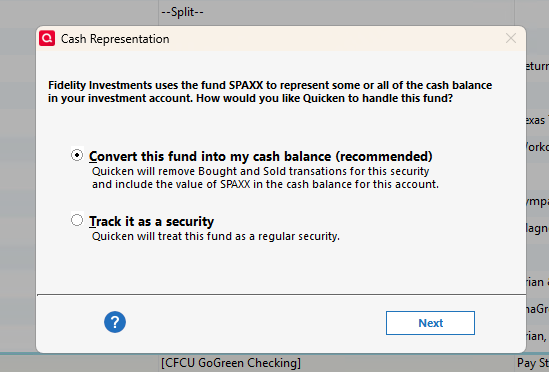
After selecting Next and then Yes on the next question, I now have both the Cash Representation and Reset Money Market cash option options included in those accounts. So, All my Fidelity accounts are now treating my CASH correctly!
1 -
Wow! Excellent news! I just saw this with mine too. I didn't get any alert during the OSU, but when I went to the account, it prompted me as above without my having to do anything, and now cash is being treated correctly for me too! I moved some of my sweep funds to FDRXX yesterday. Hopefully that won't reintroduce the issue for me, in other words I hope they fixed it for FDRXX too.
Barry Graham
Quicken H&B Subscription0 -
That was addressing one specific issue - missing transactions. That having been said, it seems that many people (including me with my test file) are reporting success with EWC+. If you are still using DC, you can wait until you are forced to migrate. That's what I plan to do.
Barry Graham
Quicken H&B Subscription1 -
And now it works with EWC+ too.
Barry Graham
Quicken H&B Subscription0 -
That was specifically about the missing transactions issue. The issue many of us are discussing is how our core position is being reflected. That post says nothing about that issue although users are now reporting that the core position issue is also resolved. Personally I won’t be switching my connection method until absolutely forced to.
Quicken Classic Premier (US): R67.7 on Windows 11 Pro
0 -
It's fixed for SPAXX and sweep holdings. Perhaps people in this thread with cash funds other than SPAXX can let us know if those funds are being reported a cash too, including the ticker symbol(s) that work.
Barry Graham
Quicken H&B Subscription0 -
Sort of fixed. I had to do some manual clean up for a linked cash account with SPAXX as the core MMF. None of the buy and sell transactions were removed. Then when I removed those, the securites value matched but the cash balance was way off. I ended up just putting an cash balance adjustment transaction in the linked account.
Deluxe R66.23, Windows 11 Pro
0 -
Let me re-frame away from indexing on "forced." Quicken should not have this update—which is automatically suggested to most users—out in the wild in its current, very buggy state. Most users will naturally assume they should just proceed. Certainly, the most experienced and careful users will proceed cautiously, and hopefully everyone has automatic backup on after closing a session so that recovery, while painful, is to a reasonable checkpoint. Those necessary priors of years of experience and/or diligence suggest that leaving this on is a bad idea until remediated.
0 -
The reason it's happening is that Quicken feels the issues have been resolved, and that seems to be true except for some cash balances which is almost fixed.
Barry Graham
Quicken H&B Subscription0 -
Only partially fixed. Out of 9 accounts only 3 of them are now correct with regard to cash balances and holdings.
I am not going to go into the numerous issues found with the other 6 accounts because it would be a very lengthy list with brokered CDs having incomplete names, Core Account suggestions being for a MMF (FZDXX) that Fidelity no longer offers as a Core Account but which I have holdings of and which I cannot reset, Cash Balances which are not accurate, Placeholders and Shares discrepancies (mostly regarding the MMFs, Core Accounts and CDs).
The only encouraging thing was that 3 accounts do now look good in all respects. But these are pretty simple accounts with relatively few securities in them. The others have a lot more complexity.
I've spent nearly 6 hrs on this today and am giving up on it for the day. Tomorrow, time permitting, I will trash everything and start from scratch in a new test file to see if I can get better results. But it's quite possible I'll be traveling for the next 3 days so I might not be able to get back to this for 4-5 days. Ugh!
Quicken Classic Premier (US) Subscription: R66.28 on Windows 11 Home
1 -
Also I deleted my password vault in my test file since all of the accounts use EWC+ and the passwords are not stored in the vault. If this causes issues I will let you know.
Barry Graham
Quicken H&B Subscription0 -
Barry,
Is choosing the treat as cash the recommended option to keep things tracking correctly? I don't need to track it as a ticker. Just want cash tk be right.
Thanks
0 -
It updated late today. FDRXX is correctly represented as cash. It asked me whether FDRXX matched any of my existing stocks (which it didn't) so I created a new one. It then told me this
 Barry Graham
Quicken H&B Subscription0 -
Based on what you said, yes treating as cash is the recommended way.
Barry Graham
Quicken H&B Subscription0 -
Today I bit the bullet and accepted the prompt to reauthorize my Fidelity accounts. Here are some tips for a successful transition. Some of these have been covered earlier or may seem obvious, but I wanted to share my experience.
- You are not required (yet) to go through this transition. If you are not ready, click on Remind me later at the bottom of the box.
- Before starting,
- back up your Quicken file in case something goes wrong and you want to start over or wait until later.
- Go to Edit > Preferences > Downloaded transactions and un-check the "Automatically add to investment transaction lists" box if it is checked. This will give you the opportunity to review any transactions that are downloaded as part of the transition before accepting them.
- Have a list of your Fidelity account names, numbers, and account types and the corresponding Quicken accounts handy. You will need this to re-link the accounts to the correct accounts in Quicken
- [adding] In the list of accounts, also include the name and ticker symbol of the money market fund Fidelity has been using for the "Core" sweep account, if any. You may also need this later.
- After selecting the accounts to authorize and authorizing Fidelity to share your data with Intuit and Quicken, you are presented with a list of the Fidelity accounts and the option to add them to Quicken or link them to existing accounts. The default is Add, but assuming you have been tracking these accounts in Quicken, you must choose the Link option.
- It is very important to link the Fidelity accounts to the correct accounts in Quicken. The list of accounts does not show the account numbers directly, but you can see the last 4 digits by hovering over the account name. Be sure to choose the correct account from the list that is displayed when you select Link.
My Fidelity accounts have very little activity. After re-linking, I received 2 new transactions in one of the accounts, from 8/28 and 9/4. These were both duplicates of transactions I had already accepted, so I deleted them before accepting them.
One of the accounts has Fidelity Government Cash Reserves an the "Core" sweep account and it has always been treated as Cash in Quicken. The ticker symbol for this is FDRXX. After re-linking I got a dialog asking if I want to treat FDRXX as Cash and I accepted the default of Yes. That left things as they were.
[Adding] Another account has been showing its cash without any associated security, with the monthly interest showing as a Deposit with the Category of Interest Inc. For this account, I got a dialog proposing to add a new security with a long name starting with FDIC INSURED. I accepted the new security but shortened the name to "Fidelity FDIC INSURED." This security was added to my Security List with a price of $1.00 and zero shares held. The cash in the account stayed the same; we'll see what happens when the interest posts at the end of the month.
Good luck!
QWin Premier subscription4 -
Thanks for that Jim. Do post if you find not all things are working as they did under DC.
0 -
I also finally bit the bullet again yesterday, after a failed transition and retreat to a backup in August. Overall, it has been successful with a few minor issues that I won't lose sleep over.
1) Redundant transactions downloaded - I have a fair amount of investment activity across numerous accounts, and it still downloaded many older transactions that were already in place and marked cleared. In total, I had more than ~125 transactions to delete, and it takes 3 distinct actions to delete each one … Edit - Delete - Yes, I want to delete. Too bad there isn't a Range-select and Delete action for Downloaded transactions, like there appears to be for Transactions already in the Register;
2) Some Securities Comparison Mismatch Errors - Despite selecting the button for each account to "Convert this fund into my cash balance (recommended)", I am still getting "Securites Comparison Mismatch" error messages related to these. Nevertheless, the Holdings show everything to be fully in sync with Positions in the Fidelity website, so I don't know why this continues to happen. I will continue to ignore these unwarranted messages and see if they eventually go away.
Conclusion - The remaining issues are minor in comparison to those that existed in August. I currently see no reason not to move forward … but for certain, make sure you have a good backup to revert to, just in case. I've tweaked my backup regimen to now backup locally every time, and then do a manual Cloud (OneDrive) backup on a weekly basis.
0 -
I am confused I have gone through the transition twice (July and August) yet the last two days none of my Fidelity accounts are updating. It is not asking me to re-authorize. What should I do?
0 -
It sounds like you're already on EWC+ (unless you reverted to a backup before the transition). You can confirm which connection you're on for each account by looking at what is says at the top of the Register for each account in question. Here's an example:

If all your account say Express Web Connect+, then you're on. As to why you're not getting updates, do you know for certain that there is activity to download ?
0 -
Yes I did some trades yesterday and they did not come through yet
0 -
@jcoley2 How do you know the accounts are not updating? Are transactions missing? Share prices not updating? Did you get an error message?
What type of accounts are these? Brokerage? IRA? 401(k)?
QWin Premier subscription0 -
Just another report. I also bit the bullet this morning. I'll reiterate what others have already recommended, make a copy of your Quicken file before you start. Also, make sure to update Quicken to the latest version (R64.29) before you start.
- I found out that you have to convert all your accounts at one time or else Quicken/Fidelity gets confused
- Make sure you manually link all of your accounts to their respective existing account and also make sure to select the right account type. You have to do the link first and then select the account type or it doesn't work correctly.
- Note that one of my IRA accounts that was linked correctly did not have the right account type (it was marked as Brokerage rather than IRA) but that was easily fixed later.
- I had lots of duplicate transaction entries (appears to be anything in the last 30 days) but they are easily deleted.
- The cash balance issue seems to be fixed as for all my accounts that had cash balances in a core position asked how I wanted it represented (nice job Quicken). Note that some of my IRA accounts currently have no cash balance so hopefully if they do I will get asked how I want it handled in Quicken.
After the conversion and the few fix up items mentioned everything seems to be working correctly including OSU.
Quicken Classic Premier (US): R67.7 on Windows 11 Pro
0 -
Go to Edit > Preferences > Downloaded transactions and un-check the "Automatically add to investment transaction lists" box if it is checked. This will give you the opportunity to review any transactions that are downloaded as part of the transition before accepting them.
Not seeing any setting like this in the Mac version. Is there one?
0 -
I updated to 64.29 this morning (After back-ups) and specifically checked all of my cash positions in Fidelity accounts. All still show complete tracking and the core funds as cash (As they were prior to the update) Any other money market funds in the accounts are reporting properly under their ticker.
I am still on the zzz-Fidelity Investments DC connection (As I have been since this fiasco began) I want to give a big THANKS to those of you who have gone forward with the DC —> EWC+ transition and provided feedback and guidance!
[Windows 11; Quicken Deluxe 64.29]
0 -
I too have often been disappointed that there was not some way to delete multiple transactions before accepting them without all the effort (3 actions each) when there are a LOT of duplicate downloads. What I have been doing recently is the following:
- First, RECONCILE the account so that all recorded transactions are shown with the "R" label on the CLR column.
- Next, ACCEPT ALL the downloaded transactions (I understand this will put the duplicates in your register, but we will get rid of them soon)
- Then under the Gear Icon on the top right, select EDIT MULTIPLE TRANACTIONS
- This will bring up a list of all your transactions in your register and you can SORT this list by CLR
- All the newly accepted transactions will have a CLR value of "c" so they can easily be identified
- This list supports the CTRL-click or SHIFT-click method of selecting multiple entries
- Select all the duplicates and then select DELETE (bottom right) and all the selected entries will be removedOf course, make a backup before you try this in case you make some mistake and also be careful that you only select the duplicates. This allowed me to get rid of all my duplicates in a few keystrokes when I converted to EWC+ a few weeks back.
Good Luck!
2 -
I agree that being able to delete multiple transactions would be good, as you can now do in a banking account.
Barry Graham
Quicken H&B Subscription0 -
I help my adult son with his investments and I have a separate Quicken file for him which is a lot simpler than mine. I just finally bit the bullet and let quicken update to EWC+ for his 3 Fidelity accounts (standard brokerage, Roth IRA, and Cash Management). The experience was the same as the recent reports. The one additional recommendation I would make is to to a one-step update immediately before you do the update to EWC+ and process all your new transactions. I did not do this and I needed to spend time deciding which downloaded transactions were duplicate and which were new. It would have been simpler if I was confident that all the newly downloaded transactions were duplicate. It's manageable either way but anything I can do to simplify before I update the connection on my quicken file (with lots of Fidelity accounts) is a benefit.
2 -
I have successfully converted to Express Web Connect + at Fidelity, except that my CMA checking balance is duplicated in the Fidelity Cash Management account in the investing group that it is linked to, so the total value of all accounts is higher by that amount. Previously the investment account existed but no transactions were visible, but now I see FDIC insured deposit values at various banking institutions. Is there a fix?
UPDATE: I see that the FDIC INSURED DEPOSIT transactions are actually Placeholder Entries, so I guess I can just delete them all? Yes???
0 -
My 17-year old uses Quicken too, but he's away at school most of the time. He is, basically, self-sufficient which is impressive since I don't remember helping him much (although he probably saw me using Quicken a lot and learned over my shoulder). He has a Fidelity Youth Account. I also track that in my Quicken, so I tested the migration and it works fine. That was how I found the SPAXX cash balance issue but that was fixed the other day. I told him that when he comes back for vacation in a couple of weeks, he'll need to do the migration and he may need my help. The trickiest thing is making sure you don't create a new account rather than linking, and making sure you don't accidentally link the accounts incorrectly.
Barry Graham
Quicken H&B Subscription0