Re-Authorize your bank, creates many duplicate transactions QWin & QMac

I am on Quicken R64.25 and yesterday I got a message when I was doing the One Step Update, that my bank (Fidelity) needs to reauthorize my downloads. Ok, no problem there. However, once you did that, and the bank authorized, I was hit with MANY MANY duplicate transactions which were downloaded, and for one specific account, I had to go thru and correct about 200 transactions.
I don't know what to say. Hopefully no one else experiences this. It was a very bad experience.
Comments
-
I have been using Quicken as long as there has been a Quicken, and have seen my share of screwed up updates. I am running R64.25 on Windows 11.
When I did one one-step update yesterday, I was prompted to update the way I connect to Fidelity. I did so, and it was a total disaster. I had 619 duplicate transactions in my cash management account going back to 2023. Those were relatively easy to delete, but the investment and retirement accounts all wanted to create a new security called "Cash" and convert any transactions affecting the cash balance in the accounts to buy and sell orders for "Cash." I also had duplicate transactions in some of the investment and retirement accounts. These had to be deleted one by one, unlike the Cash Management account, where I could select all 619 at once and delete them. Even after deleting the duplicates, the investment and retirement accounts had negative cash balances, which is impossible. So I nuked the whole thing and restored from the prior day's backup.
I saw on the support pages that Quicken says that the duplicate transaction issue has been fixed with the latest version, it most certainly has NOT been fixed!
3 -
Had to go through the "reauthorization" of my Fidelity Brokerage credentials today. Two problems:
- After reauthorizing, two of my 3 accounts appeared as "New" in Quicken. I manually linked them to their existing accounts.
- Almost every transaction since about June 1 re-downloaded. Do I need to delete these manually? There are hundreds.
I'm really now quite unsure if everything is okay in my Fidelity accounts. Is there any way to be certain? And if I delete all the duplicates in my register, will that affect the rest of my transactions?
This has been something of a nightmare, I'm afraid.
BTW — the process also brings up every account you've ever had with Fidelity, and I've had a few. So I also had to go through the list of "accounts" on the Fidelity side, unchecking those that I had closed years ago. Don't know why they are still out there.
So (1) how do I handle all the dupes? and (2) how can I be sure I'm not going to suddenly have a problem when I download again?
3 -
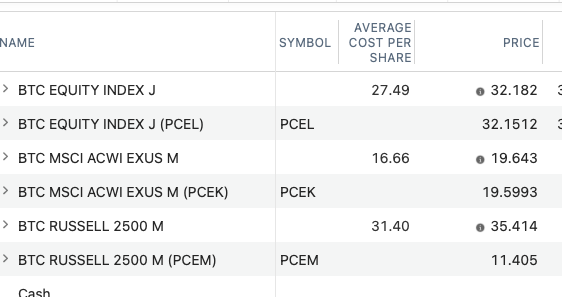
I have a 401(k) at Fidelity. I own three index funds that do not have ticker symbols. Every once in a while (including today), when I download transactions, Quicken tries to match the fund name to a stock ticker, and adds those shares, doubling my balance. For example, I own BTC Russell 2500 M - Quicken tries to match it to PCEM, and adds PCEM shares equivalent to the BTC Russell 2500 M quantity that I own. It does this will all three of the holdings.
See below. I can remove the stocks from Quicken and delete the transactions, but every time I do an update, it puts them in again. . .
 0
0 -
I have the same problem. I tried to restore an old version and download data for the last 2 days only , but they blocked this option. The only option available is to download all available data . Also it seems that they added codes besides the funds name that are duplicated .
1 -
I reported the problem to Quicken waiting for answers.
1 -
Yes, you will need to manually delete the dupes. If all of your prior transactions are marked R and the dupes are marked C, then perhaps the easiest way to do that is to pull up the Banking Transactions report:
- Customize it to include only your Fidelity account and to show only transactions that have a "Newly cleared" status.
- Left click on the 1st transaction.
- Scroll down to the last transaction.
- While holding down the Shift key left click on that last transaction.
- All of the transactions should now be shaded.
- Right click anywhere on the shaded transactions and left click on Delete transaction(s).
You might need to do this for each account individually.
But for me a bigger issue than the dupes has been the very large number of Placeholders that Quicken entered into the registers. There is no quick fix for this that I know of as each Placeholder needs to be individually resolved and trying to ascertain why the Placeholders were erroneously generated can be a daunting task.
If you have a recent backup file dated from before when your Fidelity accounts were migrated to EWC+ you might want to restore that backup file and your Fidelity DC connection will be intact. But your EWC and EWC+ connections for non-Fidelity accounts might need to be set up, again.
If you do this, you should know that when you run OSU, again, you might get that reauthorization prompt, again….but you do not need to reauthorize to EWC+ at this time. You can easily opt out of that by clicking on Remind me later or Remind me next time at the bottom of that prompt. At some point we will all be forced to migrate to EWC+ but that is not the case right now. Fidelity and Quicken are working to resolve the EWC+ issues so hopefully by opting out now those things will be resolved by the time we are forced to migrate to EWC+
Quicken Classic Premier (US) Subscription: R66.12 on Windows 11 Home
2 -
FYI:
Older version of software will not resolve the issues. The latest R64.XX versions do resolve some of them but not all of them.
This is not a not a new issue. It started on July 29 when the Fidelity migration from DC to EWC+ was started on an optional basis. Since then there have been several very lengthy discussion threads about the issues in this forum regarding Fidelity's migration from DC to EWC+. There are also several Alerts and Announcements posted about this. Here are links to some of them:
- UPDATED 8/19/25 Fidelity Cut-Over Migration - The initial Announcement/Alert. It is no longer be updated.
- UPDATED 9/15/25 Fidelity Updates - I suggest bookmarking this one so you are kept informed of developments and updates.
- What’s Going On Between Fidelity and Quicken? - If you have time, you might want to scroll through this to see what people have been posting about it.
- zzz-Fidelity Updates - This is by far the most active thread with 27 pages of posts.
- Fidelity CD Pricing Dowload Completely Wrong - I think this issue has now been resolved but if you have brokered CDs or Bonds with Fidelity you should be aware of it.
Many people are blaming Quicken but the fact of the matter is that Quicken does not decide which connection(s) will be used for downloading. That decision is entirely owned by the financial institution. And regarding all the issues, both Fidelity and Quicken have admitted shared ownership and responsibility for getting them fixed.
Quicken Classic Premier (US) Subscription: R66.12 on Windows 11 Home
2 -
Hello All,
Thank you for taking the time to visit the Community to report this issue, though we apologize that you are experiencing this.
We will be forwarding this issue to the proper channels to have this further investigated. However, we request that you please navigate to Help > Report a problem within your Quicken program and submit a problem report with log files and screenshots attached in order to contribute to the investigation.
It would also aid the investigation to include a sanitized file when submitting the problem report. A sanitized file is a data file that removes personally identifiable information so you can comfortably share this file with the Quicken team.
While you will not receive a response through this submission, these reports will help our teams in further investigating the issue. The more problem reports we receive, the better.
We apologize for any inconvenience in the meantime! Thank you.(CTP-14567)
Quicken Alyssa
Make sure to sign up for the email digest to see a round up of your top posts.
1 -
Yesterday I was prompted that there was a new connection necessary for my Fidelity account on Quicken for Mac. I went through the process to update. I was not able to complete an update on pricing last night (tried multiple times). Today I updated the account. The prices did not update with last night's close. But now I have duplicate holdings for each asset, but no transactions to cause that. Anyone else experience this?
1 -
This happened to me tonight, Fidelity over 700 existing transactions that I did not want to individually delete.
I restored my last backup from Sept 12th. I ran update again and was prompted to reauthorize with Fidelity again. I linked the accounts just like the first time. However, when the second attempt at reauthorization completed the duplicates were reduced significantly. I went from over 700 to less than 20 spread across 5 Fidelity accounts. The remaining duplicates were also all within the last week or two of transactions.
2 -
I had a similar issue and reported it to Quicken. My issue came from my NetBenefits account (401K). Fidelity actually downloaded my holdings in a new format with a symbol which was never included. The system added the shares and then deleted some of the old, but not all. The result was not an exact doubling of my account value but more than expected. Also, my history was lost for those shares deleted so the history which i use to track total performance over time is gone. No cost basis for the new securities downloaded.
I am also see issues with my Fidelity Cash Management Account. Money market funds are not showing and cash balances maintained at a bank through their FDIC bank program show up as a security, not cash. This has been going on since i first cut over back in early August (then was asked again to do it this week) No change in status and i need to manually adjust my cash balances to at least track my total account balance. I have submitted a report on this one as well. Very frustrated and evaluating Monarch Money.
1 -
Lots of helpful posts here, and also nice to know that I'm not the only one with this problem! I've decided to try restoring to an earlier date and moving forward again. I have hundreds of dupes, and junk in Placeholders, and I don't know if I can get my existing data back the way it should be.
0 -
Latest update: I restored from Sept 8, and now I get an ADDITIONAL error. This one is a CC-800 on my Citibank/Costco Visa. Really, I have no idea how to proceed right now. I do not want to go down another rabbit hole, trying to "re-establish" connectivity to my Visa, only to end up with the same problem with all of my Fidelity accounts. Ugh. Will maybe try to restore back to where it was only Fidelity that was broken, and work forward from there.
0 -
Hey, just real quick, I don't want anyone to think I'm laying this all on Quicken. I worked my whole career in software, and I totally understand how difficult it is to have to connect to a new interface when that interface does not belong to your company. I'm just venting a little. :-) I have used Quicken for a lot of years, and I've hit problems before, and I'm not ready to toss the product!
0 -
I am just like EdinSC and have been on it for decades. I got the same message reauthorized my accounts and then some didnt even show in the download. And for the duplicate transactions, unless I have missed it, you cannot highlight them all and delete you have to go one by one. I did shift select and ctrl select but nieghter of the standard windows pick multiples worked.
I also called support Friday and at that point they were still trying to resolve so I am reluctant to try this again.
Did anyone find a work around.
0 -
Hi everyone,
Thanks for sharing your experiences — we understand how frustrating it can be to deal with issues like this.
For those who recently migrated Fidelity accounts, it’s expected that some duplicates may appear. The best course of action is to remain on the new connection and manually delete/resolve any duplicates. Once cleaned up, you shouldn’t continue to see this issue going forward.
For duplicate transactions, these can be deleted (or matched if you are on Windows and have automatic entry turned off).
For duplicate securities, on Mac, the securities can be merged. In Windows, you should be prompted for a security mismatch. That prompt should allow you to specify which securities are ones you already have.
We appreciate your patience and feedback as we work to improve the experience.
Quicken Alyssa
Make sure to sign up for the email digest to see a round up of your top posts.
0 -
BoatnmaniacQuicken Windows Subscription SuperUser ✭✭✭✭✭September 18edited September 18FYI:Older version of software will not resolve the issues. The latest R64.XX versions do resolve some of them but not all of them.This is not a not a new issue. It started on July 29 when the Fidelity migration from DC to EWC+ was started on an optional basis. Since then there have been several very lengthy discussion threads about the issues in this forum regarding Fidelity's migration from DC to EWC+. There are also several Alerts and Announcements posted about this. Here are links to some of them:UPDATED 8/19/25 Fidelity Cut-Over Migration- The initial Announcement/Alert. It is no longer be updated.UPDATED 9/15/25 Fidelity Updates- I suggest bookmarking this one so you are kept informed of developments and updates.What’s Going On Between Fidelity and Quicken?- If you have time, you might want to scroll through this to see what people have been posting about it.- This is by far the most active thread with 27 pages of posts.Fidelity CD Pricing Dowload Completely Wrong- I think this issue has now been resolved but if you have brokered CDs or Bonds with Fidelity you should be aware of it.
We have enough Fidelity topics on this connection migration disaster. Can a few of these be closed and redirect users to one of those above? I receive around 30 or more notifications of new posts daily to read just to keep updated.
Why is Quicken still offering users the migration? Don't they have sufficient user data to fix the issues?
Why do we hear anything from Quicken management?
1 -
Most responsible companies, after being unable to fix an inferior software update, will automatically 'fall back' to the previous iteration. Then, they will troubleshoot, revise, or abandon the inferior buggy update.
Why is Quicken forcing their loyal subscribers to endure this fiasco for one more minute? I call upon Quicken to immediately 'fall back' to the previous version that (for the most part) worked. Suspend EWC+ until you have proven, with in-house testing, that it will work. Only then release it to the users. Stop the madness!
0 -
I see today there is a new version did this Fix the fidelity issue and if so, why are we not getting a log on message with the steps to correct, since in my calls with support the direction was to disconnect all your fidelity accounts till fixed
0 -
Hello All,
Thank you to those of you who have added to this discussion with your comments and concerns.
Anyone experiencing duplicates after the initial setup should let us know, as this will need to be reported/escalated.
There was a Hot Fix released today, you are correct. Please check out this UPDATE for details on that.
Hope this helps!
Quicken Alyssa
Make sure to sign up for the email digest to see a round up of your top posts.
0 -
I know this has been closed, but I do want to note that, having spent my entire career in software and database development, I know that it's not always possible to roll back an update. So please give Quicken a break on that. Also, although this is annoying, it's not the end of the world. I've hit problems like this before, and eventually they do get fixed. So kudos to the developers at Intuit who have probably been putting in crazy hours trying to fix this problem.
Let's just move ahead and we'll all come out okay.
2 -
Hi @OTTBMom,
Thank you for your kindness and understanding as we work through these migrations.
It is greatly appreciated!
Quicken Alyssa
Make sure to sign up for the email digest to see a round up of your top posts.
0



Categories
- All Categories
- 46 Product Ideas
- 34 Announcements
- 246 Alerts, Online Banking & Known Product Issues
- 22 Product Alerts
- 513 Welcome to the Community!
- 679 Before you Buy
- 1.4K Product Ideas
- 55.4K Quicken Classic for Windows
- 16.8K Quicken Classic for Mac
- 1K Quicken Mobile
- 829 Quicken on the Web
- 123 Quicken LifeHub