UPDATED 9/25/25 Fidelity Cut-Over Migration

UPDATE 9/25/25:
In our release today, R64.30, Quicken for Windows made changes to improve the way cash balances and money market funds are handled with the new Fidelity connection method (Express Web Connect+). We are slowly rolling this release out to customers.
For many customers, Fidelity sends Quicken both a cash balance that includes the Money Market balance and a Money Market position. If we display what is sent, the broker-reported cash balance will not match Quicken’s cash balance.
With this release, “Core” cash funds, such as SPAXX and FCFXX, which are treated as the Cash balance in Fidelity brokerage accounts, are no longer shown separately as securities with positions (x number of shares at $1.00 per share). Instead, these values show up as the broker-reported cash balance for the account. Note that Quicken’s cash balance for investment accounts in Complete Investing mode continue to be calculated from the transaction history.
You have two options:
Preferred Option:
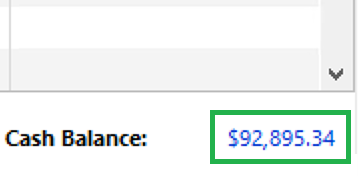
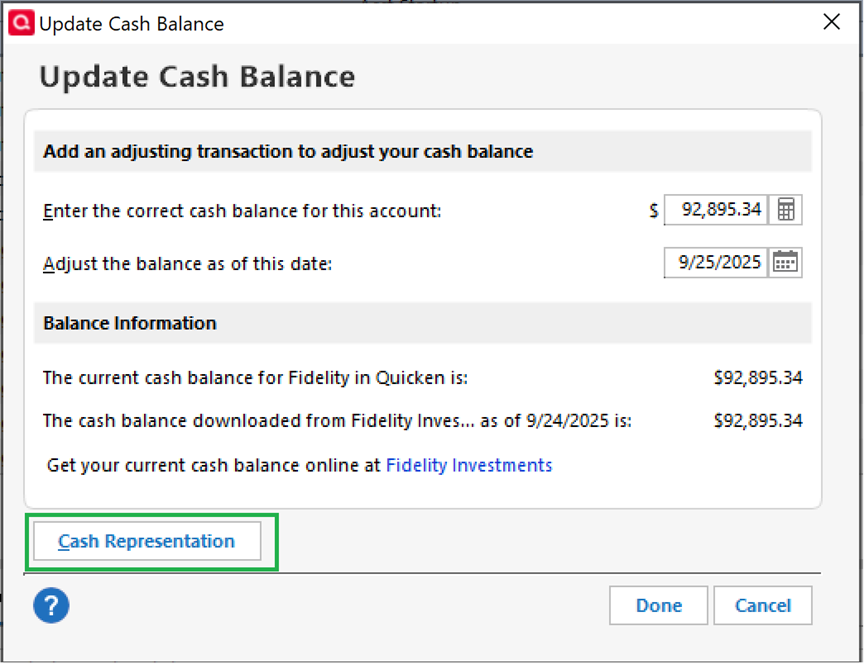
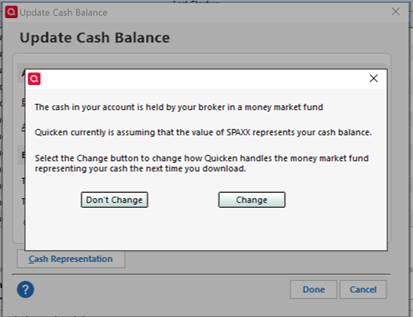
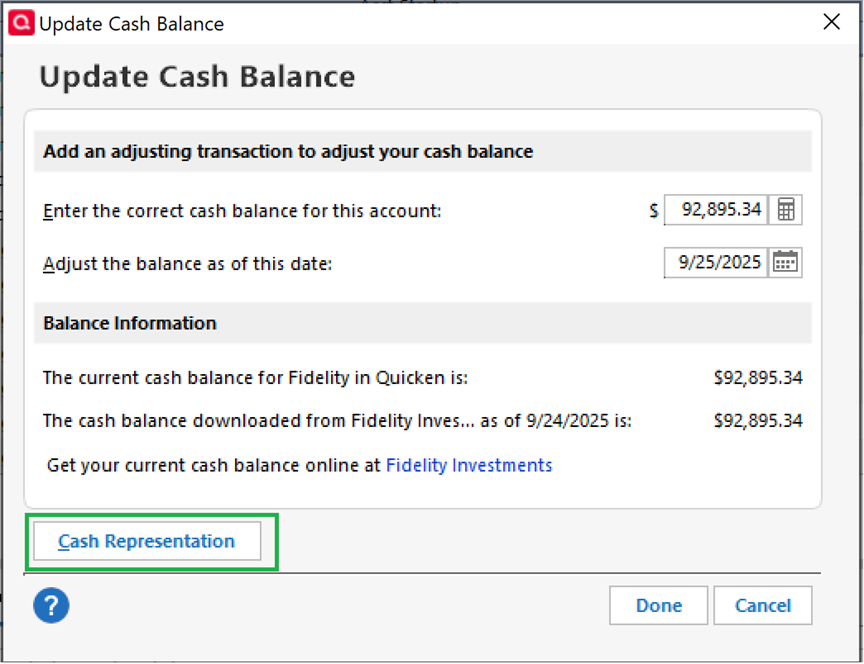
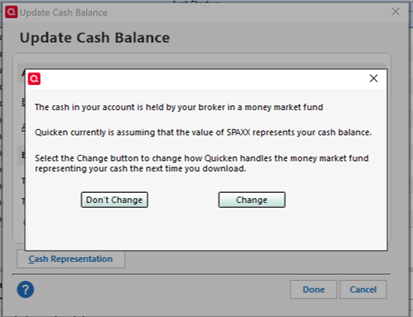
If you wish to continue viewing these balances as positions for individual investment accounts, you can override this setting by clicking on the blue cash balance at the bottom right of your investment register, and then clicking “Cash Representation” in the window that appears and following the instructions.
Second Option:
If you wish to continue viewing these balances as positions for all investment accounts, you can override this setting by selecting the “Never interpret downloaded Money Market funds as cash” under Edit > Preferences shown below. This setting affects all investment accounts, not just Fidelity accounts, and doesn’t take effect until after the next transactions are downloaded. If money market transactions have already been altered prior to the setting change, you may need to restore a backup if you wish to reinstate those transactions.
________________________________________________
Fidelity will begin an optional cut-over migration on 07/29, followed by a forced cut-over on 08/20. Customers with existing accounts will need to run through the Fix It flow or use the Add New Account flow to reconnect their accounts.
To be notified of updates as they become available, please click the bookmark ribbon located in the upper right. If you do not see the bookmark ribbon, please make sure that you are signed into the Quicken Community.
Thank you!
(Ticket #11880286)
-Quicken Jasmine
Make sure to sign up for the email digest to see a round-up of your top posts.
Comments
-
UPDATE 8/5/25
We’ve temporarily paused the Fidelity migration while we work with our service provider and Fidelity to resolve a few known issues reported by users:
- Account balances may appear incorrect due to missing or duplicate transactions.
- In rare cases, duplicate accounts may be created—this is typically caused by selecting “Add” instead of “Link” during setup.
We appreciate your patience as we work to address these issues and will update this alert once the migration can safely resume.
-Quicken Jasmine
Make sure to sign up for the email digest to see a round-up of your top posts.
4 -
UPDATE 8/6/25
The Fidelity cut-over migration has resumed. Users can now reconnect their accounts using either the Fix It flow or the Add Account flow.
Fix It Flow:
When an error is received during a One Step Update, a Fix It button will appear in the One Step Update Summary. Click the Fix It button and follow the prompts to reconnect your Fidelity account.Add Account Flow:
Alternatively, you can reconnect by deactivating and reactivating the account via Add Account. Please follow the steps exactly as outlined in this support article to ensure a successful reconnection.Thank you for your continued patience while we worked with our service provider and Fidelity to address the reported issues.
-Quicken Anja
Make sure to sign up for the email digest to see a round up of your top posts.-1 -
UPDATE 8/11/25
At this time, Fidelity has paused the migration for additional users while both their team and ours work to resolve the issues that have been identified. Throughout this process, Fidelity has been a strong partner to Quicken and continues to work diligently to address customer concerns as they arise. When the migration is resumed, we expect users to have a smooth experience, and there will be no change to the functionality of Fidelity accounts.
Thank you for your continued patience while we worked with our service provider and Fidelity to address the reported issues.
Quicken Kristina
Make sure to sign up for the email digest to see a round up of your top posts.
-1 -
UPDATE 8/19/25
The migration will not start back up tomorrow. It will remain paused while both Fidelity's team and ours work to resolve the issues that have been identified.
Thank you for your continued patience while we work with our service provider and Fidelity to address the reported issues.
Quicken Kristina
Make sure to sign up for the email digest to see a round up of your top posts.
1 -
UPDATE 9/18/25
We’re continuing to monitor the Fidelity migration process and want to keep you informed. While the migration is underway, we’re aware of an issue that some customers are experiencing:
- NetBenefits accounts may switch to the Simple Mode settings after migration (still being investigated)
Our teams are actively working to resolve this and we’ll share updates here as soon as we have more information.
Thank you for your patience as we work through these final steps of the Fidelity migration.
Quicken Janean
Make sure to sign up for the email digest to see a round up of your top posts.
3 -
UPDATE 9/18/25
We want to provide some clarification on how Fidelity accounts connect in Quicken.
- Fidelity accounts are in “Simple OR Complete” mode, meaning you can choose which tracking method you prefer.
- Fidelity NetBenefits 401(k) users are receiving transactions. However, in some cases transactions are showing an “Undefined” security name, even though the position displays the correct security.
If you encounter this, you can correct the issue by editing the transaction and assigning the correct security name. Once updated, Complete investing will work as expected.
Our teams are monitoring this behavior and will continue to look for improvements. Thank you for your patience as we work to make the connection more seamless.
Quicken Janean
Make sure to sign up for the email digest to see a round up of your top posts.
1 -
UPDATE 9/19/25
The issue with Money Market values not displaying correctly (under investigation – [CTP-14556]) has been resolved.
If you’re still encountering the issue, we recommend reaching out to Quicken Support for further assistance.
Thank you!
Quicken Janean
Make sure to sign up for the email digest to see a round up of your top posts.
1 -
UPDATE 9/22/25:
We're aware of an issue where the cash balance is improperly being shown as a money market fund instead of as cash with Fidelity accounts. We're working with Fidelity and our engineers to correct this issue for the users experiencing it.
In the meantime, you can follow this alert for further updates by clicking the bookmark icon at the top right of this thread.
[CTP-14526]
Quicken Kathryn
Community Administrator0 -
UPDATE 9/25/25:
In our release today, R64.30, Quicken for Windows made changes to improve the way cash balances and money market funds are handled with the new Fidelity connection method (Express Web Connect+). We are slowly rolling this release out to customers.
For many customers, Fidelity sends Quicken both a cash balance that includes the Money Market balance and a Money Market position. If we display what is sent, the broker-reported cash balance will not match Quicken’s cash balance.
With this release, “Core” cash funds, such as SPAXX and FCFXX, which are treated as the Cash balance in Fidelity brokerage accounts, are no longer shown separately as securities with positions (x number of shares at $1.00 per share). Instead, these values show up as the broker-reported cash balance for the account. Note that Quicken’s cash balance for investment accounts in Complete Investing mode continue to be calculated from the transaction history.
You have two options:
Preferred Option:
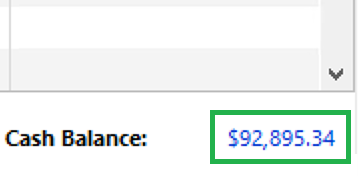
If you wish to continue viewing these balances as positions for individual investment accounts, you can override this setting by clicking on the blue cash balance at the bottom right of your investment register, and then clicking “Cash Representation” in the window that appears and following the instructions.
Second option:
If you wish to continue viewing these balances as positions for all investment accounts, you can override this setting by selecting the “Never interpret downloaded Money Market funds as cash” under Edit > Preferences shown below. This setting affects all investment accounts, not just Fidelity accounts, and doesn’t take effect until after the next transactions are downloaded. If money market transactions have already been altered prior to the setting change, you may need to restore a backup if you wish to reinstate those transactions.
Quicken Kathryn
Community Administrator-14




Categories
- All Categories
- 56 Product Ideas
- 36 Announcements
- 223 Alerts, Online Banking & Known Product Issues
- 22 Product Alerts
- 701 Welcome to the Community!
- 671 Before you Buy
- 1.2K Product Ideas
- 53.7K Quicken Classic for Windows
- 16.3K Quicken Classic for Mac
- 1K Quicken Mobile
- 813 Quicken on the Web
- 111 Quicken LifeHub