Bills, Income & Transfers Tab - Reminders

I have multiple transactions established as reminders within several accounts. This includes both payments and incomes. For the income reminders, I have split categories for each (i.e., income, fed tax, state tax, transfers to investments, plus many more).
For over the past 1 to 2 years I have encountered problems with Quicken which either automatically deletes the reminders, changes the categories I assigned, changes the memo for the category assigned, changes the amount of the income, payment or transfer, or all the above. AT RANDOM!
I have yet to find a specific cause, nor isolate the problem. I have on many, many occasions, deleted ALL my reminders and started fresh, processed the file validation tool, reinstalled Quicken, and plus any other option you can think of. No Success to Correct.
The reminders are shown on the Bills, Income & Transfer Tab. I noticed many times where a reminder is listed three or more times for the same day, listed in the register but not the tab, or is flat out incorrect.
Has anyone else experienced a similar issue? What is the solution besides finding a competitor to Quicken?
Comments
-
yes I have had the same problem.
0 -
Yes. I'm having the same types of issues.
0 -
If you haven't done so already, please do the following actions:
- Even if you are on the latest software level already, download and install the latest Manual Patch file from https://www.quicken.com/support/update-and-patch-20182019-release-quicken-windows-subscription-product to ensure your Quicken software is up to date and correctly installed.
- Reboot Windows. Let Windows fully wake up and do whatever it wants to do after booting up … 15 minutes or so.
- Start Quicken. Do not run One Step Update.
- Run BOTH Validate and Supervalidate to attempt to repair your Quicken data file.
- If nothing helps, I'd say it's time to contact Quicken Support on the phone during posted hours of operation and request help. Let them do a screen share session with you to review the situation on your computer, to determine the nature of the problem and to figure out how to fix it.
Validate and Supervalidate instructions
First save a backup file prior to performing these steps
Validate:
• Click File
• Select Validate and Repair File...
• Select Validate File
• If the data file contains investment accounts also select "Rebuild investing lots".
• If you suspect that a damaged Quotes Price History causes your problems, also select "Correct investing price history" functions "Delete" or "Repair and Rebuild".
• Click OK
• Review the Data Log. Anything interesting in there, worthwhile posting here?
• Close Quicken, leave it closed for about 30 secs
• Reopen Quicken and see if the issue persists.Super Validate:
• Click File
• Press and hold both CTRL and Shift keys while you click Validate and Repair File...
• Select Supervalidate File
• Click OK
• Review the Data Log. Anything interesting in there, worthwhile posting here?
• Close Quicken, leave it closed for about 30 secs
• Reopen Quicken and see if the issue persists.0 -
I also have issues with income reminders changing for no reason. I have deleted and reassigned and it will work fo a while and then it happens again for no reason. I use the paycheck wizard to set up my paychecks.
0 -
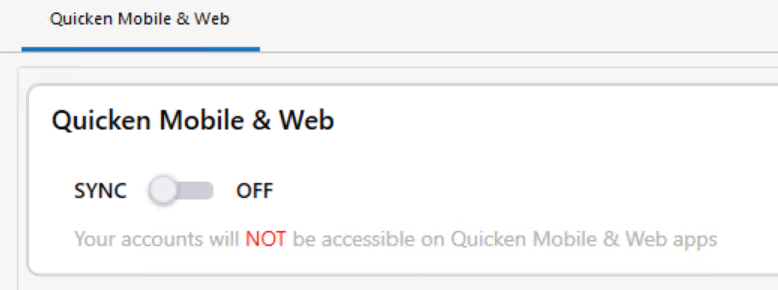
- Are you Syncing to Mobile/Web?
AND - do you actually use the Mobile app on your smartphone or the Quicken on the Web browser-based app?
The Sync process has been suspected of a number of weird happenings with Quicken. It's possible your problem is caused by Sync. Turning off Sync might prevent this issue from reoccurring.
If you answer "yes" to the 1st question and "no" to the 2nd question, turn Sync off completely. You don't need it. The Sync process should only be used in conjunction with the Quicken app for Smartphones or the Quicken on the Web browser app. It cannot be used as a replacement for backing up and restoring your Quicken data file.
If you answer "yes" to both questions, try to Reset Sync so that the current cloud sync file is replaced with a fresh complete copy
Do note that a full Sync process may take many minutes to complete.How to reset Sync to Cloud
• Log out of your mobile app, then do this on your desktop / laptop:
• Go to Edit / Preferences / Mobile and Web
• Click the "Reset your cloud data" link and follow the instructions until it is complete.
• Sync your desktop file to the cloud
• Now log back into your mobile appHow to turn off Sync to Cloud for the current data file
• Go to Edit / Preferences / Mobile and Web
• Change the Sync radio button and set it to OFF0 - Are you Syncing to Mobile/Web?
-
I've been experiencing the samre thing for about 3 weeks now. Followed all of the tips above. Do not use synch after one bad experience where I could not recover from.
0 -
I followed the validate and super validate instructions and it did say that is corrected 3 of my 4 income reminders. I'll wait until the next one come due to see if works ok and return here for comment.
0 -
the last ver 64.25 broke my Reminders big time
even I restore from old backup the second after I run online update all Paycheck and other Reminders went bizarre with negative values
makes my Quicken currently unusable for me
I don't use Mobile and Web Sync for over 3 years due to many related issues, so its Off
 Best Regards0
 -
Same here - problems with my paycheck for months and now all the split details are gone with the latest update on both my paycheck and husband's. No Mobile or Web sync. This is not acceptable! I've used Quicken for decades and the past year has made me consider moving to something else.
2 -
A backup won't help. Reset cloud will not help. Only time will help, that is the time it takes Quicken to accept this is a real issue. Bill & Income Reminders are getting scrambled during OSU. No amount of restoring from backups will help.
Adding- this issue occurs both with Sync On and Sync Off. I have 0 accounts selected for mobile sync and Sync Off. Each OSU scrambles the reminders with category splits.
4 -
Mark, do you have any accounts using EWC or EWC+? Are the scrambled reminders used in the EWC/EWC+ accounts?
Quicken user since Q1999. Currently using QW2017.
Questions? Check out the Quicken Windows FAQ list0 -
The reminders are associated with an EWC checking account. It happens whether Sync is on or off. When it is On, I have zero accounts selected for mobile/web use.
As @erbfour mentioned above, if you run a super-validate, the impacted reminders will be listed as having been "corrected". It then behaves until OSU is run. Today, after not opening the reminder after a super validate yesterday, it has been stable both with Sync On and Off. I want to wait until tomorrow to check again but if it is still stable tomorrow, I will open the reminder and re-save it to see if that has any impact.
1 -
I cannot break reminders with splits as of yesterday. I waited until this morning after a new day's OSU to see if the reminders remained uncorrupted and they did.
I cannot pin down exactly what happened but have a couple of candidates. I went from reliably being able to break the reminder after OSU as verified by seeing changed values and anomalous behavior in tax planner and also "corrected scheduled reminders" in super-validate reports to not being able to break it.
Three things I did but really cannot pin down if any one of them are responsible.
First, I deleted QW.rmd, a legacy file from BillMinder that is still used somehow in Quicken and which has been implicated in the past for bad behavior in reminders. I had not looked at it in a while and it was rather large. It's now only about 40 kb.
Second, I reset the cloud file after a super-validate and then made no accounts selected for mobile sync.
Third, after a super-validate, I would always go back to the problem reminder(s) and check them to see if anything changed. I would then resave them. The next OSU would result in corruption, sometimes even before the next OSU, I'd notice Tax Planner shift from using scheduled reminders to YTD use to date. After the last 2x super-validate, to verify a clean file, I performed OSU immediately and Tax Planner values remain as expected.
Some form of corruption was being spawned using Quicken and being perpetuated by the OSU process. It seems for now, one of the steps I took (or a back-end change in the OSU process) corrected the corruption and the file is now behaving as expected. Several others are reporting this type of issue with reminders containing splits. Hopefully, thru trial and error, a specific set of steps that can be taken to restore the file will be identified.
2 -
I had to manually downgrade to v.63.21 from v.64
nothing else worked for me.my related thread at the
Best Regards0


