Fidelity accounts not recognized when connecting via Express Web Connect+

This discussion was created from comments split from:
Fidelity Investment Update Incorrect beginning 8/28/25
.
Comments
-
My Quicken account using Fidelity Investments continues to have serious issues since the change. It doesn't recognize Fidelity Accounts - even when I requested an update and/or a full reset. I have a checking account linked to an investment account - and Quicken recognizes the checking account but not the investment account. When I request setting up the investment account, it never gives an option to link it to the existing account. Those accounts that are authorized does not download the transactions.
THIS HAS BEEN A SERIOUS DISASTER AND NEEDS AN IMMEDIATE REMEDY!!
0 -
Hello @Daniel Hoefflin,
Thank you for reaching out! To help troubleshoot, please provide more information. You mentioned that you're not getting the option to link to the existing account. What is happening when you're trying to link the account? Is it showing options, but not the correct option? Is it showing "Don't add to Quicken" and no dropdown?
You mentioned that the accounts which are authorized are not downloading transactions. Does that mean that you've been able to successfully authorize and link some accounts? What happens when you try to update those accounts? Do you see any error messages/codes, or does it act like all is good, but there are no new transactions?
I look forward to your reply!
Quicken Kristina
Make sure to sign up for the email digest to see a round up of your top posts.
0 -
I am having this same problem.
It showing "Don't add to Quicken" and has no dropdown.
What should I do?
0 -
Hello @belfen19,
Thank you for reaching out! To resolve the issue, backup your Quicken file, deactivate your Fidelity accounts, then navigate to Tools>Add Account and follow the prompts. Once you get to the Add/Link screen, you should now have the dropdown. Make sure to carefully link your accounts to the correct nickname in Quicken.
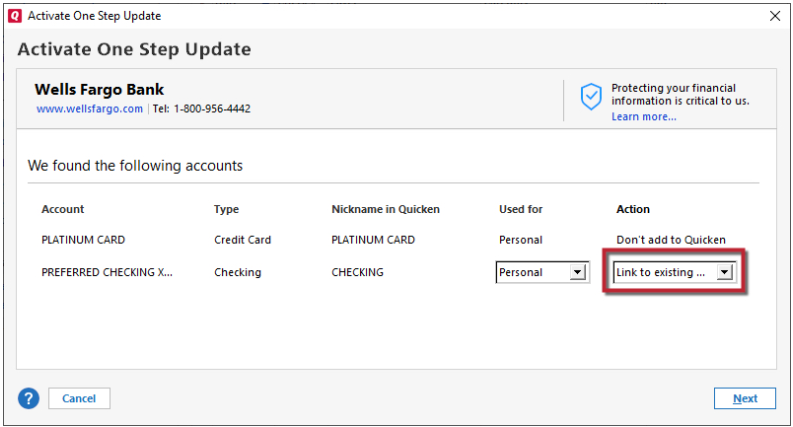
Please let me know how it goes!
Quicken Kristina
Make sure to sign up for the email digest to see a round up of your top posts.
0

