New Fidelity Connection - Incorrect # of Shares/Missing Investment Accounts [Mac]
Answers
-
Thank you for the follow-up @K. P. Lim,
I'm glad to hear the issue is resolved!
Hello @flyfishertn,
To clarify, is it showing a cash balance of $0 and an artificially high market value? If that is the case, you may be impacted by the change to the way Fidelity sends Money Market/Cash information to us. For more information and steps to remedy the issue, please see this Community Alert:
Thank you for letting us know your account values are showing higher than they should and that you already checked for placeholders. Are you able to track down what exactly is showing too high a value? For example, is the cash value inflated? Do you have too many shares of any securities, or inflated market values for specific securities?
Thank you!
Quicken Kristina
Make sure to sign up for the email digest to see a round up of your top posts.
0 -
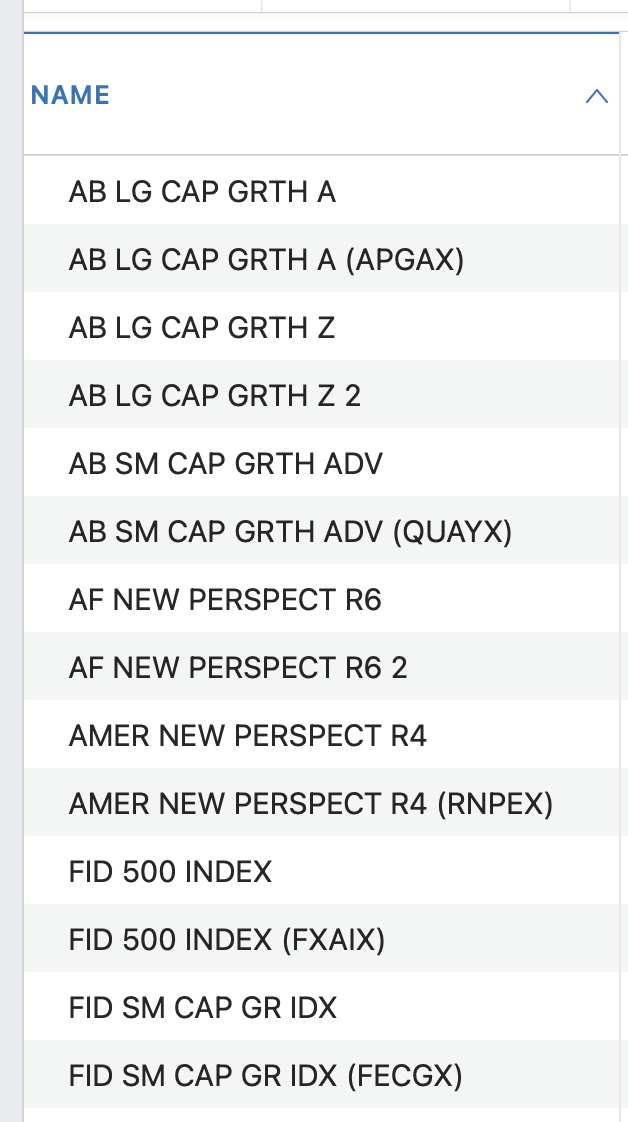
Quicken is showing 14 funds but there should only be 4. Again, trying to sort this out manually is a challenge.
 0
0 -
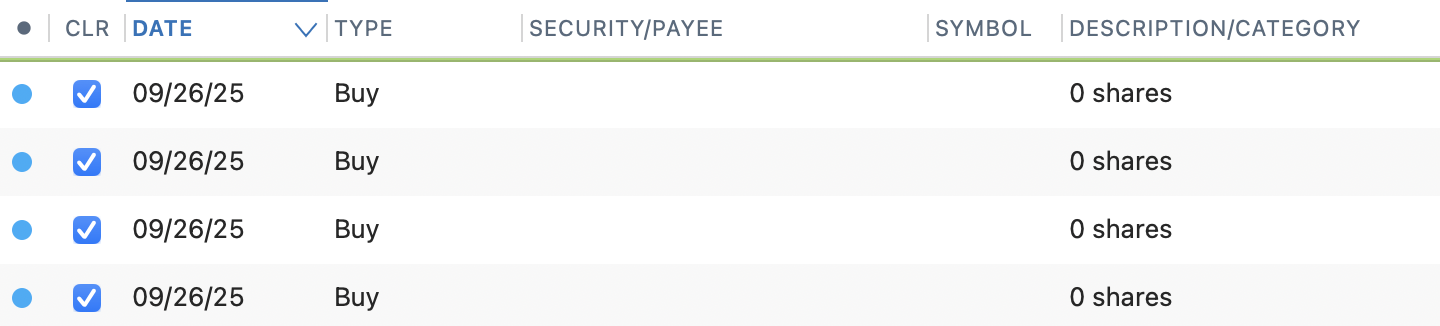
I'm so confused as to what should be fixed and what is still being fixed, but my 401k still downloads 4 0 share transactions every week when it should be downloading 9 transactions that are not 0 shares
 0
0 -
Thank you for your reply @richakaye,
It's hard for me to say, because I don't know what should be in your account in the first place. Looking at your screenshot, without knowledge of which securities should be in your account, it looks like 7 sets of duplicates.
How did all these extras appear? Did they all appear at once when you migrated your accounts to the new connection method, or have more variations appeared over time?
Hello @hurwi,
Thank you for sharing your experience. To help troubleshoot, please provide more information. Is this happening with Fidelity? What kind of transactions should these be (buy, sell, short sell, etc.)? Is the account cash balance and market value reflecting correctly?
Thank you!
Quicken Kristina
Make sure to sign up for the email digest to see a round up of your top posts.
0 -
@Quicken Kristina it's a fidelity 401k. they should be buy transactions. Quicken keeps adding remove shares placeholder transactions to make market value incorrect but when I delete those and manually add the weekly transactions that Quicken is not downloading correctly, the value is correct. I just have to keep scrolling to the bottom of the register to see if any new placeholder transactions have been added. there's no cash in the account.
0 -
Thank you for your reply @hurwi,
What kind of holdings are these remove shares transactions for? Are these placeholder transactions try to remove the same holdings that you're manually updating?
Thank you!
Quicken Kristina
Make sure to sign up for the email digest to see a round up of your top posts.
0 -
@Quicken Kristina last update they remove ALL the shares of 2 holdings. It seems to vary each week as to what Quicken is adding as placeholder transactions or downloading. There are 9 holdings in the account and they all need to be manually updated each week because downloads either download 0 share transactions or no transaction at all.
0 -
@Quicken Kristina … I gave it over weekend to see if anything resolved. I see 4 different balances in my Fidelity cash management account … The balance on my running transactions is correct. The "market value" in the upper right is off by ~$250 and the date on that says 9/26 (Friday) although I downloaded updates this morning. The "all transactions" account totals column shows a difference of +~$5000 …
The worst discrepancy is when I try to reconcile, Quicken tells me the online balance is zero. So no matter what I do here on the desktop, Quicken telling me an online balance of zero is a non-starter.
Please advise … thanks
0 -
Monday 9/29/25 @ 2:30 EST … Just got off the phone with a dude at the California number … he said there remain ongoing problems with Fidelity Investment Accounts and the tech team is working on it … boo, hiss
0 -
Hey, you found someone honest! That doesn't always happen when you call Quicken tech support. Many of their first level support people believe Quicken is always perfect, and if there's a problem it's that your computer somehow corrupted your data and you need to validate, and if that doesn't work, recover from backup, and if that doesn't work, rebuild. It's my experience that for most problems we get more support here than from the tech support line.
1 -
Hello @flyfishertn,
I sent you a DM. Please click the envelope icon near the upper right to read it.

Thank you!
Quicken Kristina
Make sure to sign up for the email digest to see a round up of your top posts.
0 -
Hi @Quicken Kristina ,
Yes, all the confusion started when I updated to the new connection method.
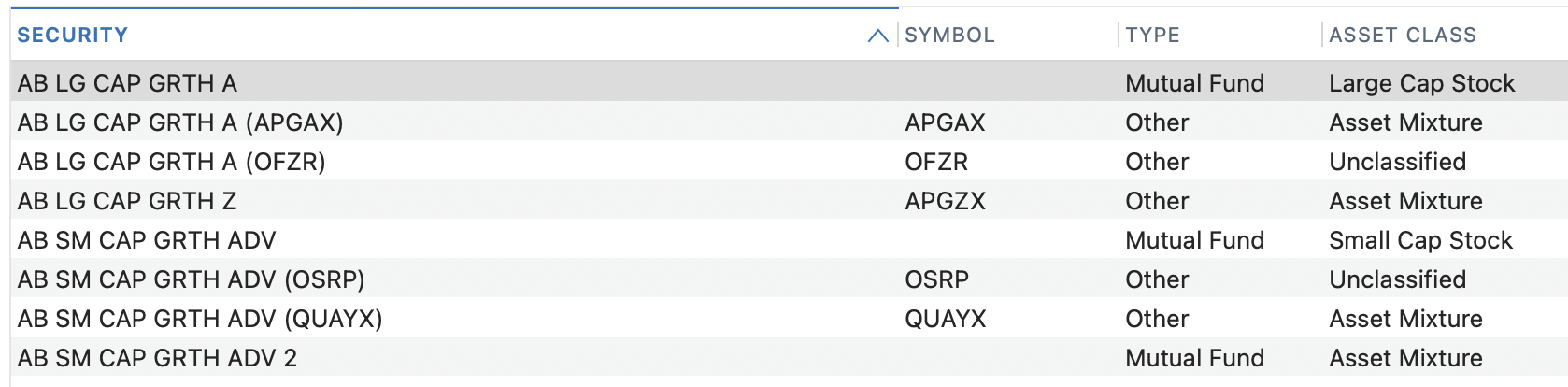
I'm attempting to use the merge securities strategy I've seen some others here post about. I made a backup and then began. As you can see from the sample below, Q has the same fund associated with different symbols. I have merged a few others and each time it prompts me to pick the one I want to merge into, then warns about one or more transactions with dates that have discrepancies. I have no ability to make a considered decision so I'm just…guessing.
 0
0 -
I've had a bit of a breakthrough and have managed to get my Fidelity account back to something resembling reality. After messing around with deleting placeholders, making wild guesses about what I could remove, and merging securities, I switched the account settings to use the Simple Investment Tracking Method. After doing that I synced the account. Like magic, my balance is now nearly identical to the penny when I look at it directly via the Fidelity site. I then switched it back to Detailed mode and the proper balnce stuck. Q did add a fairly large adjusting transaction but I can ignore that. Hopefully this trick helps out others.
1 -
Thank you for the follow-up @richakaye,
I'm glad to hear you were able to get everything back in line with reality. Thank you for sharing how you did it. Hopefully that will help others encountering similar issues!
Thank you!
Quicken Kristina
Make sure to sign up for the email digest to see a round up of your top posts.
0 -
Well let me caveat that "everything". The balance now appears accurate. But between all the manual deleting and merging I am not feeling very confident that things are fully accurate at the transaction level.
0 -
PROBLEM STILL PRESENT
Recently attempted (4th time) to move to the new Fidelity connection method.
Some most of the brokerage accounts were treated corrected but in some case the cash balance was not correct. The 401K accounts through Net Benefits still double the account value after migrate.
When should we expect a solution to this problem.
0 -
The balance in my linked FID 403B account has been correct for years. After my most recent account update, including a relinking the account to FID as requested by the software, I discovered that the number of shares was increased by the actial number of shares once in 10/1/20 and again as of 10/6/25, overstating the value by a factor of 3. I inspected the transaction journal and can not find any corresponding entries. Would a solution be to delete the account, then add it back in?
0 -
Is Fidelity now forcing us to move to their new mess of a connection? I'm now getting error code 16503 when I try to update on Direct Connect.
0 -
Me as well. I posted in another topic. Should have been here. Windows still works DC. Looks like DC in Mac has been abandoned if it is not an error message in error.
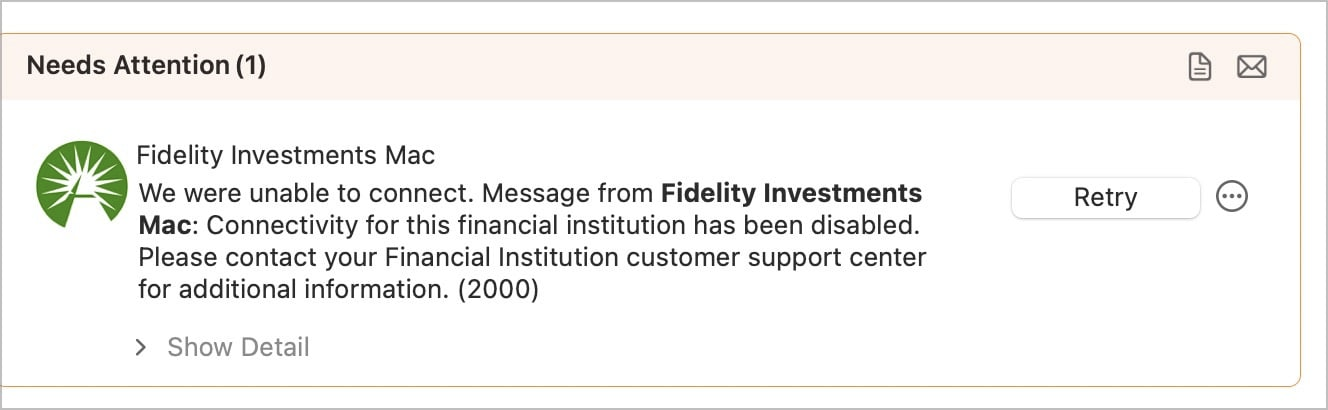
Can someone @quicken confirm or deny?
0 -
Error 2000 When Adding or Updating Accounts in Quicken for Mac0
-
Same. It seems ridiculous for DC to be disabled when the new connection is such a mess. If I switch over to the new connection today, will it ruin 10 years of history? The last time I tried the new connection, I managed to fix most of the problems. Then when I updated the next day, all the work I did was undone. None of us have hours to spend trying to correct our account balances ourselves.
0 -
Agreed.
Anyone changed in the last day or two? Working better than it was? Tips for best way to proceed?
Still a chance this is a fluke. Hoping @Quicken Kristina stops by to confirm or deny we Mac users are now forced to change.
0 -
In the past, with Fidelity and other FI's that have dropped Direct Connect, they issued a must switch drop dead date. Fidelity backed off of their previously issued date and I haven't seen anything new here yet so hopefully this gets fixed.
I absolutely refuse to switch to the new connection until all of these issues have been resolved. It's certainly not optimal, but I'll go to the website and download QFX files for import into Quicken if I have to in the interim.
0 -
I contacted Quicken support. The guy said Quicken can't see Direct Connect errors, only Fidelity can see them. Now I'm wondering if Fidelity pulled the plug on Direct Connect and didn't tell anyone.
0 -
Getting lost on where I posted. So many choices on Quicken and Fidelity. And I run Windows and Mac in parallel until I decide which shall be my chosen platform.
Decided that sooner or later had to switch so did the Reauthorize in Mac this afternoon. All went well, found accounts, linked to existing, complete accounting. But since then cannot connect to Fidelity in Mac at all for Investments..
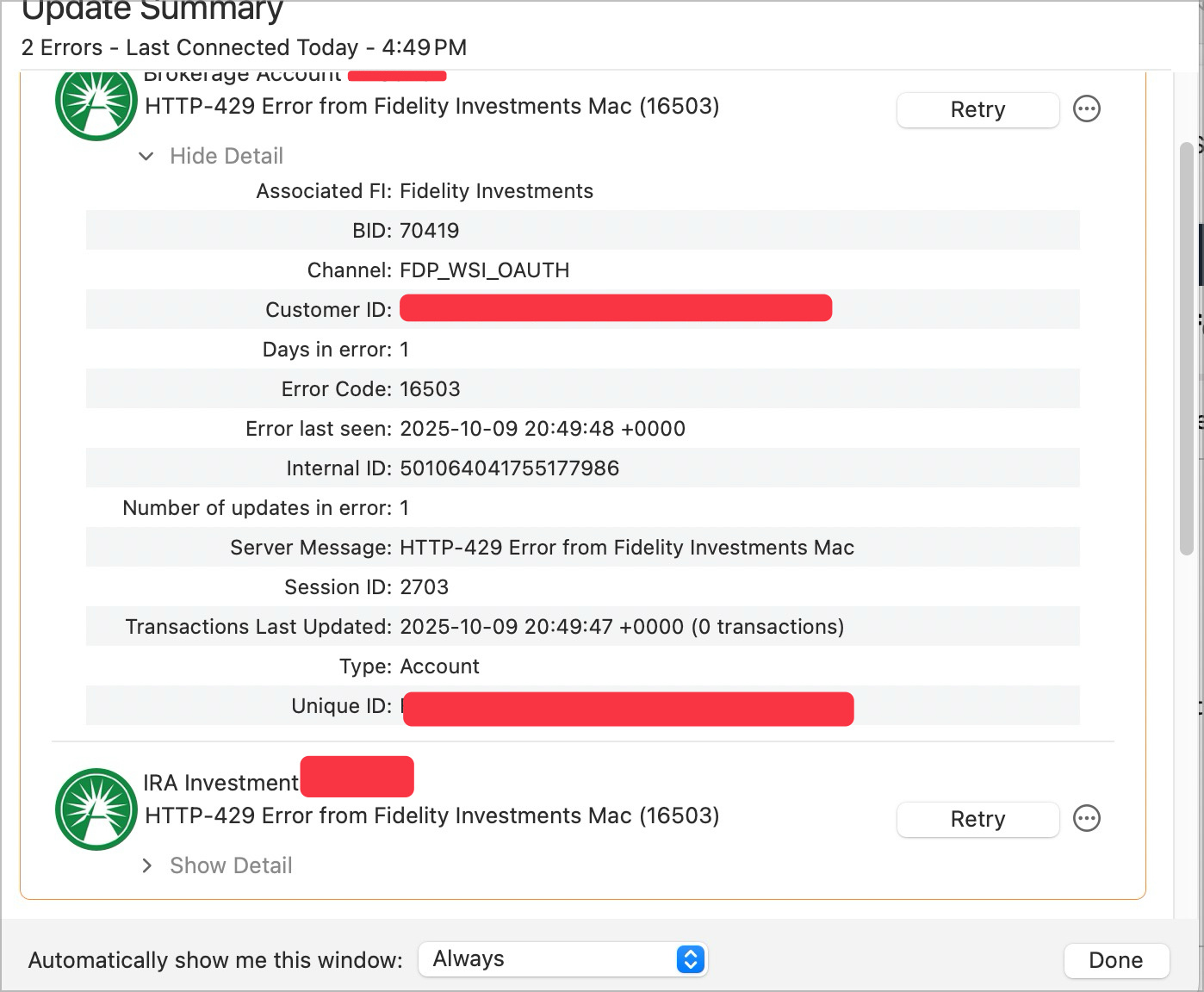
Would Change Connection help even though I should be on EWC+ now? Deactivate and reactivate? Are others on EWC+ on Mac with Fidelity able to connect?
I have no idea what to do next.
0 -
Just had my first successful connection with MAC EWC+ to Fidelity. Did not grab the transaction I expect, but no errors. First time.
0 -
I tried the new connect with my mutual funds account. I didn't spot any problems at all in that conversion.
0 -
Expected transaction just came in, but miscategorized. I'm thinking perhaps a separate topic might be helpful but maybe not, so let's test the waters here:
This was a transfer from another Bank that I had a MM fund. it was categorized as a Paycheck! Hah! So made me pause to try to figure out how to edit. I decided both Description/Category and Category (what is the difference in those fields?) should be be Transfer From XXXX. It concerned me it could make the other side of that transaction create a new entry for the same amount and throw that account off, but it did not.
So makes me question in a brokerage account what the Categories could be and how to tell what needs correcting? For example:
Buy Sell Interest Dividend RMD Reinvest Long Term Capital Gain Short Term Capital Gain
Etc. I am sure there must be more. I am sure I will be confused at some point.
Is this worth a thread or can we post enough here to get us through miscategorizations - both how to spot and how to correct?
Now, unsure if since Mac or since EWC+ but I have a number of error transactions going back years.They are not in my Windows Quicken with Fidelity at DC. All seem to be similar. How do I fix these or should I leave them be?
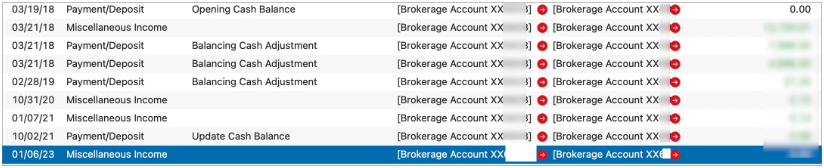
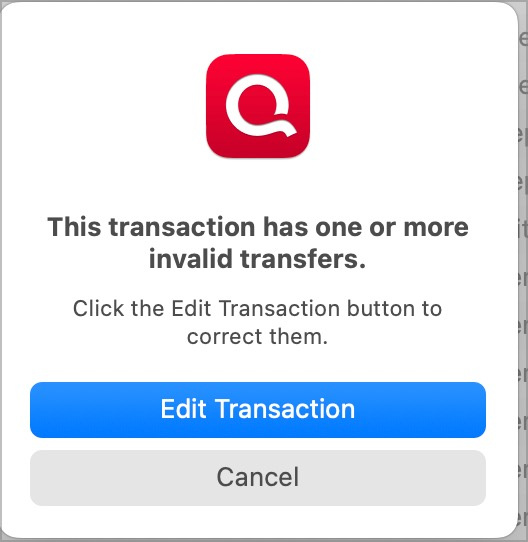
Thanks.
[Edited - Removed partial account numbers]
0 -
One more question:
Where in Mac does one choose the security that is CASH? I see no setting for that. It is correct it appears, but surprised I do not see a setting like the Windows Quicken.
0 -
The new Fidelity connector has lost a substantial amount of our Fidelity funds—the summary value shown in the dialog is correct when I start the process. But after connecting and successfully downloading, nearly 10% of the balance is missing in Quicken.
0


