Bank no longer supported?

I have had one step update enabled for accounts at my small community bank for over a decade. Last night, I noticed that the online services for these accounts had been removed in Quicken. When I attempted to re-add them, my bank is not on the list of supported banks. When I attempted to update my accounts in Quicken by downloading and importing an OFX file, I get a notification of "Quicken is currently unable to verify the financial institution information for this download. Please try again later." The bank is The Citizens Bank of Edina.
Answers
-
Which Edina? MO or MN?
And, I tried scanning FIDIR.TXT, which records the banks that have connectivity with Q, and couldn't find any reference to that bank when I search for Edina.
Normally, if the bank (NOT Q) had decided to drop connectivity, the entry would have been changed to zzz-Citizen (etc). But there was no such entry.
You might try contacting Q Support, via the link at the top of this page, to see if they know about this.
Q user since February, 1990. DOS Version 4
Now running Quicken Windows Subscription, Business & Personal
Retired "Certified Information Systems Auditor" & Bank Audit VP0 -
Missouri
0 -
Downloaded OFX files are for old MS Money. QFX files are for Quicken. Quicken will only import a QFX file if the financial institution is a participating partner.
Sounds like your FI decided to not participate.
-splasher using Q continuously since 1996
- Subscription Quicken - Win11 and QW2013 - Win11
-Questions? Check out the Quicken Windows FAQ list0 -
I'm also a long time user of Quicken. I've been downloading Bank of America account data for years, but now I get persistent "quicken is currently unable to verify the financial institution" errors. What do I do?
0 -
Whatever financial institution name you are currently using appears to have been removed from the list of supported financial institutions.
Deactivate all your accounts with Bank of America
Backup your data file and restart Quicken
Using Tools / Add Account (or click the "+" button in the Account Sidebar title) locate and select Bank of America from the list. Pretend to add all new accounts and identify yourself to the bank with your existing ID and password.
When you get to the list of accounts found at the bank, instead of adding new account registers, carefully select LINK and point the account at the bank to the correct, already existing Quicken account register. Repeat for all other accounts with BofA
After connection is complete, some cleanup may be necessary. The download process will download the last month or two of transactions from the bank. This may create duplicate transactions.0 -
have you noticed as part of this change, Quick only reports investments using the "simple" method and not the "Complete"??
0 -
Unless the financial institution is blocking it someway that I am not aware of, Simple vs Complete is a user choice that is changeable when you edit the account from the Account List:
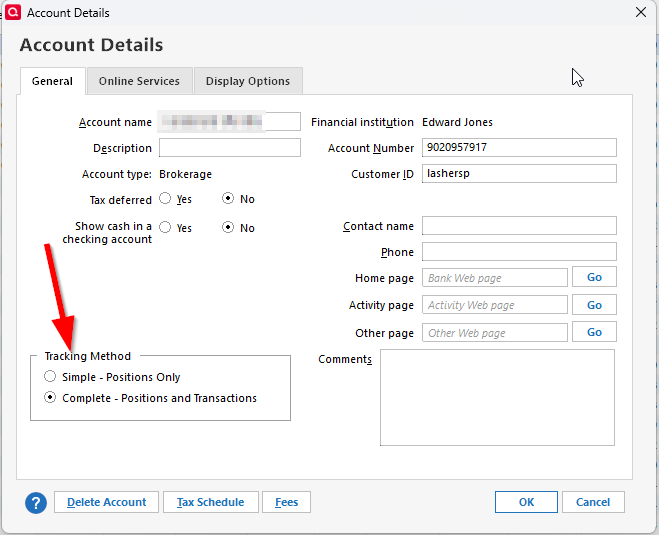
-splasher using Q continuously since 1996
- Subscription Quicken - Win11 and QW2013 - Win11
-Questions? Check out the Quicken Windows FAQ list0


