Fidelity Investments no longer downloading transaction data
Answers
-
Thank you @John_in_NC ! I'll try that in two weeks when my next payroll 401k contributions are made.
0 -
Thank you for your reply @Nick_Quick,
Based on what I'm seeing in the logs, it appears that the memo information was in the OFX logs (associated with Direct Connect), but is not in the logs associated with the new connection method. I forwarded this issue to the proper channels for further investigation and resolution.
If anyone else is seeing this issue and would like to contribute to the investigation, please navigate to Help>Report a Problem and send a problem report with log files attached.
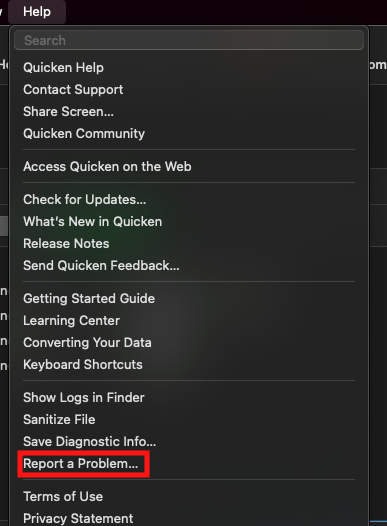
Thank you!
(CTP-14717)
Quicken Kristina
Make sure to sign up for the email digest to see a round up of your top posts.
0 -
@Quicken Kristina, it appears there's been a pretty big digression. Quicken just downloaded some quarterly fees and the transactions are a complete mess. Also, more placeholders showed up that are completely new, effectively making the portfolio total complete garbage. This is quite frustrating!
I just sent a new report.
0 -
Thank you for the update,
Are all the transactions in the screenshot you included with the report placeholders that were added? Are the fees pending or posted on the Fidelity website? How do the fees appear on Fidelity's website?
Thank you!
Quicken Kristina
Make sure to sign up for the email digest to see a round up of your top posts.
0 -
The screenshot I sent was of the errored transactions, not the placeholders. The fees were fully posted (not pending) on the Fidelity website. And on the Fidelity website they are listed as a "RECORDKEEPING FEE".
1 -
Thank you for your reply @Nick_Quick,
For this specific issue with the fees downloading incorrectly, I recommend that you contact Quicken Support directly for further assistance, as they have access to tools we can't access on the Community and they can escalate the issue as needed. The Quicken Support phone number can be found through this link here. Phone support is available from 5:00 am PT to 5:00 pm PT, Monday through Friday.
I apologize that I could not be of more assistance!
Quicken Kristina
Make sure to sign up for the email digest to see a round up of your top posts.
-1 -
I just had another normal download following payroll and it is incomplete. It's clear to me now that this issue is not resolved. I'm curious if @John_in_NC is still having issues as well?
@Quicken Kristina, is it your understanding that this issue is believed to be resolved? And, therefore, no longer getting any technical attention?
0 -
Thank you for the follow-up,
If you are referring to the issue with Memo/Notes information not downloading, that ticket has not been marked resolved. It is still open and in work.
Thank you!
(CTP-14717)
Quicken Kristina
Make sure to sign up for the email digest to see a round up of your top posts.
0 -
Howdy: @Nick_Quick
I didn't want to create additional noise in this thread, but I am happy to report my last payroll contributions downloaded 9/9 fund purchases accurately in 2 different files.
No manual entry and no merging of funds. (Fido has a history of changing fund names even in the DC days, but I think using the new name/adding ticker helped here. When I merged/kept the old fund names, it was like a bad penny that kept coming back.)
Edit: It does NOT contain the info in the memo field, but personally, I don't like that-it is redundant to the transaction itself. I would rather the field be empty so I could enter other data if desired. I never understood why they populated it-and perhaps why they no longer do.
0 -
@Quicken Kristina, I'm referring to the original ticket with the errored transaction downloads. But also glad the memo/notes tickets is still open.
I'll also add (to borrow @John_in_NC's nomenclature) my Quicken is downloading 3/5 transactions correctly. Two Blackrock securities are still coming through with no information. Just a dollar amount.
0 -
Thank you for your reply,
When I check CTP-14542 (the original ticket for the data quality issues on download, such as missing/incomplete information), that ticket is marked resolved. The team working on it believed that it was related to another known issue with 401k data that was recently fixed. The resolution they listed was that anything already downloaded would need to be manually corrected, but new transactions should be downloading correctly.
Since the issue is persisting, please navigate to Help>Report a Problem and send a problem report with log files attached. Please also include screenshots showing the missing/incomplete data that is downloading into your Quicken.
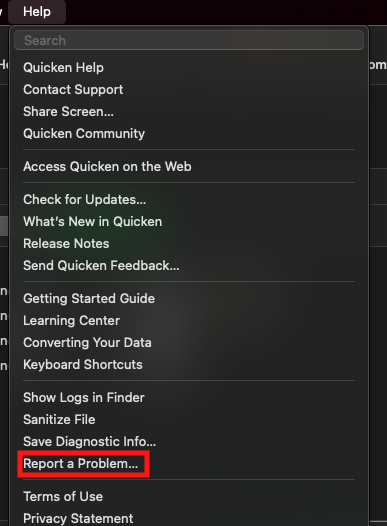
Let me know when you have sent the problem report, so I can notify our team that the issue is persisting.
Thank you!
Quicken Kristina
Make sure to sign up for the email digest to see a round up of your top posts.
0 -
@Quicken Kristina, Report sent. Just an FYI, I had already corrected the errored transactions at the time the report was sent. That said, the attached screenshot shows them in the errored state (I took the screen shot before I made the corrections in case you asked for another report).
1 -
This content has been removed.
-
Thank you for the follow-up @Nick_Quick,
I forwarded the information to our teams. Next time the issue happens, please send a problem report with logs attached and a screenshot showing the problem transactions before making any manual corrections. Manual corrections show up in the logs, which makes it much harder to tell if the issue is being caused by the way the data is being sent to us or by the way the program is interpreting the data.
Please let me know when the report is sent.
Thank you!
(CBT-877)
Quicken Kristina
Make sure to sign up for the email digest to see a round up of your top posts.
0 -
@Quicken Kristina, Quicken just pulled some fresh Fidelity transactions that again failed to download all the information properly. Two Black Rock securities were once again excluded. I submitted a report with screen shots of the errored transactions as well as the placeholders that attempt to reconcile with the errored transactions in place.
Additionally, the non-BR securities that did download appear to be entered incorrectly. They are coming through has "commissions" rather than actual reductions in shares.
1 -
Thank you for the update,
Thank you for letting me know that the issue is persisting, and for sending updated logs with screenshots.
Is this issue with transactions coming in as "commissions" new? What kind of transaction is coming in this way? Is this happening with specific securities?
Thank you!
Quicken Kristina
Make sure to sign up for the email digest to see a round up of your top posts.
0 -
@Quicken Kristina In general, the issues now only appear to be happing with the Blackrock securities. When my bi-monthly 401k contributions hit, the non-BR purchases look ok and the BR purchases are incorrect. When my quarterly management fees hit that's when i saw the non-BR purchases listed as commissions (rather than sales). The BR sales were incorrect in the same manner as with the purchases. Hope that all makes sense.
Can you please confirm that this issue has been reopened and is being worked by Quicken? I'm concerned Quicken believes these issues have been resolved, when there are clearly lingering issues.
[Edited - Readability]
0 -
I'm having the same problem. Started in September after working fine for years. New contributions are all downloaded as uncategorized or dividend income with no specifics as to which security, share amount or share price. Kind of makes Quicken worthless, since now it looks like a plain spreadsheet and doesn't let me track vital information.
I was hoping with all the back and forth over two months in this thread and elsewhere, Fidelity/Quicken would have it fixed, but the contributions of the last couple days (for the Nov. 1 paycheck) are still all uncategorized. Worse, they now are typed as miscellaneous, not even payment deposit.
So, it appears the problem is getting worse. I tried setting it up as a new account but despite saying it was authorized successfully (three times!), it either says transactions could not be downloaded or returns a completely empty register with zero balance. We took an RMD and the amounts downloaded correctly (in the old Quicken account) but again no data regarding share name, amount, or value. Any advice?
[Edited - Readability]
0 -
Thank you for your reply @Nick_Quick,
Yes, the issue has been reopened under ticket CBT-877.
Hello @christopherjhoh,
Thank you for letting us know you're also seeing an issue. To clarify, are you also seeing this issue happening with Blackrock securities? You mentioned setting it up as a new account. Did you do that in your main file, or in a separate file? When it says transactions can't be downloaded, is there any error code? What kind of account are you seeing these issues happening with (HSA, 401k, etc.)?
Thank you!
Quicken Kristina
Make sure to sign up for the email digest to see a round up of your top posts.
0 -
@Quicken Kristina, Quicken just pulled another set of garbage Black Rock transactions. I submitted a report.
I'll also add that the other transactions in this batch have lots of sign errors (took me 30 mins to back out all the errors). This really feels like amateur hour on Quicken and Fidelity.
1 -
Thank you for sending updated logs,
I attached the logs to the ticket, along with a comment that the issue is still happening.
Thank you!
Quicken Kristina
Make sure to sign up for the email digest to see a round up of your top posts.
0 -
@Quicken Kristina, I reached out to Quicken Support as I'm still having errored transaction downloads for Fidelity transactions. The support rep said I should have been contacted via email regarding ticket CTP-14542 before it was closed, but I was not. After 30 mins on the call I got nowhere. They basically said I need to call back again later. Can you please weigh in here? Can you please have someone from specialist support contact me via email? I would prefer to not call in and potentially waste more of my time.
Also, the case number from my call this morning is 12069406.
0 -
@Quicken Kristina, just following up from my 11/25 message above. I could really use some help here.
0



Categories
- All Categories
- 23 Product Ideas
- 34 Announcements
- 247 Alerts, Online Banking & Known Product Issues
- 19 Product Alerts
- 265 Welcome to the Community!
- 300 Before you Buy
- 1.5K Product Ideas
- 55.8K Quicken Classic for Windows
- 16.9K Quicken Classic for Mac
- 1K Quicken Mobile
- 834 Quicken on the Web
- 128 Quicken LifeHub