Fidelity Investments no longer downloading transaction data
Ever since I was prompted to update my connection for my Fidelity account I am no longer getting any transaction data. The general transaction amount is downloaded, but no info on shares purchased/sold, which security, cost/share, etc… How can I get this fixed to where i get all the transaction data I was getting before?
Answers
-
Hello @Nick_Quick,
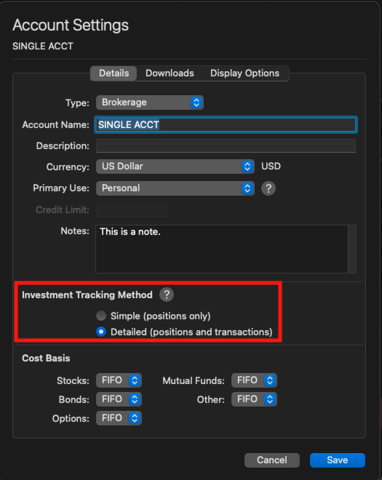
Thanks for reaching out! First, please check whether your Fidelity account in Quicken is set up for Simple or Detailed tracking.
The easiest way to tell is by opening your account and looking at the Transactions tab:
- If the tab is greyed out, your account is currently using Simple tracking, which only downloads general amounts. In this case, go to Accounts > Settings > Details tab, change the Investment Tracking Method to Detailed, and then click Save.
- If the tab is active, then you’re already on Detailed tracking.
Check back and let us know what you find!
-Quicken Anja
Make sure to sign up for the email digest to see a round up of your top posts.0 -
Hello - I can confirm I am on Detailed tracking.
0 -
Hello @Nick_Quick,
Thanks for confirming that you’re already on Detailed tracking — that rules out the most common cause. Since the issue started right after updating your Fidelity connection, it sounds like the account may not be fully linked to download detailed holdings/transactions.
Next, I suggest that you attempt to fully deactivate your Fidelity Investments account(s) then reactivate them using the Add Account function. You can follow the instructions below. I suggest saving a backup before proceeding (just in case).
To start with, please check and make sure you do not have any hidden accounts that may be connected to this financial institution.
- Go to the Accounts menu and choose Hide and Show Accounts
- Uncheck any accounts with this specific financial institution that are checked as hidden in Lists
After that, please follow the troubleshooting instructions below.
- Open the account register and navigate to the Settings gear on the bottom-right corner
- Click on the Downloads tab
- Click Disconnect Account (if there are more than one account associated with this financial institution, please repeat steps 1 through 3 for each account)
- Close Quicken
- Reopen Quicken
- Navigate to Accounts > Add Account...
- Use the search field at the top of the list to find and select your financial institution and click Continue
- Follow the prompts to sign in using your login credentials associated with the financial institution
- If the accounts have been found successfully; use the dropdown menus to link each account to the appropriate account in Quicken
Let us know how it goes!
-Quicken Jasmine
Make sure to sign up for the email digest to see a round-up of your top posts.
0 -
No luck with this approach either. I actually tried disconnecting/reconnecting this account before I started this thread.
0 -
Hello @Nick_Quick,
Thanks for attempting those steps!
Do you have multiple account(s) with Fidelity Investments?
Let me know!
-Quicken Jasmine
Make sure to sign up for the email digest to see a round-up of your top posts.
0 -
Yes, I have two accounts that are updated with this Fidelity connection. One is a simple brokerage account that seems to be updating fine. The other is a 401k NetBenefits account, this is the one that is having the issues described above.
0 -
I just realized something. It appears the transactions being downloaded are my contributions. So it makes sense they would not have any information on shares. So it appears that my problem is that the corresponding share purchases are not being downloaded at all.
For historical purposes, Quicken has never downloaded contribution data. It has only downloaded actual buy/sell transactions.
1 -
I get the same random cash "Payment/Deposit" transactions. Known issue with NetBenefits and the switch to the new connection method. They are working on it.
I personally just deleted those cash transactions and typed in the Buys for my last few pay periods (easily available from Netbenefits website) while they resolve the problem. Takes me about 5 minutes for each pay period. The holdings updated correctly.
The other issue with NetBenefits is the Security coming down as a slightly different name and thusly shows as a separate fund. That is also an easy fix if you are bitten by it; you merge the securities with the same ticker in the Securities window. If you have that issue, let us know if you need help doing that.
0 -
Thanks for the info @John_in_NC! Glad I'm not alone and it's being worked. Is there another thread where I can track the progress of that bug fix?
I have not had the issue with the slightly different security names at this time. That said, I haven't had any security buy/sell transactions download in over a month…
1 -
@Quicken Jasmine any updates on the resolution of this issue? It's a pain to be manually entering transactions when I'm paying for a premium product that is supposed to be doing it for me (and not).
1 -
Hello @Nick_Quick,
The issue with missing transactions is still being worked on. We do now have an alert that you can use to track the issue. I recommend bookmarking the alert to be notified of any updates, once available, and to know when the issue is resolved.
I hope this helps!
Quicken Kristina
Make sure to sign up for the email digest to see a round up of your top posts.
0 -
Hi @Quicken Kristina - I am now seeing some change in behavior. Just tonight Quicken download two batches of transactions going back about a month (replicating transactions that I manually entered as I waited for resolution to this issue). That said, some are spot on. And others are blank with "0 shares" in the description. But the investment $$ amounts are correct. So it seems some fix was rolled out, but it's not quite a 100% fix.
0 -
I saw the same thing tonight, @Nick_Quick I didn't know where to report this, so this thread is as good as any.
Some of this month's prior payroll 401k Buys downloaded, but far from a fix :-(
Yes, I now get buy transx now, but only for 5/9 and 6/9 of each funds for my two pay periods respectively And none had tickers, so I couldn't match to manually entered ones even if I wanted to.
And only 3/9 of the funds had the security name listed, let alone the ticker-the rest were blank. So basically, it is the same as it was before, but instead of being cash transactions, they are useless Buys. Even the memo field didn't indicate the funds purchased.
I just deleted the downloads. In some ways, this might be moving things away from correctness as now peoples' holdings are now changing.
I'm a patient guy/don't mind helping to get things working. And I do know Fidelity is one of the far better partners with Quicken. But, the average user isn't going to be able to decipher this like we can.
2 -
@Quicken Kristina and @John_in_NC, I'll also add that it is now doing that thing where it renames the security with a "2" as the end ("Security ABC" becomes "Security ABC 2"), effectively creating a whole new security, messing up the portfolio roll up.
1 -
Thank you for your reply,
To correct the duplicate securities issue, you should be able to merge the securities. For instructions, please see this article:
Please let me know if the issue with securities duplicating persists.
Are you seeing any other issues persisting?
Quicken Kristina
Make sure to sign up for the email digest to see a round up of your top posts.
0 -
@Quicken Kristina the larger subject issue is still not resolved even though some attempted fix appears to have been rolled out. Please see the messages between me and @John_in_NC on 9/10/25.
0 -
Thank you for your reply,
You mentioned that it duplicated some of the transactions you'd manually entered. Did deleting the duplicates correct that issue, or do they keep redownloading? Are you missing any transactions, or is the primary issue the quality of some of the data that downloaded? Is there any pattern to what downloaded blank with "0 shares" in the description (specific type of transaction, date range, etc.)? Was this a one-time occurrence, or are you continuing to see transactions that are blank except for "0 shares" download?
Thank you!
Quicken Kristina
Make sure to sign up for the email digest to see a round up of your top posts.
0 -
Everything in my and @John_in_NC 's 9/10/25 posts is still valid. The primary issue is the quality of the downloads. Previously (when I started this thread) transactions with essentially no data were being downloaded. Then on 9/10 things changed (see posts above). Something is still broken. My latest transactions are from 9/12 and they are all imperfect, some worse than others. They all had to be deleted and then manually reentered. And they do not redownload after being deleted.
2 -
Thank you for the follow-up,
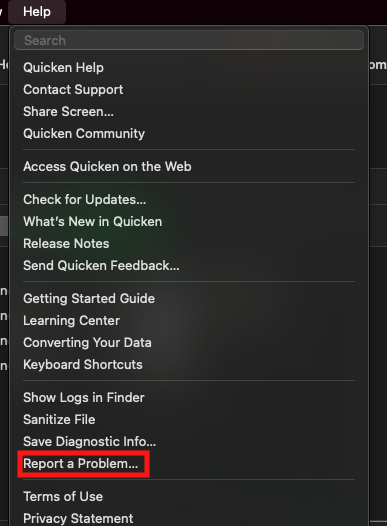
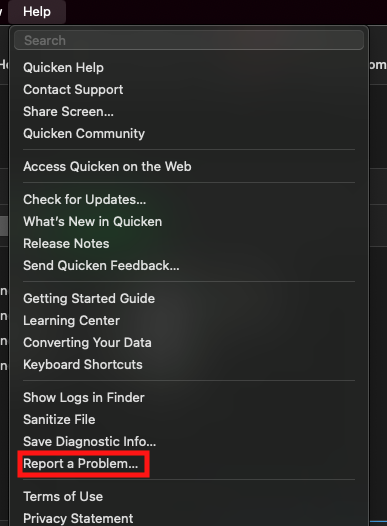
I reported the data quality issue to the proper channels for further investigation and resolution. Thank you for submitting a report with log files attached @John_in_NC. @Nick_Quick If you're willing, please also navigate to Help>Report a Problem and send a problem report with log files attached.
(CTP-14542)
To be able to investigate the missing transactions issue, we will need more information. Please provide the following information so we can investigate it:
- At least 3 samples of transactions that are posted on Fidelity's side, but are not in your Quicken at all, not even as manual transactions.
- A screenshot showing those transactions are not in your Quicken.
- A screenshot showing those transactions on Fidelity's website.
- A problem report with log files attached. Note - Please send this before entering any of the missing transactions manually.
The information can be provided in the problem report rather than posted here. Please be aware that problem reports are limited to 10 attachments. If you need to send more than 10 attachments, you can use a 2nd problem report to send the additional ones.
Please let me know once you send the problem report!
Thank you!
Quicken Kristina
Make sure to sign up for the email digest to see a round up of your top posts.
0 -
At this moment my Fidelity register is cleaned up. All of the errored transactions have been deleted and replaced with correct manual entries. It will be another week or two before any more transactions download. I'll do the exercise at that time. And if there's anything else I can do in the meantime please let me know.
1 -
@Quicken Kristina , I don't wish to tread on @Nick_Quick 's post, but I think we are in a similar boat.
Like Nick, my current file is now correct as I manually corrected/deleted the errant transactions. So, I will have to wait 1.5 weeks to see the latest payroll download.
BUT, I did go ahead and created a new blank test file tonight and let Fidelity download the 401k via Quicken Connect (not DC)
It downloaded 2 years of data. Outside of a few weird Remove Shares transaction placeholders (why would these be in a new account setup?)-the account is spot on.
It did NOT have the ticker symbol downloaded for transx outside of the initial Placeholder Add Share transactions. Those did have the ticker.
Let me know if there is any way I can help/if I should or submit this new blank test file for review.
Edit: I see in the Securities, I have a few funds in this test file that have the 2 appended to the name. All the Remove Shares placeholders are the funds with 2 appended. (Edit 2: I submitted new blank file via Report a Problem.)
1 -
@Quicken Kristina, I am seeing a new pretty annoying behavior. Every time I refresh my Fidelity account "Add Shares" placeholders download. This results in the doubling of the portfolio value. I then have to now go in and delete those every time in order to get the portfolio to then reconcile correctly.
1 -
Thank you for the follow-up,
Which holdings is this happening with? Are these newly added shares duplicates of existing securities? If so, what you may need to do to prevent them from automatically adding every time you update your accounts is merge them with the existing, so that Quicken will "see" that they're the same security. For information on merging securities, please see this article: .
I hope this helps!
Quicken Kristina
Make sure to sign up for the email digest to see a round up of your top posts.
0 -
Deleted this comment
0 -
@Quicken Kristina, I was able to successfully merge those placeholder transactions into existing transactions. They no longer appear to be reappearing when I refresh, so that is good.
This morning Quicken pulled in my latest bi-weekly transactions from Fidelity. The share values were all correct. That said, the security names were all "2" (ie "Security Name 2" instead of just "Security Name"). Therefore all of my share balances were incorrect. So I then merged the "2" securities into the existing securities and that fixed things.
My question to you, will all future new downloads all be "2" securities? Or will the merge persist going forward?
One more note, the "memo/notes" section on this download is blank for all of the securities. It used to contain info on the transaction (ie contribution vs exchange vs fee). It would be great to get those memo/notes back.
0 -
Thank you for your reply,
I would expect the merge to persist going forward. If you do have a continuing problem with securities needing to be re-merged with ever update, please let me know.
Thank you!
Quicken Kristina
Make sure to sign up for the email digest to see a round up of your top posts.
0 -
@Quicken Kristina Great, thanks for the info on the likely persistent merge. Is there any way to look into the missing memo/notes as well?
0 -
Thank you for your reply @Nick_Quick,
The missing memo/notes may be a file specific issue, or it could be a change in the data being sent to Quicken. So that I can check the data being sent to Quicken, please provide 3 sample transactions where the memo/note is missing (date, payee, amount, and the memo/note that should be there) and has not been filled in manually, and please navigate to Help>Report a Problem and send a problem report with log files attached. That will allow me to check the logs to see if the missing memo/notes are being sent or not.
Please let me know when the problem report is sent!
Quicken Kristina
Make sure to sign up for the email digest to see a round up of your top posts.
0 -
We're making progress, but still not 100% correct. But, things are improving from what I see.
@Nick_Quick We discussed merging funds earlier in this thread. While that normally works as it has in the past, it may or may not be persisted. Every time I had new transactions download, I again got the duplicated funds post merging.
Now, perhaps it has to do with better data coming down, but I found that only after I added the ticker to the "new" fund name prior to merging and using that name going forward did the problem go away. So, if you see the duplicates again, be sure to do that. Good luck.
1 -
Problem report sent!
1
Categories
- All Categories
- 56 Product Ideas
- 36 Announcements
- 223 Alerts, Online Banking & Known Product Issues
- 22 Product Alerts
- 701 Welcome to the Community!
- 671 Before you Buy
- 1.2K Product Ideas
- 53.7K Quicken Classic for Windows
- 16.3K Quicken Classic for Mac
- 1K Quicken Mobile
- 813 Quicken on the Web
- 111 Quicken LifeHub