New Online Bills System Issues
Comments
-
Yes. I’ve used QuickPay successfully previous to the recent move to the new Bill Pay system.
0 -
@cleroks Does the issue occur when you try to set up Quick Pay in general, or just with a specific biller?
Barry Graham
Quicken H&B Subscription0 -
Any biller. I suspect because it's a new Bill Pay system, it wants me to identify myself to the new system.
0 -
I suggest calling support.
Barry Graham
Quicken H&B Subscription0 -
Received this email today. Great news everyone!!
0 -
Yes, it's wonderful. I thought the same thing. This cluster has been going on for weeks now. I can't connect billers in their list. On ones that did connect, I get an email saying I have a new bill but nothing shows up in online bills. I don't see any status reports or recognition of these problems in the support announcements, etc. I've spoken to support and see many others having the same issues. So, yeah, let's get everyone into this mess.
[Removed - Rant]
0 -
Does anyone have any online Billers that work? I have had three since August all awaiting. Fidelity Visa, Amex Hilton, and Xfinity. I called support and they told me there were issues and wait until November.
0 -
I actually do have a few working :)
T-mobile and Chase. And American Express worked last month. All the rest get tested mid this month. And of course, a splatter of those they have not added yet - or maybe never will.
0 -
I have none, zero, nada working.
0 -
Hello @Bione,
Thank you for sharing your experience. When I check your recent contact with Support about the issue, I can see they tagged the Community Alert about enrollment issues. Are you seeing "Unexpected error occurred" with type "NullPointerException" errors? If not, what behavior are you seeing?
I look forward to your response!
Quicken Kristina
Make sure to sign up for the email digest to see a round up of your top posts.
-1 -
I checked your Community Alert link and I do not see it as exactly relevant. As was reported in another link I have had multiple Billers since late August with no activity. Others complained the same and Anja said we should all contact Support which was iffy. I wanted to check if anyone saw the feature working at all. This thread seamed the logical place to ask.
In the meantime, another community member suggested trying the option "Bills from Connected Accounts". Though that duplicated three of my Billers it did return a value for Amex. Xfinity did not return or duplicate. Doing a repair previously all showed connected.
0 -
Thank you for your reply @Bione,
I'm glad to hear that you're now seeing a value for AmEx. Is that online biller working correctly now? Are the other 3 billers you mentioned still not working? Are they showing any errors? Are they showing "Awaiting Next Bill"? If not, what are you seeing?
Thank you!
Quicken Kristina
Make sure to sign up for the email digest to see a round up of your top posts.
-1 -
Hi Michael, I sent you a private message to continue the conversation!
Barry Graham
Quicken H&B Subscription1 -
@Quicken Kristina I also received the e-mail about the new billing system. Is this yet another new billing system, or was it referring to the one that was rolled out recently that we are all having issues with?
Barry Graham
Quicken H&B Subscription0 -
Amex sort of works, as does Chase. None of my utility bills work - Washington Gas never got the bill downloaded, WSSC shows "Failed" and Pepco is no longer available.
Barry Graham
Quicken H&B Subscription0 -
State Farm Insurance does not work even though it's advertised to work on QKN info page
0 -
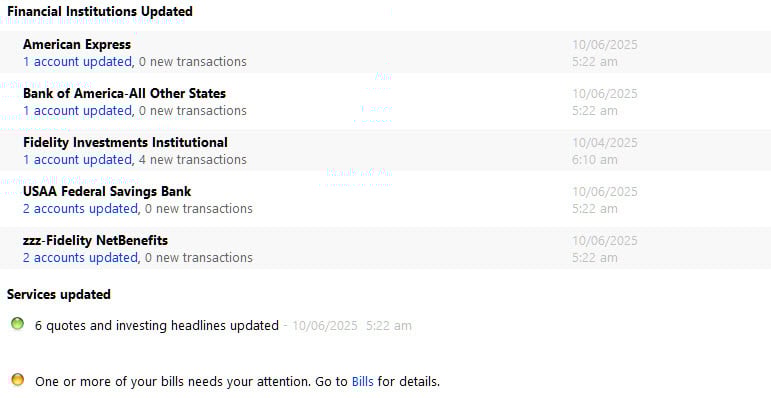
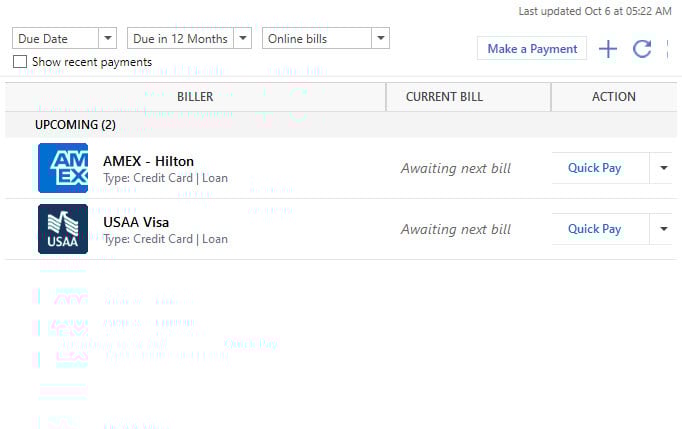
My only bills that appear to work are my AMEX and USAA Visa. My AMEX did pull down the last bill with the correct balance. I don't use my USAA often so there's been nothing to download (Zero$ balance) since the billing switch.
However, when I run OSU, it always gives me the error that one or more of my bills need attention. There are no "caution" or "warning" flags on either bill.
 0
0 -
None of by billers work in online bills. Evergy will not connect. Reported it and have been trying for weeks. Chase, NFM and a couple of others connect but always have the status of "Awaiting next bill" even though they have gone through a bill cycle. Even received an email from the system saying I had a new bill but nothing in online bills. This new "reliable" system has completely destroyed online bills for me. When will this be fixed? It has been weeks now. There really is no excuse. I pay an annual subscription and everything should have been tested and working before rollout.
0 -
Thank you for your replies,
Hello @BarryGraham
It's the one that rolled out with the version R64 program update. For more details, see this article:
Hello @nmestanas
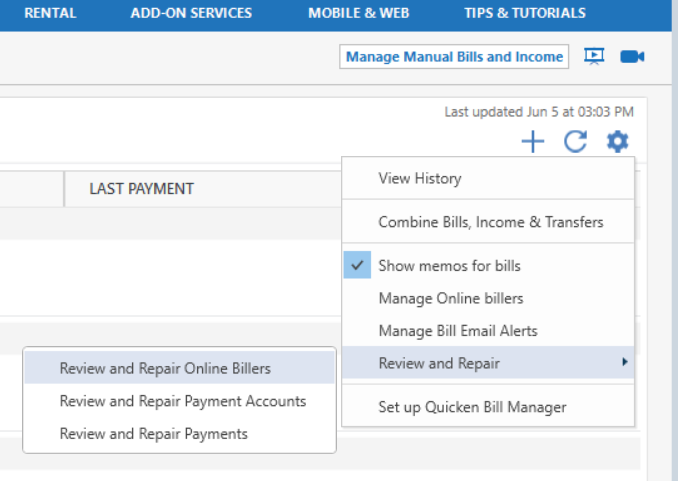
That is odd that the One Step Update Summary is seeing an issue that isn't reflecting on the Bills & Income screen. Have you tried doing a review and repair in the Bills & Income tab, to check if Quicken is seeing any errors? To do that, please navigate to the Bills & Income tab and click on the gear icon on the top-right. Then, click on Review and Repair > Review and Repair Online Billers in the dropdown menu.
Hello @sfinney55,
I sent you a DM. You can view it by navigating to the envelope icon near the upper right.
Thank you!
Quicken Kristina
Make sure to sign up for the email digest to see a round up of your top posts.
-1 -
@Quicken Kristina Thanks for the suggestion but the review and repair completes saying bills are in sync (see pic below). Funny thing is, while trying to determine what's happening, I deleted all online bills, ran OSU and it still said there was an error.
I just ran Validate and Super validate. Both reported no errors. Ran OSU and it still reports "one or more bills needs attention". All other accounts and quotes completed without error.
 0
0 -
Thank you for your reply @nmestanas,
Since everything looks correct on the Bills & Income tab, and the repair and validate did not find any issues, there is a chance this is a Quicken Cloud issue.
Please try resetting the Quicken Cloud. To do this, first, backup your Quicken file, then navigate to Edit>Preferences>Mobile & Web, and click the Reset your cloud data link.
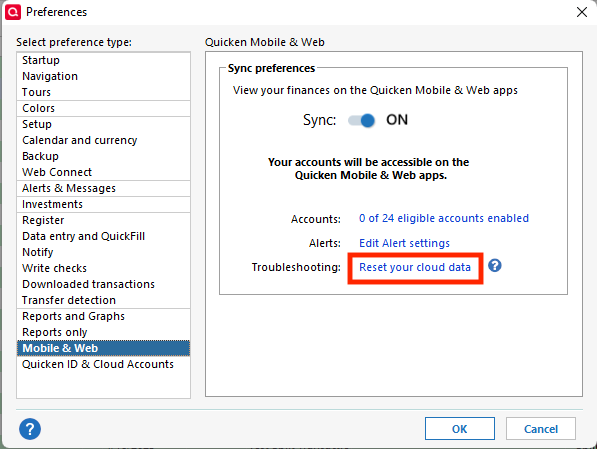
Note - If you have cloud sync turned off, then you will need to temporarily turn it on to reset the cloud. To do this, you'd click the slider by Sync to switch it to On, then click OK, then navigate back to Edit>Preferences>Mobile & Web, and click the Reset your cloud data link. Once the reset completes, you can turn Sync back off again.
Once the cloud reset completes, please verify if the issue is resolved.
I hope this helps!
Quicken Kristina
Make sure to sign up for the email digest to see a round up of your top posts.
-1 -
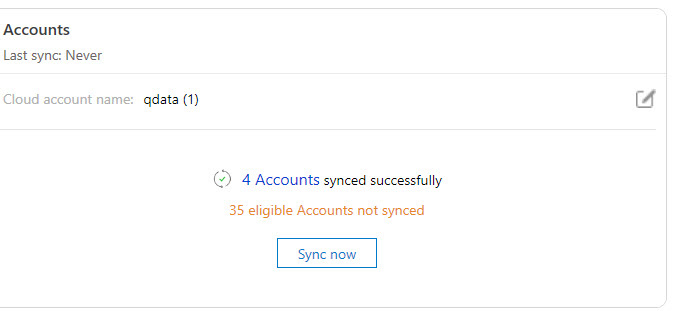
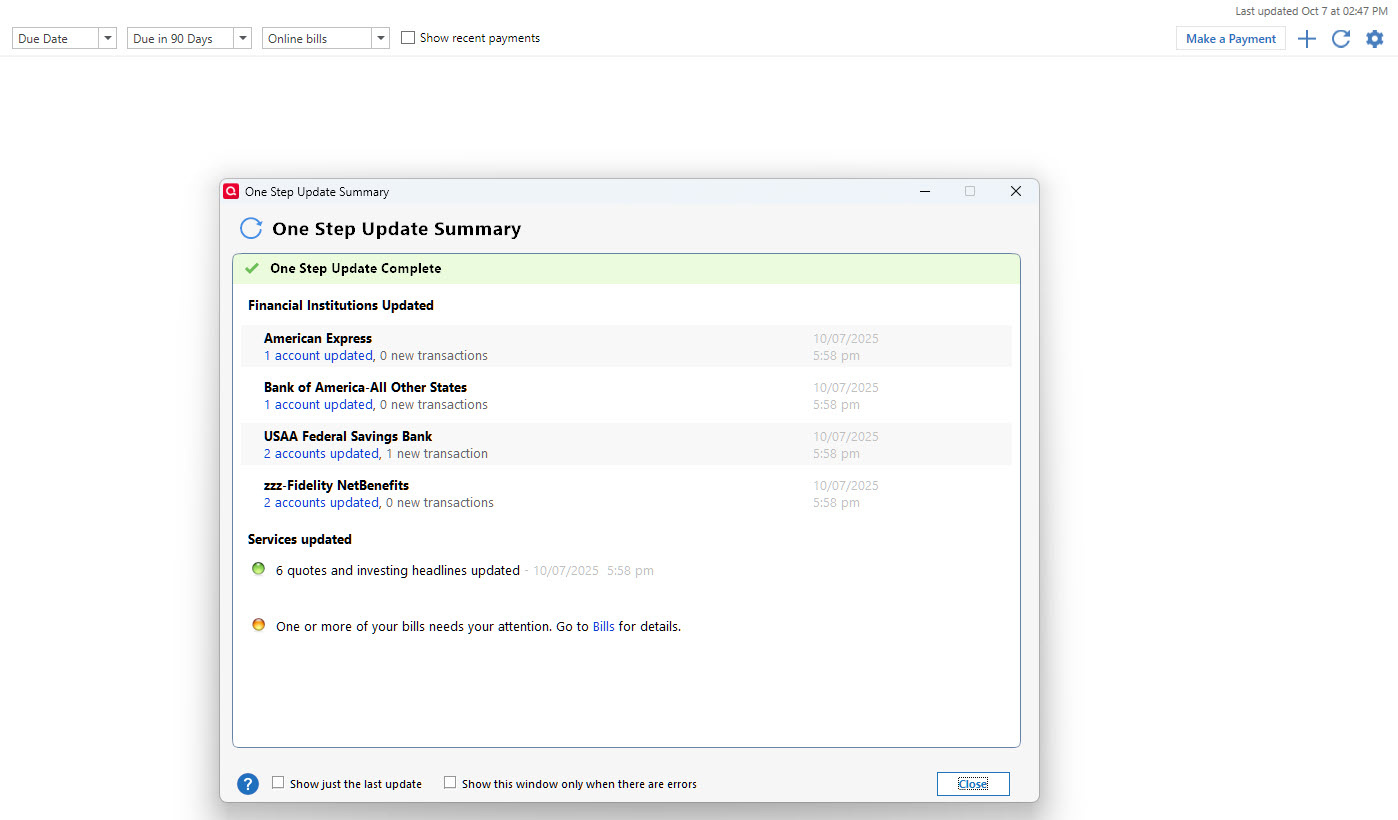
@Quicken Kristina It was worth a shot but it didn't work. Turned on sync, waited until finished (see pic). Reset cloud data, waited until complete (took a bit longer than previous sync). When finished, both online billers were gone. Ran OSU and got the same error. Added both back (pretty easy) and ran OSU again, still the same error. See pics below.
1st Sync complete. The "35 eligible accounts not synced" are either closed or not "online".
After reset and OSU. Note Bills page is blank behind OSU Summary,
Added 2 CCs and reran OSU. Same result.
 0
0 -
@Quicken Kristina Another day, another attempt. I created a new qdata file (billtest). I only added my USAA and AMEX accounts, reauthorized and downloaded the transactions. I just accepted then and reconciled. Balances matched. Then added the 2 bills and ran OSU. No error this time. So must be something in my qdata file (or it's cloud connection right?
So even though resetting my cloud file didn't work, I opened my "dummy" file so I could see the cloud files associated with my account. From there I deleted all of the files (except for dummy). Back to my original qdata, reauthorized, resynced, same error.
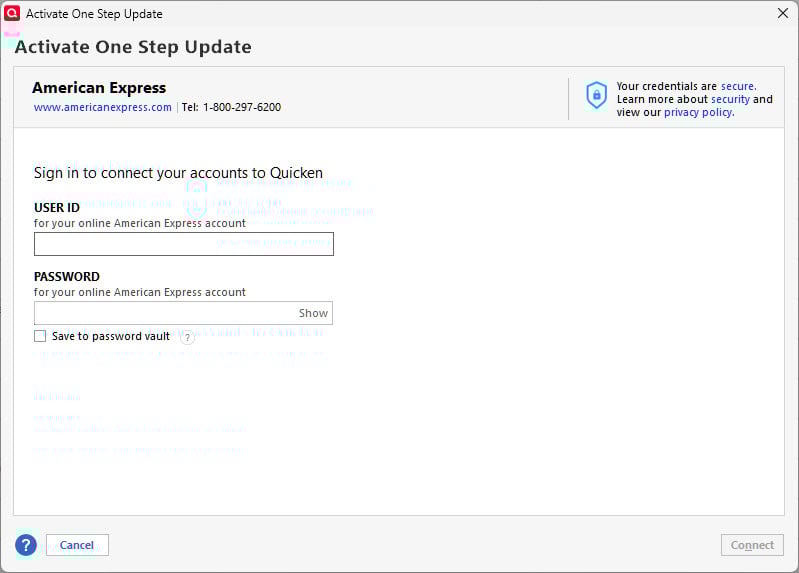
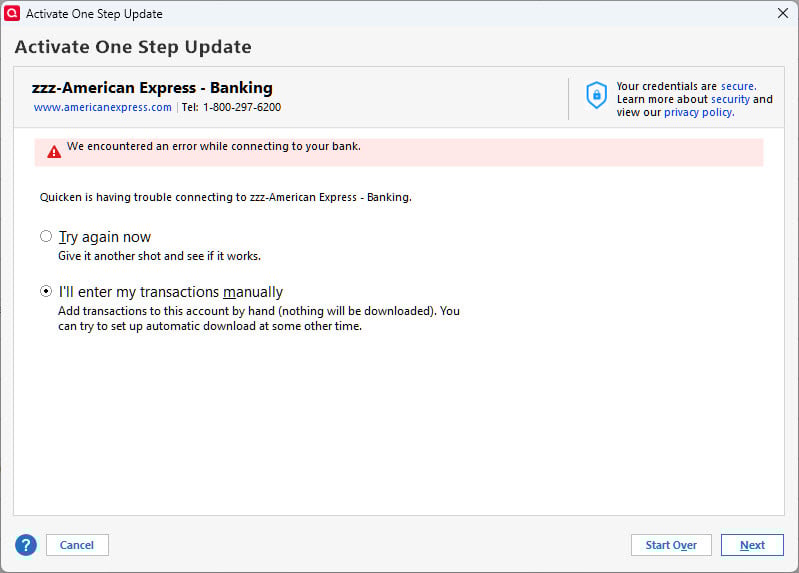
Then I created a COPY of my qdata (qdatacpy) from the begging of time to present. As I was going through the setup for my Amex, I got a few different screens. The login page (see pic) was different. I entered my credentials and got the next error (see pic). Odd that it thinks I'm using DC to connect (zzz-American Express). My Amex has been EWC+ for quite some time. So editing my Amex account, going to the Online Services tab and initiating setup always fails in this manner. Instead I added a "new account", got the usual screens for Amex, after authorizing, got the "Add to Quicken" that I changed to link to existing, and it completed successfully. I ran OSU a few more times to make sure the accounts connected OK. They did however, I still get the bills need attention. Do you think this may be related to the bill issue?
Success with new file, no other accounts
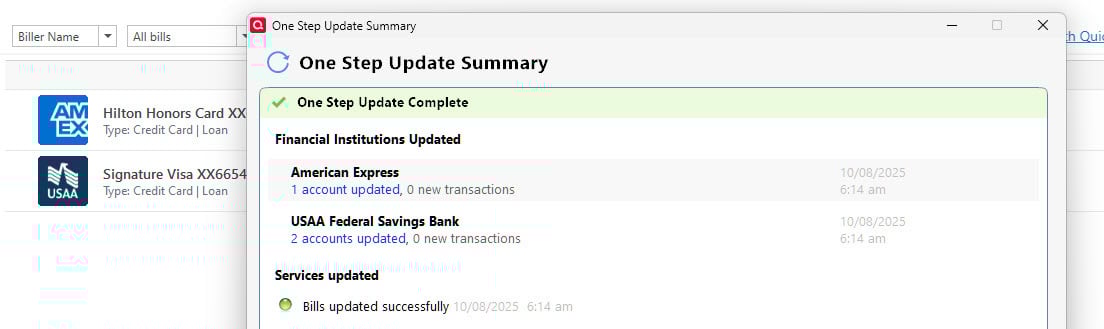
Initiate setup from Edit Account/Online services gets this login
After entering credentials I get this.
I appreciate all of your help, not just for me but others here. At this point I'm willing to let it ride as everything else seems to work OK. I still have to deal with the Fidelity migration to EWC+. My past few attempts didn't end well so I'm still on DC.
0 -
One last update. I uninstalled Quicken and removed all traces of any remnants (except my data file of course). Reinstalled and updated. Opened my data file, ran OSU and still get the error. So it must be something in my data file that validate/super validate can't detect. So for now, it'll stay. Perhaps in an update or two, I'll try it again. I have only 2 online bills since the others aren't supported. Despite the error, they appear to work fine.
0 -
I just got a new Washington Gas bill and even though it's set up to download in Quicken, the new bill is not showing
Barry Graham
Quicken H&B Subscription0 -
Still no Erie Insurance, PEPCO, or SunRun. And my Washington Gas and Washington Suburban Sanitary Commission are still pending. At least WSSC didn't fail again, so I got that goin' for me.
0 -
Chag Sameach from Yerushalayim! Did you get a WSSC bill downloaded though? I received a bill last week but not downloaded in Quicken.
Barry Graham
Quicken H&B Subscription0 -
Suspecting issues with Chase CC today.Will give it a day to see what happens. But it is entering last month's balance as due - already paid and cleared - instead of this month's.
0 -
Hello @BarryGraham & @Michael Rosen,
If you haven't already done so, I suggest you try to Review and Repair Online billers.
However, I do recommend that you save a backup of your data file first. After that, please navigate to the Bills & Income tab and click on the gear icon on the top-right. Then, click on Review and Repair > Review and Repair Online Billers in the dropdown menu.
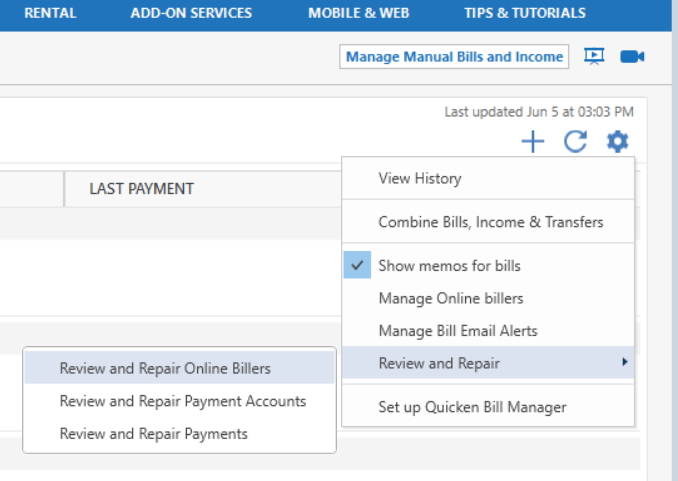
Once that is done, test to see if the issue persists.
Please let me know how it goes!
Quicken Kristina
Make sure to sign up for the email digest to see a round up of your top posts.
-1 -
@Quicken Kristina I have tried this many times and it does not fix the issue. I tried it again and it didn't fix the problem. Furthermore, The WSSC biller changed to showing "Failed" when I refreshed the bill.
 Barry Graham
Quicken H&B Subscription0




