Fidelity reauthorization process created duplicate accounts

After several reminders to reauthorize with Fidelity (to download Fidelity transactions into Quicken Windows Premiere) I bit the bullet and initiated the reauthorization process.
Unfortunately, this process created 2 duplicate Fidelity accounts. The original accounts include transactions from when I first opened the account (many years ago), but the duplicates only show transactions from June 2025.
I also noticed the original accounts use "Direct Connect" and the duplicate account use "Express Web Connect +". I would like to retain the original accounts since they include ALL the transactions but want to make sure these accounts get updated online.
I would also like to get rid of the duplicate accounts. Not sure how best to do this.
BTW, I took all the default answers (during the reauthorization process) when it shows all the Fidelity Accounts with the pull-down menus where it gives options like "Add to Quicken" and "Link to Existing Accounts". I never know which one to select so I just took the default answers. I wish there was more of an explanation. What I most care about is stuff like (you won't lose any data or you will have duplicate transactions (or duplicate accounts) if you select this option.
Please advise.
[Edited - Readability]
Comments
-
Hello @crissnyder,
Thank you for sharing your experience! Usually, Quicken correctly identifies the correct account to link to, but it sounds like this time, a couple of the accounts got added as new instead. To correct this issue, please start by making a backup of your Quicken file.
Next, since you said you do not want the duplicate accounts in your Quicken file, delete them. Warning - Deleting an account is permanent. If you accidentally delete the wrong account, the only way to get it back is by restoring a backup from before the account was deleted.
Then, deactivate the original accounts. Once the original account are deactivated, navigate to Tools>Add Account and follow the prompts. When authorizing on Fidelity's website, please make sure all accounts that you want to share with Quicken are selected. Unselecting account revokes permission for Quicken to sync with that account.
When you get to the Add/Link screen in Quicken, make sure to carefully link each account to the correct nickname in Quicken (if you have more accounts than just the 2 problem accounts, make sure to check all the accounts and make sure they are linking correctly).
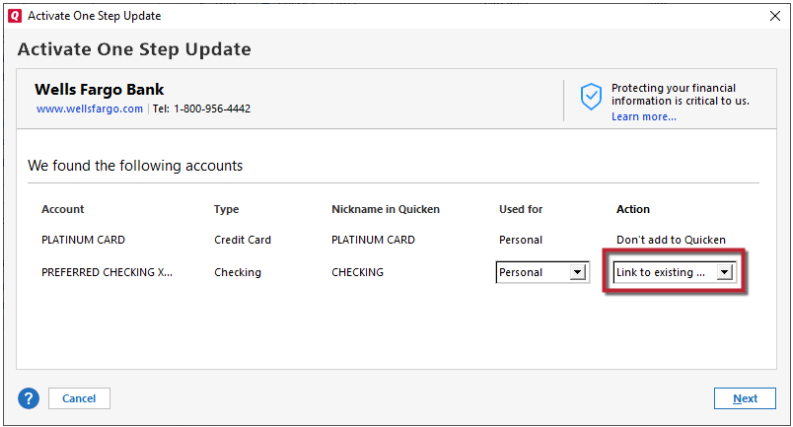
Once your accounts are reconnected, review to make sure everything is correct. There is a risk of duplicate transactions (usually just from the last 30 days). If you find duplicate transactions, please backup your file and delete the duplicates.
Please let me know how it goes!
Quicken Kristina
Make sure to sign up for the email digest to see a round up of your top posts.
0 -
Thanks for the reply Kristina. Good information. I decided to restore an older version of the Quicken file and that brought me back to where I was before I attempted reauthorization. I will ignore the reauthorization reminder as long as I can. Hopefully this will give everyone time to fix the bugs associated with this reauthorization process. Unfortunately, this messed up my Qucken Mobile balances. If I ever have an extra hour or so I will call Quicken support to see if they can synchronize it with my Windows Desktop Quicken file.
0
