Bill and Income Reminders status as Skipped

Only for my Citi Card account, all future bill reminders all show as "Skipped" rather than Upcoming. Been this way for a week or more. Downloads are fine. Other credit cards and reminders are fine.
Quicken Deluxe user since 2007, Windows 11
Comments
-
Hello @ksm,
Thank you for sharing your experience. I can definitely see why this would be confusing.
I think a good place to start would be to Validate your file.
- Go to File.
- Select Validate and Repair File…
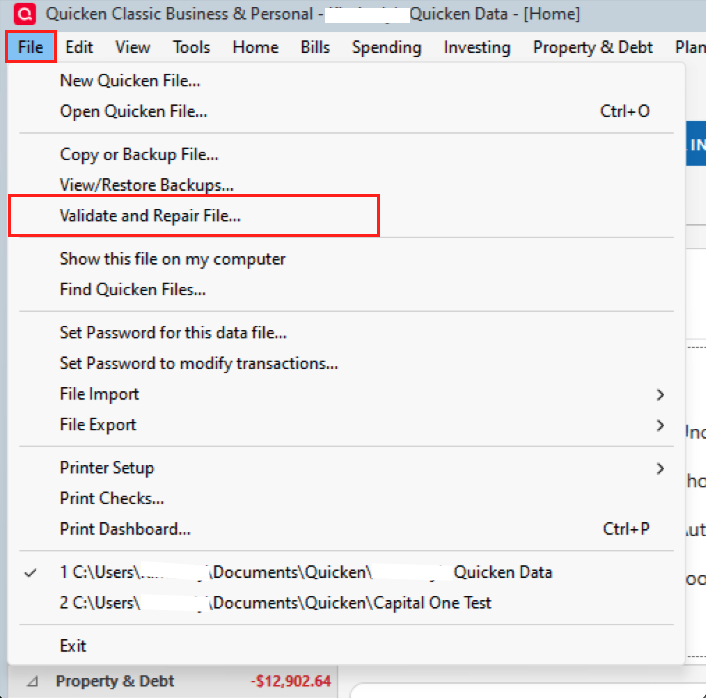
- Check the first box for Validate file.
- Click Ok.
Once that is done, check to see if your future bills still show as skipped. If they do, we may want to delete that series and re-enter it. However, there are some other things I would like to check as well before going straight to that.
- Where is your file located?
- Is it being synced/backed up by a third-party cloud service like iCloud, Dropbox, or OneDrive?
Let me know how it goes!
Quicken Alyssa
Make sure to sign up for the email digest to see a round up of your top posts.
0 -
Looking further at the issue, I note that it is NOT related to Citi Cards. (Can you change the title of this entry?) The reminders that show as skipped are all the reminders that are "Only Once" in "How Often." There are 6 of them and they are for a few different accounts.
My file is only on my computer. My computer is backed up to Backblaze.
I will run Validate and let you know how that goes.
Quicken Deluxe user since 2007, Windows 11
0 -
Hello @ksm,
Thank you for following up with additional details. I changed the title, as you requested.
With Backblaze, there should be a way to exclude certain files from the backup it performs. Please exclude your active data file. You can allow it to back up all of your Quicken backup files, but the file you are actively using should be excluded to prevent damage from occurring.
Looking forward to your response about the validation as well.
Quicken Alyssa
Make sure to sign up for the email digest to see a round up of your top posts.
0 -
Validation completed. Only Once reminders still show as Skipped.
This is not a big deal for me. I can live with it.
I don't understand why backing up my active Quicken file would damage it. It only makes a copy of the file; it does not interact with or change the files.
Quicken Deluxe user since 2007, Windows 11
0 -
@ksm , can you show us an image snapshot of (one of) these "Only Once" reminders, please?
What status should these reminders actually show? Due on (a future date)? Or Due on (a date in the past)?
What is the value of "Remind me [xx] days in advance"How long have these reminders existed in your data file?
How do I post a screenshot in the community from a mac
How do I post a screenshot in the community from windows
Please save images to files of file type PNG or JPG only. They're easier to work with than PDF files.
0 -
Status should be "Upcoming." Remind me 0 days in advance. (All my reminders are set at 0 days in advance.)
The reminder I'm attaching was created in March 2025. Others earlier and two fairly recently.
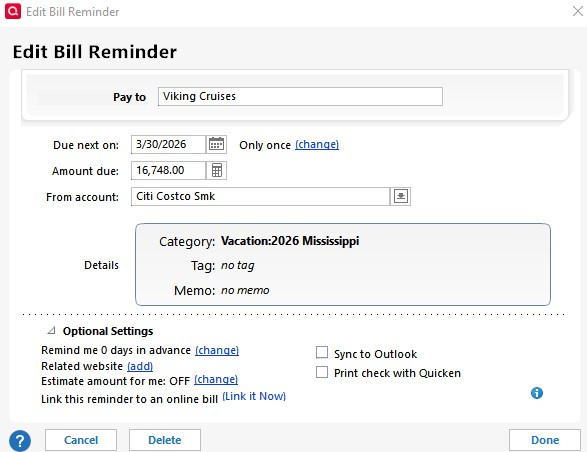

Quicken Deluxe user since 2007, Windows 11
0

