BNY Mellon not downloading since saturday

windows11 classic quicken. Since saturday unable to download my Fisher Investment transactions from BNY _ Mellon ( Pershing). All I get is "an error has occurred" when I try to do an update. It has worked flawlessly for well over a year
Comments
-
I am suddenly unable to connect to BNY MELLON PERSHING
0 -
Tell us more. What, exactly, happens? Any error codes or messages?
And, when you do TOOLS, Account List, what shows, adjacent to the BNY account(s) in the "Transaction Download", "Last Download" and "Financial Institution" columns.
Also, when you do HELP, About Quicken, what BUILD of Q are your running, which Q product, and what's your "Subscription Valid thru" date?
Q user since February, 1990. DOS Version 4
Now running Quicken Windows Subscription, Business & Personal
Retired "Certified Information Systems Auditor" & Bank Audit VP0 -
I agree with "misterconcrete", this BNY PERSHING connection has been broken since Saturday, 10/4/2025.
-1 -
I also am all of a sudden not been able to connect with the BNY MELLON PERSHING. This has been in the last few days.
-1 -
Hello All,
Thank you all for sharing your experiences.
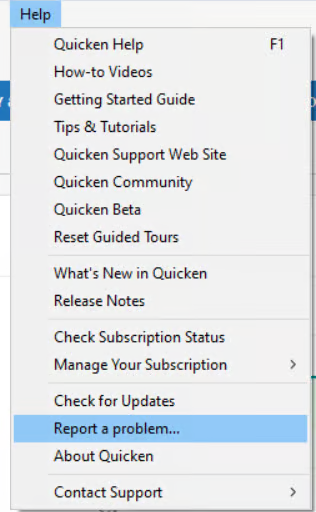
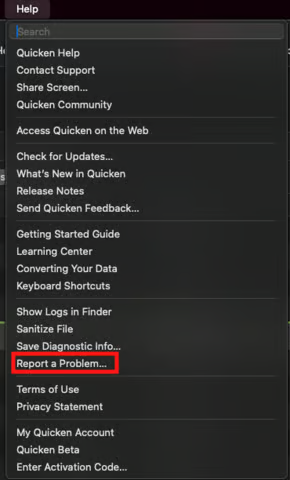
We have forwarded this issue to the proper channels to have this further investigated. However, we request that you please navigate to Help > Report a Problem within your Quicken program and submit a problem report with log files and screenshots attached.
Windows:
Mac:
It would also help to include a sanitized data file when submitting your report. A sanitized file removes all personally identifiable information so you can safely share it with our team.
While you won’t receive a direct response from the submission, these reports are critical in helping our teams investigate and resolve the issue more efficiently. The more reports we receive, the better.
We apologize for any inconvenience in the meantime! Thank you.
(CBT-856)-Quicken Anja
Make sure to sign up for the email digest to see a round up of your top posts.0 -
Downloads from BNY Pershing using Direct Connect have not happened for last few days.
They'dworked relatively problem free in the past. Attempting to do Account Reset also fails. I double checked and the password in Quicken is correct. I am able to login to the BNY Pershing website without a problem. Thoughts?0 -
I had the same issue. I tried removing and re-adding these, and ended up with all my accounts in simple - positions only view instead of complete - positions and transactions. The message said this was the format they provide now. Trying to figure out how to connect but get complete positions with transactions and can't figure it out, nor can I figure out how to download transactions manually.
0 -
Hello @JBobShu & @Katie Poteat,
Thank you for sharing these details. We understand how frustrating this is, especially since it has worked fine in the past. Please submit a problem report from within Quicken via Help > Report a Problem, and attach your log files, screenshots, and a sanitized data file if possible. These reports are crucial for our team to investigate and resolve the issue efficiently.
Thank you!
-Quicken Anja
Make sure to sign up for the email digest to see a round up of your top posts.0 -
I submitted a report. The challenge is that BNY Pershing doesn't have an option to download transactions manually so I have no way to get transactions downloaded with the simple-positions only view.
0 -
Thanks for submitting the report, @Katie Poteat. Your files have been attached to the ticket.
-Quicken Anja
Make sure to sign up for the email digest to see a round up of your top posts.0 -
Same here. I submitted a report.
1 -
Thanks for following up, @missmyrtle. Your files have been added as well.
Thank you!
-Quicken Anja
Make sure to sign up for the email digest to see a round up of your top posts.1 -
I have the same issue and I have opened a ticket (#12727654) with Pershing on this issue on Monday Oct 6t, 2025 and working with my Financial Advisor who has the direct relationship with Pershing on my behalf, (and agreed to allow me to contact Pershing Directly based on my extensive background in this area.
The latest from Pershing on my Trouble ticket to them, per my Financial Advisor is, "You seem to have stumped everyone! ". This has me very concerned! "Direct Connect Access" verses "Express Web Connect" is a common set of terms and methods for Electronic Access throughout the Financial Industry….. and Pershing Tech Support is "Stumped".
Clearly they have a quality control issue for Pershing Production System Releases, and pre- Promote to Production Release testing. I have to assume that they have some form of interface contact with Quicken Tech Support as Pershing clearly lists a Quicken Area on the Pershing Web Site area for Pershing Customers/Users to get information on connecting Quicken to Pershing Account Systems.
I am a 20 year user of Quicken and a 40 year IT Architect with Fortune 10s in the financial industry. Pershing has made a change sometime after September 30, 2025 (my last complete transaction download) and I too attempted access to Pershing on Oct 4th and found the same problem others are reporting here. It appears so far that Pershing Tech Support does not understand the change they may to the Pershing System(s), and did not do a validation for Quicken Access during Pre-production Deployment.
Please Quicken Tech Support Staff… contact Pershing and explain to them the impact of the changes they have done to their system as it is clear from my interface with them so far is that the don't understand…. and worse … they don't understand the Terms and Technology they are implementing and operating.
1 -
In short: Pershing changed Quicken Access to Pershing System(s) from " Direct Connect" to "Express Web Connect", which no longer allows Electronic Automated Downloads of "User Transaction Information" from Pershing User Accounts into Quicken. The only way to obtain Transaction Information from Pershing Customer Accounts is to:
- Turn Off "Online Access in Quicken for the Pershing Accounts we Quicken Users have in Quicken.
- Use a Browser to Log into the Pershing Web Site
- Get to your Pershing Account(s)
- Use the Manual Excel Download option to download your transactional information to a PC device.
- Go to your local Quicken "Pershing Accounts" created in Quicken.
- Perform a Manual Upload from the load "Excel File" you downloaded from Pershing.
- Then attempt to validate that what has been upload from the Excel file from Pershing is actually the Transactions that have occurred in your Pershing Account.
(This is clearly unacceptable for me in this day and age)
2 -
Hello @LF3550,
Thank you for taking the time to provide such a thorough overview of your experience with Pershing. We understand how frustrating this situation is, especially given the changes to Direct Connect and the impact on automated downloads.
I want to assure you that this issue is still being actively investigated, and the ticket remains open. If you haven’t already done so, please submit a problem report via Help > Report a Problem in Quicken, including log files, screenshots, and a sanitized data file if possible. These submissions are essential for our team to fully review and work toward a resolution.
We don’t have an ETA yet, but all the information you’ve provided is being considered as part of the ongoing investigation. Thank you for your patience while this is being addressed.
-Quicken Anja
Make sure to sign up for the email digest to see a round up of your top posts.0 -
Hello again,
We now have an open Alert for this issue, though we do not have an ETA on resolution at this time. While the investigation remains ongoing, please refer to this Community Alert for any and all available updates and information.
We apologize for any inconvenience in the meantime! Thank you.
-Quicken Anja
Make sure to sign up for the email digest to see a round up of your top posts.0 -
Same exact issue - first problem for me was 10/4, then again 10/11. Tried reset, tried deactivate then reactivate. THEN found this post and stopped wasting my time trying.
0 -
Hello @markatrobwen,
Thanks for sharing your experience— I completely understand how frustrating it is when something that’s worked reliably suddenly stops.
At this time, the team is continuing to investigate, and all information shared in these reports is being considered. Please refer to the Community Alert linked in my previous response for updates. I know waiting isn’t ideal, but your posts are helping the team understand the scope of the issue.
Thank you!
-Quicken Anja
Make sure to sign up for the email digest to see a round up of your top posts.0 -
I know it's being investigated. Just adding that my wife and I both have accounts with Pershing. They are both broken. Today I removed the online settings for my account, leaving my wife's alone. Hers is still broken. I cannot successfully add online settings back to mine.
I have used Quicken since the 1990s. Generally I love the program. However, online services are very temperamental, and have gotten worse recently. We were also affected by the recent Fidelity issues. And, online bill pay doesn't work for me at all any more since the provider change. Very disappointing.0 -
Hello @Mike4,
Thank you for sharing your experience. I understand how frustrating it can be when online services that have worked reliably for years suddenly stop functioning. Your observations about both your account and your wife’s, as well as the other recent online service issues, are very helpful for our team to understand the broader impact.
We appreciate your patience while the team continues working on this issue.
Thank you!
-Quicken Anja
Make sure to sign up for the email digest to see a round up of your top posts.0 -
SIgn in to your account. Go to your settings and after logging in again you will see a link to connect your Quicken account to your accounts at BNY
Immediately afer activating that you can dowload again to Quicken no problem
Quicken
Manage and update your account settings and information.
Device status updated successfully.
Approved Quicken Device Registration
Device Info
Machine Name
Ip address
Created
Expires
Action
QWIN
••••e002736324a93423a7d3317699c5
0 -
Hello @fr3edy,
We appreciate you taking the time to post what helped resolve the issue on your end—that information may be helpful for others following this thread as well.
Glad to hear you were able to resolve it.
Thank you!
-Quicken Anja
Make sure to sign up for the email digest to see a round up of your top posts.0 -
Hi! This worked for me, but it's still forcing me into Simple - Positions only view and I can't download transactions. I also couldn't get transactions to import using the method above - has anyone had any luck with manual imports?
0 -
Hi - I am able to connect now, but still in Simplified mode which means importing transactions manually (figured it out) and no ability to reconcile at the end of the month or quarter. Is this something Quicken you would address with Pershing?
0 -
Just received word on my (end user) Trouble Ticket with Pershing from Pershing Tech Support.
(Note: Though Pershing changed their Access Method for accessing Pershing Accounts on approximately Oct 4th, 2025, from "Direct Connect" to "Express Web Connect" … which does not support Transaction Data being downloaded into Quicken … this is what I just received from Pershing in that this is now a Quicken issue to resolve. )
"We have an update for your ticket INC12727654. Developer Update Below: “Thank you for reaching out about this issue. This has been identified as a known issue within the quicken system. Please reach out to the Intuit team (Quicken) in order to get this issue resolved. The fix will need to be implemented from their side.”
1 -
Update: I ( A Quicken User) was on a call at 10am EDT) with my Financial Institution Leader and Pershing Leadership. Pershing Technical Staff is indicating that they have been working with Quicken Technical staff, and that although we as users select the "Tracking Method" to "Complete: Positions and Transactions", that it is Quicken that is the one that is changing our access to Pershing after we connect to Pershing as being "Positions Only" and graying out the "Tracking Method" to "Simple: Positions Only".
I have tried to contact Quicken Technical Staff via the Quicken Customer Service Number to attempt to speak with Quicken Technical Staff (I am a 40 IT Professional in the Financial Services Industry) to attempt to resolve this situation, but Quicken Customer Service will only provide the status on this as "Quicken is still working on this and that there is no ETA".
I have 4 accounts with Pershing and access through Quicken. One Account will connect to Pershing via Quicken through "Direct Connect" and I get all the Transactions for only this one account at Pershing. The other 3 Pershing accounts change my Quicken Account-Pershing configuration once I establish my 1st connection to Pershing, from "Complete: Positions and Transactions" to "Simple: Positions Only" and grays out the ability to change the "Tracking Method".
Pershing indicates that they are now trying to escalate this situation within Quicken to Quicken Leadership. I can only call the Quicken Customer Service Number for status on the Quicken Problem Ticket (11991654/CTP-14800) … and get .."still being worked by Quicken".
1 -
Not sure if this is the case for everyone but this does seem to be resolved.
0 -
Has Quicken Tech staff or Pershing Tech staff corrected this major connection issue yet? I do not want the "Simple:Positions Only" method while tracking. I want the former "Complete:Posions and Transactions.” Please update this thread.
0 -
Hello All,
Thank you for your patience. The investigation is still ongoing, and at this time there is no ETA for resolution.
Please continue to refer to the Community Alert for the most current information and updates as we do not have any further details available beyond what has been and will be posted within the Alert.
We apologize for the continued inconvenience and appreciate your understanding as our team continues to work through this.
Thank you!
-Quicken Anja
Make sure to sign up for the email digest to see a round up of your top posts.0

