Error in Intervals on Net worth report

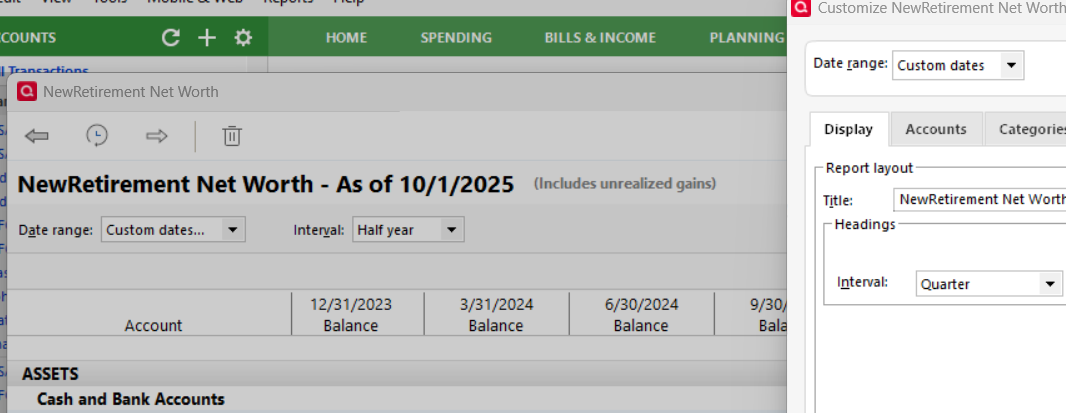
Error in intervals. For example: Report pull down window shows Interval: Half year, but heading is quarterly. Then click on settings icon: then Interval is quarterly. Same for other intervals. So I guess one to one relationship between Pull down interval is not same to customize interval.
Comments
-
Hello @jsnider47,
Thanks for bringing this to our attention!
I attempted to replicate the issue, but everything appears to be working as expected on my end. A few questions to help narrow down what might be happening:
- Where is your Quicken data file stored? Is it on your local hard drive (C: Drive) or a cloud-based/external drive (e.g., OneDrive, Dropbox, USB, etc.)?
- Have you attempted any troubleshooting steps so far? If so, what were they?
- When did this issue first start occurring?
- Were there any significant changes to your system or software before the issue began (updates, new installations, etc.)?
- Does this happen on all Quicken reports or only the Net Worth report?
- Are there any specific accounts that consistently trigger this issue?
Check back and let us know! Thank you.
-Quicken Anja
Make sure to sign up for the email digest to see a round up of your top posts.0 -
Anja,
- Where is your Quicken data file stored? Is it on your local hard drive (C: Drive) or a cloud-based/external drive (e.g., OneDrive, Dropbox, USB, etc.)? ON LOCAL HARD DRIVE
- Have you attempted any troubleshooting steps so far? If so, what were they? CHANGED INTERVAL, SAVED REPORT, RE-OPENED, NEW INTERVAL SAVED, BUT DIFFERENT THAN PULL DOWN
- When did this issue first start occurring? NOT SURE, JUST NOTICED IT
- Were there any significant changes to your system or software before the issue began (updates, new installations, etc.)? RECENTLY UPDATE TO VERSION R64.30, BUILD 27.1.64.30
- Does this happen on all Quicken reports or only the Net Worth report? I DID NOTICE THAT THIS IS A SAVED REPORT, INITIALLY CREATED ABOUT 1 YEAR AGO. I USE IT ABOUT QUARTERLY, BUT THIS WAS FIRST TIME TO USE INTERVAL. I JUST TRIED CREATING A NEW NET WORTH REPORT, AND THE INTERVAL AND SETTINGS INTERVAL ARE THE SAME. SO SOMETHING IN THE SAVED REPORT. I TRIED A SAVED ACCOUNT BALANCES REPORT AND INTERVALS BETWEEN PULL DOWN AND SETTINGS WERE SAME. FOR SAVED NETWORTH.
I DID TRY DIFFERENT PULL DOWN INTERVALS:
PULL DOWN WEEK GIVES DAY INTERVAL ON COLUMNS;
TWO WEEKS GIVES 1 WEEK INTERVAL ON COLUMNS;
HALF MONTH GIVES 2 WEEK INTERVAL ON COLUMNS;
MONTH GIVES 2 WEEK INTERVAL ON COLUMNS; …. SAME TO
YEAR PULL DOWN GIVES 6 MONTH INTERVAL ON COLUMNS; …
*** I DID NOTICE SOMETHING PECULIAR:
SAVED NETWORTH REPORT:
PULL DOWN INTERVAL: ONLY HAS 8 OPTIONS: NONE TO YEAR, BUT THERE IS NO DAY OPTION
SETTINGS PULL DOWN INTERVAL: HAS 9 OPTIONS: NONE TO YEAR, BUT YES THERE IS A DAY OPTION
NEW NETWORTH REPORT:
PULL DOWN INTERVAL: HAS 9 OPTIONS: NONE TO YEAR, BUT YES THERE IS A DAY OPTION
SETTINGS PULL DOWN INTERVAL: HAS 9 OPTIONS: NONE TO YEAR, BUT YES THERE IS A DAY OPTION
6.Are there any specific accounts that consistently trigger this issue? ONLY NOTICED IT SO FAR ON THE SAVED NETWORTH REPORT
7. SOLUTION: DELETE SAVED REPORT, CREATE NEW SAVED NETWORTH REPORT? A GLITCH IN SAVING IN THE PAST? I DID NOTICE THAT MAYBE I HAVE TOO MANY SAVED REPORTS. SOME SORT OF QUICKEN TEXT THAT YOU CANNOT SAVE ANY NEW REPORTS. MAYBE I SAVED THIS REPORT AT THE LIMIT AND IT DID NOT SAVE ALL THE OPTIONS. JUST TRYING TO HELP BUT NOT VERY SIGNIFICANT COMPARED TO OTHER PEOPLE'S ISSUES.
0 -
@jsnider47 Thank you for the detailed follow-up and for testing a new Net Worth report—it’s very helpful in understanding that the issue is specific to your saved report.
To start with, please restore a backup from before you first noticed this saved report issue and see if the same behavior occurs with the saved Net Worth report in that backup (like a pre-update backup). This will help us determine whether the issue was caused by a recent Quicken update or if it originates from the data file itself.
Once you restore the backup, open the saved Net Worth report and check if the interval pull-down and settings align correctly.
Let us know how it goes!
-Quicken Anja
Make sure to sign up for the email digest to see a round up of your top posts.0 -
@jsnider47 It appears you have run into a known issue with saved Net Worth reports. This issue was introduced when Quicken added the Day interval selection.
I believe you have already done what is needed to recover, namely to re-create the saved report. See this discussion
QWin Premier subscription0 -
Thanks. It makes sense especially for older saved reports not having the day interval.
0 -
Anja,
Jim_HarmanQuicken Windows Subscription SMentioned this must be error from 2022 when day interval was added. This report must have been before the day interval was added. So A) keep the old, saved reports and note the interval I need by looking at report. Or B) re-create report. I will do A for the older reports. Thanks, John
0 -
@jsnider47 Thanks for confirming and for outlining your approach.
Your plan to keep the older reports and note the intervals you need, while creating new reports for anything you want fully aligned with the current options, is a good approach. This way, you preserve your historical reports while ensuring future reports work as expected.
Let us know if you run into any further inconsistencies or have questions while re-creating reports.
Thank you!
-Quicken Anja
Make sure to sign up for the email digest to see a round up of your top posts.0

