Bill Reminder Issue with Split Categories

I recently identified an issue with Bill Reminders, with split categories, dropping all but one category in the split. When I edit an existing one and/or input a new one, with split categories, the split is there as intended. When I close and come back into Quicken on another day, the split reverts to a single category. On top of that, the Tag is also removed.
This is a new, unwanted behavior and I believe a bug has been introduced recently.
Is anyone aware of this issue and what can be done to resolve?
Comments
-
Hello @Gringgo,
Thank you for letting us know you're seeing this issue. You mentioned it started fairly recently. Did this start happening immediately after an update to the Quicken program? If it did, have you tried restoring a backup from before the issue started?
I look forward to your reply!
Quicken Kristina
Make sure to sign up for the email digest to see a round up of your top posts.
0 -
How does going back to a previous version solve the issue? I don't have a backup before the last update.
There's been a few updates recently and I can't tell you exactly when this started. It's a bug and needs to be fixed. Can you submit this to your support team for resolution?1 -
A backup won't help. Only time will help, that is the time it takes Quicken to accept this is a real issue. Bill & Income Reminders are getting scrambled during OSU. No amount of restoring from backups will help.
Adding- this issue occurs both with Sync On and Sync Off. I have 0 accounts selected for mobile sync and Sync Off. Each OSU scrambles the reminders with category splits.
3 -
Thank you for your replies,
If the update caused a file-specific issue, then restoring a backup from before this issue started should fix it. If you are encountering the issue that @markus1957 described, then it would be a temporary fix, since the next One Step Update would break it again.
Are you noticing that the splits and tags are getting messed up after running One Step Update? Did this start with R64.25, as your screenshot indicates? It's hard to confirm the issue you're describing when I look at the screenshots you provided. The before image is in the edit screen, while the after image is not. I can see in the after image that it's showing 1 split. Is the tag missing from the edit screen? Was the tag associated with one of the categories that went missing?
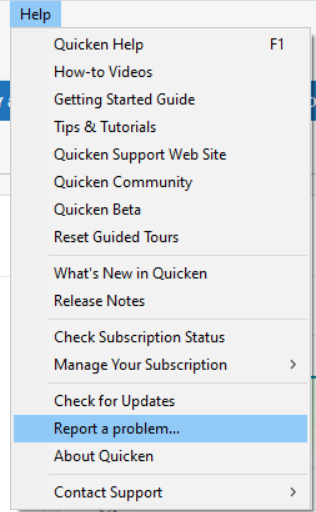
Thank you for letting us know about this issue. I forwarded it to the proper channels for further investigation and resolution. Since I am not able to replicate the issue in my Quicken, please navigate to Help>Report a Problem and send a problem report with log files attached. Including screenshots of the issue, if you're willing, would also be helpful.
Thank you!
(CBT-824)
Quicken Kristina
Make sure to sign up for the email digest to see a round up of your top posts.
0 -
@ Quicken Kristina, the issue does not always manifest with jumbled split lines but there is a form of corruption picked up in Tax Planner and when doing a super-validate.
Try adding an Income Reminder for a social security payment. Add 5 split categories, taxable social security income, non-taxable social security income, Medicare premium expense as Health Insurance with medical deduction tax line, IRMAA Part B premium as Health Insurance with same tax line and IRMAA Part D as Health Insurance with same tax line. Record Other Income in Tax Planner and the Medical Deduction amount in Tax Planner.
After OSU you will notice different amounts in Tax Planner. If you run a super validate it will say it corrected the Social Security Income Reminder.
1 -
@Quicken Kristina
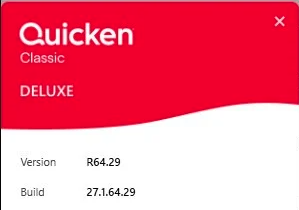
The issue started in R64.25. I am now on R64.29. I performed the OSU this morning since it's the first step performed when I open Quicken. Since the OSU was performed immediately upon opening Quicken, I did not see the split transaction. When I did check, the split was incorrect. I then corrected the split.Behavior: Opening and closing Quicken on the same day does not change the split, with or without performing a OSU. The split is incorrect when I open Quicken on a subsequent day.
Troubleshooting Steps
- Opened Quicken and performed a OSU.
- I checked the split and it was incorrect. I then corrected the split and performed a OSU. The split has remained.
- I closed Quicken and reopened it, cancelled the OSU, and the split remains.
- I performed the OSU manually and the split remained. I then closed Quicken, reopened Quicken, ran a OSU and the split remains.
I will reopen Quicken tomorrow. The question is, should I perform the OSU or cancel and review the split before running OSU?
I'll wait for a reply.
[Edit - Removed Personal Information]
0 -
Thank you for your replies,
I can see a few Tax Planner issues have already been reported. Is this issue related to the problem with the Tax Planner not recognizing scheduled paycheck information, or is this something different? For reference, here's the link to the discussion on the Tax Planner not recognizing correct paycheck info:
Thank you for your reply,
Please try cancelling OSU first to check if the split is still reflecting correctly. That can help track down what is triggering the split to get distorted.
Thank you!
Quicken Kristina
Make sure to sign up for the email digest to see a round up of your top posts.
0 -
I think the original paycheck issue has been fixed. You can see the deductions now in Tax Planner. To the extent there is still an issue with Paycheck reminders, it seems that it is related to all reminders with multiple split categories. A Paycheck is really just a special form of a multiple split reminder so it may be impacted in the same way other multiple split reminders are impacted.
1 -
The issue appears to be resolved. Steps I executed are below.
- Opened Quicken, cancelled OSU, and the split remains correct
- 2 split categories in the correct order with Tags
- Ran OSU and the split remained correct.
- Closed Quicken, reopened, cancelled OSU, checked the split (correct), ran OSU and the split remains correct.
- Reopened Quicken, ran OSU, checked the split. The split remains correct.
I'll perform some checks tomorrow to see if the issue reappears.
1 - Opened Quicken, cancelled OSU, and the split remains correct
-
I also cannot break reminders with splits as of yesterday. I waited until this morning after a new day's OSU to see if the reminders remained uncorrupted and they did.
I cannot pin down exactly what happened but have a couple of candidates. I went from reliably being able to break the reminder after OSU as verified by seeing changed values and anomalous behavior in tax planner and also "corrected scheduled reminders" in super-validate reports to not being able to break it.
Three things I did but really cannot pin down if any one of them are responsible.
First, I deleted QW.rmd, a legacy file from BillMinder that is still used somehow in Quicken and which has been implicated in the past for bad behavior in reminders. I had not looked at it in a while and it was rather large. It's now only about 40 kb.
Second, I reset the cloud file after a super-validate and then made no accounts selected for mobile sync.
Third, after a super-validate, I would always go back to the problem reminder(s) and check them to see if anything changed. I would then resave them. The next OSU would result in corruption, sometimes even before the next OSU, I'd notice Tax Planner shift from using scheduled reminders to YTD use to date. After the last 2x super-validate, to verify a clean file, I performed OSU immediately and Tax Planner values remain as expected.
Some form of corruption was being spawned using Quicken and being perpetuated by the OSU process. It seems for now, one of the steps I took (or a back-end change in the OSU process) corrected the corruption and the file is now behaving as expected. Several others are reporting this type of issue with reminders containing splits. Hopefully, thru trial and error, a specific set of steps that can be taken to restore the file will be identified.
3 -
Thank you for the update @markus1957,
I'm glad to hear that the issue seems to no longer be happening.
I've seen reports of Sync seeming to break split transactions, especially paychecks before, so if you had Sync enabled, I would suspect it may be the most likely culprit, especially if you had it set to run during One Step Update (OSU).
I look forward to your reply!
Thank you for the follow-up @Gringgo,
I'm glad to hear the issue seems to be resolved.
Please let me know if the issue returns!
Quicken Kristina
Make sure to sign up for the email digest to see a round up of your top posts.
0 -
@Quicken Kristina When I first started experiencing this Sync was Off. I move between beta versions and production so at first, I attributed the issue to corruption caused by bouncing between the 2 versions. Then I saw it reported by regular users, so I tried more troubleshooting steps with Sync On and Off. With Sync On, I always deselect all accounts to keep it simple for troubleshooting.
The issue can range from the obvious where split lines have their categories changed, which manifests with unexpected values in Tax Planner and Projected Balances. It can also be more subtle where Tax Planner switches from tracking scheduled reminders to using avg. YTD expenditures.
I don't think it's a Sync On or Off dependent issue as during OSU whether Sync is On or Off, you see in the logs where Preferences, Renaming Rules and Scheduled Reminders are synced in some fashion with the cloud. So, it's that "hidden from the user" sync process that can reinsert corrupted information at the next OSU, even if the user successfully removed it with one of the file repair processes.
The one correlation that held true in my troubleshooting was if there was scheduled reminder corruption, a super-validate would pick it up and repair it with an entry of "scheduled reminder corrected". But until yesterday, it would always get corrupted again after the next OSU whether Sync was On or Off.
2 -
I opened Quicken today and my Bill Reminder split transaction is back to one split. I am on R64.30 now. I corrected the split, then performed a OSU. The corrected split remained. I closed Quicken, reopened and ran OSU again. The split has remained. I'll run Quicken again tomorrow.
1 -
Thank you for the follow up,
Please let me know how it goes!
Quicken Kristina
Make sure to sign up for the email digest to see a round up of your top posts.
0 -
Opened Quicken and skipped OSU. Split was intact as last edited. Ran OSU manually, split remained intact.
Any idea on why this keeps happening? The only thing that's really changed is the software version.
0 -
Thank you for your reply,
If the only change was in the version, then perhaps it was a bug that got fixed in the next version? With the new online biller service provider, there have been multiple updates that made changes/fixes to the Bills & Income section.
Is the issue currently fixed, or is this problem still happening with some splits?
Quicken Kristina
Make sure to sign up for the email digest to see a round up of your top posts.
0 -
It appears that with each next version, the issue came back. As of right now, on R64.30, the issue has not reappeared.
1 -
I added an online biller, not related to the split transaction I've been having issues with, and the splits were reverted back to 1 split instead of the 2 splits that were there. I've corrected it back to the 2 splits.
1 -
Thank you for the update,
Odd that adding an unrelated online biller would trigger that behavior. Has the correction stayed so far?
If it changes again, please let me know!
Quicken Kristina
Make sure to sign up for the email digest to see a round up of your top posts.
0 -
The issue is only happening with reminders that contain splits. Unfortunately, the cloud still gets involved for renaming rules and bill & income reminders (including paycheck reminders) whether Sync is On or Off. You can see this in the cloud sync log. The cloud is storing corrupted reminders and even after fixing them once you run OSU, it will corrupt them again.
I was able to finally get mine straightened out but I do not know exactly what order of steps resolved the corruption. After repairing the reminders and before running OSU, did a super-validate and closed the file. The super-validate log indicated reminders were corrected. Then I deleted my cloud file (you need to do this while open in a different file) for the problem file. Then I opened the problem file and reset the cloud file. Sync has to be On for this but you can disable all accounts from syncing. Then I super-validated again to verify there was no more corruption in the reminders.
Prior to doing all this, I could reliably corrupt my reminders after OSU. I know super-validate alone does not fix the issue. So getting rid of the cloud file and starting fresh seems to be the key.
1 -
I opened Quicken and ran OSU. I checked the split transaction and it was intact (containing the 2 split categories). I then ran a super-validate and all looks good. File attached. The split remained intact. I created a new Quicken file and followed @markus1957 instructions to delete cloud data, but the ability to delete cloud data does not exist.
0 -
@Gringgo Sync needs to be On for cloud files window to display.
1 -
Ironically, today when I ran Quicken and OSU, the Syncing Quicken and Quicken Cloud data window popped up. I did not have my account scheduled to sync. Why would this appear?
I noticed that my split transaction was reset back to a single split. I then checked and my data was not synching to the cloud. I then turned on Cloud Sync and synced my cloud data. I then opened my other data file and deleted my cloud data in my main file. I also reset my split transaction back to the 2 categories. I had to fix OSU connections to several accounts. My split transaction remains correct.
0 -
Thank you for the update,
The Quicken program does use the Quicken Cloud for some functions other than syncing with mobile & web, so it's possible that's why you saw the Quicken Cloud data window appear. If cloud sync was causing the issue you've been seeing with the split getting messed up, I would expect that deleting the cloud account associated with that file should prevent it in the future.
Please let me know if the issue happens again!
Quicken Kristina
Make sure to sign up for the email digest to see a round up of your top posts.
0 -
Based on my own and others experience with scrambled splits in reminders (including Paycheck reminders) after performing OSU, I'm offering the following sequence of steps to resolve the issue. Note that a cloud file reset or deletion is required for a permanent fix. The reset is easier to do so if it works, that is recommended. Reminders must be free of corruption before the cloud reset/delete, or an OSU so editing the reminder to correct split issues and performing the super-validate need to be done first.
Repair Process for Scrambled Splits in Bill, Income and Paycheck Reminders
- Edit/fix any reminders that have splits that are obviously scrambled.
- On the Menu bar, click File, press & hold Ctrl+Shift keys then click "validate and repair", click super validate, click Okay, let it run & note any errors found. If reminder errors are reported as corrected, review them to verify accuracy.
- Click Edit>Preferences>Mobile & Web, Turn Sync On (do not sync if offered), click "Troubleshooting: reset your cloud data", do not sync first when offered. Let it run the reset and note any errors.
- After the cloud file reset completes, if you do not use the Mobile or Web app, verify 0 accounts are enabled for Sync. If not 0, click the link and disable all accounts for Sync. Also go to OSU Settings and uncheck the Sync to Quicken Cloud box and click Apply. Then return to Preferences and turn Sync Off.
- Repeat Step 2 and if no errors are reported, try an OSU. Verify reminders did not get scrambled.
If a Reset does not work, then a full delete of the cloud file is required. This can only be done from another open file (it can be a dummy blank file freshly created). Sync must be On to show the delete window in Edit>Preferences>Mobile & Cloud Accounts, click the "cloud accounts associated with this Quicken ID" link. Then delete the problem file cloud account. Then close the file and open the problem file. Repeat Steps 1 thru 5 above.
Added Tip- for each account register, in the Opening Balance transaction you should record the current starting balance. Sync can alter the starting balance and lead the user to think something worse than changing the opening balance happened during the initial sync.
4 -
I performed the steps outlined by @markus1957, including the deletion of the cloud file, and so far the split has remained. Thank you for your great support. I'll monitor for any changes.
2 -
Thank you for the follow-up,
I'm glad to hear it seems to be behaving so far.
Please let us know if the issue returns or if you need further assistance!
Quicken Kristina
Make sure to sign up for the email digest to see a round up of your top posts.
0




Categories
- All Categories
- 20 Product Ideas
- 34 Announcements
- 247 Alerts, Online Banking & Known Product Issues
- 19 Product Alerts
- 518 Welcome to the Community!
- 682 Before you Buy
- 1.5K Product Ideas
- 55.7K Quicken Classic for Windows
- 16.8K Quicken Classic for Mac
- 1K Quicken Mobile
- 834 Quicken on the Web
- 128 Quicken LifeHub