Not Able to Download transaction in Fidelity Cash Management Account

I use this account as my checking account, and until mid-September was able to download transactions into the register in Quicken. However, the ability to update the transactions in the Cash Management register is not occurring. Also, the 'Online Services' tab is missing for the account in the 'Account List' is not there. Any help would be most appreciated.
Answers
-
Hello @JNTexas,
Thank you for sharing your experience, and I am happy to help!
When you authorize your accounts for use in Quicken, does this account come up in the list of accounts you can authorize? Was this account previously linked to a brokerage account in Quicken? Would it be possible for you to share a screenshot of what you are seeing with the Online Services tab missing?
If needed, please refer to this Community FAQ for instructions on how to attach a screenshot. Alternatively, you can also drag and drop screenshots to your response if you are not given the option to add attachments.
I look forward to your response!
Quicken Alyssa
Make sure to sign up for the email digest to see a round up of your top posts.
0 -
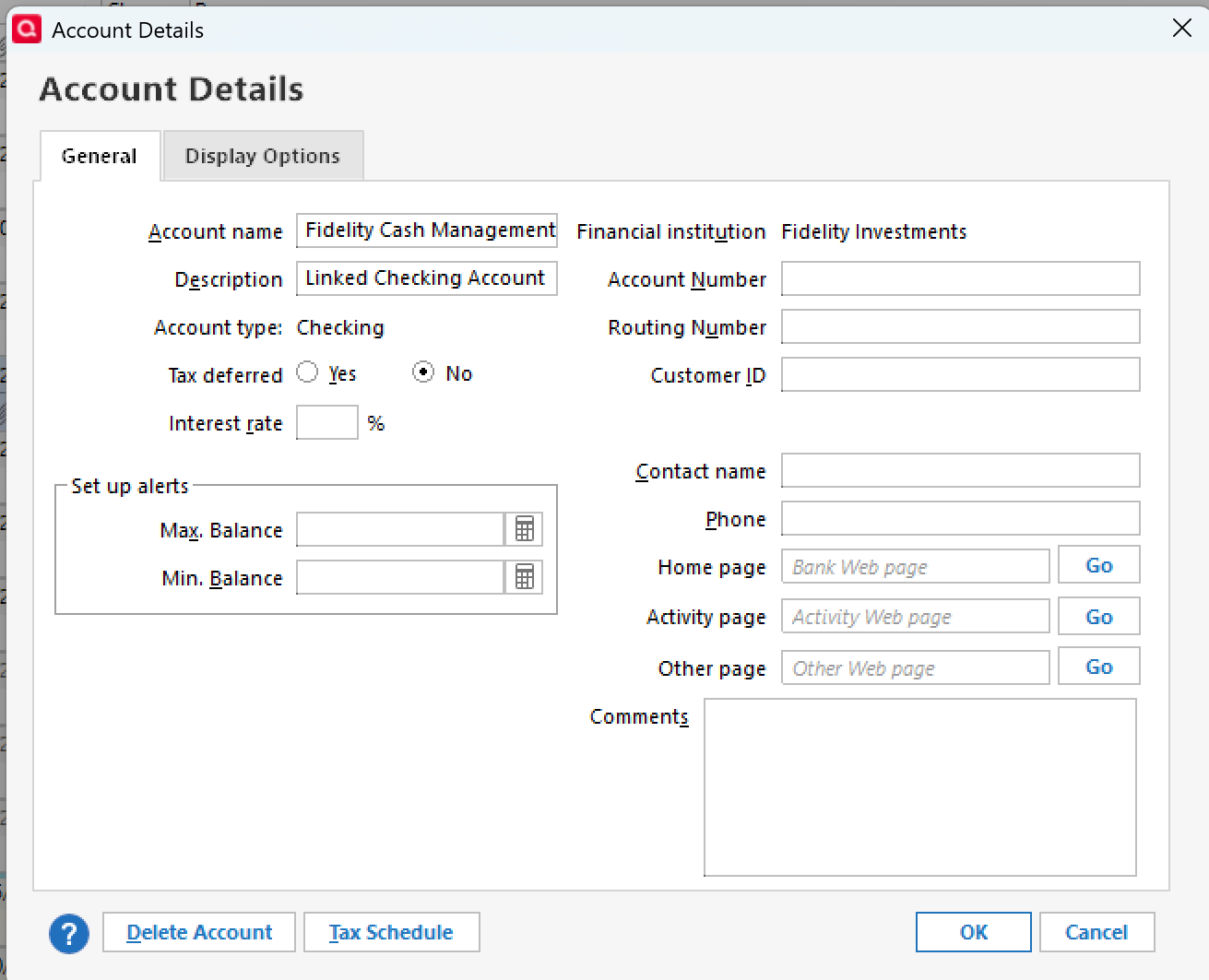
Thank you for your help! Here's a pasted screenshot of showing the 'Online Services' tab missing. I also pasted the account list display for this account, which shows that there is no option to select Transaction Download. This account is linked to a brokerage account.
Thank you.
 0
0 -
I have the same issue. Forced to switch to EWC+ and my Fidelity checking account will not reconcile even after going through hundreds of duplicate entries.
0 -
I am having the same problem. Has there been a resolution? There seems to be an issue with the new connection method for Cash Management accounts.
0 -
I am not able to download transactions for my Fidelity Health Savings Account and I assume this is a similar issue.
I tried "deactivating" and "reactivating" a couple of times.
My Fidelity regular account is working fine. I am just manually entering transactions but hoping this gets resolved soon as downloading transactions lets me know there was activity vs having to login into the account to see.
David
0 -
@JNTexas Your graphic is from the LCA, which doesn't exist in the real world. It's a Q-created representation of the cash in your taxable brokerage account.
Can you please show us the same graphic for that brokerage account?
Also, when you do TOOLS, Account List, what shows in the "Financial Institution" and "Transaction Download" columns adjacent to both the brokerage account and the LCA?
Q user since February, 1990. DOS Version 4
Now running Quicken Windows Subscription, Business & Personal
Retired "Certified Information Systems Auditor" & Bank Audit VP0 -
I was able to workaround (not resolve) it by disconnecting the online services and add back my Cash Management account as a new account in Quicken. Once that finished, I updated the account details to "Show cash in a checking account" and it created another account that will be my primary register for all of my transactions. So now I have 2 old accounts and 2 new accounts.
Next I will rename my old accounts (the Cash Management and Linked) and make sure their balances are zero.
Not ideal, but I dont think Quicken was going to let me fix the two accounts.
0 -
Take a backup.
Delete the CMA that you created, it doesn't exist in the real world. It's just your brokerage account with a MMF.
Re-select "Show Cash in a checking account". A pseudo-checking account, that's the MMF, will be created.
If you don't like the results, you've got the backup.
Q user since February, 1990. DOS Version 4
Now running Quicken Windows Subscription, Business & Personal
Retired "Certified Information Systems Auditor" & Bank Audit VP0 -
Not sure how what you're saying is different than what I did do.
When I added the account through online update, it creates a brokerage account in Quicken, let's called it CHECKING XX12 (and yes I know it is a "Brokerage" account type!). Update the account details to "Show Cash in a checking account" which creates a new account called "CHECKING XX12-Cash" and that has my newly downloaded transactions.
Many of them were duplicates from my previous pair of accounts (i.e., the "OLD CHECKING XX12-Cash" account) so I had to delete them. Hopefully going forward only my new accounts get updated.
Of course i had to also change my "Manage Bill & Income Reminders".
0 -
Hello All,
Thank you for sharing what worked for you, as it may be helpful for others experiencing the same issue.
Everyone else, take into account what @NotACPA recommended and what worked for @rfmoskowitz.
Essentially, we need to unlink/relink the cash management account.
When I try this in my own file, if I go to the Brokerage account and uncheck Show cash in a checking account, it automatically gets rid of the checking account for me, without me having to hide or delete it.
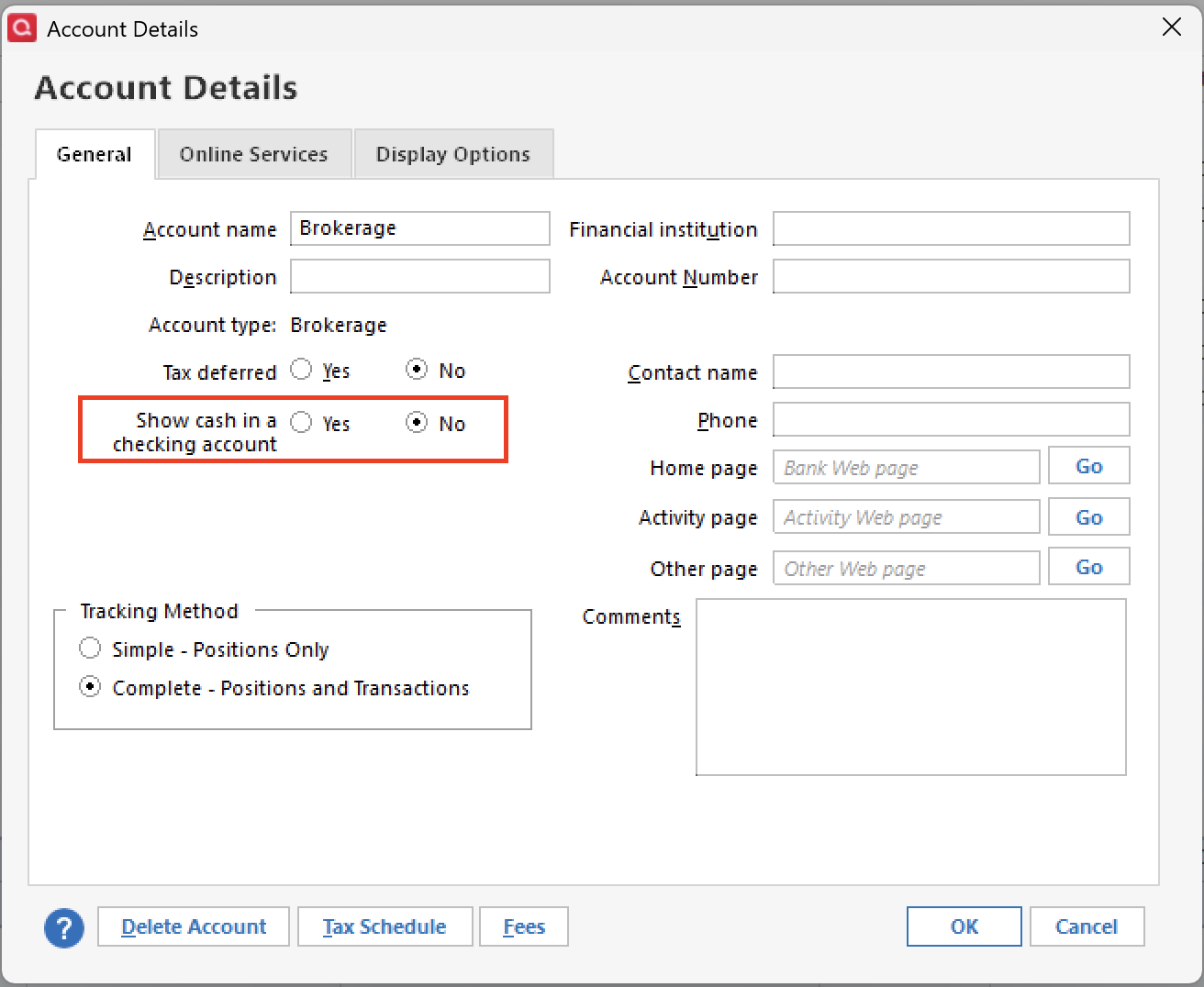
To reestablish the checking account, all I do is then change it back to Show cash in a checking account.
Hope this helps!
Quicken Alyssa
Make sure to sign up for the email digest to see a round up of your top posts.
0 -
Thanks @Quicken Alyssa . I was worried that checking "No" might delete the account, and I have 10 years of transactions that might go with it! Despite that, as an avid Quicken troubleshooter, I made a backup copy and tried that anyway and what I experienced with a dialog box saying something to the effect of "updating links". That dialog box ran and ran overnight — I came back the next morning and it was still going. Clearly it wasn't doing anything so I canceled.
That's when I decided to just start fresh with 2 new accounts.
0 -
I'm sorry but I do not follow this. Currently I have a linked checking account. One appears in banking and the other in investing. The one in banking has a small amount of cash but has all my checking account records. The other in investing has a much larger amount of cash and records the transactions from the fidelity money market flows in and out to the checking account. The EWC+ test file had many duplicates. I corrected those but still have a considerable mis-match from my current and accurate DC file. I chose the box indicating to show as cash for the checking account when I did the EWC+ conversion. How do I correct? I have over 17 years of records in the checking account.
0 -
Is Quicken team aware that transactions are not downloading from the Health Savings Account? See my comment above.
Thanks,
David
0 -
The account under "investing" should have a zero cash balance always.
I highly recommend leaving the two accounts as-is — disconnect them from online services. Then add a new account and let Quicken add the new Fidelity account (investment) for your Fidelity Cash Management account. Then edit the investment account to turn on "Show cash in a checking account". That will create the new account under "Banking" and will be where you put all of your transactions. You'll forget about (hide) the one under Investments.
0 -
I have a Fidelity HSA and have not had a problem, though I use Simple Investing so I dont actually see the transactions (and I've also not had any since I never touch my HSA balance given all of the tax benefits). Consider starting a new thread for this question since the Cash Management account is very specific and doesnt work the same was as an HSA account.
0 -
Thanks! Customer service thought it was related, but I will create a new discussion.
I download transactions.
0 -
Attempted to do as conveyed by Quicken Alyssa as follows:
When I try this in my own file, if I go to the Brokerage account and
uncheck Show cash in a checking account, it automatically gets rid of the checking account for me, without me having to hide or delete it.
To reestablish the checking account, all I do is then change it back to Show cash in a checking account.
Unfortunately, it didn't work. Ughhhhhh….
With 7 years of data in the CMA, I am reluctant to start with new accounts in Quicken for this issue that started in September…
0 -
Hello again @JNTexas,
Thank you for following up, and I am sorry that didn't work.
To clarify, the main brokerage account is updating; the only account you are having issues with is the linked cash account, correct?
Looking forward to your response.
Quicken Alyssa
Make sure to sign up for the email digest to see a round up of your top posts.
0 -
That is correct. The linked CMA is not downloading transaction. Thanks.
0 -
@JNTexas Yes, that's the problem I had too. I could get the Brokerage one to update but the Cash account still thought it was connected to the OLD online service. I know this because whenever I would go to One Step Update, it would tell me I needed to authorize the account again, even though I had already authorized all of them in Fidelity.
What is your concern/fear about starting a new set of accounts? I normally think it's a bad idea but I do think that with this update tied to the connection type changes, it constitutes a material change that using new accounts in Quicken isn't the worst thing in the world! Hope that makes you feel a little better about it! Best of luck to you.
0 -
I also have the same problem with a linked (or split) Banking (checking) and Investment account. I reported this a few weeks ago on a different thread. I'm managing 2 files, one using the old DC connection method and the other with EWC+. The old DC method still works properly but the new EWC+ does not download withdrawals from a non-core money market fund (the core money market properly shows as cash in the Banking/checking section of Quicken.
Quicken Classic Deluxe; Ver R64.30, Build 27.1.64.30; Windows 11 Home – Quicken user since Windows 3
Currently I'm performing daily backups on Quicken files and maintaining 2 identical files, one using the old DC connection method and the other the new EWC+ connection method. I'm doing this to identify and potentially debug issues with online updates.
0 -
Hello @JNTexas,
Thank you for following up with those additional details.
At this point, I think the best course of action would be for you to contact Quicken Support directly so they can take a closer look at this for you.
Hope they can get it all sorted out for you!
Quicken Alyssa
Make sure to sign up for the email digest to see a round up of your top posts.
0 -
unfortunately the work arounds suggested above for linked checking and investing accounts do not work in my case. One is that both suggestions remove history and two is that option of showing cash in a checking account has no effect as the MMF is in FZDXX. I’m close to resolving many of the problems in this transition save this one.
0 -
Hello @es114,
Thank you for sharing your experience, though I am sorry the suggestions didn't resolve your issue.
Please contact Quicken Support directly for further assistance on this issue.
Thanks again.
Quicken Alyssa
Make sure to sign up for the email digest to see a round up of your top posts.
0

