Reports pop-up reverted to initial size [Edited]

I have multiple reports in a tab group popup and resized it to be bigger. However, it kept reverting back to the initial size. This has been happening for at least over the past year if not longer. Anyone else seeing this problem?
Comments
-
What’s a tab group pop up?
0 -
Usually, when I generate a new report, it shows up as its own pop-up window, so if I have 3 reports, there will be 3 separate pop-up windows. However the tab group option will only have 1 pop-up window with 3 tabs, one for each report. This is a MacOS feature, not specific to Quicken and applies to all apps.
0 -
Is that a Windows thing? Because I'm not familiar with anything like that on the Mac. If it is Windows you should post over in one of the Quicken Windows forums.
0 -
Not Windows, I specifically said it’s a MacOS feature. I am not at my laptop now but if memory serves me correctly, it’s this setting, it works on Preview app too
System Settings –¸ Desktop & Dock –¸ Prefer tabs when opening documents - Always0 -
OK, I see what you mean (on my Mac that's set to only work in Full Screen mode which I never use). It looks like it remembers the size of the first tab the last time that tab was active. So you need to either select the first tab before resizing or you need to go back to the first tab after resizing one of the other tabs. Then it will go back to that size the next time Quicken opens.
I looked at the same behavior in Apple Mail and in that app it doesn't matter which tab I'm looking at when I resize the window, it will go back to that size. So this does seem to be a bug.
1 -
Hello All,
Thank you for taking the time to visit the Community to report this issue, though we apologize that you are experiencing this.
I was able to replicate this issue and forwarded it to the proper channels to be further investigated. If you would like to contribute to the investigation, please navigate to Help > Report a problem and submit a problem report with log files attached.
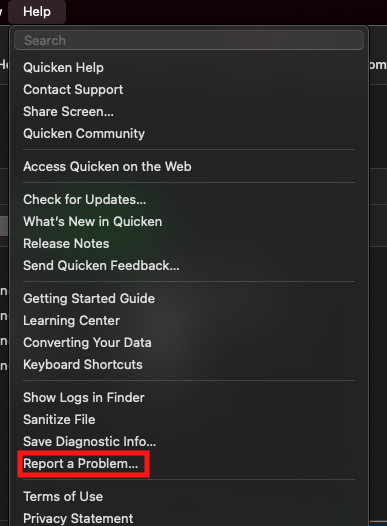
While you will not receive a response through this submission, these reports will help our teams in further investigating the issue. The more problem reports we receive, the better.
We apologize for any inconvenience!
Thank you.
(CBT-867)
Quicken Kristina
Make sure to sign up for the email digest to see a round up of your top posts.
1 -
@Quicken Kristina thanks for submitting a bug report. Can you update us when you hear back from engineering? Thanks.
0 -
Thank you for your reply,
I can, however, please keep in mind that it may be a while before the bug is fixed. Additionally, our teams typically don't respond directly on the ticket unless they need clarification or need to confirm that the fix worked.
Thank you!
Quicken Kristina
Make sure to sign up for the email digest to see a round up of your top posts.
1
