RMD Income

In the tax center, download the RMD if any for the year and include it in the Projected Tax.
Also include the credit for Qualified Charitable Distributions made.
This will improve the accuracy of the Projected Tax for people over age 73.
Comments
-
Your RMD is just a distribution. That it's required is immaterial. Are NO distributions downloading?
OR, are you expecting Q to download the amount that's required? Which would require that the various FI's provide such.
I see no need for the required amount to be downloaded, when it can be easily calculated.
And, I'm 74
Q user since February, 1990. DOS Version 4
Now running Quicken Windows Subscription, Business & Personal
Retired "Certified Information Systems Auditor" & Bank Audit VP0 -
Quicken can already properly record distributions such as RMDs from a tax deferred account to a taxable account in Quicken so that the tax implications are captured correctly, but it can be tricky to set up.
There are no built-in Categories for IRA tax withholding; you must set them up yourself. I use these:
- Tax Fed:Fed IRA WH with a tax line item of 1099-R:IRA federal tax withheld
- Tax State:State IRA WH with a tax line item of 1099-R:IRA state tax withheld
In the IRA, click on the gear at the top right and select Edit account details. Click on Tax Schedule and set Transfers out to "1099-R:Total IRA taxable distrib." If you don’t see the Tax Schedule button at the bottom of the Account Details dialog, click on View in the top menu and select “Tabs to show”. In the list of tabs, select Planning.
Enter one or more Sold transactions for the securities that were sold. This will put a cash balance in the account equal to the total amount of the distribution, including any taxes that were withheld.
If no taxes are withheld from the distribution, you can simply enter the distribution in the IRA as a transfer to the receiving account.
If taxes are withheld from the distribution, the process is more complicated because you must record the gross distribution as well as the withholding(s) in the taxable receiving account. To do this, go to the receiving account and:
1) Enter a Deposit transaction for the net amount of the RMD as a positive number.
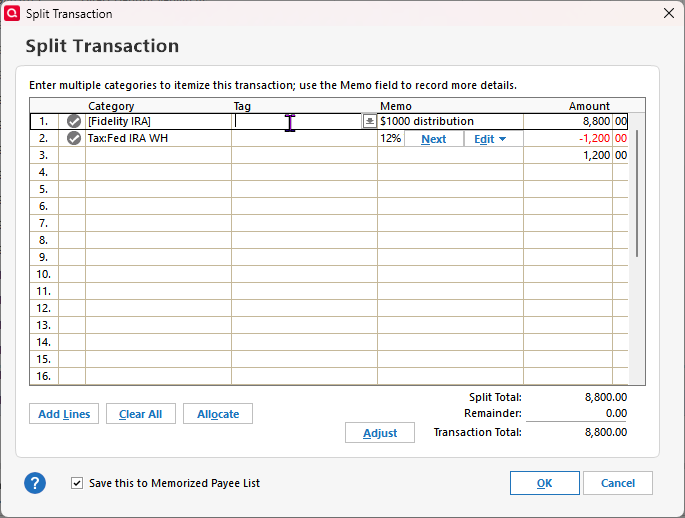
2) Split the Category:
- Line 1 of the split: Category = the IRA account name in [square brackets] for the gross amount as a positive number. This will create a transfer from the IRA.
- Line 2 of the split: Category = the Fed tax withholding category that you use, as a negative number.
- Line 3 of the split: Category = the State tax withholding category that you use, as a negative number.
- Total of the split: Must equal the net amount of the deposit.
If the deposit is made to a banking account between Jan. 1 and April 15, you will see a dialog titled “Confirm Your Contribution Tax Year”, even though this is a distribution and not a contribution. Select the current year, not the default of the previous year, and click on OK. This seems to be a bug.
If you receive the distributions regularly, you can save repeated manual entry by setting up this transaction as an Income Reminder.
If taxes were withheld, you must delete or not accept any downloaded transactions in the IRA for the net distribution and the withholding.
With this setup, the taxable income will be shown in the Tax Planner and the “1099-R Total IRA Taxable distrib.” and any tax withholding in the withholding sections of the Tax Schedule report.
QWin Premier subscription2 -
It is also possible to record an IRA distribution that is used for a Qualified Charitable Distribution (QCD), using the following procedure
- Set up a special Expense category for QCDs. I called mine Charity-QCD. Give it a Tax line item of "1099-R:Total IRA taxable distrib." This causes the QCD to reduce the taxable portion of the IRA distribution by the amount of the donation.
- Sell securities in the IRA if necessary to generate the cash for the QCD.
- In a dummy taxable banking account, enter a Deposit transaction for the net amount of the donation, with a split if necessary with the first line a transfer from the IRA for the gross amount of the distribution and the second line any taxes withheld as a negative number. My state (CT) requires state withholding for all IRA distributions unless you file a special form.
- In the dummy account, enter a second transaction for the net amount of the donation, using the Charity-QCD Category. I use a second transaction to give the donation better visibility in the register and reports, and because Quicken tends to get confused if you enter a split transaction for a zero amount.
- When the QCD transaction downloads from the FI, accept the matching security sale but delete or do not accept the downloaded cash transaction(s)
With these entries, the Tax Planner, Tax reports, and spending reports all appear to be correct and no manual adjustments are required in the Tax Planner.
QWin Premier subscription-1 -
Hi Jim,
Thank you for your detailed post and for all the guidance you share with the community. Your explanations are always clear and really helpful.
I was curious about the part where you suggest deleting or not accepting the downloaded transactions in the IRA and instead entering a split deposit in the receiving taxable account.
In my case with Fidelity, both the withdrawal and the tax withholding appear directly in the Fidelity IRA account, while the CMA just shows a single net deposit. It feels more accurate to keep the transactions where they actually occur, since that matches the real account activity and makes reconciliation easier.
I can see how your method ensures the Tax Planner and Tax Schedule reports display correctly, but I’d love to understand why Quicken requires this workaround instead of being able to recognize the distribution and withholdings directly from the IRA side.
I’m using Quicken Classic Business & Personal for Windows R63.21 and Quicken for Mac Business & Personal Version 8.3.2 (Build 803.58902.100).
Thanks again for all your help and for clarifying this approach.
1 -
Q is unable to record tax-related txn in a non-taxable account, such as an IRA.
Thus the necessity of transferring the total amount to a taxable account and splitting the transaction to reflect the Gross transfer minus the tax withheld, resulting in the Net deposit.Q user since February, 1990. DOS Version 4
Now running Quicken Windows Subscription, Business & Personal
Retired "Certified Information Systems Auditor" & Bank Audit VP0 -
Another way of explaining why it is necessary to record the tax related transactions in a taxable account is that if the IRA is included in in the Tax reports and the accounts that the Tax Planner "sees," then other tax related transactions inside the IRA, such as dividends and capital gains, would also appear in the reports and Tax Planner. Because these transactions are not taxed, they must not be included in the reports and Tax Planner.
QWin Premier subscription1 -
I was playing around with it for a few minutes.
I ran the Reports>Tax>Tax Schedule report but it did not show the 1099-R IRA federal tax withheld. It only showed the transfer from the Fidelity IRA under — Total IRA taxable distrib.
Then I clicked on the Customize widget in the upper-right of the report, and then clicked on "Accounts" and noticed the Fidelity IRA did not have a a check in the checkbox next to the account name. After I checked the box the withdrawal showed up in the report.Once I clicked ok the — IRA federal tax withheld amount showed up, as you can see below.
The Tax withdrawal shows up as negative (red color) I assume that is correct?
This makes sense to me since this is exactly how it would show up in the Fidelity Statements, rather than creating fake transactions in the CMA account which would not match the statements from Fidelity.
I have not tested this on the Mac Version, but if I am missing something, I would appreciate feedback.Note: if you don't save the report the accounts are "unchecked" from the customize report setting which means when you run the report again the IRA federal tax withheld will not be included in the report.
0 -
@Jim_Harman I didn't follow most of your post. I'm with you on step 1. That's what I did. But a QCD is not taxable and you don't need to subtract it from your taxable distributions. And there shouldn't be any withholding on a QCD. You should enter it separately from your taxable distributions. Seems like you are making a lot of extra work for it. Oh, but I don't download transactions.
When I turned 70 1/2 I started making QCDs. A QCD is not taxable income even if they cover a RMD. That's the main reason to do a QCD I just entered the sale in my IRA which gave me a cash balance. Then I made a Withdraw (not a transfer) and categorized it to "QCD Charity". I made a separate Category called QCD Charity from my regular Charity donations since the QCD is not taxable.
I'm staying on Quicken 2013 Premier for Windows.
0 -
@BougaTech Please review my post from a few minutes ago.
If you look elsewhere in the Tax Schedule report, you will see that if the IRA account is included in the report, dividends and capital gains in that account would also be included, which of course would be wrong.
What should really happen is that Quicken should create a special transaction or wizard to handle distributions from tax deferred accounts. Please see this Idea post, which has over 214 votes and has been in the "Planned" state for over two years.
QWin Premier subscription1 -
There should not be any Federal tax withholding from a QCD, but some states, including Connecticut, usually require that state taxes be withhheld from all IRA distributions, including QCDs.
It may be different for other FIs, but at Vanguard, if you want the charity to receive a certain amount, you must compute a larger amount to request for the QCD and Vanguard withholds the tax and writes a check to the charity for the net amount.
There is a way to get around this by filing a special form with the state and the FI. This stops all CT state tax withholding from IRA distributions, so if you file this form, you usually must then make estimated tax payments to the state to cover the tax due on regular distributions.
I use the dummy taxable account so that the Tax Planner and Tax reports do not include the QCD as taxable income or a deductible gift on Schedule A but spending reports include it as a gift to the charity. If there is a better way to accomplish this, I'm all ears.
QWin Premier subscription2 -
@Jim _Harman I see what you mean now, and I really appreciate your help — your post cleared up a lot.
I just wanted to suggest a small tweak for the Windows version.
In Step 1, there’s really no need to enter the net amount first. Quicken automatically carries that number into the Split window, but since you’ll be entering the gross amount there anyway, it just ends up being overwritten.
So instead of entering the net amount, you can either leave the Deposit field blank or enter the gross amount right from the start. For example, if the gross distribution is $10,000 and the net is $8,800, typing $8,800 first just makes Quicken prefill that value in the split — and you have to change it again to $10,000 later.
Step 1 could say something like:
Create a new entry in the register, add the Payee and Memo info (optional), set the category to the [Transfer from account], and either leave the amount blank or enter the gross amount. Then continue with the split as you described.Everything else you wrote works perfectly once that’s clarified. Thanks again for taking the time to share those steps — they really helped make sense of the process.
 0
0



Categories
- All Categories
- 22 Product Ideas
- 34 Announcements
- 247 Alerts, Online Banking & Known Product Issues
- 19 Product Alerts
- 265 Welcome to the Community!
- 630 Before you Buy
- 1.5K Product Ideas
- 55.7K Quicken Classic for Windows
- 16.9K Quicken Classic for Mac
- 1K Quicken Mobile
- 834 Quicken on the Web
- 128 Quicken LifeHub