Reauthorizing Fidelity accounts caused a duplicate account and other issues

This discussion was created from comments split from:
Fidelity download errors with new connection method 25.09.13
.
Comments
-
This update completely messed up my (4) Fidelity accounts!
Because way back when I first set up these accounts (2013) I used names that were meaningful to me and NOT the current name Fidelity used for the new download method. So, "reauthorization" created new accounts.
One of those accounts does not actually exist.
One of the newly created accounts duplicated an existing account but with nothing but placeholder transactions for all the holdings as of 9/25/2025 while not retaining the history (back to 2013) for the account it is meant to link to in Quicken.
I'm afraid to try to update the other two Fidelity accounts to the "new method" as it seems quite clear that "reauthorization" means "creating new accounts for existing accounts you used to download automatically" thus losing all the history, which messes up / negates tax reporting information as well as gain/loss history for investments!
[Removed - Rant/Edited - Readability]
0 -
Hello @Wayne Cole,
Thank you for sharing your experience. Quicken usually is fairly good about identifying the correct account to link to, but there are times where it guesses wrong, or assumes it's a new account.
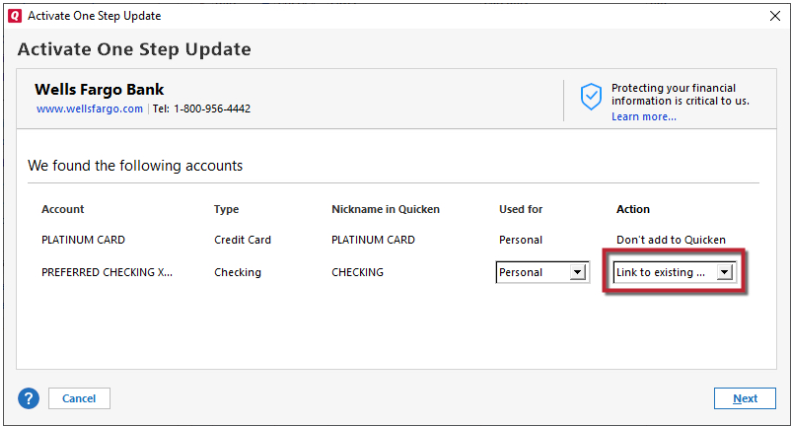
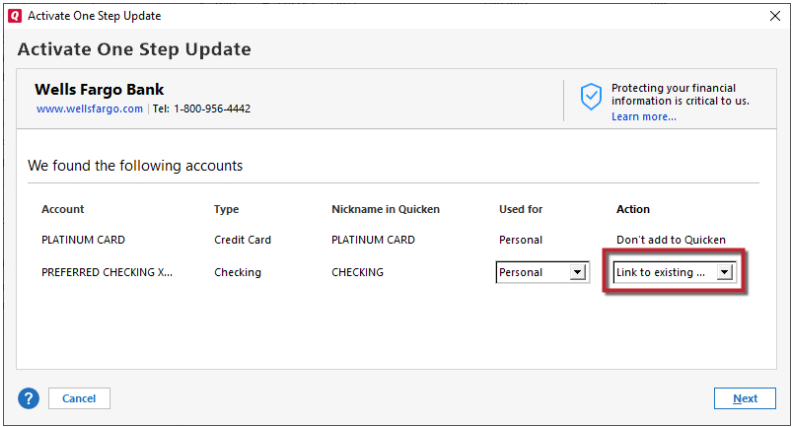
To correct the issue, first backup your Quicken file. Next, delete the duplicate account and the account that does not actually exist. Then, navigate to Tools>Add Account and follow the prompts. When you get to the Add/Link screen, make sure to link the accounts to the correct nickname in Quicken. If there are any accounts Quicken is seeing that you do not want in your file, make sure to select Don't add to Quicken for those accounts.
I hope this helps!
Quicken Kristina
Make sure to sign up for the email digest to see a round up of your top posts.
0 -
Quicken Kristina
I found the "Link to existing…" AFTER deleting the newly created accounts. Apparently you have to "One Step Update→[account] one account at a time to get that option. Because in the old Quicken Vault, multiple accounts were attached to a couple of the login UIDs so the "reauthorize" pane somehow skipped past the pane with "Link to" option. (Perhaps I inadvertently initiated "One Step update→All accounts".)
However, after deleting the "new" accounts I went back and did a One Step Update→[one account at a time] to get the Quicken account to link properly with it's online counterpart. But it appears now each time I try to run "One Step Update" it requires re-authorization EVERY UPDATE! So for each Fidelity account I have to go through the "enter code", get the code via phone, then agree to terms (multiple page form with two boxes that have to be checked before "I Agree" button is active) and get to the "re-athorization complete, returning to Quicken" page BEFORE Quicken update request times out. Didn't make the timeout on two occasions.
Then, it ALWAYS duplicates transactions already in the account for the previous 30 days. It also doesn't handle the cash correctly when Fidelity records cash as shares of some money market account like "Fidelity Government Cash Reserves", FDRXX leaving you with a pop-up to deal with placeholders for unrecognized securities and improper cash balance! What an f'n mess!
My regularly scheduled (weekly) update for "All accounts" has yet to run, so we'll see what happens when Quicken attempts that. I have a feeling it will no longer function as I won't be present and/or able to run through the lengthy re-authorization process before Quicken times out the update request.
0 -
Thank you for your reply,
If you're getting prompted to reauthorize every time you update your accounts, that indicates that Quicken is still seeing one or more accounts connected by the old connection method. Usually, the reauthorization prompt will tell you the name(s) of the account(s) that it sees need to be reauthorized.
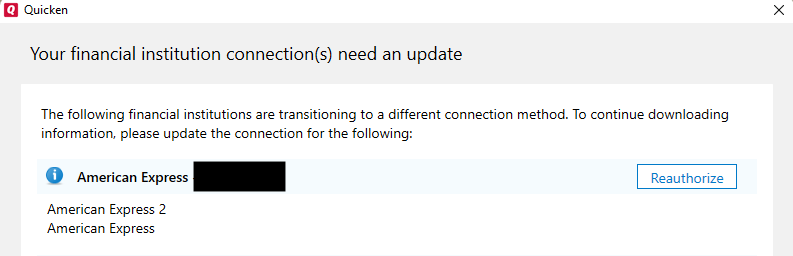
To resolve the issue, you would need to remember the account names the reauthorization prompt lists, then backup your Quicken file and navigate to Tools>Account List. If you see the option to "show hidden accounts" at the lower left, select that box.
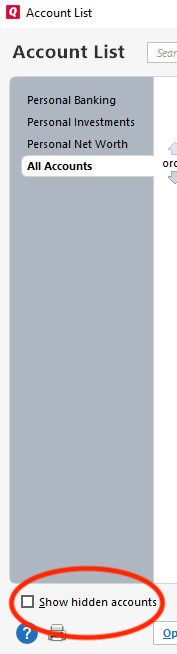
Then, review the account list to find the account(s) Quicken says needs to be reauthorized. When you find the problem account(s), deactivate it. If it is an account that is closed or no longer in use, you can mark the account closed. If it is still in use, then you can connect it via the new connection method by navigating to Tools>Add Account, following the prompts, and making sure to link it to the correct nickname in Quicken.
Please let me know how it goes!
Quicken Kristina
Make sure to sign up for the email digest to see a round up of your top posts.
0 -
I THINK I have it sorted out. Weekly update ran, reported 0 new transactions (as expected) and produced no duplicates. It appears all sorted.
Thanks.
0 -
Thank you for the follow-up,
I'm glad to hear everything is working properly.
If you need further assistance, please feel free to reach out!
Quicken Kristina
Make sure to sign up for the email digest to see a round up of your top posts.
0

