What’s Going On Between Fidelity and Quicken?
Comments
-
Well, I bit the bullet this afternoon and converted to EWC+, after making a backup.
Other than having to delete a number (30 or so, across 6 accounts) duplicated transactions it seems to have gone well so far.
Q user since February, 1990. DOS Version 4
Now running Quicken Windows Subscription, Business & Personal
Retired "Certified Information Systems Auditor" & Bank Audit VP0 -
I've been keeping a DC datafile and EWC+ datafile for about 2 weeks now. So, I just need to discontinue the DC datafile, but manually updating it for 1 day so far. EWC+ has some aggravating deficiencies that require manual fixing as well.
Deluxe R66.23, Windows 11 Pro
0 -
@leishirsute can you elaborate upon those "aggravating deficiencies" (besides known design differences between EWC+ and DC)?
Q user since February, 1990. DOS Version 4
Now running Quicken Windows Subscription, Business & Personal
Retired "Certified Information Systems Auditor" & Bank Audit VP0 -
I've been subscribed to this thread for months hoping that we would have this problem resolved and it's clearly not.
I have deactivated and re-activated the online services with Fidelity multiple times. It clearly works when doing a one step update as far as showing the green ball status completed. It NEVER brings any new transactions in.
There is nothing unique about the transactions I'm executing in my Fidelity account in fact they are very basic buy and sells and an occasional interest payment. NONE of the transactions download when Quicken connects to Fidelity and it's green every single time I do a one step update.
Because of this long standing issue, I've been manually logging into Fidelity's website, going to the transaction tab and manually entering all my transactions until Quicken finally fixes this.
What I can't believe is Quicken kept that arbitrary deadline to force everyone to EWC+ knowing full well this thread is extremely active and it's clearly still broken.
For the Quicken admins watching and commenting on this thread, we deserve regular status updates on what is tested and working and what still remains to be fixed with dates. The silence doesn't work.
1 -
fdrxx is being treated as a security when it is the core money market account. Result is quicken cash balance doesn't match Fidelity website. Manual fix: ignore discrepancy
Some reinvested dividends are being treated as a Deposit with no assigned security along with a Bought transaction for the matching security . Manual fix: delete the Deposit transaction and change Bought to a ReinvDiv
Some regular dividends are treated as Deposits with no assigned security. Manual fix:look at Activity on Fidelity website and change the deposit to a Div for the security matching the Deposit's $ amount.
Renaming rules don't work. They are ignored. Manual fix: use memorized transaction to correct the downloaded payee. Reference: https://community.quicken.com/discussion/comment/20515629/#Comment_20515629
I consider the fact that these issues require manual corrections when they previously worked with the DC connection to be deficiencies.
Deluxe R66.23, Windows 11 Pro
2 -
Thanks for the list. I'll be watching, and will update with what I observe.
Q user since February, 1990. DOS Version 4
Now running Quicken Windows Subscription, Business & Personal
Retired "Certified Information Systems Auditor" & Bank Audit VP1 -
fdrxx is being treated as a security when it is the core money market account. Result is quicken cash balance doesn't match Fidelity website. Manual fix: ignore discrepancy
This is only true with some accounts. Out of my 6 retirement accounts (both IRAs and Roth IRAs) 4 of them correctly reflect the value of FDRXX as the Cash Balance and not as Shares. But 2 of the accounts report FDRXX as Shares and not as the Cash Balance….and there is no reset button on Online Services of Account Details to change this.
- EDIT / UPDATE: The prior paragraph was about my Fidelity EWC+ accounts in a test file. This evening my main file was force migrated to EWC+. In my main file all 6 of my retirement accounts report FDRXX as security shares, not as cash….and there is no reset button on the Online Services of Account details to change this. Too, bad, that is a step backward from my perspective.
To be added to @leishirsute's list: Brokered CDs are sometimes still downloading at 100X the actual share volume at 1% of the actual share price…example, instead of downloading them as 25 shares @ $1000 dollars each ($25K total) it is downloaded as 25K shares @ $1 each (for $25K total). When these transactions occur, they must be manually corrected, especially with Sold transactions or they will not properly decrement the original Buys which were downloaded correctly.
- Today I noticed that this might actually be an issue with the Fidelity website because 2 Sold CD transactions shown in the online account Activity tab there were also showing 100X the actual shares volume at 1% of the actual share price. But if this is the case, then why is this never an issue with DC downloads?
I know a lot of people are reporting duplicate transactions to be a Fidelity EWC+ issue but IMO this is not a Fidelity issue nor an EWC+ issue. Duplicate transactions is an occurrence that sometimes happens whenever there is a connection change (new connection, refreshed connection, different connection) regardless of what the prior connection method was.
There are some who have reported other issues which I have not experienced so I really have not been tracking those.
Quicken Classic Premier (US) Subscription: R66.23 on Windows 11 Home
1 -
Both my taxable account, and my wife's, use the "Show Cash … " function. My cash is actually in FDRXX and her's in SPAXX, so tomorrow morning might be interesting.
There's presently no cash in the other 4 account (3 IRA, 1 taxable)
No dividend reinvestments are expected until month-end.
I/We don't invest in CDs, so that's a non-issue for us.
Q user since February, 1990. DOS Version 4
Now running Quicken Windows Subscription, Business & Personal
Retired "Certified Information Systems Auditor" & Bank Audit VP0 -
Here's something that is perplexing. I created a new test datafile a few days ago and added just Fidelity to the datafile with EWC+ connection. I tried downloading the latest transactions for Fidelity into the file and it downloaded nothing and gave no error. I know there were transactions to download because it was missing newer transactions that were present in my full datafile (i.e. all my accounts + Fidelity). It seems EWC+ is not correctly marking the latest transaction downloaded for different datafiles using the same Fidelity login.
Deluxe R66.23, Windows 11 Pro
1 -
For all my Fidelity accounts that use SPAXX as core, Quicken is correctly treating SPAXX as the core MMF.
The 1 IRA account using FDRXX as core is incorrectly treating FDRXX as a security.
You can determine if the core account is being treated correctly by looking at the Account's Holdings in the Quicken Online center. The core account has "(cash balance)" suffixed to its name.
For me, FDRXX does not have "cash balance" suffixed to its name and the account's Cash Balance in the register shows a value of $0.00 downloaded from Fidelity.
Deluxe R66.23, Windows 11 Pro
0 -
My impression (I may be wrong) is that the download process doesn't care what has or has not been previously downloaded — each FI will download its transactions (last 30 days, last 90 days, last whatever). It's then up to Quicken on each machine to match the downloaded transaction against data already in the data file. It then discards anything it sees as a duplicate, leaving us to deal with "new" transactions. @leishirsute
So, I would think that unless Fidelity is doing something no other FI is doing, or Intuit or whoever is handling the EWC+, you should have gotten in your download to file2 the same data as downloaded to file1.
If it "downloaded nothing and gave no error" then my suspicion is that it downloaded nothing because the EWC+ system was not properly contacted, or the account(s) not properly identified/authorized, or some other reason that /should/ have generated an error but did not.
Sigh…
0 -
i have the same issue. I’m trying to backfill a couple of days that were missed by creating a brand new file and adding fidelity accounts. No errors but it pulls no transactions or cash balances. I have “tricked” it in the past by only choosing one account on fidelity’s authorization site. At this point, I’m exhausted after spending at least 10 hours deduplicating transactions. If I didn’t have so many accounts, I’d consider moving my accounts to a firm that works with Quicken
Separately, i am getting new transactions (fingers crossed) successfully for the last few days.
0 -
Does your IRA have more than one Money Market fund or any banking (FDIC) accounts ? If so, just as a test, try selling these leaving only FDRXX and see if it recognizes as CORE. It worked for me.
0 -
It is the only MMF in the account and has been the core since 2006.
Deluxe R66.23, Windows 11 Pro
0 -
That was my expectation as well. EWC+ is not behaving that way.
Deluxe R66.23, Windows 11 Pro
0 -
From Fidelity's Reddit support site:
FidelityLiz
•
51m ago
Community Care Representative
Profile Badge for the Achievement Top 1% Commenter Top 1% CommenterThanks for coming by the sub to share your thoughts on the Quicken and Express Web Connect+, u/leishirsute. I'll jump in here to share some information.
Now that the Express Web Connect+ migration is complete, we've been receiving reports that clients who deactivate and reactivate their Fidelity accounts in Quicken helps to resolve the connection issues. We recommend trying that to see if your connection improves. If it doesn't improve after trying that step, we suggest contacting Quicken Support, as they can better assist with their platform and integrating accounts.
We appreciate your patience as we worked to resolve this for our customers. If you have any additional questions or comments, please let us know. We'll be around and happy to help.
https://www.reddit.com/r/fidelityinvestments/comments/1o8jaya/quicken_clients_are_forced_to_use_a_broken/
Deluxe R66.23, Windows 11 Pro
0 -
So, when looking at the Account's Holdings in the Quicken Online Center does it display "Your Quicken account and your Brokerage Holdings are in agreement" ?
0 -
Yes, I had the option for about a week and then it disappeared and never reappeared again. Very unpredictable behavior.
Deluxe R66.23, Windows 11 Pro
0 -
A new issue:
I reauthorized access to Quicken with Fidelity. Quicken reported a successful reauthorization, but the investment account that has a linked cash account shows it never was set up in the Online tab for the Account Details. Quicken will not connect it. It appears the Quicken linking process offers to link the linked cash register instead of the investment account. The link operation is ignored and no error is given.
The rest of the story:
I had to change the account that has a linked cash account back to just an investment account which was very time consuming and has thrown off the cash balance. Then I could setup the connection with Fidelity. Once connected again, i changed the account to have a link cash register again. All because Quicken did not connect for a linked cash account.
Deluxe R66.23, Windows 11 Pro
0 -
See screenshot. For the account you've selected at the left, you then click on the "Compare to Portfolio" button at the right and you'll get following message if it's in agreement.

Otherwise, you get the "Securities Comparison Mismatch" error similar to the following
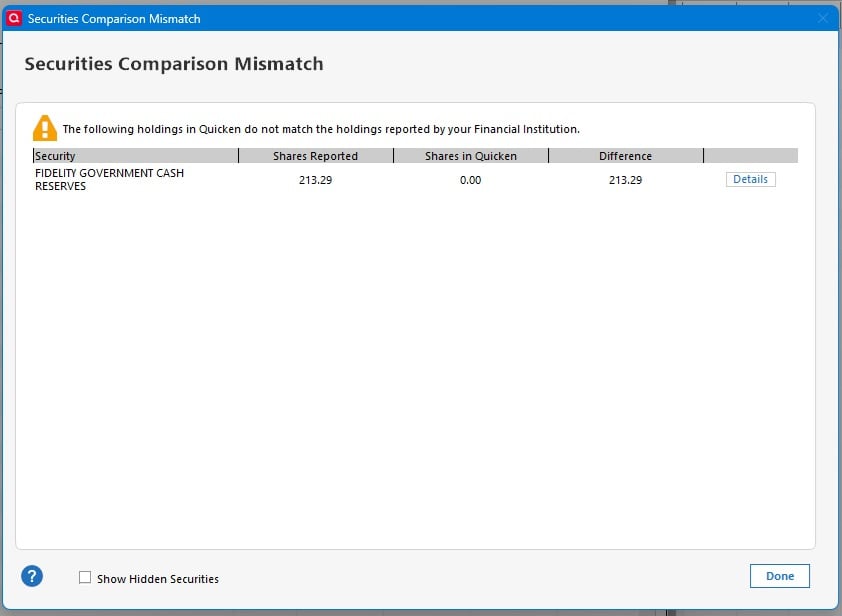
- Quicken user since 1992 (back in the good old DOS Version days)
- I don't use Cloud Sync, Mobile & Web, Bill Pay/Mgr, Budgeting, Tax Planner
0 -
@leishirsute Thanks, this is a good summary of some of the ongoing problems.
To help clarify, are all of your accounts affected by the "Dividends download as deposits" problem, or just some of them? What types of accounts are affected? Regular brokerage accounts, HSAs, IRAs, NetBenefits 401(k)s, etc.? What does Fidelity show as the "Core position" in these accounts?
I have two Fidelity HSA accounts. One uses FDRXX as the "core position". With DC, this was treated as Cash. I had zero shares of FDRXX in Quicken and no Bought or Sold of FDRXX and the monthly FDRXX dividends were reported as Divs.
After I converted to EWC+, the downloads started treating the cash as shares held in FDRXX. I got a Security Comparison Mismatch for the FDRXX, and the FDRXX dividends became ReinvDivs. Cash dividends for other securities were accompanied by a Bought of FDRXX. This account does not have a Cash Representation button.
I would prefer that this account continue to show the FDRXX as Cash as it did before the conversion. I was able to make the account reconcile and eliminate the mismatches by manually entering a Bought transaction for FDRXX for the whole cash balance.
In the second HSA account, the core position is the FDIC insured option for Cash. With DC, that was shown as Cash and the monthly interest was reported as Deposit with a Payee of INTEREST EARNED. I had a Memorized Payee that assigned a Category of Interest Inc. All was well.
After converting that account to EWC+, like the first account, Quicken started to show a mismatch, this time for the ticker FDIC94939, equal to the amount of cash in the account. I again entered a manual Bought transaction to reduce the cash to zero and resolve the reported mismatch.
On 10/8, I did an OSU and received a message offering to convert FDIC94939 to Cash. I accepted this and Quicken warned that it "will remove Buy and Sell transactions to convert to cash." I accepted and the manually entered Bought transaction for FDRXX was deleted, restoring the Cash balance. Now the cash is as it was with DC and no Security Comparison Mismatch is reported. It also now has a Cash Representation button, so I suppose if I wanted to convert back to showing the cash as a money market fund, I could do that.
In summary, it appears that the account that holds the cash in the FDIC Insured option is now working as intended, but in the account that uses FDRXX as the core account, the only way to reconcile the cash and avoid Security Comparison Mismatch errors is to buy FDRXX and show the cash as shares in FDRXX.
QWin Premier subscription0 -
Earlier today I'd posted that in a Fidelity EWC+ test file there are 6 retirement accounts that have FDRXX as the Core Account and that 4 of them showed the value as Cash with only 2 of them showing the value in Shares.
Since that post, my main data file was forced to migrate to EWC+. In this file, all 6 retirement accounts show the FDRXX values as Shares, not as Cash. None of these accounts have a cash representation reset button on the Online Services tab of Account Details. I hope this gets fixed but at least the accounts have the correct balances.
Quicken Classic Premier (US) Subscription: R66.23 on Windows 11 Home
0 -
They are not in agreement.
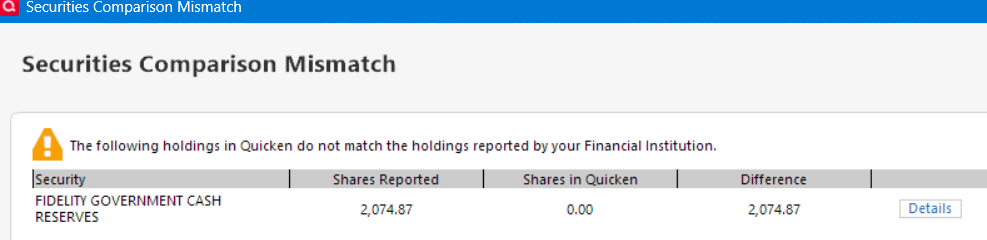
Deluxe R66.23, Windows 11 Pro
0 -
"To help clarify, are all of your accounts affected by the "Dividends download as deposits" problem, or just some of them? What types of accounts are affected? Regular brokerage accounts, HSAs, IRAs, NetBenefits 401(k)s, etc.? What does Fidelity show as the "Core position" in these accounts?"
It is happening to non-IRA accounts. The core position is SPAXX.
I have only 1 account that has FDRXX as a core position. It is a Traditional IRA account. Quicken is treating it as a security instead of as the cash balance.
Deluxe R66.23, Windows 11 Pro
0 -
Does your Cash Balance show $2074.87?
If so, then you should try entering a Buy transaction for 2074.87 shares of FDRXX @ $1.00 each. That will change the Cash Balance to $0.00 and the shares discrepancy will no longer be an issue.
Unless/until Fidelity/Quicken fix the FDRXX cash representation issue we can be pretty sure that FDRXX will continue to be reported as shares so this discrepancy should not be showing up, again, in the future.
Quicken Classic Premier (US) Subscription: R66.23 on Windows 11 Home
0 -
In my case the incorrect "Deposits" without a category assigned (should have been DIV) are associated with Non-US Stocks in my Roth accounts. All my other accounts hold Mutual Funds.
In addition I JUST noticed a few Foreign Tax Fees where not assigned a category during Aug thru Oct.
 "No Matter Where You Go, There You Are"Windows 11 Pro, Quicken SubscriptionIntel Core i7-12700, 32GB Ram0
 -
As I see it, the issue of making this entry for FDRXX is that anytime cash enters or leaves the account (Divs, Int., Buys, Sells, etc) it'll get swept to or pulled from the core position and thus a NEW mismatch/discrepancy will occur again unless you go and edit the manual entry to "BUY FDRXX" every time new cash enters/leaves the account.
- Quicken user since 1992 (back in the good old DOS Version days)
- I don't use Cloud Sync, Mobile & Web, Bill Pay/Mgr, Budgeting, Tax Planner
0 -
Edit: I don't think I have quoted the right prior comment, but can't tell. In fact I have found it impossible to link to the comment I am trying to respond to. I'm trying to respond to something @Movie Nut was writiting about. Maybe it has actually been moved somewhere else because it is off-topic.
This is still off-topic but if it's coming up here I will respond here.
Seems like you have made a simple thing sound complicated. I've been doing pretty much exactly this for years. On the IRA side, from Fidelity, 3 transactions arrive, for the net amount sent to my bank, for the federal tax withheld, and for the state withheld. All are inserted by Quicken as Withdrawals (on QWin; or as a "Payment/Deposit" on QMac), and that is that. There is virtually nothing I need to do in the retirement accounts.
On the receiving bank side, you have a category set up for the gross, and you enter a negative amount in the regular fed and state categories. That's what I do, too. Done.
That's all there is to it.
Even easier, in the bank account, I copy an existing transaction, then paste it as a new transaction, then change the date before pressing Enter. Then I go in and change the gross, and the withholding, if I need to, and click the adjust button so that the overall total matches the total of the split lines if I have changed them.
The process takes 30 seconds.
I question your subcategory of RMD. Maybe you will never have to withdraw more than your RMD, but if you do, your subcategory for RMD might get unwieldy. You'd have to add a second subcategory for "non-RMD" withdrawals, and properly apportion the withdrawals. Maybe most of the time a withdrawal will be purely RMD, or purely not-RMD (which would come after your RMDs were finished for the year). If there is a single transaction that has both amounts, you'd have to include both categories in the split lines. And if later in the year you discover that you need to take more RMDs, well you need to track this all if you want the RMD total/non-RMD total for the year to be correct, and you might have to go back to older transactions to fix them - like if you withdrew more than you had to, you'd want to recategorize part of all of some older ones as non-RMD.
I don't bother distinguishing between RMD and non-RMD. I just have a category of Retirement Distribution, with subcategories for what retirement account they came out of. It's enough for me to see the "income" in my reports, vs. my expenses, and the net total.
I use the income and expense reports, not the cash flow reports. I honestly barely know the difference. Like you, I exclude retirement accounts and exclude transfers. So I am reporting on bank accounts and credit cards.
It's a whole other topic, whether retirement withdrawals are even really income. From a tax perspective, an IRA withdrawal is taxable income. But from the same perspective, what is a Roth IRA withdrawal? It's not taxable income, and how is moving of money from a Roth to a checking account different from moving it from a bank savings account to a checking account? Or from a taxable brokerage account to a checking account? These accounts all hold "savings", and if one moves them into checking account, they look like income as much as IRA withdrawals do. You'd be moving money into checking to meet living expenses.
This has been discussed by the community several times.
I prefer to do it your way, but understand the arguments for the other way.
Oh, and something that IS actual income, but is not taxable, is the receipt of dividends and realized gains in the retirement accounts! Which we both omit from our reports. So, we are reporting as income what is really not income, and ignoring the actual income.
No perfect solution. What we are doing is kind of a hybrid, because we are ignoring real income, while reporting on some "transfers" as income, and ignoring any other transfers (from brokerage accounts and savings accounts). It's kind of a mess, and everyone has to chart their own course, to come up a solution that gives them the insights they are looking for.
0 -
@qudtp Thanks for your insight and response. I did not mention it but i did create another sub-category named "Roth" to use for future Roth conversions (withdrawal from IRA (in-kind) and deposit in ROTH account. No, I would not consider this Income as it is still in a sheltered account. I would consider it as income when/if I take a withdrawal from the Roth. I found the default RMD transactions in the IRA were not capturing this revenue source of Cash accurately as it was masked in the Transfers and turning them on in the Expense/Income reports really clouds actuals. The Cash Flow seemed to give me a better picture of a sort of Profit/Loss scenario. But I will take your input and during my next RMD, I will see how your process is depicted in reports. Thanks again.
"No Matter Where You Go, There You Are"Windows 11 Pro, Quicken SubscriptionIntel Core i7-12700, 32GB Ram0 -
The Quicken Cash Balance is the same as the Cash Balance for the core account on the Fidelity website. For me, that is the preferred behavior. I just ignore the mismatch on shares of FDRXX.
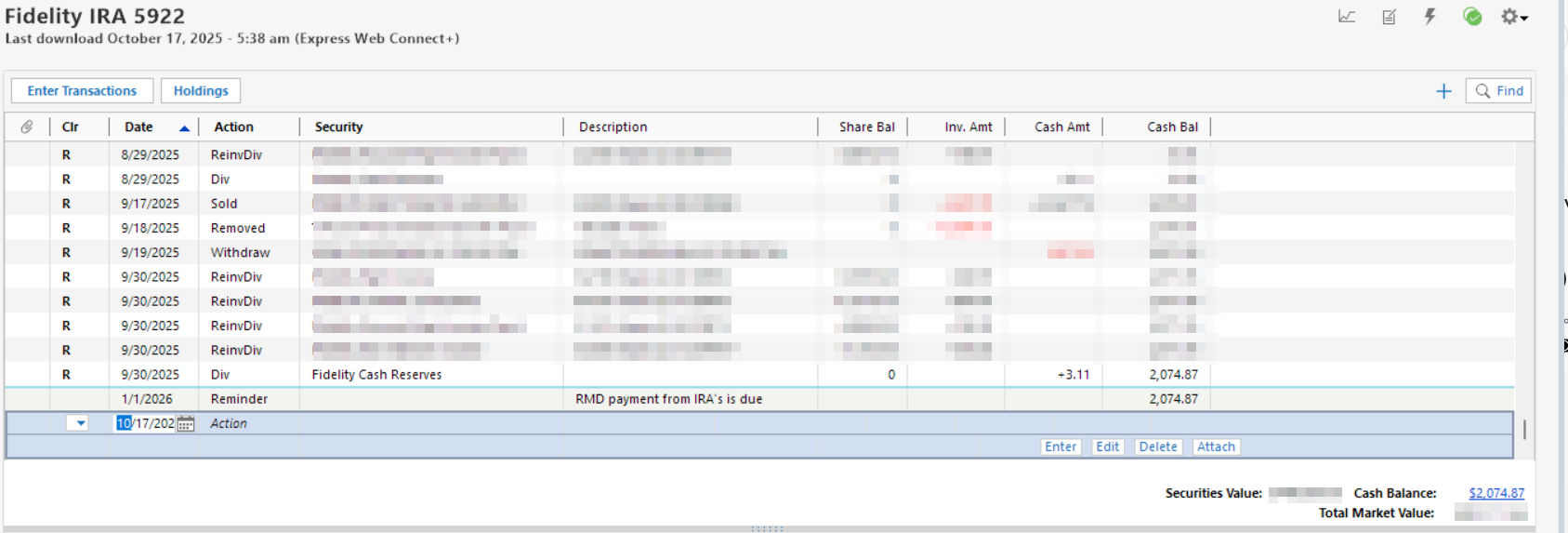
Deluxe R66.23, Windows 11 Pro
0