zzz-Fidelity Updates
Comments
-
Patrick LarkinMember ✭✭✭2:42PMHi Ray. 2 questions:
ONE: You say you have 2 data files. Will you be able to some how merge the "right" content to get back to using just one file once all this settles? How would you do that? (I have 47 accounts in one Q file [7 at Fidelity], 22 boxes checked on 'One Step Update Settings', and transaction history back to 1998.
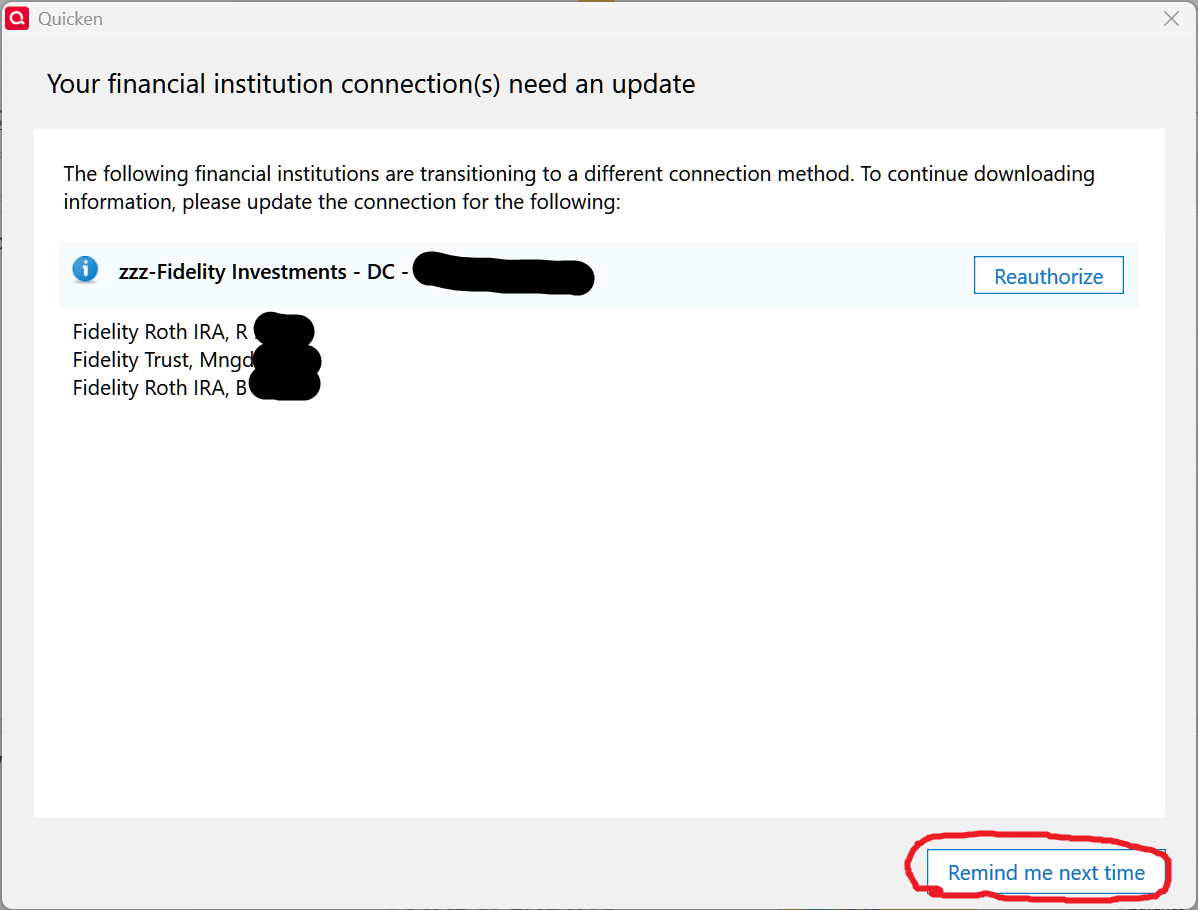
TWO: What does the prompt to update to EWC+ look like? I've only seen prompts (a couple weeks ago) to "Reauthorize" which created a mess in my Qfile, but I think I have it squared away. What prompt should I be watching for so I can also choose to procrastinate on it?
Answer to ONE:
I actually have 3 data files. I started using Quicken in 1997. In 2010, One Step Update started failing and support couldn't repair it. So I created a new one from scratch. In 2023, I noticed minor issues with OSU (that I've since fixed) and reports. In case it crashed, I created another one from scratch. I don't update the 1st but continue to update the 2nd and 3rd as insurance against catastrophic failure. I have 42 active accounts. OSU updates 9 institutions with 20 of the accounts. Even if I could move accounts or transactions between data files, it would take a lot of editing to connect their transaction to the other accounts. (My 3rd data file uses EWC+ and is only for testing.)
Answer to TWO:
This is the prompt from today.
 0
0 -
Does anyone know if the problem has been resolved and we can now change back from DC to EWC? The other thread on the issue is giving permission problems to access it and the DC is not working today.
0 -
"The" problem??? More than one. And i changed over because I thought it was being forced. Had I suspected DC would still work I would have stayed until the last minute. And if you switch, don't expect it to be issue free. Duplicates., Re-categorizations and the like are almost inevitable.
-1 -
For reference, the community alert above where they were posting updates to the EWC+ problems is the post that seems to be down for me. Is it now downloading transactions?
0 -
Anyone else getting OL-295-A messages today on Direct Connect? Anyone get a successful Direct Connect update today?
0 -
I get OL-295-A starting this morning. It appears that the cutover may be forced now.
Deluxe R66.23, Windows 11 Pro
0 -
One of my data files with a single Fidelity brokerage account connected via DC has not been downloading since last Saturday.
At first I got the OL-293 error code which refreshing the Fidelity profile in Quicken resolved but transactions still did not download.
Since Monday I have been getting the OL-295 error code and Update Now (which often resolves this error code) did not resolve it. Also, refreshing the Fidelity profile in Quicken did not resolve the issue.
So, today I bit the bullet and reauthorized the account for EWC+. Here were the results:
- Reauthorization: Worked well and Quicken linked the download correctly to the account in Quicken.
- Duplicate Transactions: Improvement observed…there were duplicate transactions for only the last 30 days instead of the last 90 days. This meant there were only 8 duplicate transactions that needed to be deleted making it pretty easy and fast to complete.
- CD Transactions_Not OK: 2 CD sell transactions (matured) were downloaded. They had incorrect shares (25,000 shares instead of the actual 250 held shares) and incorrect share prices ($1/share instead of $100/share). The total value, however, was correct. These transactions were manually corrected. (Note: I had been assuming that the pricing and shares issue with brokered CDs is an issue with Fidelity's EWC+ process. However, when I looked at the online account I noticed that Fidelity's own website shows these 2 CD were priced at the incorrect $1/share and 100X shares issue. So, maybe this is a Fidelity system issue, instead?)
- CD Transaction_OK: 1 CD buy transaction downloaded correctly showing 30 shares @ $100 ea.
- New Transactions: There were 6 new transactions for interest and dividends that downloaded correctly.
- Core Account (SPAXX): I was prompted to decide how Quicken should report this MMF. I selected report it as the Cash Balance. This was correctly processed by Quicken so there are no shares held of SPAXX in Quicken and the Cash Balance matches what is shown in the online account.
So, except for the duplicates issue (a relatively common issue whenever the connection method is changed or modified or refreshed so I do not consider this to be an issue specific to Fidelity's EWC+ connection) and the brokered CD shares/prices issue it does appear that at least this account is OK and correlates well with the online account data. This also correlates well with what was observed and reported earlier in a test file with this same brokerage account.
Quicken Classic Premier (US) Subscription: R66.28 on Windows 11 Home
1 -
FDRXX and FDZXX are still recognized as investment positions not cash per my download at 4pm ET.
0 -
I am having the same issue and do not see any "button" or other way to change to cash and remove shares.
Thanks.
0 -
This is a known issue that’s being “worked on” … in the meantime, I recommend doing whatever edits or hand entered transaction necessary to mitigate or keep the Cash Balance "correct". You may or may not have an issue depending on your selections of Core positions. Eventually they will get it fixed.
0 -
Today I had a single transaction (stock dividend reinvestment) in my Fidelity brokerage account download successfully with no issues using EWC+. So far so good. I won't know about money market dividends appearing as cash until the end of the month.
0 -
My spouse's 401(k) BrokerageLink account downloaded an incorrect transaction with EWC+ today:

Should have been an IntInc with a positive amount. Weird thing was my account downloaded a correct IntInc for a TIPS today.
0 -
More polarity errors in my regular 401(k):

This was a sale of FIGXX and a transfer out to the BrokerageLink account. I fixed it as such:

Removed the minus sign in the Sold amount and changed the Deposit to XOut.
0 -
I transitioned fully to EWC+ some weeks ago now, with multiple (15) accounts, dealing with the initial cleanup of many duplicate transactions the old-fashioned way … deleting them one-by-one with 3 mouse clicks each. Since then, the issues have been relatively minor, the so-called "missing Cash Representation button" issue, accompanied by incorrect Cash Balance and Cash dividend handling, which is manageable, since it's only once a month on 3 of 15 accounts. However, just this morning, after downloading a batch of previous day Security buys, there was one buy that was duplicated (2 copies of the same buy downloaded and showing in the Download list). I'd become accustomed to just Accepting Buys, as I've never had this happen before, but this one threw a Securites Mismatch error. When I deleted the duplicate, all was well. In summary, for EWC+ users getting too complacent, be on the lookout for additional anomalies, such as fresh duplicates, or other transaction glitches like those being mentioned above. Good luck to us all !
2 -
As of 3pm pst today my OSU failed of zzz-Fidelity accounts with error code OL-297-A. The rebranding process as mentioned in did not work. Will try again later tonight.
Update at 4:11 pm pst.
Now getting OL-301-A errors.
"No Matter Where You Go, There You Are"Windows 11 Pro, Quicken SubscriptionIntel Core i7-12700, 32GB Ram0 -
I too got a 297-A error 10/15. The refresh method worked (cntrl+shift+F3 in online center). @Quicken Kristina Today, 10/17 however, I got a 301 error saying I can no longer download from Fidelity unless I reauthorize the connection. A splash screen comes up after OSU to sign into online account. So, no way to continue zzz DC connection downloads, even though EWC+ not completely fixed yet.
0 -
According to Fidelity, the cutover to the EWC+ connection is completed and the DC connection is no longer available. By the way, the comment to deactivate and reactivate mention in the response below did not resolve any EWC+ transaction download issues.
Deluxe R66.23, Windows 11 Pro
0 -
I took a break from this thread and I see that the issue with FDRXX not being shown as cash has been reported, and it's affecting my HSA and Rollover IRA accounts. Now that we have been forced to migrate to EWC+ this issue, and other reported in this thread, need to be resolved ASAP.
Barry Graham
Quicken H&B Subscription0 -
Deleted by poster
Barry Graham
Quicken H&B Subscription0 -
I have been following this thread for months. Yesterday Quicken refused to connect with the DC link, telling me I must convert. So I did. Spent 3 hours last night !!!
Most of my accounts don't handle the cash balance properly. I appears the only account that does uses the SPAXX fund as cash. The others using FZFXX and FDRXX don't. Issues like the monthly interest payment showing as a Reinvested Dividend back to the fund instead of a Dividend to the cash balance. Every time I reconcile it shows a warning window with the full fund balance reported by Fidelity and zero $ in Quicken. Quicken does not provide me with either of the two ways to fix this (clicking the blue cash balance on the account register screen or clicking the Online tab in the account setup window) for these accounts but does for my SPAXX account.
It appears that Quicken can only link a fund to the cash balance if the fund is SPAXX. So if I convert my accounts to use SPAXX will this issue be solved? Will Quicken automatically give me those two options to manage my cash account when it sees I am using SPAXX? Will I have to go thru the whole conversion process again?
Thanks You !!!
0 -
Help me to understand the issue, please.
I have an IRA and a Brokerage. BOTH have a SPAXX account. One has an additional (brokerage) FZCXX account. If I over spend SPAXX, it automatically debits FZCXX.
Now is the issue how FZCXX will handle monthly interest? something else?
Is the issue that without SPAXX there is no Cash Account in Quicken even though Fidelity sees the FZ… as a Cash Account?
Trying to understand as well as prepare for anything manual I may need to adjust on Nov 1.
0 -
I've spent hours performing that exercise as well. One tip to avoid 3 mouse clicks per delete, especially if you have a few transactions in a row in the ledger to delete: select the row, then Ctrl+d, Enter. You can repeat that sequence for each consecutive transaction you wish to delete. that said, if you change windows (away from Quicken), it won't apply the keystrokes.
2 -
regarding deleting downloaded transactions quickly, mouse over the amount, mouse click pulls down the option to delete, then hit D key. The transaction goes away, the next one moves up in its place, then just keep alternating click/d with right/left hands, until they’re gone.
4 -
@Bob. Just speaking from my experience at the end of September, when I was post-transition to EWC+ on all accounts. I also have one of Fidelity's "Premium Class" Money Market Funds, as a distinct Position in some of my accounts (I use FZDXX, you're using FZCXX … I'll comment on these separately at the end of this post). I saw no problem with the Dividend on the FZDXX position, as it showed up correctly as a ReinvDiv on the FZDXX position. My core cash in this account is not SPAXX, but is FDRXX. Quicken was not handling dividends correctly (as of end of Sept) since it was also downloading these as ReinvDiv and therefore establishing a Position in FDRXX. I manually countered that by deleting the ReinvDiv and replacing it with a simple Div transaction that appropriately puts the dividend into the Cash Balance in Quicken. With this simple adjustment, I am obtaining 100% agreement between Quicken and Fidelity account holdings comparisons, including the Cash Balance. In conclusion, I suggest looking out for ReinvDiv transactions on your Core Cash, and be prepared to delete the downloaded ReinvDiv transaction and manually enter a Div transaction instead. Hopefully they will eventually get this right without the need to intervene.
Just a bit about FZDXX vs. FZCXX. As you probably know, these both require 100K initial deposits to establish, but then can be drawn below 100K, if needed. FZDXX does not have the "Government" word in it's name, though from a practical standpoint, they are very similar, though FZDXX current has about 10.63% "Financial Company Commercial Paper" in its composition, so theoretically slightly more risk than FZCXX which is 100% Government content. With this slightly higher theoretical risk, FZDXX slightly outperforms FZCXX in all timeframes analyzed, 7-day, 1 Yr, 3 Yr, 5 Yr, and 10 Yr. For $100K held over 10 years, the difference works out to a net advantage of $2145.50, or about 2.15% (FZDXX > FZCXX).
2 -
Different topic re Fidelity NetBenefits on EWC+. Things slowly getting better: Problem: For one of my non-public funds in my 401k through NetBenefits, its not pulling in historical prices and I have over 10 years of history which impacts the Investing tab and various reports / graphs that have historical information. I’ve been unable to successfully match them. I think this is because CUSIPs are being filled in differently and/or Quicken can’t match for some other reason. My solution was to export the old security price history and import it into the “New Security Name” in hopes that One Step Update then syncs having the historical prices in it. (It worked and has been ok now for about a week).
Create Backup. Reset Quicken NetBenefits Account in Account Details Online Services tab. Got the question, was the security renamed? I selected “It was renamed, but will update this myself”. The new name only has prices from 9/19/2025 to current. Quicken’s AI ChatBot told me to make up a symbol since the fund is non-public. I put a “zz” in front of the symbol that Fidelity has in the download (Fund Code). Made the symbols the same for both securities.
https://community.quicken.com/discussion/7871099/exporting-security-prices
Exported price history. Opened in Excel - Delete out first 5 rows (including header info) and High/Low/Volume columns. Create a new column A named Symbol and copy/paste the ticker symbol you are using for all the records. File should have 3 columns (Symbol, Date, Price). Save excel file using Save As, CSV comma-delimited.
Import using the following directions
https://community.quicken.com/discussion/7893435/import-security-prices-from-csv-file
If successful – create additional backup point just in case.
In the security name in Quicken (old one) clear out the Symbol so its blank (not public anyway)
In the security name that Fidelity is now using (new one), remove the ‘zz’ from the ticker symbol and merge quotes. Price history will now be in the new security name and should match your old security.
Fix Asset Class Mixture for new security while at it as that also isn’t downloading.
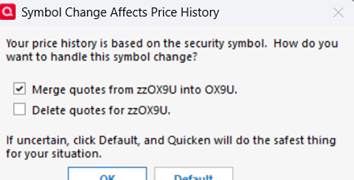
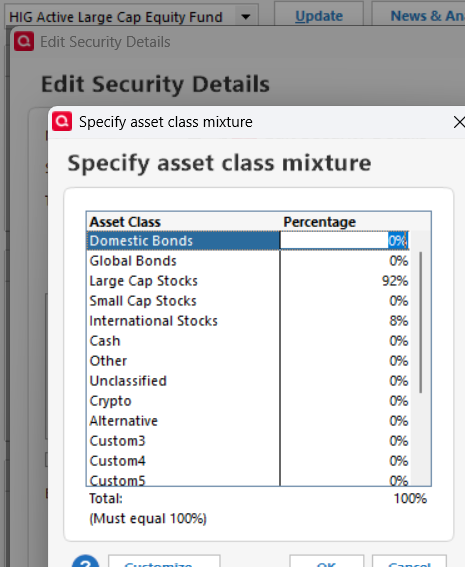
Go into Account for Netbenefits 401k. Click Edit Account Details Icon. Click Online Services. Reset Account or Deactivate/Reactivate Online Setup. Price History remained in the new security name and included the most recent day.
NEXT STEP – MOVE ALL TRANSACTIONS TO THE NEW SECURITY NAME – Manually change each transaction to the new security name. Long copy paste save transaction exercise. Sort on security name to group them all and go one by one. I ran One Step Update and subsequent days price has downloaded correctly.
1 -
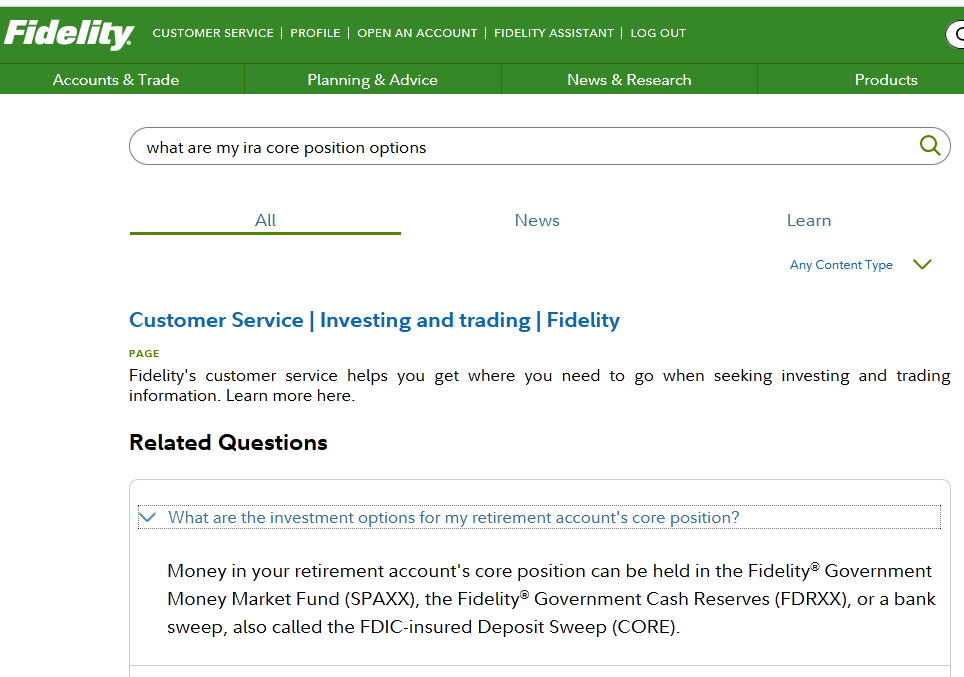
I noticed a recent change on the Fidelity website regarding Core Position/Account options. In the past FDRXX was listed as a standard option for Retirement Accounts but now it is not included in the list. If Fidelity has indeed removed FDRXX as a standard Core Position option then is that perhaps the reason why we are no longer being given the option to have it reported as Cash in Quicken….even though in our online accounts FDRXX is still listed as the grandfathered-in Core Position?
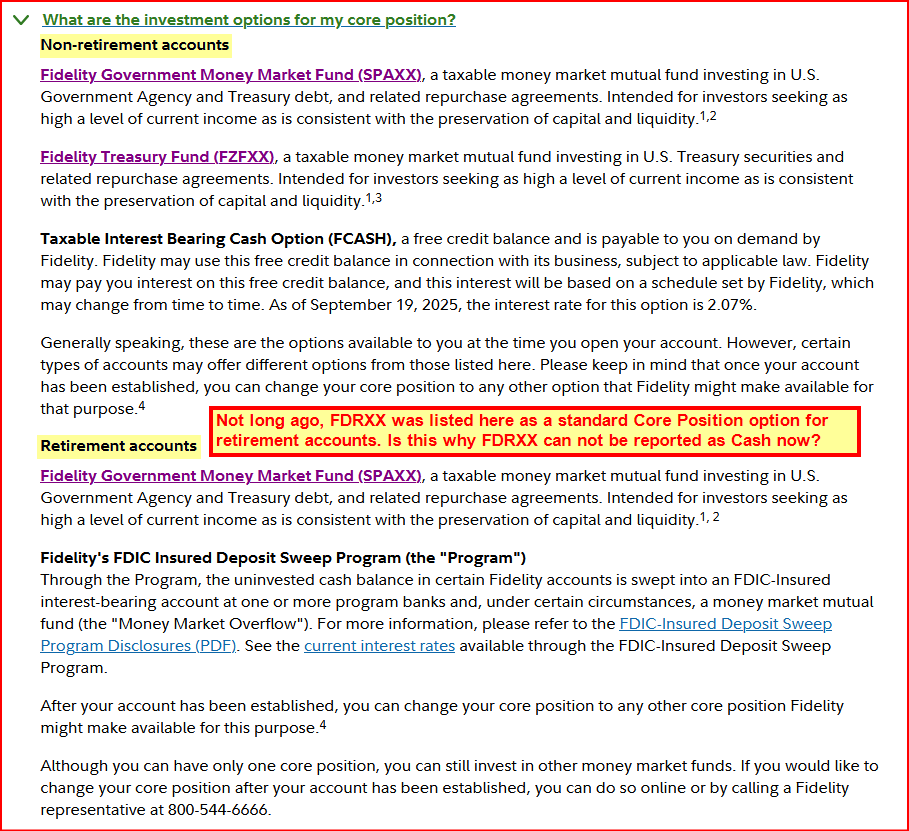
FYI: This list of Core Position options is the list of standard options available to all investors. There are a few other options that are available for high net worth investors but they are not listed in this article. To see the options that are available to you, you can click on the Core Position in your online Fidelity account and then click on "Change Core Position". If you are eligible for other Core Positions they will then be listed there. Or you can call Fidelity and speak with a representative who will be able to tell you which Core Position options you are eligible for.
Quicken Classic Premier (US) Subscription: R66.28 on Windows 11 Home
1 -
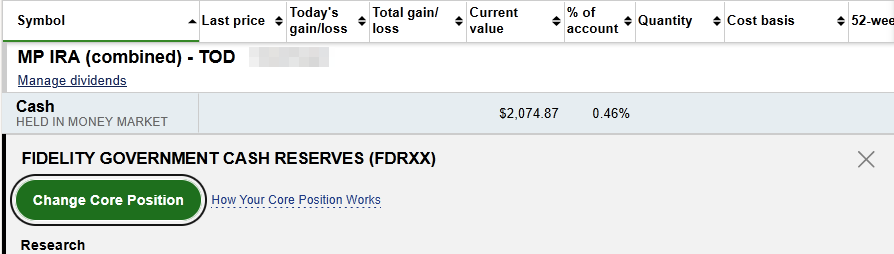
Interesting, FDRXX still shows up as the core position for my IRA.
Deluxe R66.23, Windows 11 Pro
0 -
I want to express my great appreciation for the guidance I've received on this (lengthy) Discussion. I waited until today to make the transition for our accounts.
I used the guidance provided by Jim_Harman on September 19+20. Your step-by-step was great and your repeating the guidance provided by @bmbass to first reconcile the accounts so that I could accept all downloaded transactions and then "mass" delete the non-reconciled downloaded transactions was great.
My thanks to all!
Quicken Deluxe user since 2007, Windows 11
2 -
Yes, my IRAs and Roth IRAs also show FDRXX is the Core Position. So, it made me think that if indeed Fidelity had changed the standard Core Position options (removed FDRXX) then they probably would have kept FDRXX intact as the Core Position for Retirement Accounts that were previously set up with it. That is why I mentioned that maybe being FDRXX was "grandfathered-in" meaning that perhaps new accounts could not be set up with it or existing accounts could not be changed to it.
But what you posted from the Fidelity website showing that FDRXX is still a Core Position option for IRAs maybe means this might simply be a matter of conflicting documentation on the Fidelity website and we really don't know whether or not something has actually been changed regarding the Core Position options. (Sigh!)
Maybe if someone has a retirement account where the Core Position is SPAXX or a Sweep they can check to see if they can change it to FDRXX. That would help to clarify this.
Quicken Classic Premier (US) Subscription: R66.28 on Windows 11 Home
0 -
I have SPAXX as my Roth core MMF. FDRXX is a core option for the account. Just to make sure, I called and asked Fidelity as well.
Deluxe R66.23, Windows 11 Pro
2






