Fidelity accounts won't update at all after conversion

I was finally forced to do the Fidelity connection conversion today, I followed the directions and successfully authorized all the accounts on the Fidelity website but none of them will connect or download new transactions. All accounts are linked to Fidelity Investments.
When attempting an Update, each account gives me a version of the following error message;
OfxSecurePlus request denied due to unmapped bid, bid={10482} (2000)
is there a solution? This makes Quicken unusable for me.
Comments
-
I had the same problem and error. I talked to both Fidelity and Quicken. Unfortunately quicken told me that my file had got corrupt. I did not really believe this to be the case. The solution they took me through is horrible. They had me export everything out and then import it into a new file. This fix the problem. But created so many other problems. I lost 13 reports. All my budgets. All my custom views and when it imported things back, it updated the memo line incorrectly. It also duplicated transactions in Fidelity. It’s been a nightmare. So I would caution to fix. Even though with the error, you have you can’t update your Fidelity accounts.
0 -
I have the same problem that I have been dealing with for two weeks. I don't understand how one day my accounts updated without issue and the next day they failed to update and I got the same error message that you reported.
Quicken Please Fix this Problem It is not Fidelity - it is you!0 -
Thank you for letting us know you're seeing this issue. The unmapped bank ID (BID) the error is referring to is Fidelity NetBenefits. That error implies that Quicken is still seeing at least one account attempting to update on that connection.
To troubleshoot this, start by navigating to Accounts>Hide and Show Accounts…. In the window that comes up, check for any accounts that are connected using the no longer supported connection. If the account is connected, it will show which connection it is using in the Financial institution column.
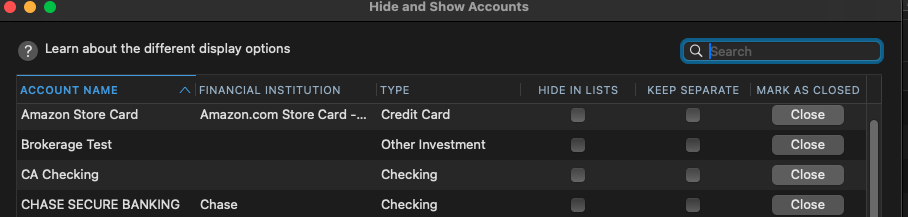
If you find any that are still trying to use the Fidelity NetBenefits connection, make sure they are not hidden, then backup your Quicken file and deactivate the problem accounts. Once the problem accounts are deactivated, navigate to Accounts>Add Account… and follow the prompts. When you get to the Add/Link screen, carefully link your accounts to the existing account in Quicken.
If there are no accounts showing connected to Fidelity NetBenefits, then backup your Quicken file and deactivate all your Fidelity accounts. Then, navigate to Accounts>Add Account… and follow the prompts. Once you get to the Add/Link screen, make sure to carefully link the accounts to the existing accounts in Quicken.
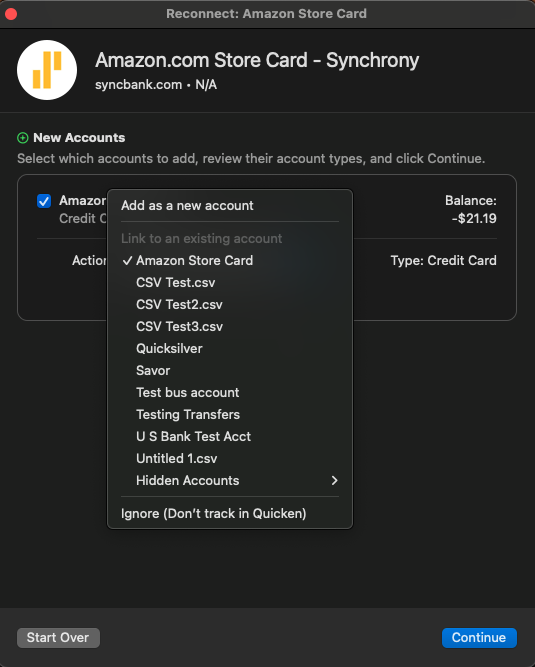
Please let me know how it goes!
Hello @MACMONEY,
Thank you for sharing your experience and the solution that Quicken Support walked you through, though I'm sorry to hear there wasn't a less painful solution available.
Thank you!
Quicken Kristina
Make sure to sign up for the email digest to see a round up of your top posts.
0 -
This solution didn't work for me. Still getting the unmapped bid error. I have multiple fidelity accounts, only my 401k accounts are showing this error. I had migrated other Fidelity Accounts prior to attempting my 401k connection conversion on 10/25. All my previous attempts to migrate my 401k accounts successfully connected, but the balances were not accurate causing me to revert to a backup to correct.
0 -
Hello @biskit,
Thank you for reaching out. Since the troubleshooting above did not help resolve the issue, I recommend that you contact Quicken Support directly for further assistance. Support has access to tools that we can't access on the Community and they're able to escalate the issue as needed. Quicken Support's contact information can be found through this link here. Phone support is available from 5:00 am PT to 5:00 pm PT, Monday through Friday. Chat support is available from 5:00 am PT to 5:00 pm PT, 7 days a week.
I apologize that I could not be of more assistance!
Quicken Kristina
Make sure to sign up for the email digest to see a round up of your top posts.
0
