Stray security showing up in Portfolio X-ray

Hi - Portfolio X-Ray is telling me that one Australian security accounts for more than 50% of my investments. Ticker TSPCF. I am only invested in MFs and ETFs, but none of those investments is close to 50% The other parts of Portfolio, by contrast, are providing reasonable answers - about 10-15% international. Can you assist?
Thanks,
Jim
Comments
-
That is odd.
If you go to Tools > Security List and check the Show hidden securities box, is TSPCF listed there? If so, is the name correct - Cleanaway Waste Management Ltd.?
If you click on the name of the security to open the Security Detail view, does it show that you hold any shares?
What does it show as the Asset Class for that security?
QWin Premier subscription0 -
Hi Jim - thanks for responding so quickly.
Unfortunately, Tools/Security List does not contain TSPCF even with hidden securities box checked. It shows up, so far I can figure, only in Portfolio X-Ray. It is Cleanaway Waste Managment Ltd, based in Australia, the Industrials. X-Ray says it accounts for more than 50% of Investments!! in all the X-Ray views!! However, that does not appear in Investing/Allocations, which says that about 11 % of investments are International Stocks - which makes much more sense.
Any further suggestions??
Jim
0 -
My expectation would be that Quicken feeds tickers and share numbers to Morningstar and gets the X-Ray summary back. If so, it would seem some ticker symbol is being misinterpreted. I suggest:
- Run through the X-Ray with one account at a time to see if a specific account is a problem, or
- Run through the X-Ray with smaller groups of securities to better identify which security is being misread.
A separate step might be to sort your Security List by Ticker to see if one is close to the TSPCF. Then try the X-Ray omitting any close securities.
For the discussion, how many securities are you dealing with?
1 -
When a stray security shows up unexpectedly in X-Ray, the most likely explanation is an error in the Morningstar holdings data for one of your MF's or ETF's. You can isolate which one by running X-Ray individually for each MF and ETF, then look at the Stock Intersection tab to see when the culprit shows up.
You can confirm this problem by going directly to the Morningstar website, search for the MF/ETF, view the Portfolio tab, and scroll down to Holdings.
I ran into a similar problem with a Vanguard ETF (VEU) that showed some Russian company as literally the largest company in the world (outstripping NVDA by a factor of 5X!). Contacted Morningstar and after some back and forth, they eventually got their data corrected.
0 -
Thanks! Apologies for not responding sooner, but I'm one of the "excepted" federal employees who is working and not getting paid. From your suggestions, I think I know the issue - and it's related to the fact that I am a USG employee. I have an account in Quicken I've title "Jim TSP" (the Thrift Savings Plan) and one of the investments is the "C Fund." There is no ticker for that, but I could see Morningstar turning that into "TSPCF"!! Any ideas how to tell X-Ray not to do that??
Thanks again!
Jim
0 -
If you go to Tools > Security List and click on the C Fund entry to open the Security Detail view, is there a ticker symbol - maybe TSPCF? If so, click on Edit details and delete the ticker symbol. Also make sure the Download Quotes box in the Security List for that security is un-checked. That will prevent Quicken from trying to get quotes for that security. Because the C Fund is not publicly traded, the quote provider will not have prices for it anyway.
If for some reason that does not fix the X-Ray problem, try changing the name of the security to something that could not be mistaken for TSPCF. You might try ThrSavingsCFund.
Please let us know what you find.
I tried this in a test file just now and it appears that the X-Ray is currently off line, not returning any data.
QWin Premier subscription0 -
a) you can specify the securities to include in the X-ray
B) as Jim said, you could try renaming the security. I’m really surprised x-ray would try to interpret the security name.
0 -
As of 10 AM Eastern time, the X-Ray is still not returning any results for me.
QWin Premier subscription0 -
Thanks, again. In checking the Security List, I have the C Fund included as "Fund C" with no ticker symbol. The List did say that it was trying to download prices for Fund C (and not any other TSP Fund). So maybe X-Ray translated "Jim TSP" Fund C" security into TSPCF. Ugh! I've now unchecked that box. Once X-Ray is back online, I can test that out.
0 -
As far as I know, the Download Quotes setting will not affect which holdings Quicken tries to send to the X-Ray. It should just affect the ticker symbols that are sent to Quicken's quote provider.
Also I would be surprised if the X-Ray results would include anything for the TSP funds even if it did not assign bogus ticker symbols, because they are not publicly traded. Of course that would mean that if you have most or all of your retirement money in TSP funds, the X-Ray's asset allocation would be skewed.
One thing you could do to compensate for that would be to create a Separate account in Quicken with holdings that mimic the composition of the TSP funds and include that instead of your actual TSP account when specifying the accounts for the X-Ray. For example, Fund C is basically an S&P 500 index fund, so your Separate account could include an amount of VFIAX to match your Fund C holding.
QWin Premier subscription0 -
Well the X-Ray is back on line and I was able to observe this problem. I set up a bogus TSP account in a test file and tried several variations of securities with names like TSP C Fund. It was not until I added the ticker symbol TSPCF that I started seeing the C Fund holding categorized as the Australian stock.
The weird thing is that even if I remove the ticker, delete the price history for TSPCF when prompted, and rename the security to something not at all like TSP C Fund, the X-Ray is still treating it as TSPCF. It is as if Quicken's internal index for that security is permanently mapped to TSPCX. This persists even if I exit and restart Quicken.
Stranger yet is that I deleted the Buy of the C Fund security, deleted the security itself, and created a new offline security with a different name and no ticker symbol. The new security now has the price history that previously went with the C Fund security. It seems that there is more than one problem at play here, and it affects more then just the X-ray.
QWin Premier subscription0 -
Hello All,
Thank you for taking the time to visit the Community to report this issue, though we apologize that you are experiencing this.
We have forwarded this issue to the proper channels to have this further investigated. In the meantime, we request that you please navigate to Help > Report a problem and submit a problem report with log files attached and (if you are willing) a sanitized copy of your data file in order to contribute to the investigation.
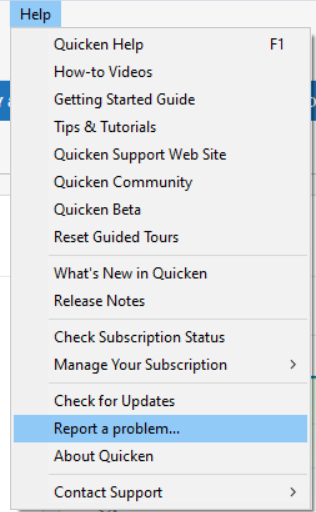
While you will not receive a response through this submission, these reports will help our teams in further investigating the issue. The more problem reports we receive, the better.
We apologize for any inconvenience!
Thank you.
(CBT-890)
Quicken Kristina
Make sure to sign up for the email digest to see a round up of your top posts.
0 -
JIm - thanks for all that trouble shooting. You're definitely correct that that did not solve the issue. And you tried even more iterations. I haven't noticed any issues outside of X-Ray. Of course, I've never had a security in my security list designated as "TSPCF", so I don't have any price history (that I know of) for that phantom security.
Jim
0 -
Quicken Kristina, Happy to report this problem, but where are the relevant log files? As far as providing a sanitized copy of the data file, I'm very hesitant - I don't know how I can sanitize my file, which has years of expenses. Just lmk, Thanks, Jim
0 -
Thank you for your reply,
When you navigate to Help>Report a Problem, the log files should be pre-selected.
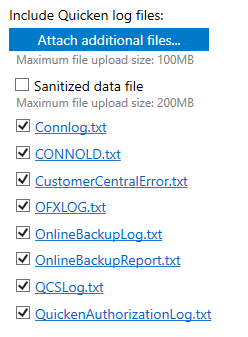
To create a sanitized data file, you would click the box next to Sanitized data file. For information on sanitized data files, please review this help article: . Note - Since our teams have not yet specifically asked for a sanitized file, it is optional. You do not have to send one if you don't want to.
I hope this helps!
Quicken Kristina
Make sure to sign up for the email digest to see a round up of your top posts.
0 -
Thank you. I just reported this as a problem. We'll see what's next.
1 -
Thank you for sending the problem report with logs attached,
It will help our teams investigate the issue!
Quicken Kristina
Make sure to sign up for the email digest to see a round up of your top posts.
0


Categories
- All Categories
- 6 Product Ideas
- 34 Announcements
- 248 Alerts, Online Banking & Known Product Issues
- 19 Product Alerts
- 265 Welcome to the Community!
- 301 Before you Buy
- 1.5K Product Ideas
- 55.8K Quicken Classic for Windows
- 16.9K Quicken Classic for Mac
- 1K Quicken Mobile
- 834 Quicken on the Web
- 129 Quicken LifeHub