Merrill Lynch pending transactions flagging out holdings

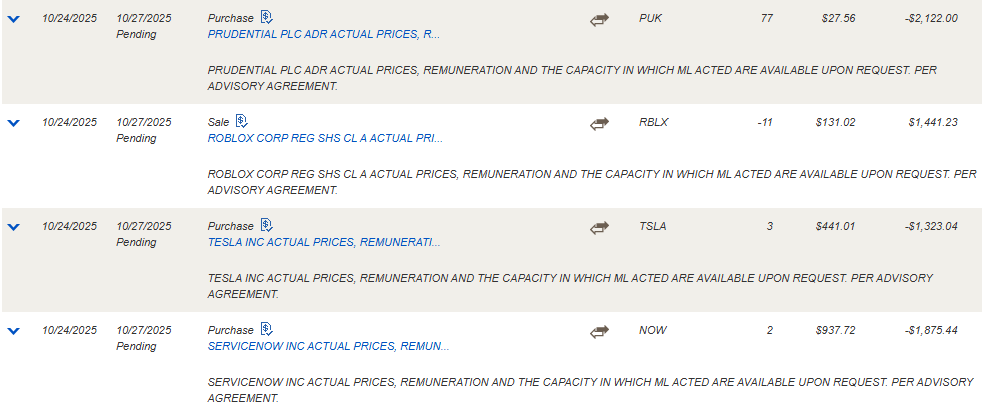
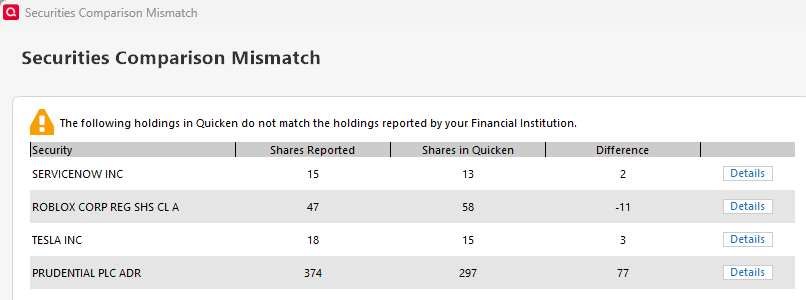
I have "Pending Transactions" download turned off on all accounts, including my Merrill Lynch accounts. This morning the "Reconcile Shares" feature included pending transactions in the stock shares totals flagging out 5 holdings where the trades that have not cleared yet. Apparently the "Reconcile Shares" function does not subtract out the pending trades. This has worked forever but broke this morning.
I do NOT want to turn the "Pending Transactions" feature on for any of my accounts. This has caused all kinds of problems in the past and is not a feature I wish to use (or will use).
With the "Pending Transactions" turned off globally, the "Account Settings" button is grayed out. There is no way that I can find to look to see if by some error the Merrill Lynch accounts have had the checkbox for "Include in current & ending balances" has been somehow checked.
Comments
-
Hello @neiltramel,
Thank you for sharing your experience.
I have some follow-up questions for you, if that's ok.
- Did you ever have pending transactions turned on in the past?
- When did these pending transactions first start showing up, just this morning?
- Where is your data file located?
- Is your file being synced/backed up by any third-party services like OneDrive, Dropbox, or Carbonite?
Additionally, screenshots of what you are seeing could be helpful. If needed, please refer to this Community FAQ for instructions on how to attach a screenshot. Alternatively, you can also drag and drop screenshots to your response if you are not given the option to add attachments.
Looking forward to your response.
Quicken Alyssa
Make sure to sign up for the email digest to see a round up of your top posts.
0 -
The Pending transaction feature in Quicken is only for non-investment accounts.
Since you are talking about investment transactions we have to look into other causes.
The concept of "pending" for an investment transaction is a bit different than in a non-investment account.
For a non-investment account, it would be like a charge that takes a day to post.
In an investment account I assume you are talking about a transaction that has yet to close like a buy or a sell.
It is totally up to the financial institution how it wants to send these transactions to Quicken. Some will not send them until the transaction closes, and some will send them immediately. And in the case of when a financial institution changes from Direct Connect to Express Web Connect + this might change. It can have some strange effects. I remember that Vanguard would send the buy/sell immediately, but the transaction for transferring the cash in or out of the money market mutual fund wouldn't come until the transaction actually closed.
Normally whichever way this is handled usually doesn't cause a problem as far as the transactions go, but there is another potential problem which I think you are running into.
Along with the downloaded transactions there is a section of information stating how many shares of each security you have and your cash balance sent by the financial institution.
Unfortunately, it isn't that uncommon for the financial institutions to put not keep the transactions and this extra information in sync.
This is why when you use "Reconcile Shares" Quicken says that what it has for the number of shares doesn't match what the financial institution has. Both of these are sent by the financial institution and as such only they can fix it.
In practice trying to get them to fix it is next to impossible. What people tend to do is note that this is happening and ignore the inconsistency until the transactions actually close and by that time the information they send tends to be back in sync.
0 -
For Quicken Alyssa,
Answering your follow up questions:
I have some follow-up questions for you, if that's ok.
- Did you ever have pending transactions turned on in the past? Once a long time ago. And then only on my Chase bank accounts.
- When did these pending transactions first start showing up, just this morning? This behavior on my Merrill Lynch accounts started this morning. It was fine over the weekend. This is a very actively traded account with generally 2-10 transactions a day. The positions in question this morning were traded on the 24th and are set to clear today on the 27th. They still show as "pending" in the Merrill Lynch system.
- Where is your data file located? On my local hard drive. Technically it is a solid-state drive.
- Is your file being synced/backed up by any third-party services like OneDrive, Dropbox, or Carbonite? This file is backed up manually to my personal NAS RAID server on my local network.
 0
0 -
This is exactly what I described, Merrill Lynch is sending this inconsistent information. This would be evident in the Cloud Sync log file.
And once these transactions clear I fully expect they will be back in sync.
0

