Fidelity Updates Still Broken after Update

I received an update (Quicken Classic version R64.30 build 27.1.64.30) that allegedly fixes the Fidelity issues, but did absolutely nothing for my Fidelity HSA account. The previous "new method of connecting" made a disaster of the account, adding multiple money-market transactions & short-cover transactions (?), changing previously reconciled transactions, etc. The net result was a unfathomable balance mismatch. Additionally, no new REAL transactions have been downloaded in several weeks, even though they show up on the Fidelity website as activity.
Again, the "update" appears to do nothing. Meanwhile, I deleted all the extraneous transactions and am about to disconnect the account from online access altogether unless this can be resolved quickly
Like another recent post, I've been using Quicken for decades and have never encountered such situation
Comments
-
Hello @extravoice,
Thank you for sharing your experience. Have you made any manual corrections to the account or restored a backup and migrated it again, to see if the incorrect transactions was a one time occurrence or a persistent issue?
For the transactions not downloading issue, have you confirmed that the register is sorted by date?

Is there any chance the missing transactions incorrectly matched to transactions already in the register? Have you checked to see if they may be downloading into an incorrect account?
I look forward to your reply!
Quicken Kristina
Make sure to sign up for the email digest to see a round up of your top posts.
0 -
I am having the same issue. I haven't had a new transaction download from Fidelity for most of my accounts since 9/22.
0 -
Same here, no new transactions have downloaded for a few weeks, even though there are several in my accounts. I have 2 brokerage accounts and an IRA. All having the same symptom.
Have deactivated all 3, restarted quicken, then gone through the add acccount/link to existing process. All succeed but no transactions download.
Only 1 of the 3 accounts prompts me to choose how to handle the core mutual fund, even though all 3 had it set up before.
1 -
The new connection is still broken probably
0 -
I'm just going to punt. Too much time has elapsed, and too many transactions have occurred in my other accounts (with and without online access) to simply revert to an old backup and reconstruct all the other accounts just because my Fidelity HSA account was messed up by the update. [Edited - Language]
I've disabled online access and will handle transactions manually. [Removed - Rant]
0 -
Hello @J_Hamm, @Drinkingbird, & @Kevin Lee,
If the issue with missing transactions is persisting, and you've already followed the troubleshooting from my earlier post, then I recommend that you contact Quicken Support directly for further assistance, as they have access to tools that we can't access on the Community, and they are able to escalate the issue as needed. The Quicken Support phone number can be found through this link here. Phone support is available from 5:00 am PT to 5:00 pm PT, Monday through Friday.
Thank you for your reply @extravoice,
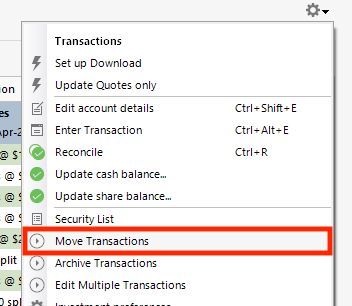
Since restoring a backup isn't a viable option, if you want to troubleshoot further, I recommend making a backup of your file and adding your HSA account as a new account in your Quicken. If everything downloads correctly in the new account, you would be able to copy your historical transactions from the original account to the new account by clicking the gear icon near the upper right of the account register and selecting the Move Transactions option, then, once you've confirmed everything is correct in the new account, you could delete the original.
Thank you!
Quicken Kristina
Make sure to sign up for the email digest to see a round up of your top posts.
0 -
The troubleshooting steps for missing transactions were just to make sure it sorted by date and that I didn't match the transactions incorrectly, neither is the issue here. No transactions download, I can't accept them (correctly or incorrectly).
I totally deactivated and reactivated online services (twice) for Fidelity. No transactions downloaded when doing that even though there were multiple in there that have never downloaded, across 3 accounts. I haven't had a transaction download since Sept 3rd, but the issue may have started later than that (there was a recent update that fixed core fund handling, may or may not be related).
Sorry, but dealing with support is a nightmare. They'll try to get me to go through steps that will completely destroy my data file and not resolve anything, then just tell me that I should start over with a new data file or that I shouldn't keep more than 1 year of transactions in the file.
This issue is apparently affecting multiple users as seen in this thread and others, it should be reported back to the product team to look at a fix.
1 -
Thank you for your reply @Drinkingbird,
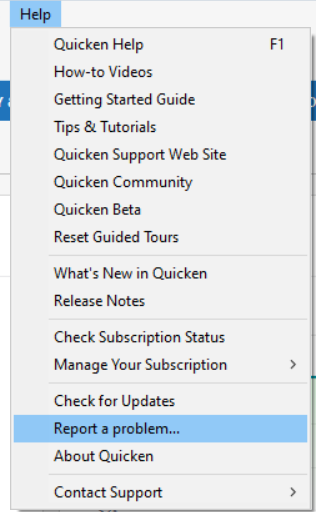
If contacting Support directly is not a viable option for you, then please navigate to Help>Report a Problem and send a problem report with log files attached plus the following additional information:
- At least 3 sample transactions (date/payee/amount) for each account that is missing transactions.
- The name of each account you're encountering this issue with, both as it appears in Quicken and as it appears on the financial institution website.
- A screenshot of the transactions as they appear on the financial institution website.
- A screenshot showing that those transactions are not in your Quicken.
Note - Problem reports allow a maximum of 10 attachments. If you need to send more than 10 attachments, please use a 2nd problem report to send the extra attachments.
Our teams require all of the information I requested above to be able to investigate the issue.
Please let me know once you have sent the problem report.
Thank you!
(CBT-848)
Quicken Kristina
Make sure to sign up for the email digest to see a round up of your top posts.
0 -
I've been having the same issues with Fidelity for weeks now, and have resorted to manually entering transactions. I'm not going to go through the usual deactivate/activate my connections and end up with duplicate transactions. I expect to see an update which will correct this.
Mike
0 -
I am having the same issues with Fidelity - last transaction update was Sept 18. It says successfully updated with no new transactions when I perform the one-step update even though I can see new transactions on the Fidelity website. I have deactivated and reactivated my connection, repaired my quicken file, reset the account.
0 -
[Removed - Rant]
0 -
Thank you for letting us know you're also having trouble with missing transactions/transactions not downloading. If you haven't already done so, please try the troubleshooting steps I posted earlier in this discussion:
Please let me know how it goes!
Quicken Kristina
Make sure to sign up for the email digest to see a round up of your top posts.
0 -
I got an email from Quicken that said I should now have my Fidelity signon credentials in Quicken to resolve the transaction download problem. I have entered a new Fidelity account, but I got nothing to enter signon data into Quicken. This seems to be a major problem with no resolution yet. I will have to enter transactions manually, and give up on downloads.
0 -
Hello @Catnap30,
Thank you for reaching out! To help troubleshoot, please provide more information. You mentioned receiving an email from Quicken about resolving your transaction download problem. Was this regarding a contact with Quicken Support? If so, what is the ticket number? What instructions did the email provide?
I look forward to your response!
Quicken Kristina
Make sure to sign up for the email digest to see a round up of your top posts.
0 -
This content has been removed.
-
Transactions started downloading for all 3 Fidelity accounts tonight. Still some issues like a reinvest being downloaded as two separate transactions, and two accounts are no longer detecting the core fund as cash like they were before. Hopefully they get this all sorted out soon.
1 -
Thank you for the update @Drinkingbird,
I'm glad to hear that transactions are downloading again. Are the accounts with the reinvested dividends downloading as 2 transactions regular Fidelity accounts, or are they with Fidelity NetBenefits? Is it an issue where the pending transaction downloads, then it downloads again when it posts? If not, then please provide more details what you are seeing.
Thank you!
Quicken Kristina
Make sure to sign up for the email digest to see a round up of your top posts.
0 -
These are regular Fideilty accounts, not netbenefits. One is a brokerage, and one is an IRA. The transactions did not show up as pending, they just downloaded as two separate transactions at the same time (one div, one buy). Technically this is how they show up in Fidelity's history but they've always (even after EWC+ conversion) downloaded as a single reinvest.
Maybe just a glitch related to the issue and the fix, suppose we'll see next time there is a reinvest.
The 3rd account is a brokerage also but that didn't have any reinvestments or any transactions recently.
0 -
Thank you for your reply,
Please let me know if it happens again next time transactions of that type download!
Quicken Kristina
Make sure to sign up for the email digest to see a round up of your top posts.
0 -
The transactions did not show up as pending, they just downloaded as two separate transactions at the same time (one div, one buy). Technically this is how they show up in Fidelity's history but they've always (even after EWC+ conversion) downloaded as a single reinvest.
I haven't taken the Fidelity reauth plunge yet, but FYI, in my ETrade downloads, if a reinvestment unit cost * share count matches the total cost EXACTLY then it'll be processed as a Reinvest, otherwise it will be processed as a DIV followed buy a BUY.
I'm happy to leave them that way … there's no impact on me as far as I can tell from the two different ways of recording the same thing.
0 -
For HSA it's a known issue:
0 -
Yes these matched exactly, I'm aware (and ok with) when there is say both a dividend and capital gain then a single buy. But these are a perfect match and always have come through as reinvest before (even after EWC+ conversion). Hopefully it was just due to the issues and will sort itself out, will find out next week when the next reinvestments come through.
0 -
Alas I am part of the crowd in which Fidelity accounts no longer sync ever since I "upgraded" from Direct Connect. It's been months since any transaction of any type was downloaded - I have to enter everything manually. Unlike others I don't get incorrect entries or anything - simply no transactions at all.
I have gone through ever possible way of fixing this:
- Reset affected accounts
- Deactivate / restart / setup online services
- Deactivate / restart / Validate & Repair / setup online services
- Deactivate / Add new account
The last attempt (add new account) I chose a single account to just recreate from scratch planning on moving transactions once I got it working. This was interesting - I selected the account based upon account number but when I got to the screen that lets you add to Quicken it had selected the wrong account and the drop down was read only on "do no add to quicken". This means my attempt to add the account to quicken failed probably because the account already existed (I had not disabled the other accounts). I have to assume that the presented lists of accounts from Fidelity (with partial account numbers) is not correct since I definitely selected the correct by account number but the next screen showed the wrong account being added.
What's frustrating is I also have Schwab which uses Express Web Connect and this is rock solid never having had a single issue. If I could move the accounts to Schwab I would.
0 -
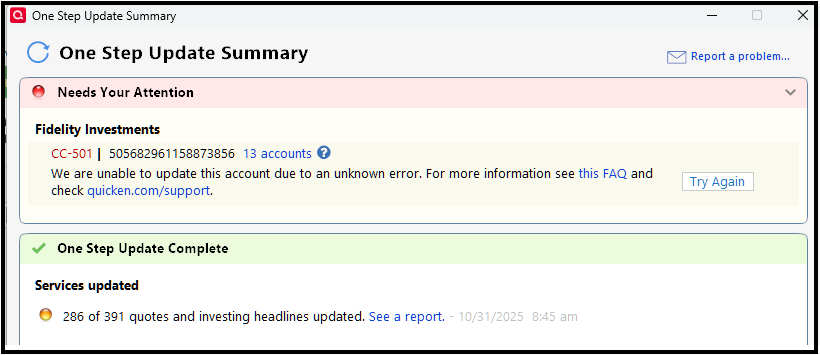
My Fidelity accounts updated yesterday morning. This morning none of my Fidelity accounts update during OSU and I'm getting a CC-501 error. I had already changed to EWC+ weeks ago.
Problem report submitted.
Quicken Classic Premier (US): R66.28 on Windows 11 Pro
0 -
Same thing here. I have been having other issues since I was finally forced to move to EWC+. This is the first time I have received the CC-501 error since I migrated weeks ago.
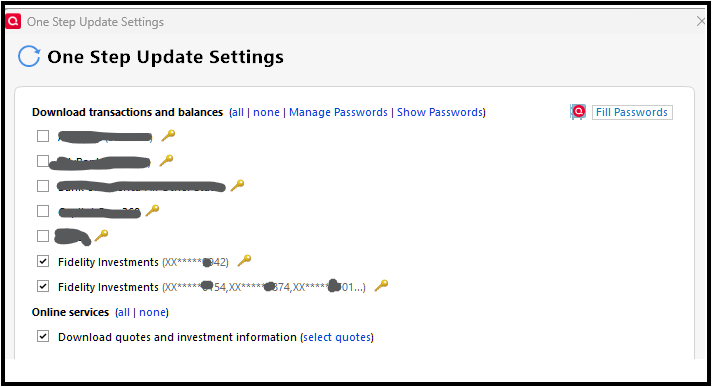
UPDATE - After two more tries I had partial success. One of my 14 Fidelity accounts updated. This is an account ending in 42 that is listed separately on the One Step Update (happened weeks ago when support had me deactivate and reactivate). The remaining accounts still get the CC-501 error.
 1
1 -
One additional data point for the Quicken team. I manage finances for a family member that also has Fidelity accounts. I use a separate Quicken file for them that I also update every morning. I am getting the same CC-501 error for their Fidelity accounts during OSU (I had no problems doing the OSU yesterday morning) so it appears to be a global problem with the connection to Fidelity.
Quicken Classic Premier (US): R66.28 on Windows 11 Pro
0 -
@jersey42 One thing to note about some of your Fidelity accounts being listed separately for OSU. I had the same issue and was able to fix it by deactivating all my Fidelity accounts and then reactivating them and selecting them all again when the selection screen comes up during the activation process. I think the issue occurs when you activate some of your Fidelity accounts separately and not all together at once. Not sure if it really matters but my OCD did not like having separate lines…LOL.
Note that I would not attempt anything at all with Fidelity until they get the connection to Quicken fixed.
Quicken Classic Premier (US): R66.28 on Windows 11 Pro
0 -
Oct 31, Same problem, fidelity account positions wont download. I see others having issues with Fidelity. If this is a known issue that is being addressed then I would sure like to hear that.
0 -
It does not look like the requests to DL data is getting to Fidelity from Quicken. Fidelity third party access authorization is viewed after logging into Fidelity and then going here:
"https://digital.fidelity.com/ftgw/digital/dae/fidelityAccess"
That also lists the last time the connection was made and for me it lists 10/30/25, obviously yesterday.
Quicken Classic Premier (US): R66.28 on Windows 11 Pro
1 -
I posted this in another newly created thread. Essentially, me too!.
OSU ran for over 5 minutes before I killed the task. I could see the swirling circles so I knew it didn't freeze, it was just not connecting. After another failed attempt, I came to the forum and saw the other thread. I then ran OSU and unchecked Fidelity and it ran fine and completed successfully.
As @Mark Wagner suggested, I checked the third party access and, indeed, it was yesterday.
I not going to reauthorize (done that enough over the past month). Instead I'll try later.
0