What is the sort order for investment accounts?

Using Quicken Classic for Windows… I'm looking at a brokerage, IRA, annuity, and 401(k) account, and they are neither sorted alphabetically by provider nor by account balance. Any rules or reason here?
Best Answer
-
Hello @Tom Auer,
Thank you for posing this question.
In my own Quicken, Brokerage accounts fall under Personal Investments, while my 401(k) and IRA accounts fall under Personal Retirement.
You can rearrange the accounts within these sections to suit your needs.
To do this:
- Go to Tools.
- Select Account List.
- Click on the account you would like to move.
- Use the arrows to the left to move it up or down.
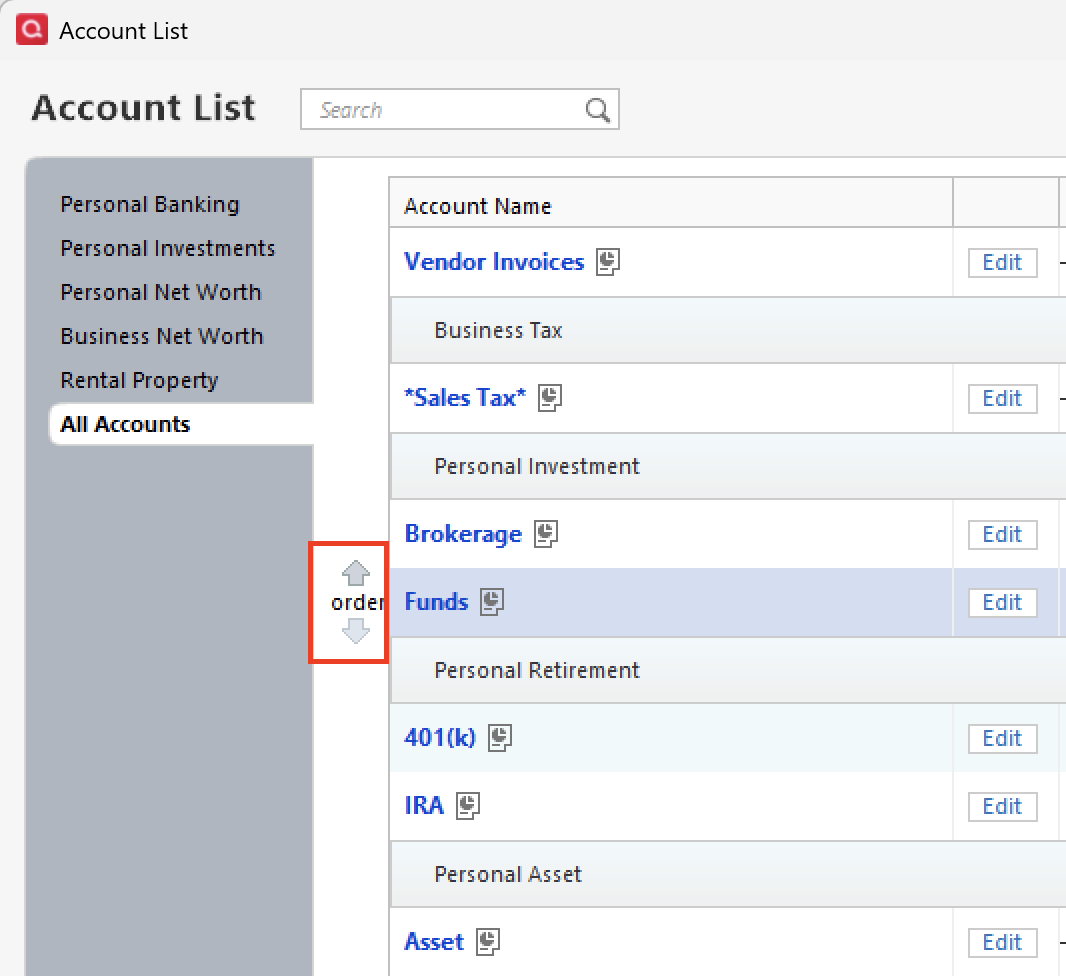
Hope this helps!
Quicken Alyssa
Make sure to sign up for the email digest to see a round up of your top posts.
0

Answers
-
Where in Quicken are you looking at the list of accounts?
In the Investing > Portfolio views, the Account Bar, usually on the left side of your screen, and at Tools > Account List, you can reorder the accounts manually.
QWin Premier subscription0 -
Hello @Tom Auer,
Thank you for posing this question.
In my own Quicken, Brokerage accounts fall under Personal Investments, while my 401(k) and IRA accounts fall under Personal Retirement.
You can rearrange the accounts within these sections to suit your needs.
To do this:
- Go to Tools.
- Select Account List.
- Click on the account you would like to move.
- Use the arrows to the left to move it up or down.
Hope this helps!
Quicken Alyssa
Make sure to sign up for the email digest to see a round up of your top posts.
0 -
Alyssa, thank you for an interesting, but incomplete, answer. My accounts seem to be categorized under Banking, Investing, Property & Debt, and Separate, and I don't see any way to change or modify those categories. Furthermore, under Investing, my accounts are segregated into Investing and Retirement, and I don't see any way to modify those categories. How can I modify the account categories, or is that a feature that is only available in certain versions of Quicken?
0 -
You can't change the account sections, but you do have limited ability to change which section a given account is in. From the Account List select Edit and then the Display Options tab. From there change the Account intent, this is what controls which section that account will be in.
Also, if the goal is to get the accounts sorted in alphabetic order (in a given section) select the Options button at the bottom of the Account List and then Alphabetize accounts.
And there is also a newer/faster way to move accounts around. From the same Options button (or by right clicking on a blank part of the Account bar) select Rearrange Accounts. From there you can do a drag and drop to move them around.
0


Categories
- All Categories
- 6 Product Ideas
- 34 Announcements
- 250 Alerts, Online Banking & Known Product Issues
- 19 Product Alerts
- 265 Welcome to the Community!
- 301 Before you Buy
- 1.5K Product Ideas
- 55.8K Quicken Classic for Windows
- 16.9K Quicken Classic for Mac
- 1K Quicken Mobile
- 834 Quicken on the Web
- 129 Quicken LifeHub