I am trying to connect my merrill lynch 401K with Quicken
Answers
-
This fix appears to work for me as it updated my asset prices. I'll try it again on Saturday morning when my 401k payroll deductions appear in my Merrill Lynch 401k. Essjay gets the A for the day!
0 -
I have a bit of a confession, I'm very aware of the fact that you can edit the financial institution's ID in the QFX file to "make it work". In fact, my free program ImportQIF can do this for you automatically.
But the reason for not interjecting that into such a thread is that I strongly feel that Merrill Lynch/Intuit should fix this problem. Having the user edit the financial institution ID isn't a fix, it is a workaround that isn't even really approved by Quicken Inc/Intuit.
Merrill Lynch should tell Intuit to put back the benefits 10779 entry in the fidir.txt file.
Note that another possible idea would be just to have Merrill Lynch change the financial institution ID to 05550 in the QFX file that they generate on their website, but that feels "wrong" to me. First off, I bet it would be harder to get Merrill Lynch to change their website code for this, but on top of that there is a distinct difference between the two financial institutions, that might confuse Quicken users. 10779 has always only supported Web Connect/QFX files, whereas 05550 supported Direct Connect and Web Connect, and has now gone to Express Web Connect +. The 401K accounts on the www.benefits.ml.com site aren't going to be able to use Express Web Connect + since it pretty clear that these are two completely different sites, and Merrill Lynch would have to implement Express Web Connect + on the www.benefits.ml.com site which seems very unlikely.
0 -
@Chris_QPW said:
>"…I strongly feel that Merrill Lynch/Intuit should fix this problem. Having the user edit the financial institution ID isn't a fix, it is a workaround that isn't even really approved by Quicken Inc/Intuit. Merrill Lynch should tell Intuit to put back the benefits 10779 entry in the fidir.txt file."
I couldn't agree more. Manually editing of the QFX file is only a temporary work-around which should only be attempted if confident in doing so, and updating 401k transactions is urgent pending permanent resolution by Quicken/Merrill Lynch.
1 -
I think Quicken should fix this problem. It seems
10779
was in their authorized financial institution list, but was removed recently.
They need to add it back. There is nothing for Merrill Lynch to fix.1 -
I couldn't agree more…
1 -
From
Charles DongMember ✭✭✭October 10"I think Quicken should fix this problem. It seems '10779' was in their authorized financial institution list, but was removed recently. They need to add it back. There is nothing for Merrill Lynch to fix."
So, is this issue going to be fixed or no? I don't care who fixes it, but I'm extremely disappointed that, from my end, it appears nothing is being done. I'm paying for a financial program that now shows millions of dollars in my Total Assets that aren't really there.
0 -
The solution above works, when will Quicken fix this in the app for www.benefits.ml.com clients?
0 -
Wow this workaround was effective for me — thanks so much for describing it!
0 -
Same issue, will proceed with workaround until problem is corrected
0 -
I'm considering rolling my Merrill Lynch elsewhere. Could someone who uses Vanguard, Fidelity, or another describe Quicken connection? QFX download or One-Step access? Can you do transactions from within Qkn?
FWIW, essjay's workaround didn't work for me, and I would prefer simplest connection.
0 -
I highly recommend Vanguard as I've been using them for over 20 years. I go to their website after logging in and download a qfx file. Easy Peasy. I switched to Vanguard from Fidelity in 2004 after reading Common Sense on Mutual Funds by John Bogle (the founder of Vanguard). Vanguard is the Aldi of investing. Low cost without sacrificing quality (ie performance).
0 -
The Fidelity accounts download to Quicken Classic by One Step Update. Sometimes the transaction downloads are delayed 2-3 days after execution date. Last spring our downloads totally missed two transactions which had to be manually entered into Quicken. But we are very happy with them overall.
Earlier this year Fidelity changed from Direct Connect (?) to Express Web Connect+, and it only took a few minutes to update Quicken's download method. But "zzz-Fidelity Investments - DC" worked for months with the old method, while "Fidelity Investments" and Quicken rolled out the EWC+ method.
Fidelity does NOT provide QFX files, since they have EWC+. Currently, online, you can see transactions for any 365 day period, back to 5 years from current date. They do have CSV download if you want to keep digital data outside of Quicken.
We do NOT initiate transactions within Quicken. We go to the financial institutions' web sites to ensure they are done exactly as we expect.
My family likes Fidelity because the monthly Rollover-IRA statements and quarterly Investment statements list every transaction. (I believe statements are available online for 10 years.)
One of my family has Vanguard for investments and is happy with them. But that person has not shown me their statements nor web site.
If you do a rollover, your money might be "in limbo" for about 1 week while moving between institutions. We had an investment-lull of about 3 weeks because it went by a "Direct Rollover" check, during Christmas/New Year's holidays.
FYI - Fidelity has self-directed accounts that have zero advisory-management fees. See Planning and Investment Advice Offerings | Fidelity then look for "Fidelity DIY" for Brokerage and Retirement-IRA accounts.
QUICKEN Still Needs To FIX "Benefits.ML.com" in "fidir.txt".0 -
I am experiencing the same problem. I can log into the Merrill Lynch website without difficulty.
Sign in from Quicken directly fails (does not recognize ML credentials as valid)
I cannot upload a file manually downloaded from the ML website as I receive error "Quicken is unable to verify the financial institution. Please try again later'. This error persists.
0 -
Just to be clear Quicken Inc can’t change this. Intuit is the one maintaining the file Quicken uses to determine what financial institutions support. Quicken Inc pays Intuit for “connection services”. Intuit maintains the connections and relationships with the financial institutions. The financial institutions tell Intuit what connection methods they want to support.
The mistake is at Merrill Lynch. And it is pretty clear that they don’t seem to understand that benefits.ml.com is handled differently than ml.com.
0 -
Is the connection method from benefits.ml.com changed? I don't see it changed. Then why mistake is at Merrill Lynch? Whoever (Quicken or Inituit) maintain the list of financial instituions need to update by puting back 10779 ID.
0 -
They can't change it back without Merrill Lynch's approval. This doesn't seem to get through to people, it is the financial institution that decides what they want to support. Quicken Inc and Intuit can't force them to do anything. And if it is a communication problem between Merrill Lynch and Intuit, they have to work it out together.
I can say one thing, about communications, it seems like a lot of people involve just can't get it through their heads (I'm referring at Merrill Lynch and even Quicken Inc, I don't know about Intuit, because they don't talk to us, they only talk to the financial institution and Quicken Inc) that benefits.ml.com and ml.com are not the same. So, they keep talking about what is true for ml.com not benefits.ml.com.
0 -
Just to hopefully add a bit more detail without more confusion, Merrill Lynch is a wholly owned subsidiary of Bank of America. The benefits.ml.com website is the portal for employer-sponsored benefit accounts for BofA and other firms that use Merrill Lynch for their employee retirement accounts, whereas the ml.com website is the public-facing consumer portal for investing and financial services for general clients. This is perhaps a distinction without a difference as it still apparently up to Bank of America to fix the problem, not Intuit/Quicken. Complaints may be more effective directed at Bank of America.
1 -
No, they get it alright, it's just easier to play stupid than acknowledge the problem.
0 -
You seemed to imply that Merrill Lynch instructed Quicken to remove ID 10779. If that is the case, then it is the mistake Merrill Lynch has to correct. I did not know if that is case.
0 -
The process always starts at the financial institution. In this case, we are actually talking about what Intuit/Quicken considers three different financial institutions as far as what to enable and disable even though they are all "BofA". There are the ones you see as BofA, checking, savings, and credit cards, and then the Merrill Lynch for brokerage accounts and seems "some retirement accounts", and then there is "benefits" which are the ones this thread is about which has 401K accounts.
It is quite possible that the people directing the changeover at Merrill Lync didn't fully understand the ramifications of telling Intuit to "disable Web Connect/QFX files". As in they meant it for the brokerage accounts and checking but didn't even think about the benefits/401K accounts, but Intuit took it that way.
We will never know because we can't see their conversations.
And the benefits site is "special". It has never had Direct Connect, only Web Connect. Whereas the "BofA" and "Merrill Lynch brokerage" were using it. So, for those two they really did want both Direct Connect and Web Connect to be disabled and Express Web Connect + enabled.
It would actually be nice if benefits could get Express Web Connect + but given these are different servers running different software it is highly unlikely that they would add whatever software they need for that. I think the best we can hope for is just getting Web Connect turned back on.
BTW personally I can see where this mistake would be easy to make, but what is a bit frustrating is that all it would take is for Merrill Lynch to understand the problem and direct Intuit to change it. The edit of the file by Intuit would be trivial.
0 -
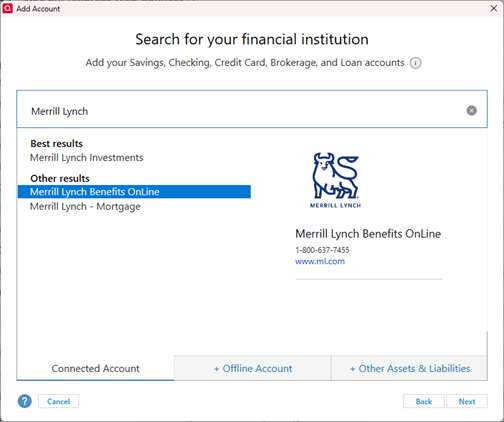
When I launched Quicken today, it appears that the FIDIR.TXT file was updated. I now have Merrill Lynch Benefits Online as an option for adding a Connected Account. It is now using Express Web Connect+, and limited to "Simple" positions tracking method only (not Complete Transactions) for 401k. NOTE: The dialog shows www.ml.com, but it sent me to www.benefits.ml.com.
 1
1 -
Very interesting! Thanks for pointing this out. I guess this is Merrill Lynch's answer to this problem. I'm not sure this will be desirable to everyone since some might want to track the transactions, but personally it is fine with me.
I will also add that I had to force the update of the FIDIRT.TXT file before it took me to the right site to authorize this. You can either wait up to 4 days or just change the last update date to one about a week ago in the C:\ProgramData\Quicken\Config\Quicken.ini file. The line is: Periodic_last_update=
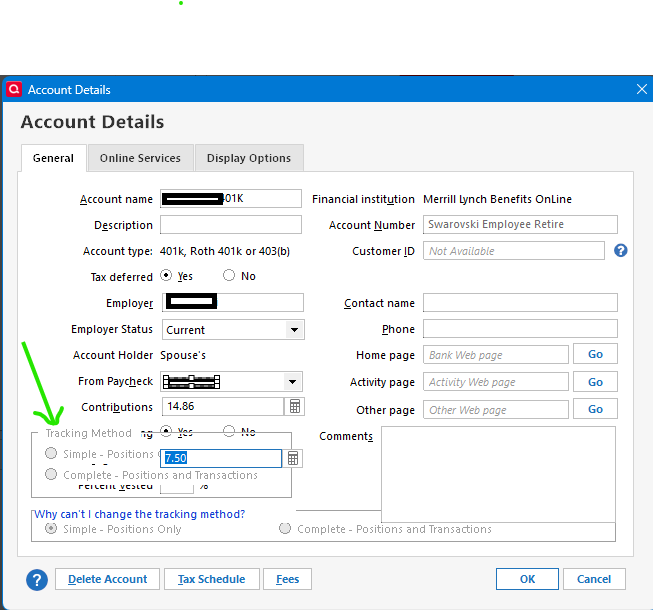
I will also note that this has surfaced a problem in Quicken. Evidentially the Quicken developers never anticipated "Track Method" to be turned on in a 401K account because the Account Details dialog now has overlapping controls on it.
 0
0 -
@Quicken Alyssa I have submitted a problem report on the above dialog problem titled: "Merrill Lynch 401K in simple mode dialog, overlapping controls"
1 -
BTW if anyone has used the workaround suggested in this thread, they need select Deactivate on the Account Details → Online Services tab, before then using Ctrl+A (Add Account) to select Merrill Lynch Benefits Online and go through the process of authorizing the Express Web Connect +/Simple investing mode, and be sure to link the online account to your 401K account in Quicken.
0 -
I too had been using the workaround, decided to try the new connection to see if I could live with the simple tracking method. I can. One strange issue though for me and not sure which side the error is on, Quicken or Merrill. After adding the new connection, my positions and cash balance that hadn't been invested yet were correct. The next day after running OSU, the position for one of the four funds in the account (a bond fund) changed from the correct total of 5534.0134 to 55.3401 and cash balance disappeared (resulting in a 100k+ loss in my 401k and a quick panic attack before assessing the situation). Manually corrected both issues it and run OSU again, same issue again. I deactivated the connection then added it again. The correct positions and cash balance came back and I left it alone. At the next OSU a day or 3 later same issue with the same fund. Verified deactivating and adding account again corrected the issue, until next update. Manually fixing the single position has been my fix after each OSU since much quicker and less steps than going through whole reauthorization process. Just a very strange issue and wondering if others experienced this as well. And thanks to Chris as I had been using his tool.
0 -
When you download transactions there is two parts to the data. The transactions and the "summary information". The "summary information" includes the number of shares of each security, and the current price, and your cash balance. This is also true of what is in the QFX file too.
When you are using the Complete investment mode, you are mostly using the transactions. The "summary information" is only used when comparing what is in Quicken to the financial institution has sent in that "summary information".
When you are using the Simple investment mode Quicken ignores the transactions and only looks at the "summary information". What it does with that is use add/remove transactions and misc income or expense transactions to make Quicken agree with that summary information.
Clearly if that information isn't correct then in Simple investing mode it is possible for it to jump around like you have seen. And for sure, you can't "correct it", because the next time you do One Step Update Quicken will just download the same information and force it back to lining up with that information.
I will say though that I'm not seeing that wife my Wife's 401K account that is serviced by Merrill Lynch. She gets a paycheck every week and as such it is updated for new buys and at the end of the month for reinvesting. I have been using the Express Web Connect + connection with Simple investing mode for about 2 weeks now. There was a day where I was getting errors, but that cleared up a day or so later.
0 -
Hello All,
Thank you to everyone who has added to this discussion.
Is everyone able to use the Merrill Lynch Benefits OnLine instance to connect their 401(k) accounts? Or are some of you still not able to add these accounts?
Can you send logs for the overlapping controls issue? I did receive the screenshot.
Thank you!
Quicken Alyssa
Make sure to sign up for the email digest to see a round up of your top posts.
0 -
From Merrill Lynch 401K Website assistance
Hello <XXXX>,
Thank you for you inquiry. I am very sorry for the inconvenience. Regrettably, we do not have a time frame for when the Quicken link will be available again. Our tech team is working on a solution.
Kind regards,
<XXXXXXXXXXXXXXX>
Customer Service Representative
Retirement & Benefits Contact Center
0 -
I have submitted a problem report with the title "Overlapping controls when a 401K account is setup as Express Web Connect +."
1


