After Rebalancing 401k, Quicken displaying Incorrect Account Balance

I rebalanced my 401k and moved the money from the 4 existing funds I had. I consolidated it all into one fund. Quicken now shows the wrong balance on the account. The balance is negative. It has all the transactions from the rebalance - the selling of the existing shares in the existing funds and purchasing the shares in the new fund. My brokerage is Fidelity. I found this page:
Updated 10/28/25 Fidelity Migration — Quicken
but it does not seem to apply to my situation. What quicken seems to be doing is taking the prior value, subtracting the sales of the old funds and using that as the new value. Even that is wrong because it comes out with a negative number for securities value whereas when I do the math on the transactions, the value of shares of each fund sold matches the value in the new fund. I am not sure where it is getting the extra ~ 10,000 to make a negative 10,000 value. How can I resolve this? If it is relevant I use complete tracking and not simple tracking.
I am using version R64.35
Always the latest version
Comments
-
Hello @David Green,
Thank you for letting us know you're seeing this issue. To clarify, when you say the balance is negative, are you referring to the cash balance, the market value, or both? Which funds were sold? Which fund were they consolidated into? You mentioned that the transactions look correct. If you haven't already done so, I recommend checking for placeholders that may be causing the discrepancy. For information on placeholders, please see this article:
I look forward to your response!
Quicken Kristina
Make sure to sign up for the email digest to see a round up of your top posts.
0 -
The cash balance and market value are negative. They also are different values. The cash balance is listed as -$950, which was the transaction cost to me to do the rebalancing. The total market value is -$11,900 which I have no idea how Quicken is calculating that. The Securities value is equal to the total market value minus the cash balance.
The transactions are all correct. They are not placeholder entries. There are 4 transactions selling all of the shares in each of the 4 index funds I had - one per fund and another transaction purchasing shares in the targeted retirement fund. There's 1 more transaction charging me the fee to do the rebalancing. it deducts this amount from the retirement fund. If I add up the values of each of the sales they equal the value of the transaction to purchase shares in the retirement fund.
I do notice that the transactions selling the shares occur in the ledger after the transaction to purchase. If I change the dates of the purchase of the retirement fund would that help? It should not matter. The total value of the account should stay the same since all I did was move money between funds. However I am wondering if there is some bug that Quicken is deducting the sales from the total and not realizing they were transfers between funds.
[Edited - Readability]
Quicken for Windows Premiere
Always the latest version0 -
Thank you for your reply,
The order the transactions show up in the register would impact the running balance, but shouldn't impact the totals like that.
If you're willing, posting a screenshot of the issue may help with spotting what is causing these negative values to reflect (please make sure to redact any personal information). If needed, please refer to this Community FAQ for instructions on how to attach a screenshot. Alternatively, you can also drag and drop screenshots to your response if you are not given the option to add attachments.
Thank you!
Quicken Kristina
Make sure to sign up for the email digest to see a round up of your top posts.
0 -
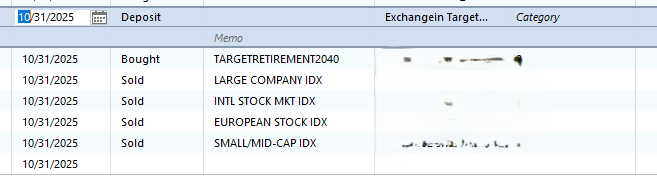
Could this be the reason? The first transaction is showing up as a deposit and not bought shares. I do not want to share the values publicly. I can open a ticket next week if necessary. The second transaction is what I believe is the transaction fee. The last 4 are the funds that I sold.
 Quicken for Windows Premiere
Always the latest version0 -
Thank you for your reply,
Those two top lines look like a BoughtX split into two transactions, with the first being the transfer of funds from another account to cover the purchase and the second being the actual purchase. Is that what they are? If not, it is possible that they are the source of the problem, since it may indicate that incorrect data was sent to Quicken, or that the data was correct, but interpreted incorrectly by the program.
Thank you!
Quicken Kristina
Make sure to sign up for the email digest to see a round up of your top posts.
0 -
Hello. I looked at my brokerage online. The second transaction that says "bought" is not a fee. It is a new contribution made to the new fund after I did the transfer. I was confused and thought it was a fee. It is not. It is my normal scheduled contribution. The top transaction that is labeled a deposit is the transfer to the new fund. So from that screenshot the transactions for the transfer are the first one that is the deposit and the 4 that are the Sold. It seems quicken is interpreting something incorrectly.
Quicken for Windows Premiere
Always the latest version0 -
Thank you for your reply,
I recommend that you contact Quicken Support directly for further assistance, as they have access to tools we can't access on the Community and they're able to escalate the issue as needed. The Quicken Support phone number can be found through this link here. Phone support is available from 5:00 am PT to 5:00 pm PT, Monday through Friday.
I apologize that I could not be of more assistance!
Quicken Kristina
Make sure to sign up for the email digest to see a round up of your top posts.
0 -
@David Green Could it be you're seeing this bug?
By the way, that seems like a hefty cost to rebalance. I've never paid to rebalance. I'd move that to an IRA if I was no longer at the company.
0

