PNC bank upgrade affecting Quicken downloads?
Answers
-
YES.. thank you. 👍️ I've been so acclimated to sending the checks via quicken that I forgot about the BILL PAY method.
1 -
That's so easy to do, isn't it?
Like you, I have not changed my connection from DC to EWC+. If this connection issue goes on much longer I will probably make that change so I can get transactions downloaded. But when DC comes back online I'll switch right back to it.
Quicken Classic Premier (US) Subscription: R66.23 on Windows 11 Home
0 -
I am having the same issue, however, I have 2 different PNC user accounts(Me and my husband) that use Direct Connect on Quicken. The 1 user downloaded transactions fine (can't see if still working as no new transactions yet) the other user won't download anything via Direct Connect after 10/24. Goes thru the normal process and says 0 transactions dowloaded (there are many transactions). Figured I would throw that out there. I will be calling PNC as soon as they open as I didn't discover the issue till yesterday and after reading all the posts here it sounds like a PNC issue. I will also note that both user accounts have been using direct connect for over 10 years, and are both older account types.
0 -
Please let us know what PNC tells you. I'll try to find some time to call as well. It'd be great if they had some sort of issue number that kept us all from having to call, but if calling helps to get this fixed, we should.
0 -
MBaron - Having the same issue with PNC DC. Trying to contact PNC but have been transferred and dropped 3 times. Upgrades are always problematic and usually spell downgrade for my use.
0 -
I phoned yesterday. A little frustrating to get them to understand the issue.
Quicken Deluxe for Windows 11 Pro. Latest subscription version. I've been a user for decades.
- Jim S.
0 -
Same issue here with not downloading posted transactions using direct connect.
Called PNC, opened a ticket and sent the Quicken CONNLOG.TXT file with the error at PNC:
After the PNC migration on 10/25 they evidently never reset the web site to allow connections.==== Mini-OSU Start (20251103/07:52:12) ====
20251103 07:52:12: QFN: Beginning send to https://www.oasis.cfree.com/test.ofxgp
20251103 07:52:14: QFN: End send to https://www.oasis.cfree.com/test.ofxgp, netstatus 0
20251103 07:52:14: Marketing session sending to: http://www.pnc.com/webapp/unsec/Requester?resource=/wcm/resources/file/eb39bf46f66d1b8/Quicken2008_index.ini
20251103 07:52:14: QFN: Beginning get from http://www.pnc.com/webapp/unsec/Requester?resource=/wcm/resources/file/eb39bf46f66d1b8/Quicken2008_i
20251103 07:52:34: ***QFN kQFFinished: returns 67186402
20251103 07:52:34: Your Internet connection or the server has timed out. Try again now, or wait and try later.
20251103 07:52:34: QFN: End get from http://www.pnc.com/webapp/unsec/Requester?resource=/wcm/resources/file/eb39bf46f66d1b8/Quicken2008_index.ini, netstatus 36
20251103 07:52:34: QFN: Beginning send to https://www.oasis.cfree.com/test.ofxgp
20251103 07:52:34: QFN: End send to https://www.oasis.cfree.com/test.ofxgp, netstatus 0
20251103 07:52:35:0 -
Also having problems with PNC Bank transactions not downloading. Last transaction that successfully downloaded to Quicken was 24 Oct 2025. Since then 3 transactions have posted to the PNC account. I just tried to update the account in Quicken — it reports a successful connection but no new transactions. Account in Quicken is set up for Direct Connect which is what I believe I have always used with PNC.
0 -
I am also having problems with PNC. Not receiving transactions after Oct 24. I have Quicken Classic Premier and am using One Step Update.
0 -
Any update on this issue? I’m still unable to download in Direct Connect or Web Connect.
0 -
So to clarify, is Quicken working with PNC to get this corrected?
2 -
Same here. Direct Connect hasn't downloaded since 11/24. Quicken support in Guatemala is useless. Service rep told me she was aware of the problem and had "the fix". Disconnect and reconnect accounts. Did nothing to resolve the issue(s). JFTR, the Quicken support is a third party company. I agree this is a PNC problem, but both Quicken and PNC should be working to resolve the problems ASAP. Direct Connect is owned by Quicken….. but I am sure PNC screwed up the interface on their end with their recent "upgrade".
At this point I am on hold with PNC …… going on 35 minutes :-)
Question. Does anyone know if the payments I processed using Direct Connect since the 24th are actually getting processed? In other words, are the payments I uploaded after the 24th getting moved from Direct Connect to PNC for payment???
thx
0 -
Glad (well perhaps not) to see I'm not the only one experiencing this PNC DC download issue. I just realized today that the summary page is incorrect. As many have experienced, it gives you the green radio button suggesting a successful download of transactions, but I have not had a new transaction downloaded since 10/25. I know I've got several when I check the PNC website.
I tried validating my file and disconnecting and reconnecting with PNC. None of these actions have worked to re-establish a connection and download transactions.
I did initiate bill payments this morning, and it looks as if my instructions uploaded correctly. I'm getting a "sent" message in the transaction status column.
As with many of you, I rely on this DC connection for bill pay and account transfers. Please Quicken Support, get this fixed ASAP!!!
0 -
I'm with #Boatnmanic. I'm a DC user with PNC and not an EWC+ user. I need DC, so I can initiate transactions with the bank from Quicken directly. I'm still not getting transaction downloads from PNC via my DC connection, although the summary One Step Update screen in Quicken is suggesting that my connection is working fine and zero new transactions have been processed. This is false. I've got several sitting visible on PNC's website that have not downloaded.
0 -
I just got off the phone with PNC Tier 3 support. Finally someone who knows what is going on.
The systems migration was done by PNC and a 3rd party. Direct Connect was completely overlooked. (the "boring bank" says …..oooooops).
PNC and the 3rd party are working on resolution, but the rep had no idea when a fix could be expected. I opened a case/ticket so I have definitive record of the problem.
Temporary work around might be to disconnect and reconnect using Express Web Connect Plus. Good only for downloading. After downloading, disconnect and reconnect to Direct Connect for uplaods. The rep did believe that payments and downloads will eventually work and "hopefully" nothing is lost. She also commented that as of this AM she was getting reports that Express Web Connect Plus was experiencing time out errors…. so not sure if its worth playing with.
I would encourage everyone to call PNC support at 800-762-2035 (online banking support) and demand to speak with anyone who can help with Quicken. Open a case! The more people who complain, I think the more resources PNC will throw at this. A case number will also help should this fiasco cause late fees, etc.
After 45 years of banking with PNC, this just might be the beginning of the end for me. Yes, they have been "boring", but as a legacy bank they sure do have problems with technology.
In my opinion the worst part of this entire mess is that even after a week PNC hasn't bothered to proactively reach out by email or text to every single Direct Connect customer and update them on what is going on. Inexcusable.
7 -
I'm currently on hold with PNC Online Banking to try to get this problem elevated. Evidently, their Quicken help desk has a 45 minute waiting time! The Level Two I spoke with doesn't know anything about the Quicken application, so she was relatively useless. Quicken is telling me that PNC Direct Connect is a PNC issue. The Level Two who I spoke with doesn't seem to have any problem like this reported.
Quicken folks, can you please elevate this issue with PNC from your end? We need resolution here, and everyone appears to be passing the "hot potato" around without owning it.
2 -
JFTR, Direct Connect is a hosted system that sits between your bank and Quicken. Direct Connect is what translates/formats data from Quicken so the bank can use it and also formats information from the bank so Quicken knows how to use it. Direct Connect is part of Quicken's parent company (formally CheckFree I believe). The Direct Connect interface is used by every bank, not just PNC. PNC just needs to make sure it is interfacing correctly with Direct Connect for the bidirectional flow of data.
Unfortunately, just because we get the green globe and the "sent" icon in Quicken, this does not necessarily mean the information (payment) has been moved from the Direct Connect servers to your PNC account (usually only happens once per day)….. just that the information is at Direct Connect. The support person I spoke with "thinks" this is still happening and that the Direct Connect issue was only an "export" issue and not an "import" issue… but she wasn't 100% sure.
I think the best way to be sure is to log on to PNC and look for transactions in your account that you transmitted after the "migration". If they are there, then the "importing" is working. If after 24 hours the transactions are not in your account ….. then the issue is bidirectional and payments arent being made as planned.
0 -
My PNC direct connect has not downloaded transactions or updated my online balance since 10/24. I can send in payments however. I have an open case with PNC but they haven't got back to me yet. It's pretty clear this is a result of the PNC online banking update.
1 -
You can send payments in via DC? How are you getting confirmation that the bill pay command went through correctly? Did PNC download a check number and the confirmation status in the Check # field of the transaction?
Quicken Classic Premier (US) Subscription: R66.23 on Windows 11 Home
0 -
I just ran OSU and 1 of my 3 PNC Bank accounts downloaded an interest transaction and the Online Balance was correctly updated to show today's Online Balance.
The other 2 PNC Bank accounts did not download any transactions and the Online Balances are still from 10/23.
Hopefully this is a good sign and by tomorrow all 3 accounts will get updated.
Quicken Classic Premier (US) Subscription: R66.23 on Windows 11 Home
0 -
I am having same issue with PNC Direct Connect. No updates or transactions since 10/25. I spoke to PNC rep earlier today and she said they are aware of this issue and are working on a fix. She was not, however, able to provide an estimated timetable to resolve problem. I will call in two days to see if any progress is being made.
0 -
Just ran an update (Nov 4 @ 4AM EST). Got one transaction downloaded from my PNC savings account, which seems correct since account basically just sits there and gets interested credited once a month. Transactions from my PNC checking account are still not coming through. Last successful one was 10/24/25 and there should be several more. Connection is set up as Direct Connect.
0 -
Update, I spoke with PNC yesterday they opened a ticket, the 1 thing they asked me to do is open a case with Quicken and get a case # so they can communicate with Quicken. The tech said someone will call me for the case number. So I opened a case with Quicken for just that, and wait for them to call me for it. We will see, I got no information more then they are opening a case. I will be able to follow this post for the next 3 days but unable to log in. I hope they get it fixed soon! I tried this morning again and it is still saying successful but no transaction received. It did let me reconcile an account but only with transactions to 10/24.
0 -
I am also a PNC Bank customer and I am using Quicken for Mac, Version 8.3.2 (Build 803.58902.100). I am having the same issues with PNC Bank as of October 24, 2025. Yes, the problem started after after their recent update and I am using Direct Connect. I can update other financial institutions with no issues with Quicken. I am been using Quicken for 30+ years. Thank you, Barry
0 -
Savings downloaded a transaction yesterday via direct connect. So, I got excited and tried my checking, but no good. Then connected via express web connect + (as directed by a quicken agent who guided me through the process), and I was fully updated as far as downloads, cleared payments, payments received. etc. But, I do not think I am able to send any payments, and I am having trouble adding new payees.
0 -
It took a minute but changing to web connect finally worked.
0 -
Great to know you were able to download. Now switch back to Direct Connect to send payments.
0 -
Same, have always had DC, and stopped updating as others. Reported problem as stated above.
0 -
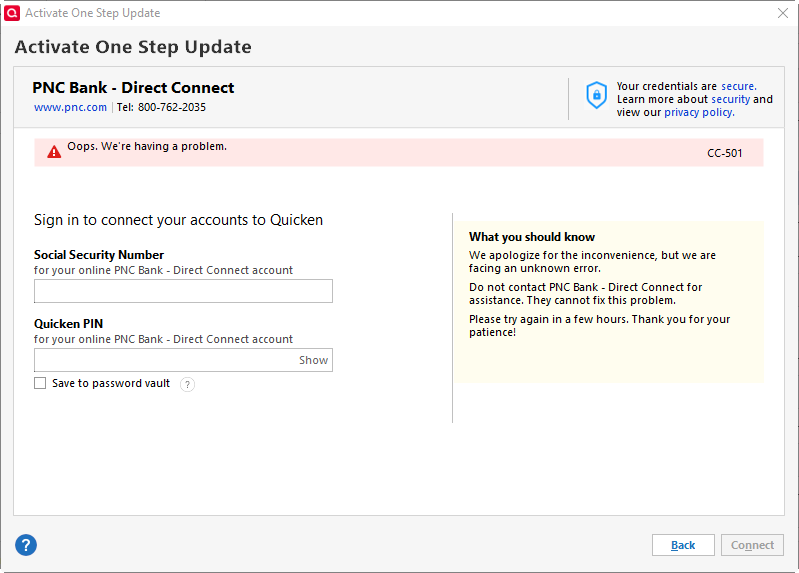
I'm seeing the same issue. I'm not able to download any transactions from my PNC accounts that use Direct connect (accounts that use Express Web Connect + are fine). I tried to reset the account, no improvement. I tried to deactivate and reactivate the download and I get an error "OOPS. We're having a problem. CC-501.
 0
0 -
You must be connected for downloading with DC in order to send Bill Payments to PNC and to be able to set up new online Payees for the DC Bank Bill Pay feature. EWC+ does not support either of these features.
Also, you should note that when you switched the DC connection ot EWC+ the online connection linking any Bill Payments you had previously scheduled to PNC has been broken and cannot be reestablished. This means you cannot make any changes to previously scheduled but not yet processed Bill Payments. However, those Bill Payments should still be processed as they were last scheduled but just in case I would watch them closely to make sure the payees receive the payments on time.
If you need to make any Bill Pays before PNC fixes their DC connection issue you can:
- Log into your online checking account and schedule the payments there.
- Or, log into your online account with the biller and schedule your payment from there.
- Or, you can write out a check and mail it to them.
BTW, today I switched 2 of my 3 accounts from DC to EWC+ because I really needed to get some transactions downloaded. As many have posted here earlier, EWC+ downloading with PNC works well.
I kept 1 account set up with DC because yesterday an interest payment did download from that account. By keeping this account set up with DC I can track the DC-issue resolution progress better.
Quicken Classic Premier (US) Subscription: R66.23 on Windows 11 Home
1

