Identical transaction match anomoly

I have two identical credit card transactions on the same day from a Express Web Connect+ account . If they post and download on the same day, they usually match backwords in that the first transaction matches to the second and visa versa. This isn't a problem in that case since they look identical. However, if there is a one or more day delay in one transaction posting, the second transaction never presents a match. I think it's because the downloaded second transaction thinks the first was already cleared and never gives a choice to match to the second uncleared transaction. It would be nice if there was some message or choice given but there isn't. I know I can manually play games to get the right match or force a match on the second by setting the cleared bit but this seems like something that Quicken could easily facilitate. Any thoughts?
Comments
-
Hello @JohnA,
Thank you for sharing your experience.
Please take a look at this Support Article that goes over the handling of downloaded transactions. It states near the end of the article that Quicken uses Date, Payee, and Amount to determine a match.
If you would like to request that this feature be able to match transactions with different dates, you can create an idea post. This way, other users who have the same or a similar request can vote on your idea.
Our Development and Product teams frequently use our idea posts in order to improve Quicken and implement new features requested by customers.
Hope this helps!
Quicken Alyssa
Make sure to sign up for the email digest to see a round up of your top posts.
0 -
The date is used, but it certainly isn't used as an "exact match".
If I write a check today and enter it into Quicken and send it by mail it is impossible for Quicken to use its date at the one to match to the downloaded posting date, but it does match them.
I think the only time the date is really used is to limit how far back it will search for a match. In the past it didn't even do that, and it could match a very old transaction.
Even the payee is more of a "hint" than really something to match to. If I enter a transaction for a new payee, the likelihood that I will enter the exact same payee's name as what is downloaded is not 100%, but it will still match. The amount is the one field that it does use exactly.
This means that it is very possible to mismatch transactions that have the same amount provided they are within the cutoff period which I think is something like 30 days or maybe even 60 days.
Now going back to @JohnA original question which is different.
I think this might be a problem with Express Web Connect + because I'm not seeing it with testing using Web Connect. The major difference between the two is Web Connect is only using Quicken's matching system, and from what I have seen Express Web Connect + does some kind of matching on the Quicken servers too.
Here is my testing. You will notice that neither the date or the payee is really looked at for the matching.
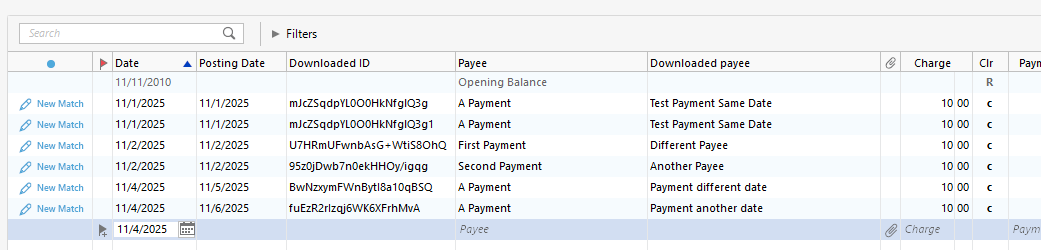
Input data.
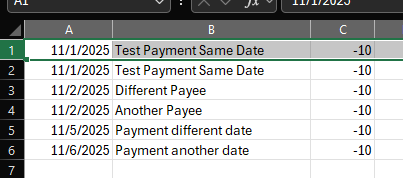 0
0 -
I think Chris hit the nail on the head in that it’s a Web Connect+ problem. I’m used to Web Connect behavior and it doesn’t work the same. However, if that’s the case, why does the first simultaneous download match both of them backwards for a double mismatch?
0 -
Thanks for following up.
I have some things we can check.
- How long has this issue been happening?
- Where is your data file located?
- Is your file being synced/backed up by any third-party services like Dropbox, Carbonite, or OneDrive?
Looking forward to your response.
Quicken Alyssa
Make sure to sign up for the email digest to see a round up of your top posts.
0 -
- How long has this issue been happening?
The matching backwards has been happening ever since I can remember. But the delayed posting of one of the two transactions seems to have picked up popularity lately so it has been more of an annoyance (I can only remember it doing it once a while ago).
- Where is your data file located?
C:\Users\<name>\Documents\Quicken
- Is your file being synced/backed up by any third-party services like Dropbox, Carbonite, or OneDrive?
No
0 -
Thank you for following up with that additional information.
Due to the nature of this issue, it is recommended that you contact Quicken Support directly for further assistance, as they can walk you through troubleshooting steps in real-time and escalate the situation as needed. The Quicken Support phone number can be found through this link here. Phone support is available from 5:00 am PT to 5:00 pm PT, Monday through Friday. I apologize that I could not be of more assistance!
Hope they can help!
Quicken Alyssa
Make sure to sign up for the email digest to see a round up of your top posts.
0 -
Thanks! This really isn’t an issue that’s worth “troubleshooting” to me. If no one else has experienced it, I’ll work around. But if they have, maybe Quicken can do something as it’s not unique to my setup. Thanks again for your input, I appreciate it.
0 -
Thank you for following up.
Totally understandable. If you change your mind, you know where to find us!
Thanks again!
Quicken Alyssa
Make sure to sign up for the email digest to see a round up of your top posts.
0

