Merrill Lynch Investments does not update – NO ERROR CODE

When I run one step update, Merrill is checked for update. After update is completed, Merrill is not listed as an account updated on the summary.
Checking the account list, transaction download indicated EWC+ is connected, but last download shows as not available.
I attempted to update transactions from the account screen, but the screen just flashed and the normal screen you would see to confirm update did not come up.
I attempted an account reset, but the screen just flashed.
I attempted an update from the online center. The confirmation to update screen came up and the one step update screen also came up indicating it was attempting to update, The summary screen came up saying update complete, but the financial institution was not shown, no financial institutions were listed on the summary screen.
I logged into Merrill account and confirmed my third party access does not expire until June 2027.
I have NOT attempted to deactivate and reactivate the account. I first wanted to find out if anyone else has been seeing this issue. I could not find a post that seemed to match what was happening to me.
I did see the post -.
This post lists Merrill along with other financial institutions with problems.
I have three financial institutions that use EWC+ connection – B of A, Fidelity and Merrill. B of A download are working. Fidelity is giving a 501 error, but some of the Fidelity account downloaded and some did not download. Merrill is doing as described above. Fidelity and Merrill are both listed on the above referenced post.
Anyone out there have any suggestions?
Comments
-
Hello @mvwabc,
Thank you for reaching out. I can see that you recently tried resetting or reconnecting your accounts. Did that correct the issue, or is it persisting?
If the issue is persisting, please start troubleshooting by following these steps from our article on missing transactions/transactions not downloading:
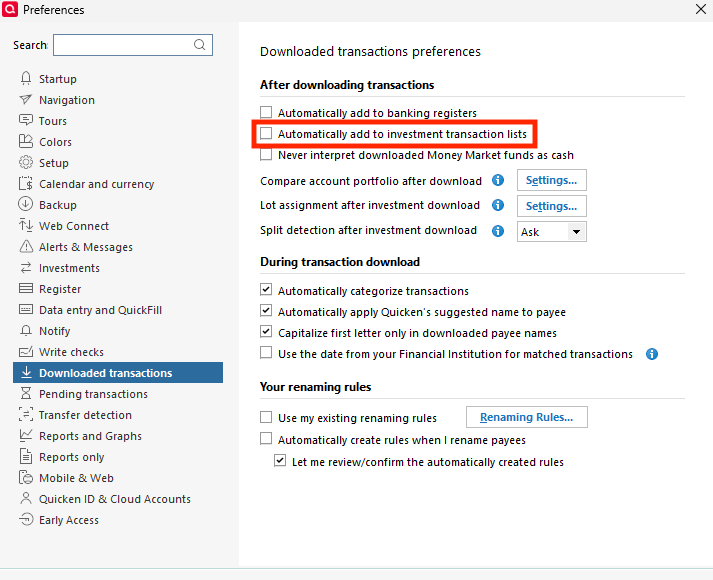
1. Go to Edit > Preferences > Downloaded Transactions. The option Automatically add to investment transaction lists needs to be unchecked.
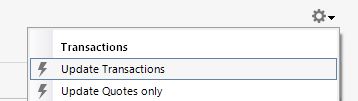
2. Refresh your online account information by clicking the Actions Gear Icon on the upper right of the register, and select Update Transactions. Follow the on-screen instructions to complete the update.
3. Confirm that the Sort Order in your account is by Date; just click the top of the Date column in your account register. It's possible the transactions are in your register, but not where you thought they'd be.

4. Try refreshing your login session: To do this, go to Help > Refresh Sign in. After completing the log-in process, trying running a One Step Update again.
5. Go to Tools > Account List and check Show Hidden Accounts at the bottom left. Confirm the missing transactions haven't been added to a hidden account by clicking on the name of any account that appears with a check mark in the Hidden column.

Please let me know how it goes!
Quicken Kristina
Make sure to sign up for the email digest to see a round up of your top posts.
0 -
The instructions in your response were the same as given for the Fidelity 501 problem. So I went through the instructions, and it did not fix the Merrill problem. Since no one had responded to my post, I went ahead disconnected and reconnected the Merrill account this morning. That appears to have fixed the problem, but since there were no transactions to download, I will just need to continue to watch.
0 -
Thank you for the update,
I'm glad to hear disconnecting and reconnecting the account seems to have corrected the issue so far. Please let us know if transactions fail to download!
Thank you!
Quicken Kristina
Make sure to sign up for the email digest to see a round up of your top posts.
0

Categories
- All Categories
- 6 Product Ideas
- 34 Announcements
- 249 Alerts, Online Banking & Known Product Issues
- 19 Product Alerts
- 266 Welcome to the Community!
- 301 Before you Buy
- 1.5K Product Ideas
- 55.8K Quicken Classic for Windows
- 16.9K Quicken Classic for Mac
- 1K Quicken Mobile
- 834 Quicken on the Web
- 129 Quicken LifeHub