Fidelity Netbenefits 401k purchases show as "contribution" and are missing information

This discussion was created from comments split from:
Fidelity new connection issue (Fidelity NetBenefits now gone)
.
Comments
-
Merging securities worked for me. The main issue that I am having right now is that monthly 401k purchases do not have the details when I download - just shows up as "contribution." I have to log in to fidelity and manually change the transaction to "buy" then enter the symbol and the number of shares purchased. This is new since the new connection - I hope that this improves.
1 -
Hello @SK2020,
Thank you for letting us know you're seeing this issue. When did you first notice this behavior with incomplete/incorrect information downloading? Is this happening in just one account, or multiple? Is this happening only with purchase transactions in your 401k account(s)? If it is happening with other transactions, please provide information exactly what you are seeing.
If you're willing, please provide screenshots of how these transactions are downloading into your Quicken and how the appear on the financial institution's website (please redact any personal information). If needed, please refer to this Community FAQ for instructions on how to attach a screenshot. Alternatively, you can also drag and drop screenshots to your response if you are not given the option to add attachments.
I look forward to your reply!
Quicken Kristina
Make sure to sign up for the email digest to see a round up of your top posts.
0 -
I am also seeing the issues @SK2020 describes. This happened when changing from direct connect to Express Web Connect. The first transaction with the issue was Aug 11, but I probably didn't download that until some time in October as I had stopped importing from Fidelity during the cutover.
This is only happening in 1 account. The EWC connection has 5 or 6 accounts associated with it - One Step Update used to list all of them if you hover over, but now it just lists 3 and ellipses indicating more. It is however the only 401k account in the group.
Unfortunately I just resolved the issue by deleting the incorrect "contribution" line item and manually entering a "Bought". I can try to attach screenshots in two weeks when presumably it will recur.
1 -
Hello @dlott,
Thank you for sharing your experience! If the issue happens again, please let us know and provide a screenshot of what you're seeing.
Thank you!
Quicken Kristina
Make sure to sign up for the email digest to see a round up of your top posts.
0 -
I think I have the same issue. Looks like starting mid September all updates to my Fidelity Netbenefits account only show cash contributions and no longer come down as 'buys' for the specified securities. Same w/ dividends, they show up as cash, not as reinvestments.
Is there a resolution for this?1 -
Hello @Chris Le Dantec,
Thank you for letting us know you're seeing this also. If possible, please post a screenshot of what you're seeing (with personal information redacted). If needed, please refer to this Community FAQ for instructions on how to attach a screenshot. Alternatively, you can also drag and drop screenshots to your response if you are not given the option to add attachments.
Thank you!
Quicken Kristina
Make sure to sign up for the email digest to see a round up of your top posts.
0 -
I'm seeing the same issue with a 403b plan where part resides in an account in NetBenefits and part is self directed in a std Fidelity Brokerage account (where I can also see the balances for the NetBenefits account). When I look at Activity on the std Fidelity site for the NetBenefits account, I see the same "Contribution" transactions and not the Buys (which are only visible in the NetBenefits site).
This may be a Fidelity problem but haven't made progress with them yet…. Has anyone seen this and discussed with Fidelity???0 -
Hello @basegad,
Thank you for letting us know you're seeing this also. If possible, please post a screenshot of what you're seeing (with personal information redacted). If needed, please refer to this Community FAQ for instructions on how to attach a screenshot. Alternatively, you can also drag and drop screenshots to your response if you are not given the option to add attachments.
Thank you!
Quicken Kristina
Make sure to sign up for the email digest to see a round up of your top posts.
0 -
Hello @Quicken Kristina,
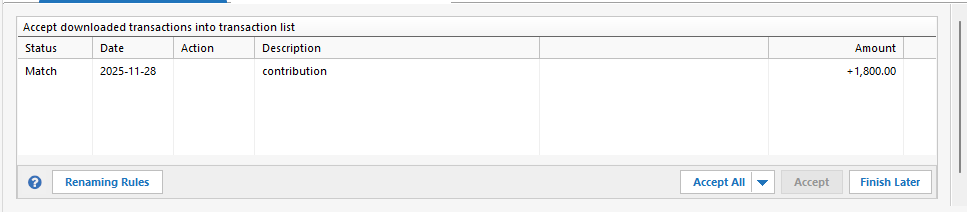
This happened again. In Quicken this comes as a contribution transaction with no share detail:
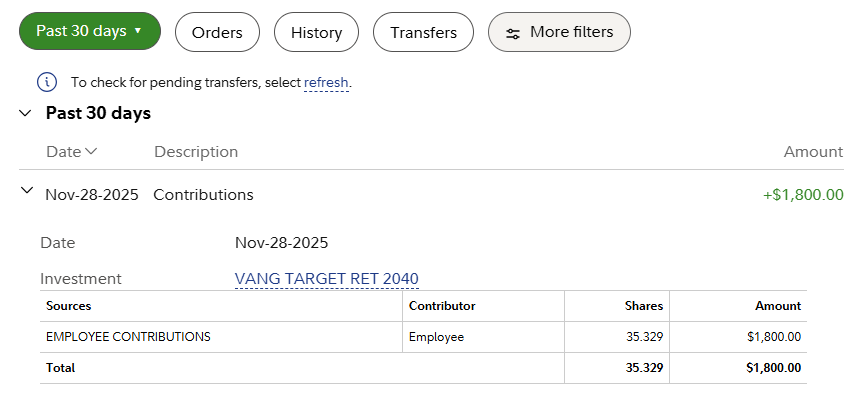
Whereas on the Fidelity website we can see the contribution and resultant buy:
Again this is a 403B plan.
@basegad what do you mean "part resides in an account in NetBenefits and part is self directed in a std Fidelity Brokerage account"? I see this all via fidelity.com, and I can see non retirement accounts and my donor advised fund, so I that's a standard brokerage account?
0 -
Thank you for the update,
Thank you for letting me know it happened again and sharing the screenshots. I forwarded this issue to the proper channels for further investigation and resolution. To assist with the investigation, please navigate to Help>Report a Problem and send a problem report with log files attached.
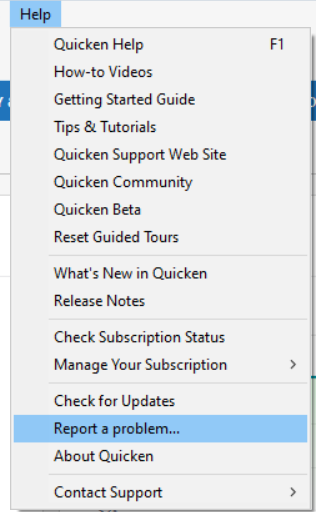
While you will not receive a response through this submission, these reports will help our teams in further investigating the issue. The more problem reports we receive, the better.
We apologize for any inconvenience!
Thank you.
(CTP-15584)
Quicken Kristina
Make sure to sign up for the email digest to see a round up of your top posts.
0 -
I just reported a problem and included a link to this thread in the comments.
Hope it helps!
1 -
Thank you for sending the problem report,
It will help our teams investigate the issue!
Quicken Kristina
Make sure to sign up for the email digest to see a round up of your top posts.
0

