USAA downloading online balance but not transactions

In one step, USAA checking is downloading the correct online balance but not inputting transactions. I have tried deactivating then activating the online services in my USAA checking account as well as logging off/on my Quicken account. Note there is no issue with my USAA credit card account, just my checking account.
This issue started on Nov. 14, 2025.
Thanks in advance for your inputs.
Quicken Classic Delux Version R64.35 Build 27.1.64.35 running on Windows 10 Enterprise.
Comments
-
It is doing it for my USAA Rewards card as well now. I can see transactions that are no longer pending (cleared) but are not downloading but balance has updated. I deactivated and reactivated the account with no success.
0 -
Having the same issue. Most transactions that have cleared USAA in the last two days have not downloaded to Quicken. This is affecting numerous accounts.
0 -
Hello All,
Thank you for taking the time to report this issue to the Community, although we apologize for any frustration or inconvenience experienced.
This issue has been reported to our Development and Product teams for further investigation and resolution. Though we do not currently have an ETA, you can bookmark this Community Alert to get updates when available and to know when the issue is resolved. If you do not see the bookmark icon at the upper right, please make sure you are logged into the Community.
Thank you!
(Ticket #12054304)
Quicken Kristina
Make sure to sign up for the email digest to see a round up of your top posts.
1 -
I have had the same problem with my Credit card off and on for over a year. Some transactions will download, but not others in the same day. This is actually worse than no download at all since I have to go over my account every day to find out what has been missed. At one point Quicken even updated my opening balance so all of my reconciliations were out. I would much rather download from the Institution website like I do with Amex and Chase so I could control the time frame. If possible, please bring this option back. Not sure if that is driven by Quicken or the other institution.
0 -
Hello @Lizziep1999,
Thank you for sharing your experience. It is the financial institution that decides which connection types to support. If the financial institution used to support QFX/Web Connect, and now does not, you would need to talk to the financial institution to request they support it again.
The issue you mentioned with the opening balance changing sounds like a known issue. See this article for more information:
If you're impacted by this issue, it's a good idea to put the correct opening balance in the memo column, so that it'll be easier to catch and correct if it happens again.
For the issue with missing transactions, was there any pattern to what went missing? Usually, when some, but not all transactions fail to download, it's either an issue with how the data is sent to Quicken or an issue with the transactions improperly matching to reminders or other transactions in the register. For the latter behavior, it may be easier to catch if you have automatic entry turned off, since that gives you the chance to review what downloaded before it goes into your register.
To turn off automatic entry for an account, navigate to Tools>Account List, click the Edit button next to the problem account, then on the Online Services tab, click the blue Automatic entry is: link.
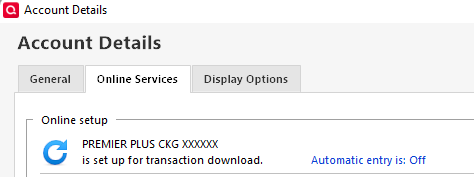
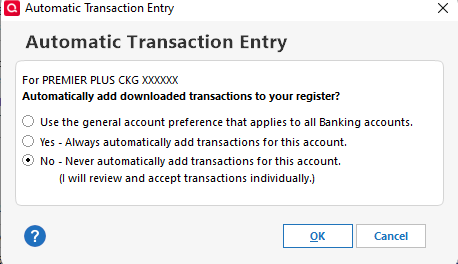
That will bring up a window that will let you choose to turn automatic entry on or off. To turn automatic entry off, you would need to select No - Never automatically add transactions for this account, then click OK.
I hope this helps!
Quicken Kristina
Make sure to sign up for the email digest to see a round up of your top posts.
0 -
Thanks for the suggestion on the opening balance change problem. It happened to me twice.
As for the missing transactions. I cannot determine a pattern. Automatic entry has always been turned off and Never automatically add is selected. I review everything.
I will suggest to USAA that they go back to supporting a QFX download, but don't hold out much hope.
Thanks again
L
1 -
Thank you for your reply,
Are you impacted by the current known issue where transactions aren't downloading from USAA at all, or is it still seemingly random transactions that fail to download?
I look forward to your response!
Quicken Kristina
Make sure to sign up for the email digest to see a round up of your top posts.
0

Categories
- All Categories
- 22 Product Ideas
- 34 Announcements
- 245 Alerts, Online Banking & Known Product Issues
- 19 Product Alerts
- 265 Welcome to the Community!
- 360 Before you Buy
- 1.5K Product Ideas
- 55.8K Quicken Classic for Windows
- 16.9K Quicken Classic for Mac
- 1K Quicken Mobile
- 834 Quicken on the Web
- 128 Quicken LifeHub