Are others having trouble with Quick Pay

I have been using Quicken from almost the beginning in the 80s. I currently use Quicken Premier on a PC. I used to use Quick Pay through Bank of America quite a bit. I stopped between the new Quick Pay vendor. It may be more reliable as advertised, but for me it seems to have altered the use of the Income and Payments tab. In particular, on the automatic payments initiated by company or service, like a credit card company, the bill shows up and I can adjust it as before. It does show the date of the scheduled payment on the right, but instead of showing the "waiting for the next bill" message, it shows the same amount as the current month's with next month's date. Of course, some account which were formerly available are no longer. I'm working it out, but I'm why offers of better reliability result in poorer or at least confusing changes.
Comments
-
[Removed-Rant]
0 -
I have to be careful because moderators tend to remove any negative comments as a rant, which reduces the utility of this forum to help isolate how many people are having what kind of problems.
Yes, I have issues with Bill Manager - frequently. I came here today because I have another one. Today, I'm trying to send a check pay payment, but it told me that it could not due to an issue with my payment account. It told me to disable and then re-enable the payment account. I disabled it and then tried to re-enable it. I now get a message that says "Could not add payment account." Not very helpful, so I don't know how to proceed. This is just the latest in a string of issues with Bill manager. First time for this one. Another issue is that the new processor doesn't seem to connect to any of my payees. They are not small companies, I'm talking about Duke Energy and Spectrum.
EDIT: Just tried to add a different payment account and that one also fails with the same error.1 -
Have you tried the Review and Repair Payment Accounts function available from the gear icon in the Bills, Income & Transfers view?
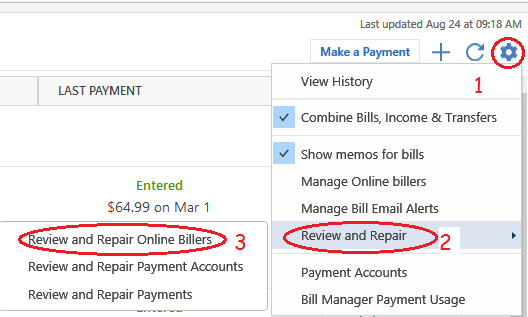
If that doesn't work, I'd say it's time to contact Quicken Support on the phone during posted hours of operation and request help. Let them do a screen share session with you to review the situation on your computer, to determine the nature of the problem and to figure out how to fix it.
0 -
Yes, I've tried the repair. No joy.
0 -
to enter a manual check I get "Edit payment account" enter then rejects with "could not add payment account". Need HELP>
0 -
If the check transaction is still defined as a Check Pay transaction you need to change the Check# field from "Check Pay" to the actual paper check's number.
0 -
Thank you for letting us know you're encountering this issue. There is currently a known issue impacting some customers when they attempt to make Check Pay payments. For more information, view this Community Alert.
The error message you describe is a bit different from what is in the alert, so if the review and repair payment accounts that @UKR recommended did not correct the issue, I recommend contacting Quicken Support directly for further assistance. Support has access to tools that we can't access on the Community and they're able to escalate the issue as needed. The Quicken Support phone number can be found through this link here. Phone support is available from 5:00 am PT to 5:00 pm PT, Monday through Friday.
I apologize that I could not be of more assistance!
Quicken Kristina
Make sure to sign up for the email digest to see a round up of your top posts.
0

