Having issue with a phantom Stock Split transaction

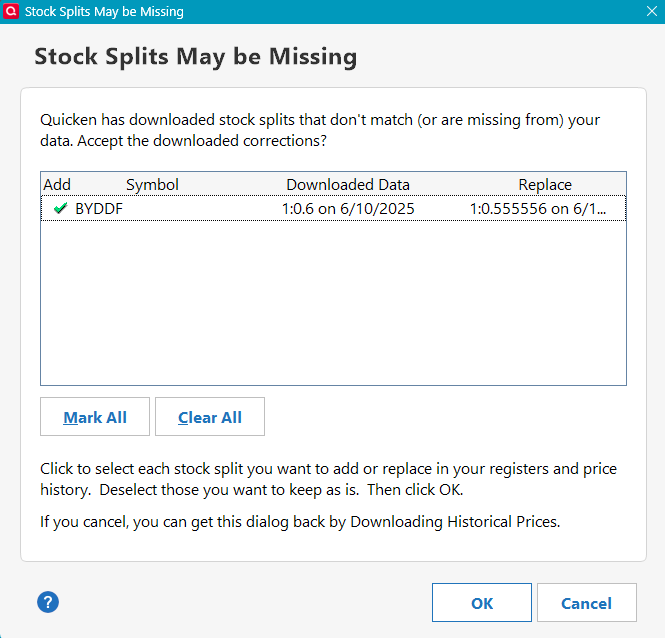
Whenever I update my broker's transaction I get the message shown below.
The 1:0.6 split transaction on 6/10/2025 has already been recorded and I cannot find the 1:0.555556 split on 6/11/2025. I've tried:
- validating and rebuilding the lots
- super validating
- closing the account and re-opening a new "fresh" one with no past transactions (same error message pops up)
- I allowed the transaction and clicked OK and it keeps coming back
- I unchecked the transaction and clicked OK and it keeps coming back
- I looked at BYDDF historical prices and removed those around 6/10/2025
I called Quicken Support line but they wanted to me to share my screen which I'm not willing to do.
It's as if there's a hidden 1:0.555556 split on 6/11/2025 somewhere in the system that I can't find. I did a global search to no avail. I really don't know what else to do. Any suggestion?
Answers
-
Apparently this has been wildly confusing:
See if anything said over there helps.
0 -
Yep, that's my issue and no, there isn't a resolution. Maybe someone found a solution and it wasn't published?
0 -
Has anyone figured out a way to stop the split message?
1 -
Hello @Francois,
Thank you for reaching out! The issue has already been reported and our teams are working to resolve it. Currently, there are no new updates.
Thank you!
(CTP-9154)
Quicken Kristina
Make sure to sign up for the email digest to see a round up of your top posts.
1 -
I hate to say it but we pay a substantial amount of money to Quicken. It would be nice if these issues were resolved in a timely manner. Thank you.
1 -
I'm a Quicken user having this same problem. There's really nothing you can do. If it seems as if there is a hidden split somewhere in the system, you're right. There is. But it's one you can't see on the user side. I think I understand what caused this problem — an error in the data feed used by One Step Update. Some of the info below comes from my two earlier posts (now closed).
Here's Some Background —
BYD Co. Ltd. (“BYD”) has two different share classes traded in the U.S.:
• BYDDF – Class H shares (OTC)
• BYDDY – ADR
Both share classes represent the same company, but they are different securities, with different tickers, different prices, different CUSIPs, and different corporate action schedules. The transactions were share dividends, not stock splits, and they belong to two different securities.
Below is BYD's published Corporate Actions for each Share Class —
- BYDDF (Class H)
- 3-for-1 share dividend
- Ex-Dividend Date: June 10, 2025
- Payable Date: July 29, 2025
- Shareholders received 2 extra shares for each 1 held (total 3)
- BYDDY (ADR)
- 6-for-1 share dividend
- Ex-Dividend Date: June 11, 2025
- Payable Date: August 13, 2025
- Shareholders effectively received 5 extra shares for each 1 (total 6)
Where the Error Seemed to Come From ―
Quicken’s third-party data supplier, Morningstar, appears to have sent incorrect data to One Step Update that:
- Treated BYDDF and BYDDY as if they were the same security
- Applied BYDDY’s 6:1 share dividend to BYDDF
- Labeled the transactions as stock splits instead of share dividends
- Sent the transactions to Quicken on the ex-dividend dates, instead of the payable dates (BYDDF’s payable date was July 29, not June 10, and BYDDY's payable date was August 13, not June 11).
What This May Have Caused Inside Quicken ―
- BYDDY’s 6:1 share divided (the phantom split) was incorrectly downloaded into BYDDF on June 10 with a replace date of June 11, 2025 (as shown in your screen shot)
- BYDDF’s price history was incorrectly adjusted to the split price on June 11
- Quicken began flagging BYDDY's phantom 6:1 split as a “missing transaction” for BYDDF (again, shown in your screen shot)
- This created a permanent “Stock Splits May Be Missing” message after every One Step Update
- Quicken never downloaded BYDDF’s real 3:1 share dividend on July 29 (the payable date), because the incorrect June 10 data feed likely overrode it
Bottom Line ―
Here's my take on what seems to be happening: One Step Update pulled in wrong information from Quicken's third-party data supplier back in June, and treated the phantom BYDDY 6:1 split that you see as if it were a real split belonging to BYDDF. Once that happened, that bad split became part of Quicken’s historical data for BYDDF. Now One Step Update checks against that same incorrect history and repeatedly flags the phantom BYDDY 6:1 split as a "missing" split for BYDDF. Because of that, Quicken will continue show the alert indefinitely until there's a patch or other fix. For now, you (and I, and anyone else having this BYDDF problem) will need to keep clearing or dismissing the “Stock Splits May Be Missing” message after each One Step Update.
I reported this issue back in June 2025. Quicken is aware of the issue. There is an open ticket (CTP-9154), but after almost six months, there is no known fix date.
2 -
Come on Quicken! Either FIX this specific issue or give us a workaround to manually delete it.
If you want to charge good money for your software (which I endorse), you are obligated to support it. Receiving an incorrect warning every time I download transactions … forever… is not acceptable.
0 -
What we now know from Quicken is that this is a known issue (CTP-9154), Quicken's "teams are working to resolve it", and "there are no new updates". I first reported this error to Quicken in June 2025 and it's now January 2026, almost seven months of waiting. Users are still experiencing the problem.
What I don’t understand is what “no updates” means at this point after more than half a year of waiting for a fix. Is this issue actually being worked on? Has it been pushed back to the bottom of the triage pile?
Even a brief more specific status clarification would be helpful after this amount of time.
 0
0

Categories
- All Categories
- 24 Product Ideas
- 34 Announcements
- 248 Alerts, Online Banking & Known Product Issues
- 19 Product Alerts
- 265 Welcome to the Community!
- 301 Before you Buy
- 1.5K Product Ideas
- 55.8K Quicken Classic for Windows
- 16.9K Quicken Classic for Mac
- 1K Quicken Mobile
- 834 Quicken on the Web
- 129 Quicken LifeHub