Target Downloading Issues - changing to Target Circle Card
Comments
-
I thought that it was working ok for me, but Target went back to my previous problem. I can resolve the download issue by editing the downloaded file in Notepad, changing INTU_BID from null to 03820. After I do that, the downloaded file imports into Quicken. It's a workaround, but shouldn't be necessary.
1 -
My target CC seems to be downloading okay now (without creating a new account) but I'm not sure whether the downloads only work at month-end/payment received. At least Target CC (and all my other 25 accounts) are not currently prompting me for MFA information on every download.
0 -
Thank you for the update,
I'm glad to hear they seem to be downloading. I have seen reports that the downloads are available only when the statement comes out. It is possible that's why they downloaded.
Please let us know if it continues to consistently download, or stops until the next statement comes out!
Quicken Kristina
Make sure to sign up for the email digest to see a round up of your top posts.
0 -
I'm having the same issue with Target. The last transaction I have that downloaded is 9.26.25. I have several transactions between 9.26.25 and 10.23.25 however they have not downloaded to Quicken Mac. I do not get an error when downloading. It "appears" to finish, but the transactions are missing.
The 9.26.25 transaction is the last one that was on my statement for September. So it appears that no transactions are downloading until the next statement comes out? Not really acceptable.
Is Quicken going to resolve this?
0 -
On my end - I am using Target National Bank, setup for One Step Update. In my case, I can confirm that transactions do not download until the statement has been cut. I believe this all started when Target "upgraded" their website earlier this year.
1 -
The Big Apple - thanks for the information. I guess I will wait until the next statement cuts and see if the transactions download at that time. I wish they downloaded more frequently, but downloading once a month is better than not downloading at all.😁
0 -
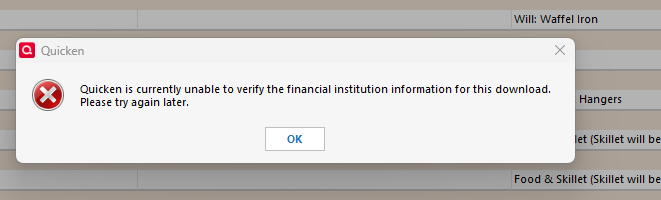
Downloading from Target does not work and if I try to import the transactions, I get the message that states Qkn can verify the financial institution info.
 0
0 -
I, too, have been unable to get downloads (or import QFX files downloaded directly) from my Target RedCard account at Target National Bank (www.target.com) that postdate the transactions in the latest statement. [I called Target National Bank who told me there's been a problem with Quicken downloading since Target changed its web platform in March. I then went through several diagnostic steps with Quicken support to no avail, but was at least referred to this discussion where I learned of other customers' similar problems.] When I used the one-step update, it appears to go through its process without any errors, but there are no new downloaded transactions that postdate the transactions in the latest statement. When I download transactions directly from my Target RedCard account website and try to import the QFX file, I get the error message shown in Phil H's comment, above ("Quicken is currently unable to verify the financial institution for this download. Please try again later.") I expect that I will be able to get intervening transactions when I try again in early November after my next statement comes out. If so, that's better than having to manually enter them, but its not what I would consider "fixed." In the meantime, the error message should be changed to say, "Quicken is currently unable to verify the financial institution for this download. Please try again AFTER THE FINANCIAL INSTITUTION ISSUES ITS NEXT STATEMENT." That would take some of the guesswork and frustration out of this situation until the problem is fixed.
1 -
The key for me was using "Target National Bank" within Quicken, when setting up Online access. There are other options there containing the word 'Target' but that one is what got things working normally for me.
Perhaps you've already done that, in which case your problem is different from what I had. But just in case your Online access was configured using a different Target entity within Quicken, thought I'd throw that out there.
0 -
I use TNB. In the past the system worked but a couple of updates back it stopped. The way I made it work ONE time was to allow it to create a new account and then I transferred the data over.
1 -
I did set up my Target Red Card account within Quicken using Target National Bank, so that was not the issue. I checked today and saw that my Target Red Card statement had been issued this morning, so I opened Quicken and was able to download the transactions on that statement. This confirms that (at least for me) I am able to download Target Red Card transactions when (and only when) those transactions are contained in a Target Red Card statement. I suggest anyone having problems with downloading Target Red Card transactions check to see whether the most recently downloaded transactions are those that are contained in your most recently issued Target Red Card statement. Until Quicken actually fixes this problem, I'll just have to wait each month for my Target Red Card statement to be issued before I try to download new transactions into Quicken.
2 -
Still can't get it to work.
longtime
0 -
It seems to only download once a month, on the day after the statement is released. My statement notification email from Target come to me yesterday, and today, my One Step Update included a month's worth of transactions. The rest of the month, my OSU just says, 'no transactions'. Sounds like something on Target's end…
At least it's not asking for 2FA every single time anymore!
1 -
In one step update I keep getting the same transctions over and over again so it must tied somehow to statement , I will see . But I have encountered it with other accounts recently and dont understand if a Quicken issue now not updating
0 -
I retract my statement that this is working again. Even though I haven't been getting any error messages, I also haven't made many purchases since it was "fixed". Today after my statement was posted, all of the older transactions this month downloaded at once so clearly this is only downloading the transactions after a statement has been posted instead of when the transaction posted. This still needs to be addressed since it's not working the way it used to.
1 -
Target is not downloading for me. I have tried reconnecting. I have tried deleting the connection and trying again. None seem to start downloading. When I try to connect, the summary shows I have a balance online for the card, but Quicken thinks I have a Zero balance as there is no new downloads.
Any ideas on what to try?
0 -
I found that Target transactions only get downloaded after the statement is issued. Thus I never received up-to-date transactions until the end of the statement period. I have not tested this long term but this is what I found recently
0 -
I'm not even getting my transactions after the statement date. I have to manually enter everything. I changed to Target National Bank and it worked for a very short period. But, as someone else said, at least it is not asking for 2FA every time.
1 -
Just changed to Target National Bank and it worked! New transactions are downloaded… so glad to find this post, thanks!
1 -
I don't know if this is pertinent to the problem but whenever I have problems reconciling an account I download the transactions in .CSV to check with Excel (since I can't read *.QIF files) and even *.csv file is missing the latest Transactions!
GTClover
0 -
Hello @GTClover,
Thank you for sharing your experience! If you reviewed the CSV file and it is missing those transactions, then I'd recommend reaching out to the financial institution directly, since they are the ones who generate that file.
I hope this helps!
Quicken Kristina
Make sure to sign up for the email digest to see a round up of your top posts.
0 -
i just added a new account. I added it under Target National Bank. It linked to my existing Target Card account and the downloaded transactions went all the way back to December 2024 and didn’t memorize the existing categorized transactions. I’m glad it’s working but now I have over a year of uncategorized transactions.
0 -
it worked to download all the transactions through December 2024 but now it is not downloading anything after December 2024. Does that mean they are only allowing transactions monthly and I have to wait for the January statement? Is Quicken even working with Target on this issue or is Quicken just directing us to contact Target.
0 -
Target transactions download after each monthly statement is available.
0 -
Everything downloaded today. so apparently everyone is right that it only downloads monthly. so all charges have to be manually entered for the month. not ideal but at least the downloads are happening.
0 -
This has been the situation for the last 9 months. Still not fixed.
Quicken Mac user since 1993
0 -
I don't see how Quicken regards this in any way as acceptable. Target cards continuously have intermittent issues and all we get is "this is a known issue, no target date". As Quicken grabs more and more data by forcing transactions to go through their service, the product gets worse while the price goes up. Fix the problem or lose customers.
0 -
Any updates to this? I cannot update Target Red Card automatically and haven't been able to for a long time.
0 -
Still no fix? Like I said on another thread, I get this is likely the card issuer's issue, not Quicken's, but I pay for a yearly subscription to aggregate my transactions through Quicken. I would hope for that subscription, they would advocate on our behalf.
1

