Cannot Rearrange Investing Accounts.

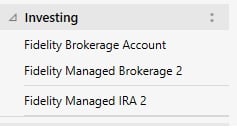
I have two Brokerage and one IRA account. I would like to put the Brokerage 2 account at the bottom which I can't. Is there any way? Options to do this are greyed out.
Answers
-
Go to the Accounts List. Right click on the account and use the "Order" button.
0 -
I did. I cannot move the file down. As you can see "Move Down" is greyed out.
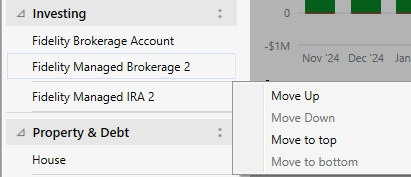
I also cannot move IRA 2 to the top. It seems Brokerage Accounts and Tax Free Accounts are grouped and cannot move totally independently. All options for the IRA 2 account are greyed out also.
0 -
Retirement accounts are always separated from regular investment accounts. Can't change that sequencing.
1 -
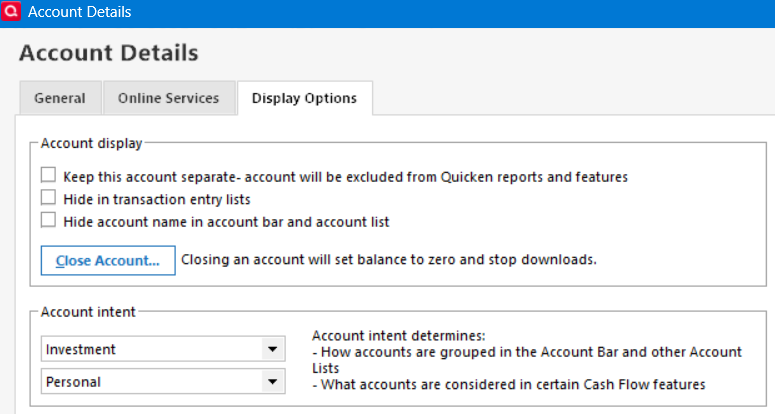
Go to the Display tab of Account Details for Brokerage 2. There you can change the Intent from Investment to Retirement. That will move Brokerage 2 to the Retirement group and it can then be repositioned in that group as desired.
BTW, changing the Intent does not change how the account interfaces with tax reports and Tax Planner. But it does change where it shows up in the Accounts side bar, in the Account List and in cash flow reports.
Quicken Classic Premier (US) Subscription: R66.12 on Windows 11 Home
0 -
Just as a reminder you can do the moving up and down by right clicking on a blank spot on the Account Bar and selecting the menu option to reorder the accounts and then you can drag and drop. But for moving between sections you still need to use the intent selection.
0 -
I am confused with changing the IRA to Taxable. Since the Tax Planner tracks Capitol Gains along with Short and Long-Term gains and losses, would not the IRA account transactions now be included?
What would work also for me is to get retirement accounts listed before Brokerage. I need to get the Brokerage 2 account on the bottom because it contains 700 securities (another subject discussed) and it takes a lot of time to scroll through them to get at a lower account. This has been discussed in another thread.
0 -
You can’t change the order of the investment and retirement sections on the Account Bar.
When dealing with investment accounts it is the account type that decides if the account will be included in a tax report and the tax planner.
There is a quirk that you can set the intent of a savings account to either investment or retirement and it will show up in places like the account bar and portfolio and I think the investment reports but it’s interest will be excluded and as such doesn’t really work right.
0 -
I am confused with changing the IRA to Taxable. Since the Tax Planner tracks Capitol Gains along with Short and Long-Term gains and losses, would not the IRA account transactions now be included?
It is good to be cautious. The suggestion was to change the INTENT of the Fidelity 2 to Retirement using the Account Details / Display Options. That is not the same as changing the account TYPE to IRA or another retirement setting. If you try that, you should still check out that you are gettign the right tax information where and when you need it.
I am not clear where you are having to scroll through 700 securities of one account to get to an account below it.
0 -
@Bione - If you have concern about what we have suggested, you can back up your data file and then afterward make the Intent change. Then review your Tax Planner and tax reports to verify that these will still show the correct data.
If you don't like what you are seeing you can then restore that backup file and everything will be as it was before making the Intent change.
I, too, do not understand that bit about having to scroll through 700 securities. Would you care to expound on that some?
Quicken Classic Premier (US) Subscription: R66.12 on Windows 11 Home
0 -
This is a Fidelity Managed Account issue. They have a new system they claim will help reduce taxes this year by a couple of thousand dollars. They keep about 75% of the portfolio in regular mutual Funds then they spread the balance in what I count is about 700 individual stocks grouped into the individual investing categories. Most of these are individual stocks. Many of these stocks are fractional less than 1 share. The amount of transactions (in the pennies) that occur are huge. When they trade, I get over 150 transactions. My guess is that this is some sort of new AI thing.
I had to switch the account to Simple Investing because Quicken/Fidelity would have 15 account mismatches at a time. With that many items the "Investing" page does not scroll well so I wanted to put this account at the bottom. Also Quickens investing tools (ex. Morningstar) cannot handle over 250 securities with the accounts combined.
After doing you suggestion I found that this was not where I needed to make the change. I went to the investing page and selected "Customize > Accounts" to change the Display order. Evidently, I was rearranging the accounts in the wrong area for this display.
1 -
Thanks for the information about the Managed Account. I hadn't heard of this type of investment account strategy before. I think I now better understand what you were trying to accomplish and I'm glad to hear that you were able to do that by customizing the order on the Investing tab.
Quicken Classic Premier (US) Subscription: R66.12 on Windows 11 Home
0



Categories
- All Categories
- 18 Product Ideas
- 34 Announcements
- 246 Alerts, Online Banking & Known Product Issues
- 19 Product Alerts
- 518 Welcome to the Community!
- 682 Before you Buy
- 1.5K Product Ideas
- 55.7K Quicken Classic for Windows
- 16.8K Quicken Classic for Mac
- 1K Quicken Mobile
- 834 Quicken on the Web
- 127 Quicken LifeHub