"Tax Schedule" button in Account Details dialog is missing if "Planning" tab is hidden. Bug?

If you select View -> Tabs To Show, and de-select Planning, then the Tax Schedule button in the Account Details dialog disappears.
According to the following comments, the Tax Schedule button is still necessary whether the Planning tab is visible or not:
There was also a further comment that a developer acknowledged that it shouldn't be hidden and that it might be an easy fix, but it was either forgotten about or perhaps not such an easy fix. Either way, it still happens.
I might also add that there is nothing in the dialog's help screen to explain this button's disappearance. All it says about the button is "To change the tax information for this account, click Tax Schedule." In another help screen titled "How do I set tax attributes for an account?", it says to open the Account Details dialog and "Click Tax Schedule Info" (here it even misnames the button). In neither case does it say what to do if there is no such button.
Comments
-
I'd forgotten about this since I always have the Planning tab visible. Thanks for bringing this bug up, again.
Clearly something fell through the cracks with the Dev Team on this. Let's make sure to get this in front of them, again. Please go to Help > Report a Problem and submit a report about this. You can post the URL to this thread so they can easily see what the issue is as well as reference the 2024 post thread.
I will report it, as well. The more people who report an issue, the more likely it will stay in front of the Dev Team and get fixed.
Quicken Classic Premier (US) Subscription: R66.23 on Windows 11 Home
1 -
Done. Thanks.
1 -
My suggestion is to take a closer look at what happens when you have the Planning tab set to not show. All planning features are hidden.
- The Planning menu disappears
- The entire Tax section disappears from the Reports and Graphs window
- All toolbar buttons related to Planning disappear - a total of 13 buttons by my count
Similar swaths of menus, reports and graph sections, and toolbar buttons disappear if you set Investing or Property & Debt tabs to not show. My assumption has always been that these sets of features becoming hidden is intentional design enabling users to have a less cluttered interface. If memory serves, that is the way we chose to present it in the Official Guide, which Quicken Inc and Intuit before them reviewed for accuracy each year.
Quicken user since Q1999. Currently using QW2017.
Questions? Check out the Quicken Windows FAQ list1 -
Does the Official Guide's description of the Account Details dialog explain that the Tax Schedule button might be missing because of a setting somewhere else? The help screens within Quicken don't. And in the referenced thread, neither does (at least one) Quicken support person.
Of course the Quicken community is always available for these things, but (if I remember correctly) when I had this same problem several years ago, not even the superusers could explain the missing button and the suggestion was that I contact Quicken support. I guess that's why this behavior annoys me.
And just to keep this rant going a little further, as you correctly point out, when the Planning tab is hidden, the entire Tax section disappears from the Reports and Graphs window. But it doesn't disappear from the Reports menu
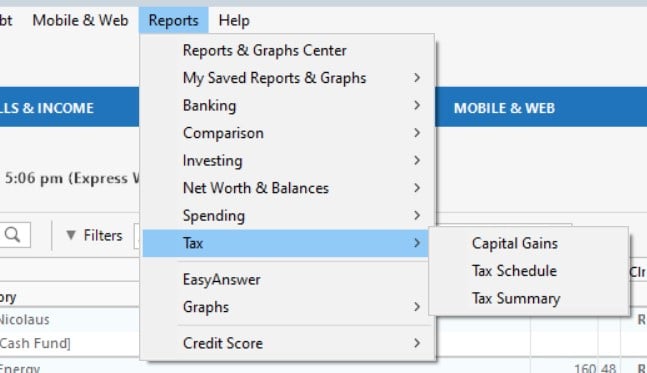
And those reports continue to work just fine. So... why hide them?
0 -
I am convinced this is a bug and that is how I reported it to Quicken. In addition, that is what the 2 Quicken Dev Team members told me a couple of years ago when I mentioned that to them.
It's now been reported to Quicken, again, as a bug and it is easily replicated and supposedly easy to fix. Let's hope this gets fixed this time.
Quicken Classic Premier (US) Subscription: R66.23 on Windows 11 Home
0 -
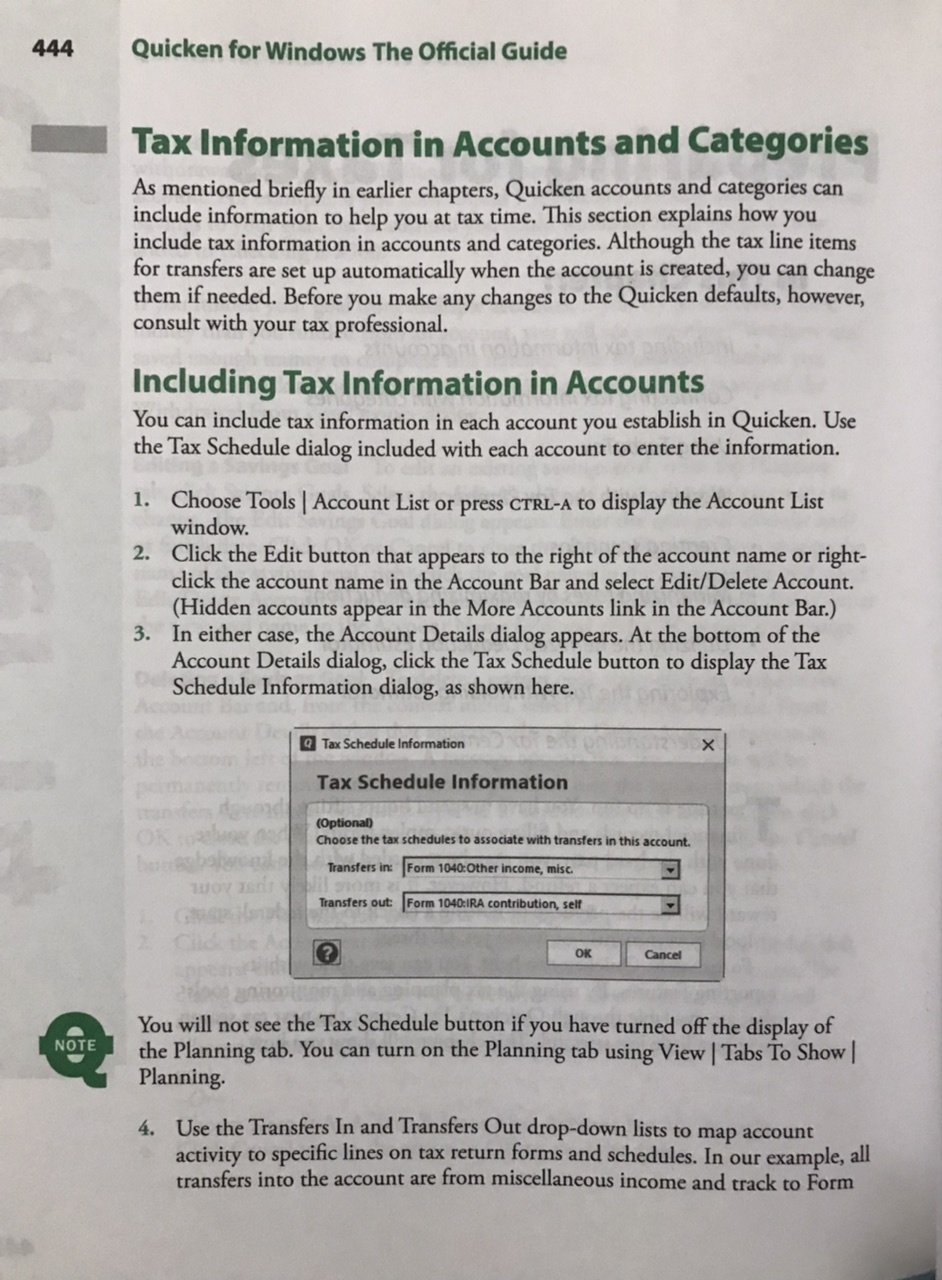
It is mentioned in the OG. See the callout near the bottom of the page.
Quicken user since Q1999. Currently using QW2017.
Questions? Check out the Quicken Windows FAQ list1 -
My guess would be Quicken team investigated the prior bug report and found it was a feature, not a bug.
Quicken user since Q1999. Currently using QW2017.
Questions? Check out the Quicken Windows FAQ list0 -
Perhaps. But, if so, they should explain why it is a feature and not a bug. And they should explain how not being able to assign a tax schedule to an account is a good thing when it comes to how that can end up screwing up the tax reports.
Quicken Classic Premier (US) Subscription: R66.23 on Windows 11 Home
0 -
Maybe I missed the beginning of the story? Why did the OP have the Planning tab hidden?
Quicken user since Q1999. Currently using QW2017.
Questions? Check out the Quicken Windows FAQ list0 -
I don't think they are intentionally hiding the Planning tab, or if they are they don't know why the Tax Schedule button is not visible. See the discussion for example.
QWin Premier subscription0


