OnePay Walmart+ Synchrony Download

Any progress on adding OnePay Walmart+ Synchrony to the approved list? How do I get added to the list of those wanting this?
Answers
-
I noticed too Synchrony made a major change to Amazon downloads, as I went to the page synchrony summary which is linked to download transactions into a synchrony quicken account from the online downloads at the Synchrony account , clicked export a download file sits waiting in the windows download file. Try to open the .qfx file but opens up windows error message saying trying to configure windows then a quicken error message that says “There are quicken components currently open, and cannot be uninstalled. Please close quicken and try again”
All exports were working fine until the change from Synchrony
0 -
Just found this a maybe
0 -
Hello,
Thank you for helping your fellow user and sharing your knowledge on the situation and what you found in the Community.
Thank you for asking this question.
This issue has been reported. There is an existing thread going for this; you can check that out here.
Some users have found success connecting to other instances in Quicken, like Guitar Center CC and Care Credit. So it is worth trying other synchrony instances.
To aid in the investigation and be added to the ticket, please go to Help>Report a problem>Send to Quicken and send over your log files.
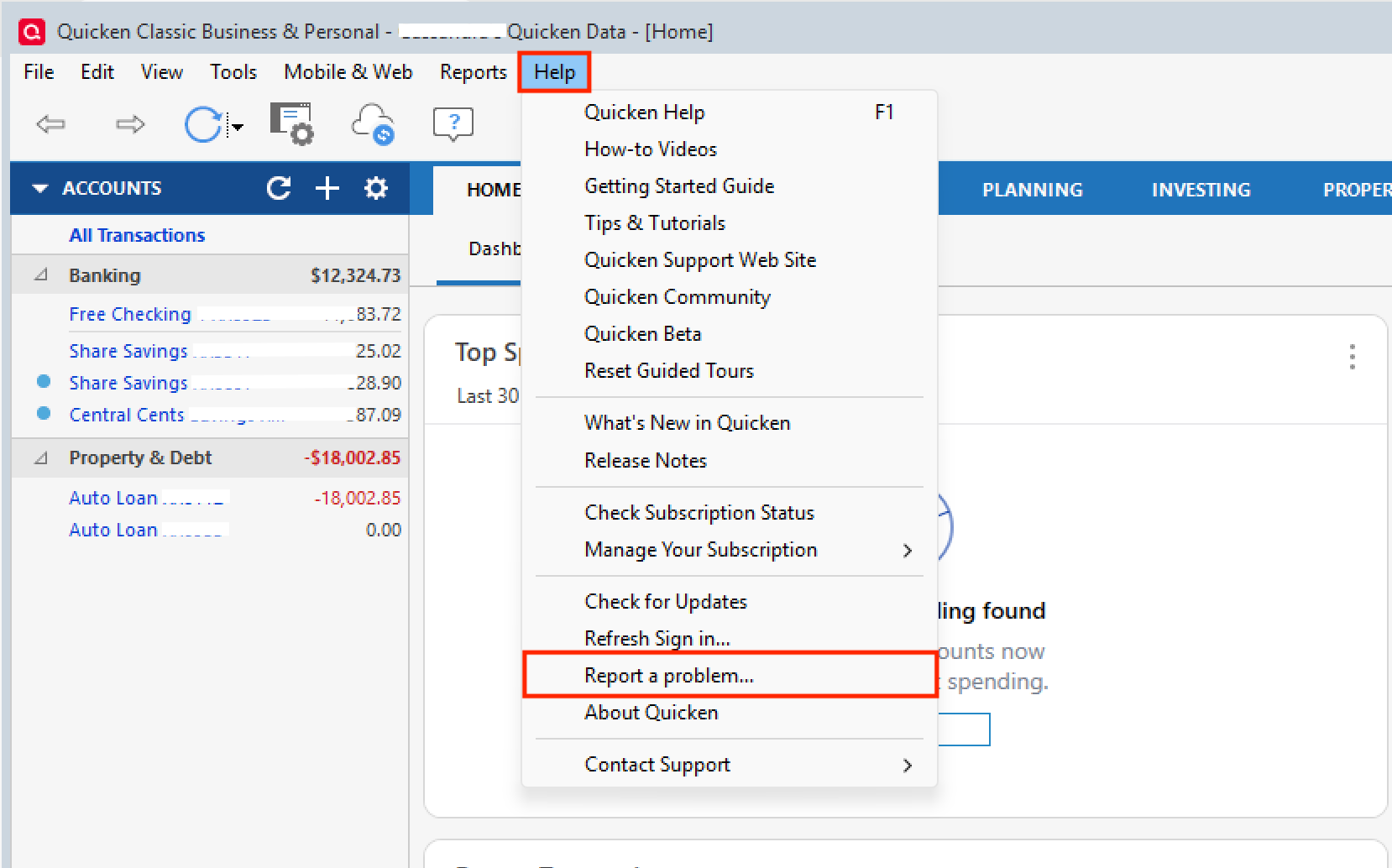
Let me know once you have, and I will get them added.
Thank you!
[CTP-15053]
Quicken Alyssa
Make sure to sign up for the email digest to see a round up of your top posts.
0 -
Spoke with SYNCHRONY desk help about Download Transactions Problems Tuesday, December 2, 2025 Synchrony does have a relationship with Quicken, so you'll be able to download transaction, balance, etc. using their software. If you're having problems using Quicken, you'll need to contact them for assistance. If you're having problems using Quicken and SYNCHRONY contact Microsoft
-1 -
Thank you for updating the thread with more information. I'm sure others will find this to be useful, and we appreciate your contribution.
Thanks again!
Quicken Alyssa
Make sure to sign up for the email digest to see a round up of your top posts.
0 -
Here's another find …..
Why is windows configuring quicken because of a amazon.syf download?
The prompt to "Please wait while Windows configures Quicken" when attempting a download or update usually indicates an issue with theQuicken installation files being corrupted or incomplete, which triggers the Windows Installer to try and repair the application using original installation files. This most often happens when:Corrupted Installation Files:A recent update may have corrupted some necessary program files, or certain components like the .NET Framework that Quicken relies on might be damaged.Update Conflicts:The Quicken software automatically checks for and attempts to apply updates. If this automatic process fails or conflicts with another open Quicken process (including background components), it can cause the installer loop.Missing Installation Source:The Windows installer is looking for the original Quicken.msi file (the installation package) to complete the configuration, but it might not be able to find it in its expected location (often due to it being deleted from the original download folder).Security Software Interference:Aggressive antivirus or firewall settings can block Quicken from running or installing necessary components properly.
Essentially, Windows is trying to fix a broken link in the software installation chain, but it's getting stuck because it can't find what it needs or something else is in the way.Potential SolutionsQuicken and Microsoft support communities suggest a few workarounds:Ensure Quicken is fully closed:Before initiating any download, make sure all Quicken components are completely closed, including any background processes, via the Windows Task Manager.Run a manual patch:You can bypass the automatic updater by downloading and running the latest manual patch from theQuicken website. This can often resolve installation issues.Run the Installer as an Administrator:Right-click the Quicken shortcut and choose "Run as administrator" to give the program the necessary permissions to configure itself.Full Reinstall (Last Resort):A complete uninstall and reinstall of Quicken often resolves deep-seated installation conflicts.Make sure to back up your data file first!You can find detailed instructions on theQuicken support site.Temporarily Disable Antivirus:If comfortable, briefly disable your antivirus/firewall during the installation process to rule out interference, remembering to re-enable it immediately afterward
0 -
Hello All,
Can I please have you all try using the Wal-Mart Credit Card instance in Quicken to connect these accounts?
Before doing this, you will want to make sure the account is disconnected.
- Select the Tools menu and select Account List.
- In the Account List, select the account you want to deactivate, and then click Edit.
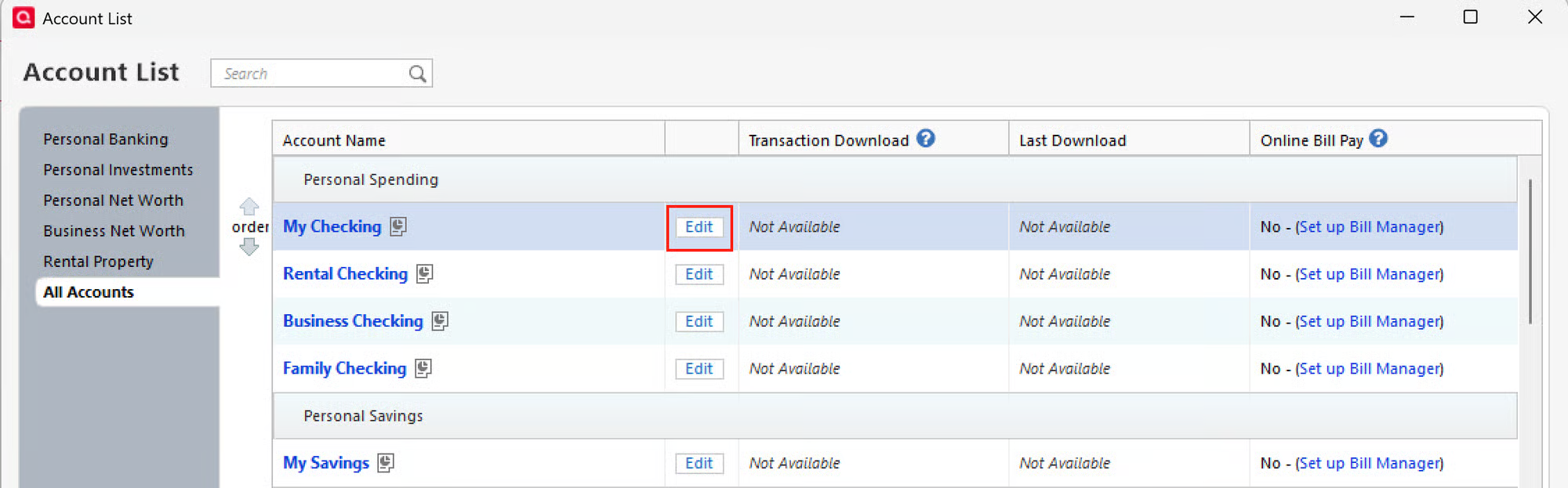
- In the Account Details window, click the Online Services tab.
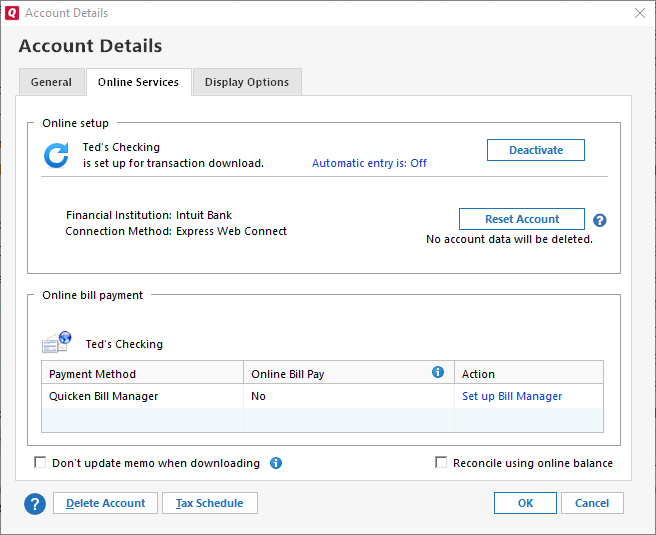
- Click Deactivate next to the service you want to disable.
- Click Yes to the message confirming if you want to disable this service. Note: If you do not receive this message, additional information is available below.
Then you can reconnect it using the "Wal-Mart Credit Card" option.
- Go to Tools > Add Account.
- Type in "Wal-Mart Credit Card".
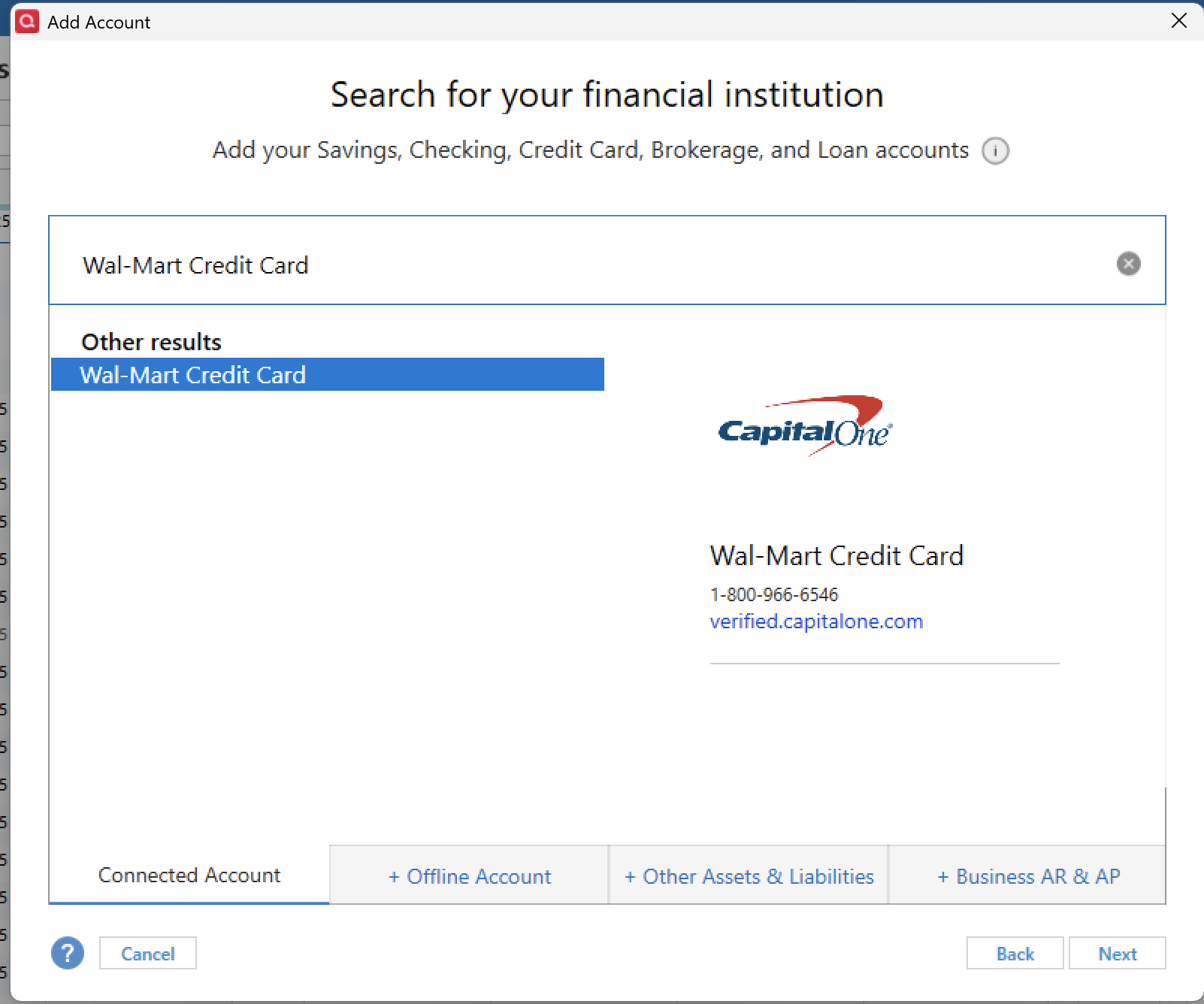
- Enter your credentials and click Connect.
- When the list of located accounts appears, choose LINK next to each account you want to reactivate.
- Click Next, then Done on the last prompt.
Let us know how it goes!
Quicken Alyssa
Make sure to sign up for the email digest to see a round up of your top posts.
0 -
Does Synchrony Bank work with Quicken? Synchrony Mastercard tells me that they DO support Quicken and that I should contact Quicken Support. Quicken's position is that Synchrony DOES NOT support Quicken. This was a decision made by Quicken, not a system glitch.Nov 12, 2024
No, Synchrony Bank generally doesn't offer direct, reliable Quicken connectivity for many of its retail cards, despite telling customers they do; the issue stems from Synchrony's fragmented system and Quicken's inability to keep up, requiring workarounds like manual QFX/CSV imports or trying different retailer names (e.g., "Sam's Club") to connect, as the bank treats each store as separate, frustrating users with connection errors like CC-503.
Why This Happens (The "Blame Game") Synchrony's Side: Synchrony manages many store cards (Lowe's, Amazon, Sam's Club, etc.) under one system but often doesn't provide Quicken with a unified connection, leading Quicken to see them as unsupported.
Quicken's Side: Quicken relies on financial institutions to maintain connections; when Synchrony changes things or doesn't fully support a link, Quicken shows errors or can't find the account.
0 -
I recently got a One Pay Walmart+ credit card by Synchrony. Can't figure out how to download transactions in Quicken Deluxe for One Pay. Can this be done?
0 -
I have same problem as above. Trying to add an Account for Synchrony (Walmart OnePay Card)
My login works for for Synchrony, but will not add as an account to Quicken.
To login:
Once logged in:
I have a new card, but it's disappointing to see this problem has existed for months.
Yes I have "reported a problem" within Quicken.2 -
Hello All,
Thank you for adding to this discussion.
This issue is still being worked on, and we apologize for the inconvenience.
Thank you for providing that information. I have added it to the escalation ticket.
Thanks again!
Quicken Alyssa
Make sure to sign up for the email digest to see a round up of your top posts.
0 -
I have the same problems with synchrony bank. the lowes card has been working up until a month ago. now, however, the update loads no more transactions to my quicken account and there have been additional charges made that show up on their website. i found no download or export link on that website so it is manual all the way…hopefully for just a little while.
then, to complicate it further, my spouse signed up for a walmart credit card that is handled thru the same bank. no chance to add these transactions to quicken because i guess it is setup to only service just my spouse alone. many attempt to add to synchrony the new card with no help.
HELP !! we all need this to operate quicken smoothly. we are considering cancelling the onepay/synchrony/walmart card as it is too hard to maintain. any thoughts ?
0 -
I was able to successfully link my OnePay (Walmart) card using the 'Guitar Center Credit Card' bank entry in Quicken (I don't have a Guitar Center credit card), logging in with the same credentials used for synchrony.com.
2 -
I still haven't seen a method for all of us to load the Walmart/Onepay?Synchrony cart!!!!
0 -
Hello All,
Thank you for adding to this discussion.
This issue has been escalated internally and is actively being worked on. We do not have an ETA as to when it will be resolved.
Thank you!
[CTP-15053]
Quicken Alyssa
Make sure to sign up for the email digest to see a round up of your top posts.
1 -
Given the inability to download into Quicken I have cancelled the OnePay Walmart card. I am surprised Walmart had not explored this in advance of working with the OnePay/Synchrony product and they have not applied pressure on OnePay/Synchrony to fix the issue. It reflects poorly on Walmart.
2 -
It does reflect poorly on Walmart but also on Quicken. I think this is more on Quicken to resolve personally and may be due to the new card essentially not having a username password to access the account. Will not be the only bank to make this move to password less account management.
0 -
While Quicken certainly has challenges with various financial institutions, Synchrony has always been an issue. It would be nice to have, and I too have thought about cancelling the OnePay, but not just because of Quicken. Frankly, the website they offer to manage the card is very basic. There are no download capabilities let alone interfacing with Quicken. So, in this case I would say it's more on Synchrony and by extension Walmart. It is sad that one must manually enter transactions when Walmart is a frequently used shopping choice. I waited years for TSP accounts to be added, and it did. Hopefully this won't be nearly as long.
1 -
Add me to the list of those users that are disappointed in finding no download offerings for Walmart OnePay into Quicken. Walmart is The world's largest retailer. Quicken is the Standard in Personal Finance software. Synchrony is a Leader in private retailer credit systems management. Nobody at any of these companies anticipated a need for a download link ?
0 -
Hello Everyone,
Thank you for contributing to this discussion.
Our team has identified that the issue is on the provider’s side and is actively working with them toward a resolution. At this time, there is no estimated timeframe for when it will be fixed. In the meantime, please try adding your account periodically.
Thank you.
Quicken Alyssa
Make sure to sign up for the email digest to see a round up of your top posts.
0
